


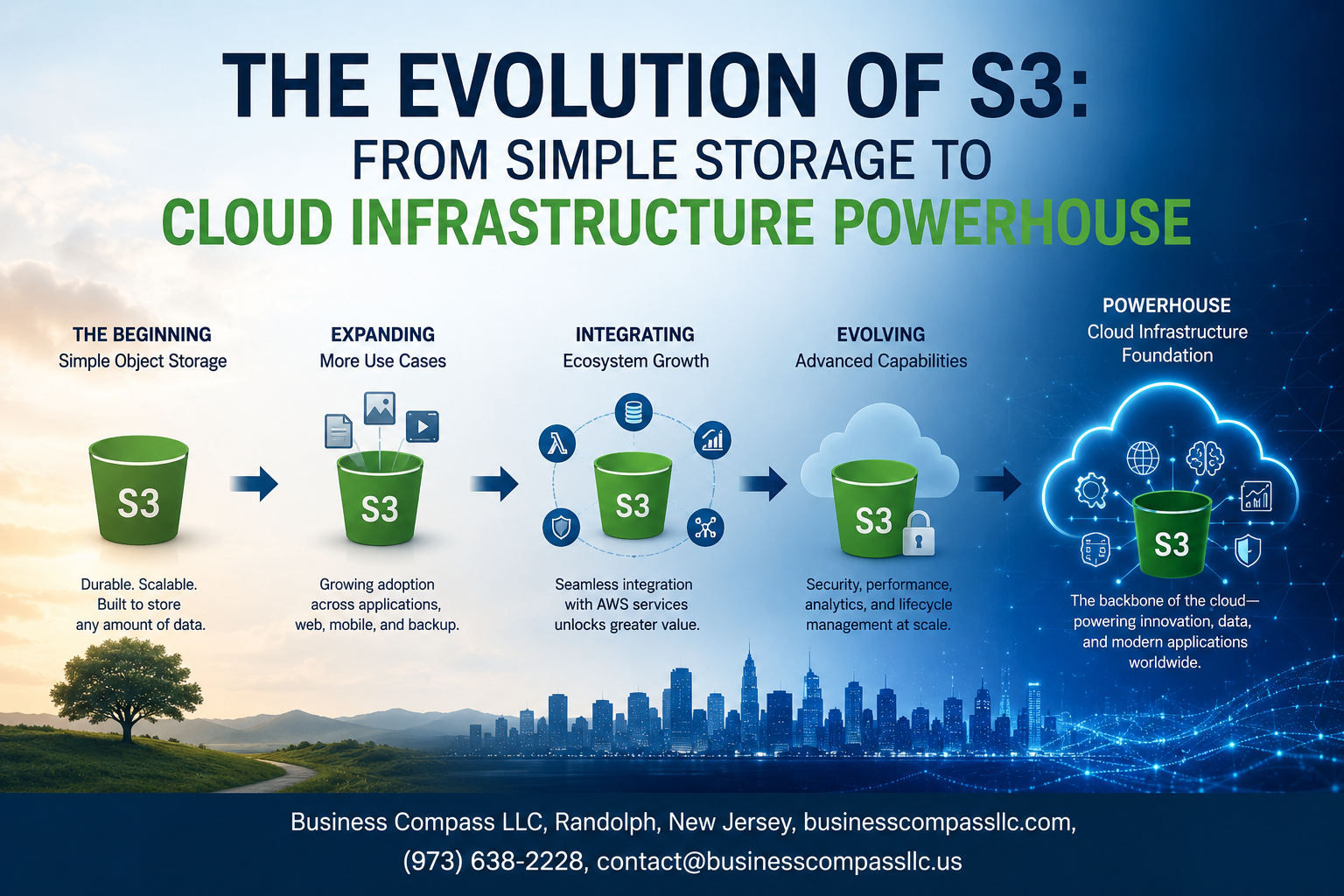
From a Simple Storage Bucket to the Engine Behind the Modern Cloud
Amazon S3 launched in 2006 with one job: store files reliably in the cloud. Nearly two decades later, it powers everything from startup side projects to the data pipelines of Fortune 500 companies. The Amazon S3 evolution is not just a product story — it’s a window into how cloud infrastructure itself grew up.
This guide is for cloud architects, developers, and IT decision-makers who want to understand how S3 cloud storage history shaped the tool they’re working with today — and why those choices matter for what they’re building next.
Here’s what we’ll walk through:
- How S3 went from basic object storage to the backbone of modern data architecture, including the key Amazon S3 milestones that changed everything
- The security and compliance features that made S3 a serious option for enterprise workloads with strict regulatory requirements
- How S3 scalability, performance improvements, and cloud-native application storage support have redefined what teams expect from object storage in production environments
If you’ve ever wondered why so many modern systems default to S3 — or you’re evaluating S3 object storage solutions for your own infrastructure — you’re in the right place. Let’s dig in.
The Humble Beginnings of Amazon S3

What S3 Was Designed to Solve in 2006
Back in 2006, storing data at scale was a nightmare. Companies had to buy expensive hardware, manage physical servers, and pray nothing crashed. Amazon S3 launched as a way to take that headache away — giving developers a place to store any amount of data without owning a single rack.
The Core Promise of Unlimited, Affordable Object Storage
The pitch was simple: pay only for what you store, access it from anywhere, and never worry about running out of space. S3’s object storage model treated every file as a standalone unit with its own metadata, making retrieval fast and flexible — a sharp departure from traditional file or block storage systems.
Early Adoption and the Businesses It Empowered
Early adopters included:
- Startups that couldn’t afford on-premise infrastructure
- Media companies storing large video and image libraries
- Developers building web apps that needed reliable, scalable file hosting
Amazon S3’s evolution started here — proving that cloud storage history didn’t have to be complicated or costly to be powerful.
Key Milestones That Transformed S3 Over the Years

Introduction of Versioning and Access Controls
When S3 rolled out versioning, it was a game-changer for teams managing critical data. Suddenly, accidental deletions or overwrites weren’t disasters anymore — every version of every object was recoverable. Paired with granular access controls through IAM policies and bucket policies, organizations finally had real control over who could touch their data and how.
- Versioning protects against accidental overwrites and deletions
- IAM and bucket policies enable fine-grained permission management
- MFA Delete adds an extra layer of protection for sensitive buckets
The Shift Toward Lifecycle Policies and Automated Storage Management
Managing storage manually at scale is a nightmare. Lifecycle policies solved this by letting teams automate transitions and expirations based on rules they define. Old logs move to cheaper storage tiers automatically, and objects past their useful life get deleted without anyone lifting a finger.
- Automate object transitions between storage classes
- Set expiration rules to clean up stale data
- Reduce operational overhead without sacrificing control
Launch of Storage Classes to Optimize Cost at Scale
S3’s storage class lineup transformed how companies think about cost optimization. From S3 Standard to Glacier Deep Archive, each tier targets a specific access pattern and price point. Teams running modern data architectures on S3 can align storage costs directly with business value.
- S3 Standard – frequent access workloads
- S3 Intelligent-Tiering – unpredictable access patterns
- S3 Glacier/Deep Archive – long-term, rarely accessed data
Cross-Region Replication and the Push for Global Reliability
Cross-Region Replication (CRR) pushed S3 into enterprise-grade territory by making global data redundancy straightforward. Businesses with compliance requirements or disaster recovery goals could replicate objects across AWS regions automatically, keeping data close to users and safe from regional outages.
- Supports compliance mandates requiring geographic data separation
- Reduces latency for globally distributed teams
- Pairs with Same-Region Replication (SRR) for flexible redundancy strategies
How S3 Became the Backbone of Modern Data Architectures

Powering Data Lakes and Big Data Pipelines
Modern data architecture S3 sits at the center of nearly every serious data lake setup out there. Organizations dump raw, structured, and semi-structured data into S3 buckets and then run tools like AWS Glue, Apache Spark, or Amazon Athena directly on top of it — no need to move the data anywhere first.
- Cost-effective storage tiers let teams store massive datasets in S3 Intelligent-Tiering or Glacier without blowing up their budgets.
- S3 Select lets query engines pull only the relevant rows and columns, cutting down processing time dramatically.
- Native integration with AWS Lake Formation makes governance and access control way easier than managing it all manually.
Enabling Serverless Workflows with Lambda and Event Notifications
S3 object storage solutions pair naturally with AWS Lambda through S3 Event Notifications — the moment a file lands in a bucket, Lambda can kick off automatically, no servers required.
- Upload a CSV → Lambda triggers → data gets cleaned and pushed to a database, all without anyone touching a button.
- Event notifications can also route to SNS, SQS, or EventBridge, giving teams flexible, real-time pipeline options.
- This tight coupling makes S3 a genuine workflow engine, not just a place to park files.
Supporting Machine Learning and AI Workloads at Scale
AWS S3 infrastructure has become the default staging ground for ML training datasets, model artifacts, and inference outputs.
- Amazon SageMaker reads training data directly from S3, keeping data movement minimal and pipelines clean.
- Teams version datasets using S3 object versioning, making experiment tracking and reproducibility much more manageable.
- Large-scale feature stores and embedding libraries regularly rely on S3 as the underlying storage layer, handling petabyte-scale workloads without breaking a sweat.
S3 Security and Compliance Features That Build Enterprise Trust

Encryption at Rest and in Transit to Protect Sensitive Data
S3 enterprise security starts with keeping data locked down at every stage. Server-side encryption (SSE) automatically protects objects stored in your buckets, and you get three solid options to work with:
- SSE-S3: AWS manages the encryption keys for you — low friction, solid baseline protection
- SSE-KMS: Brings AWS Key Management Service into the picture, giving you audit trails and tighter key control
- SSE-C: You supply and manage your own keys, keeping full ownership on your side
For data moving between your applications and S3, TLS encryption makes sure nothing gets intercepted mid-transfer. This combination of at-rest and in-transit encryption is exactly what security teams in healthcare, finance, and legal industries need before they’ll sign off on any cloud storage solution.
Bucket Policies and IAM Integration for Granular Access Control
Getting access control right in S3 means layering multiple tools together rather than relying on a single setting.
- IAM policies attach to users, groups, or roles and define what actions they can perform on S3 resources
- Bucket policies are resource-based and let you control access at the bucket or object level without touching IAM
- Access Control Lists (ACLs) handle finer-grained permissions for individual objects when needed
- S3 Block Public Access acts as a safety net, preventing accidental public exposure across accounts or individual buckets
The real power here is in combining these tools. A developer team can have write access to a specific prefix inside a bucket while a read-only analytics role pulls data from a different folder — all without overlap, and all auditable.
Compliance Certifications That Open Doors to Regulated Industries
Amazon S3 carries an impressive stack of compliance certifications that regulated industries actually care about:
- HIPAA — healthcare organizations can store protected health information (PHI) in S3 with proper configuration
- PCI DSS — payment card data handling requirements are met, making S3 viable for financial workflows
- SOC 1, 2, and 3 — independent audits verify AWS’s security controls across availability, confidentiality, and integrity
- ISO 27001, 27017, 27018 — internationally recognized standards for information security management
- FedRAMP — opens S3 up to U.S. federal government workloads
These certifications don’t happen by accident. They reflect years of AWS investing in the infrastructure, processes, and documentation that enterprise procurement and legal teams require before approving any vendor.
S3 Object Lock and Immutable Storage for Audit-Ready Operations
S3 Object Lock is a game-changer for industries where data tampering is a serious legal or regulatory risk. Once you apply a lock to an object, it can’t be deleted or overwritten — period. Two retention modes give you flexibility:
- Compliance mode: Even account administrators can’t remove or shorten the retention period — the strictest option for regulated industries
- Governance mode: Administrators with special permissions can adjust retention settings, giving more operational flexibility while still protecting data
Object Lock supports two retention mechanisms:
- Retention periods: Define a fixed window during which the object stays protected
- Legal holds: Place an indefinite hold on an object tied to ongoing investigations or litigation
This is the kind of immutable storage that satisfies SEC Rule 17a-4, FINRA, and similar regulations that require write-once, read-many (WORM) storage. It also makes audit preparation significantly less painful.
Visibility and Threat Detection Through S3 Access Logs and GuardDuty
Knowing what’s happening inside your S3 environment is just as important as locking it down. AWS gives you two strong tools for this:
S3 Server Access Logging
- Captures detailed records of every request made to a bucket
- Logs include the requester, bucket name, request time, action, response status, and error codes
- Useful for security audits, understanding access patterns, and troubleshooting
AWS GuardDuty for S3
- Uses machine learning and threat intelligence to spot unusual behavior
- Flags things like access from unexpected geographic locations, sudden spikes in data retrieval, or API calls that don’t match normal patterns
- Integrates with AWS Security Hub for centralized alerting and response workflows
Together, these tools give security teams the visibility they need to catch both honest mistakes and bad actors before damage gets out of hand. For enterprises managing sensitive data at scale, this kind of continuous monitoring isn’t optional — it’s the baseline.
Performance and Scalability Advancements That Redefined Expectations

How S3 Handles Millions of Requests Without Degradation
Amazon S3 scalability performance is genuinely impressive — the system automatically partitions and distributes data across thousands of servers, handling millions of simultaneous requests without slowing down. AWS removed prefix-based request rate limits back in 2018, meaning your applications can now push 3,500 PUT/COPY/POST/DELETE and 5,500 GET/HEAD requests per second per prefix without any manual optimization tricks.
- No manual sharding or bucket configuration needed
- Auto-scaling happens invisibly behind the scenes
- Consistent low-latency responses even during massive traffic spikes
S3 Transfer Acceleration for Faster Global Data Movement
S3 Transfer Acceleration routes your uploads through AWS CloudFront’s globally distributed edge locations, dramatically cutting transfer times for users located far from your target S3 bucket region. Real-world speed improvements can reach 50-500% faster compared to standard uploads, especially across continents.
- Uses optimized network paths instead of the public internet
- Works seamlessly with existing S3 API calls
- Particularly valuable for media uploads, backups, and large dataset transfers from remote locations
Multipart Upload for Efficient Handling of Large Objects
Multipart Upload lets you break files larger than 100MB into smaller chunks, uploading them simultaneously rather than sequentially — cutting total transfer time significantly.
- Supports objects up to 5TB
- Failed parts can retry independently without restarting the entire upload
- Parallel uploads maximize available bandwidth efficiently
The Expanding Role of S3 in Cloud-Native Application Development

Static Website Hosting and Frontend Delivery Made Simple
S3 makes hosting static websites surprisingly straightforward. You drop your HTML, CSS, and JavaScript files into a bucket, flip on the static website hosting setting, and you’re live. No servers to manage, no hosting bills bloating your budget — just clean, scalable file delivery that handles traffic spikes without breaking a sweat.
- Enable static website hosting directly from the S3 bucket settings
- Set index and error documents for proper routing
- Use bucket policies to control public access at a granular level
- Pair with custom domains through Route 53 for a polished, branded experience
Integration With CloudFront for Low-Latency Content Distribution
S3 paired with CloudFront is one of those combinations that just works. CloudFront caches your S3 content at edge locations scattered across the globe, which means users in Tokyo or Berlin get the same snappy experience as someone sitting next to your AWS region. This setup is a go-to pattern in cloud-native application storage architectures.
- Reduce latency by serving content from the nearest edge location
- Protect your S3 bucket by keeping it private — only CloudFront gets access
- Leverage signed URLs and signed cookies for secure, time-limited content delivery
- Take advantage of CloudFront’s built-in DDoS protection through AWS Shield
Using S3 as a Centralized Store Across Multi-Cloud Environments
One of S3’s quiet strengths is how well it plays in multi-cloud setups. Teams running workloads across AWS, Google Cloud, and Azure often anchor their data in S3 because of its reliability and the mature tooling built around it. Cross-region replication keeps data close to wherever compute lives, and tools like AWS DataSync smooth out the transfer process considerably.
- S3 acts as a single source of truth across distributed environments
- Cross-region replication keeps data available where you need it most
- Works with third-party orchestration tools that span multiple cloud providers
- Lifecycle policies help manage storage costs even when data volumes grow fast
S3-Compatible APIs and Their Influence on the Broader Storage Ecosystem
The S3 API has quietly become the universal language of object storage. Competing platforms — MinIO, Wasabi, Backblaze B2, even on-premises solutions — built S3-compatible APIs because developers already knew how to talk to S3. That familiarity lowered switching costs and sparked a whole ecosystem of tools built around AWS S3 infrastructure patterns.
- S3 API compatibility is now a standard expectation for new storage platforms
- Open-source solutions like MinIO bring S3-compatible storage to private data centers
- Developer tools, SDKs, and frameworks assume S3-style interactions as a baseline
- This ecosystem effect strengthened S3’s position as the de facto standard in S3 object storage solutions globally

Amazon S3 has come a long way from being just a place to dump files in the cloud. It started simple, grew through some seriously game-changing milestones, and quietly became the backbone of how modern businesses store, secure, and scale their data. From powering complex data architectures to supporting cloud-native apps and meeting enterprise-grade security standards, S3 has proven it’s not just keeping up with the times — it’s helping shape them.
If you’re building in the cloud today, S3 deserves a closer look beyond just its storage basics. Dig into its performance features, security controls, and the expanding role it plays in cloud-native development. Chances are, you’re only scratching the surface of what it can do for your architecture.









