


Stop Letting Large File Uploads Break Your App
If you’ve ever watched a 2GB file upload fail at 98% — or seen your server buckle under the weight of concurrent uploads — you already know the problem. Standard file upload approaches fall apart fast when file sizes grow. That’s where large file upload on AWS with S3 pre-signed URLs comes in.
This guide is for backend engineers, cloud architects, and full-stack developers who need a reliable, production-ready upload system that doesn’t crumble at scale.
Here’s what we’ll walk through:
- How AWS S3 pre-signed URLs actually work — and why offloading uploads directly to S3 is a smarter move than routing everything through your server
- S3 multipart upload — the right way to handle large files in chunks so a lost connection doesn’t mean starting over
- Securing your upload pipeline — keeping things locked down without killing performance or adding unnecessary friction for users
By the end, you’ll have a clear picture of a secure file upload architecture on AWS that’s ready for real-world traffic.
Let’s get into it.
Why Large File Uploads Demand a Smarter Architecture

Common Pitfalls of Traditional Server-Side Upload Approaches
Routing large files through your server burns memory, blocks threads, and risks timeouts.
How File Size and Volume Create Scalability Bottlenecks
High traffic amplifies these problems fast—your servers choke under concurrent large file upload AWS requests.
Key Benefits of Offloading Uploads Directly to S3
AWS S3 pre-signed URLs let clients upload straight to S3, cutting server load entirely.
Understanding S3 Pre-Signed URLs and How They Work

What a Pre-Signed URL Is and Why It Matters
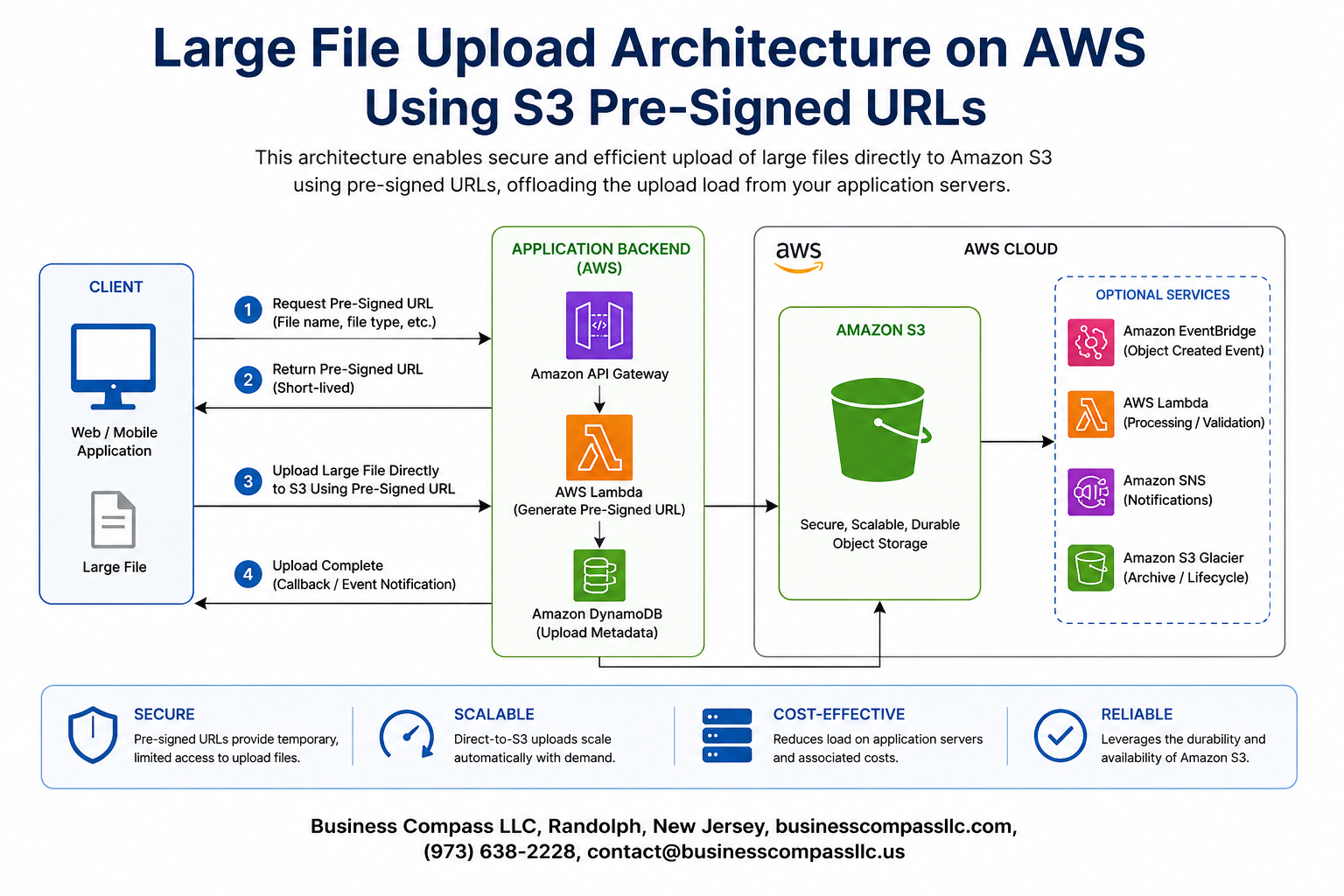
AWS S3 pre-signed URLs grant temporary, scoped access to upload or download objects without exposing credentials. Your backend signs the URL using IAM permissions, then hands it to the client. The client uploads directly to S3, keeping your servers out of the data path entirely — perfect for large file upload AWS workflows.
Designing the End-to-End Upload Architecture

Core Components Involved in the Workflow
A solid large file upload AWS architecture needs four pieces working together:
- Client browser/app
- Backend API
- AWS S3
- A state tracker (DynamoDB or Redis)
Role of the Backend API in URL Generation
The backend authenticates requests, then generates AWS S3 pre-signed URLs — keeping credentials server-side always.
Implementing Multipart Uploads for Large Files

When to Switch from Single-Part to Multipart Uploads
Switch to S3 multipart upload when files exceed 100MB. For large file upload on AWS, chunk files into 5–50MB parts, upload chunks in parallel using pre-signed URLs per part, then call CompleteMultipartUpload. This cuts upload time dramatically and handles network interruptions without restarting everything.
Securing the Upload Pipeline Without Sacrificing Performance

Scoping IAM Permissions for Pre-Signed URL Generation
Grant only s3:PutObject to the signing role, scoped to specific bucket prefixes.
Restricting File Types and Size at the URL Generation Layer
Validate MIME type and enforce size limits before issuing AWS S3 pre-signed URLs.
Using CORS Policies to Control Browser-Based Uploads
Whitelist only trusted origins in your S3 CORS config to block unauthorized cross-origin requests during large file uploads on AWS.
Optimizing Cost and Performance at Scale

Choosing the Right S3 Storage Class, Accelerating Uploads, and Cutting Costs
For large file upload AWS workflows, pick S3 Standard for active files, S3-IA for infrequent access. Use CloudFront to speed up uploads globally. Track failures via CloudWatch metrics. Set lifecycle policies to auto-delete incomplete multipart uploads, slashing unnecessary storage costs significantly.

Uploading large files reliably and securely is not something you can wing with a basic setup. Throughout this post, we walked through why traditional upload approaches fall apart at scale, how S3 pre-signed URLs shift the heavy lifting directly to the client, and how to architect an end-to-end pipeline that holds up under real-world conditions. Multipart uploads keep things from breaking mid-transfer, while the right security controls and cost optimizations make sure you’re not trading performance for protection or burning through your AWS budget unnecessarily.
If you’re building or refactoring a file upload system, start with the architecture before touching the code. Get the pre-signed URL flow right, plan for multipart from day one, and keep a close eye on how your design scales as file sizes and user traffic grow. The patterns covered here give you a solid foundation to build something that’s fast, secure, and cost-effective without overcomplicating it.









