


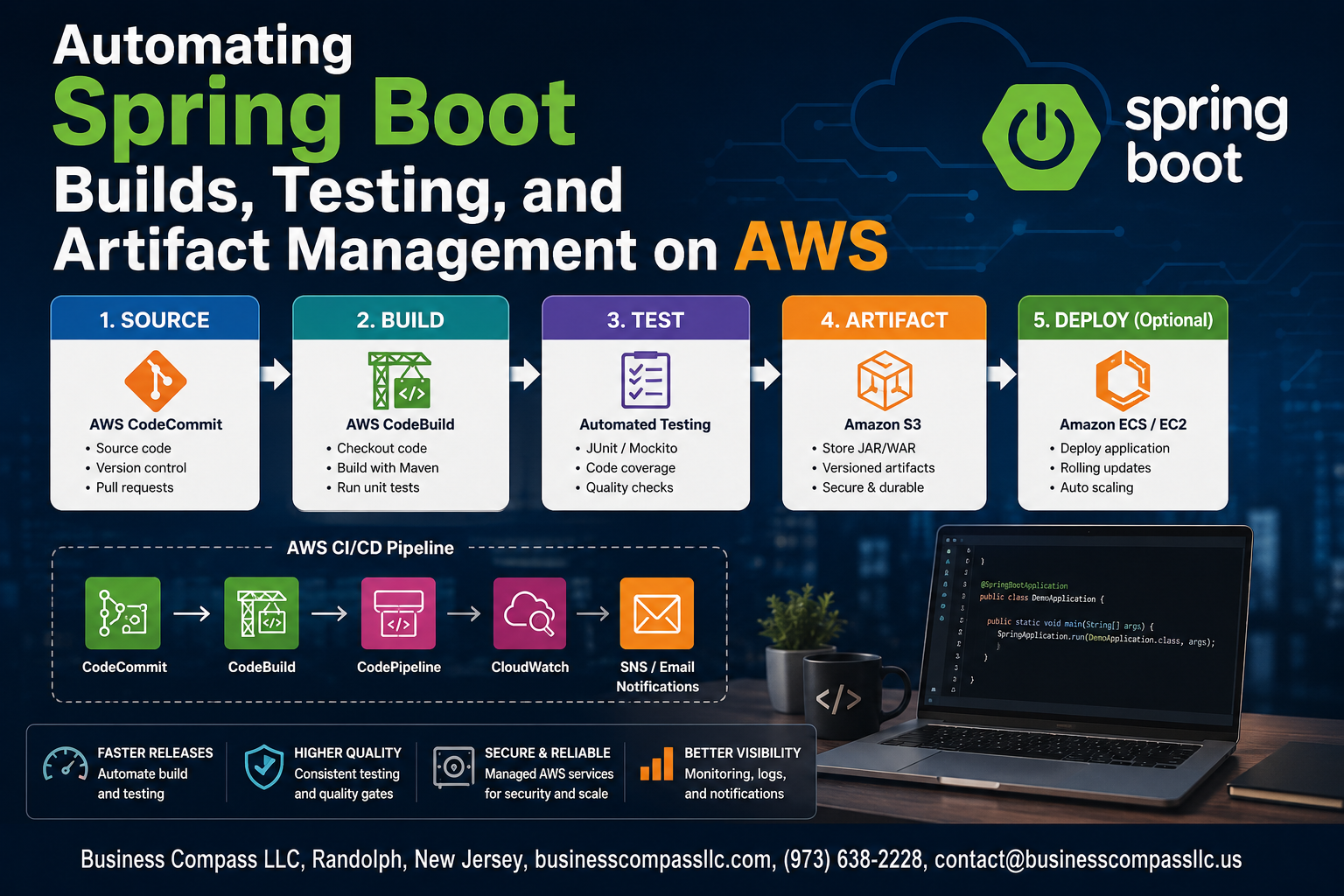
Stop Deploying Spring Boot Apps by Hand — Let AWS Do the Heavy Lifting
If you’re a Java developer or DevOps engineer tired of manually building, testing, and deploying Spring Boot applications, this guide is for you. Automating Spring Boot builds on AWS cuts down on human error, speeds up your release cycle, and frees you up to focus on writing actual code instead of babysitting deployments.
Here’s what we’ll walk through together:
- Setting up a CI pipeline with AWS CodeBuild to automatically compile and build your Spring Boot projects every time you push code
- Automating your test suite so bugs get caught early, long before anything touches production
- Managing build artifacts on AWS so your packaged JARs and WARs are stored, versioned, and ready to deploy at any point
By the end, you’ll have a working Spring Boot CI/CD AWS pipeline that handles the repetitive stuff automatically — from the first commit all the way to artifact storage — using AWS CodePipeline to tie everything together.
Why Automating Spring Boot Workflows on AWS Saves Time and Resources

The Hidden Costs of Manual Build and Deployment Processes
Manual Spring Boot builds drain developer hours through repetitive tasks, inconsistent environments, and costly late-night hotfixes.
Key Benefits of Integrating AWS Automation
- Faster deployments with AWS CodeBuild CI pipeline
- Reliable artifact management
- Scalable testing automation
How Automation Reduces Human Error
Automating Spring Boot CI/CD on AWS eliminates configuration drift and accelerates delivery significantly.
Setting Up Your AWS Environment for Spring Boot Automation

Choosing the Right AWS Services for Your Build Pipeline
Pick AWS CodeBuild, CodePipeline, and S3 as your core stack for automating Spring Boot builds.
Configuring IAM Roles and Permissions
- Grant CodeBuild roles access to S3, ECR, and CloudWatch
Preparing Your Spring Boot Project
- Add a
buildspec.ymlto your repo root
Connecting Your Repository
Link GitHub or CodeCommit to trigger pipeline runs automatically.
Building a Reliable CI Pipeline with AWS CodeBuild

Writing Effective Buildspec Files for Spring Boot Projects
Use buildspec.yml to define Maven/Gradle commands, phases, and artifact paths.
Optimizing Build Performance with Caching and Parallel Execution
Cache .m2 dependencies in S3 to cut build times significantly.
Handling Build Environment Variables and Sensitive Credentials Safely
Store secrets in AWS Parameter Store, referencing them directly in CodeBuild environment settings.
Automating Testing to Catch Issues Before They Reach Production

Running Unit and Integration Tests Automatically Within the Pipeline
Configure your buildspec.yml to trigger Maven tests automatically:
phases:
  build:
    commands:
      - mvn test verify
Enforcing Quality Gates
Use JaCoCo to block failing Spring Boot CI/CD AWS builds below coverage thresholds, stopping broken code from advancing through AWS CodePipeline stages.
Managing and Storing Build Artifacts Efficiently on AWS

Using Amazon S3 to Store and Version Build Artifacts Securely
Store your Spring Boot JARs in versioned S3 buckets with server-side encryption enabled.
Publishing Artifacts to AWS CodeArtifact for Team-Wide Reuse
Push artifacts to CodeArtifact so every team member pulls consistent dependencies automatically.
Implementing Artifact Retention Policies to Control Storage Costs
- Set S3 lifecycle rules to expire old builds after 30 days
Orchestrating the Full Pipeline with AWS CodePipeline

Connecting Build, Test, and Artifact Stages Into One Automated Flow
AWS CodePipeline stitches your Spring Boot CI/CD AWS workflow together — CodeBuild compiles, tests run automatically, and passing artifacts get stored in S3, all hands-free.
Configuring Pipeline Notifications and Alerts for Real-Time Visibility
- Use Amazon SNS for instant failure alerts
Triggering Deployments Automatically After Successful Artifact Creation
- Route artifacts straight to CodeDeploy or ECS
Monitoring and Continuously Improving Your Automation Pipeline
Using Amazon CloudWatch to Track Pipeline Health and Performance
Monitor your AWS DevOps pipeline using CloudWatch metrics, dashboards, and alarms to catch failures fast.
Identifying Bottlenecks and Optimizing Slow Pipeline Stages
- Profile slow AWS CodeBuild stages
- Cache dependencies to speed up Spring Boot CI/CD AWS builds
Scaling Your Pipeline to Support Growing Teams and Microservices
Add parallel pipelines per microservice.

Automating your Spring Boot builds, testing, and artifact management on AWS is one of those investments that pays off almost immediately. From setting up the right AWS environment to wiring together CodeBuild and CodePipeline, every piece of the puzzle works together to keep your code moving smoothly from development to production. Catching bugs early through automated testing, storing artifacts cleanly, and having full visibility into your pipeline means fewer surprises and a lot less firefighting.
If you haven’t started automating your Spring Boot workflows yet, now is a great time to take the first step. Even small improvements, like automating a single build stage, can make a noticeable difference in how your team works. Start simple, build from there, and keep an eye on your pipeline’s performance so you can tweak things as your project grows.









