


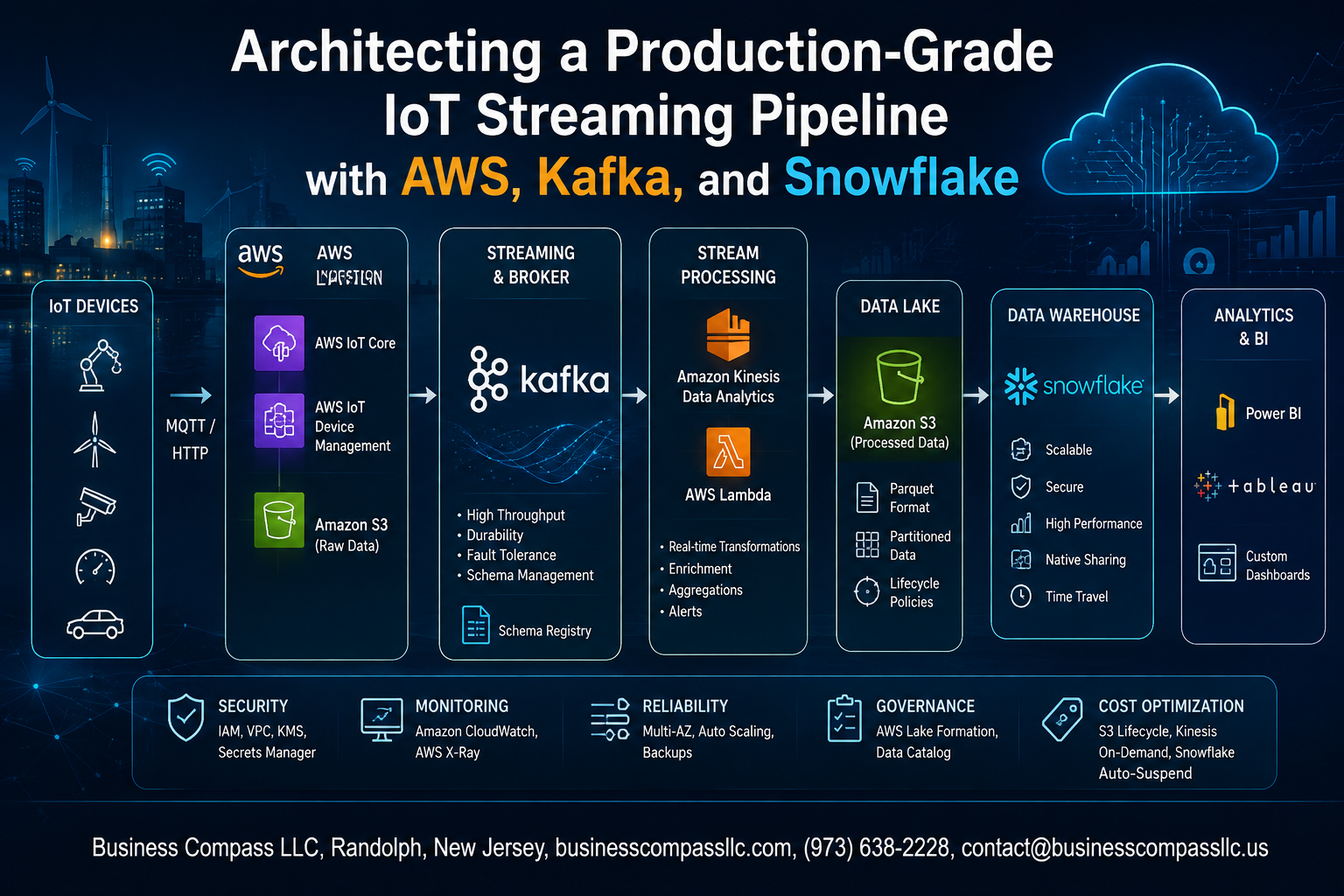
Architecting a Production-Grade IoT Streaming Pipeline with AWS, Kafka, and Snowflake
If you’re building a real-time IoT data pipeline that actually holds up in production, you’ve probably already hit the wall with half-baked tutorials that work on a laptop but fall apart at scale. This guide is for data engineers, cloud architects, and IoT platform teams who need a battle-tested, end-to-end IoT streaming pipeline using AWS, Kafka, and Snowflake — not a proof of concept, but something you can actually ship.
Here’s what we’ll walk through together:
- How the core architecture fits together — and why this specific stack of AWS IoT data engineering tools, Kafka streaming, and Snowflake analytics makes sense for high-volume, real-time workloads
- Building a scalable ingestion and Kafka streaming data pipeline — from raw device data hitting AWS IoT Core all the way through a reliable Kafka backbone that doesn’t buckle under pressure
- Getting data into Snowflake the right way — including transformation, enrichment, and optimization steps so your Snowflake IoT analytics queries are fast and your data is actually trustworthy
By the end, you’ll have a clear blueprint for a scalable streaming pipeline architecture that covers security, fault tolerance, and production readiness — the stuff most guides skip over.
Understanding the Core Architecture and Its Business Value

Why Traditional Batch Processing Falls Short for IoT at Scale
Batch jobs processing sensor data hourly means acting on stale insights — a failing conveyor belt gets flagged after production stops.
Key Components: AWS, Kafka, and Snowflake Working Together
- AWS IoT Core ingests device data
- Kafka streams it reliably
- Snowflake handles analytics
Real-World Use Cases
Predictive maintenance, smart energy grids, connected vehicles.
Setting Up a Scalable IoT Data Ingestion Layer on AWS
Choosing Between AWS IoT Core and Kinesis for Device Connectivity
For real-time IoT data ingestion, AWS IoT Core handles device authentication natively, while Kinesis excels at high-throughput streaming. Pair both: IoT Core manages MQTT connections, routing messages into Kinesis Data Streams for Kafka ingestion.
- Use MQTT over TLS with X.509 certificates
- Schema your payloads in Avro or Protobuf to cut downstream costs
- Enable Kinesis Enhanced Fan-Out for concurrent consumer scaling
Building a Reliable Kafka Streaming Backbone

A. Deploying Kafka on AWS Using MSK for Managed Reliability
AWS MSK removes broker management headaches, auto-scaling storage and handling patches automatically.
B. Designing Topics and Partitions to Match IoT Data Velocity
Partition by device ID to keep ordering intact while spreading load across consumers cleanly.
C. Implementing Exactly-Once Semantics
Enable idempotent producers and transactional APIs — zero duplicates, zero data loss reaching Snowflake.
D. Using Kafka Connect
The Snowflake Kafka Connector handles batching and schema evolution natively, bridging your Kafka streaming data pipeline directly.
E. Monitoring Consumer Lag
Track lag in CloudWatch; spikes signal under-provisioned consumers before real-time IoT analytics degrade.
Transforming and Enriching Streaming Data Before It Reaches Snowflake

Applying Real-Time Filtering and Aggregation with Kafka Streams
Use Kafka Streams to drop noisy, out-of-range sensor readings before they hit Snowflake, keeping storage costs low.
Enriching Raw Device Data with Contextual Metadata
Join raw payloads with device registry data — location, firmware version, owner — turning bare telemetry into analytics-ready records.
Managing Schema Evolution
Use Confluent Schema Registry with backward-compatible Avro schemas so downstream Snowflake consumers never break when fields change.
Loading and Optimizing IoT Data in Snowflake for Analytics

A. Snowpipe for Continuous Ingestion
Auto-ingest files from S3 the moment they land.
B. Table Clustering Keys
Cluster on device_id and event_time to slash scan costs.
C. Data Retention Policies
Set DATA_RETENTION_TIME_IN_DAYS per table based on compliance needs.
D. Materialized Views
Pre-aggregate device metrics for dashboard queries hitting sub-second speeds.
Securing and Governing the Entire Pipeline End to End

Encrypting Data in Transit and at Rest Across All Pipeline Layers
Enable TLS on Kafka brokers and AWS IoT Core endpoints. Use AWS KMS for S3 and Snowflake encryption keys.
Enforcing Role-Based Access Control in Snowflake for Compliance
- Assign least-privilege roles per team
Auditing Data Lineage to Meet Regulatory Requirements
Track lineage using Snowflake Access History and AWS CloudTrail.
Ensuring Fault Tolerance, Scalability, and Production Readiness

Designing for Auto-Scaling, Dead Letter Queues, and Observability
A production-grade IoT streaming pipeline on AWS needs auto-scaling Kafka consumer groups, dead letter queues catching malformed messages, and CloudWatch plus Grafana dashboards tracking lag and throughput. Run chaos tests — kill brokers, flood traffic — before go-live to confirm your scalable streaming pipeline architecture actually holds up under real pressure.

Building a production-grade IoT streaming pipeline is no small feat, but the combination of AWS, Kafka, and Snowflake gives you a solid foundation to handle real-world data challenges at scale. From setting up a reliable ingestion layer on AWS to building a Kafka backbone that keeps data flowing without hiccups, each piece of the architecture plays a critical role. Transforming and enriching data mid-stream means your analytics in Snowflake are working with clean, meaningful information rather than raw noise. And with the right security, governance, and fault tolerance practices baked in, the pipeline does not just work on day one — it holds up over time.
The biggest takeaway here is that a well-architected IoT pipeline is not just a technical achievement; it directly impacts how fast and confidently your business can act on data. If you are ready to move beyond proof-of-concept setups and build something that can scale in production, start by auditing your current ingestion and transformation layers — that is usually where the biggest gaps show up. Take these patterns, adapt them to your specific use case, and build a pipeline your team can actually rely on.









