

Want to run Python ETL on AWS without babysitting servers? This guide shows you how to build a serverless ETL pipeline on AWS that grows with your data.
It’s for data engineers, backend developers, and analysts who know some Python and want a pipeline that holds up in production.
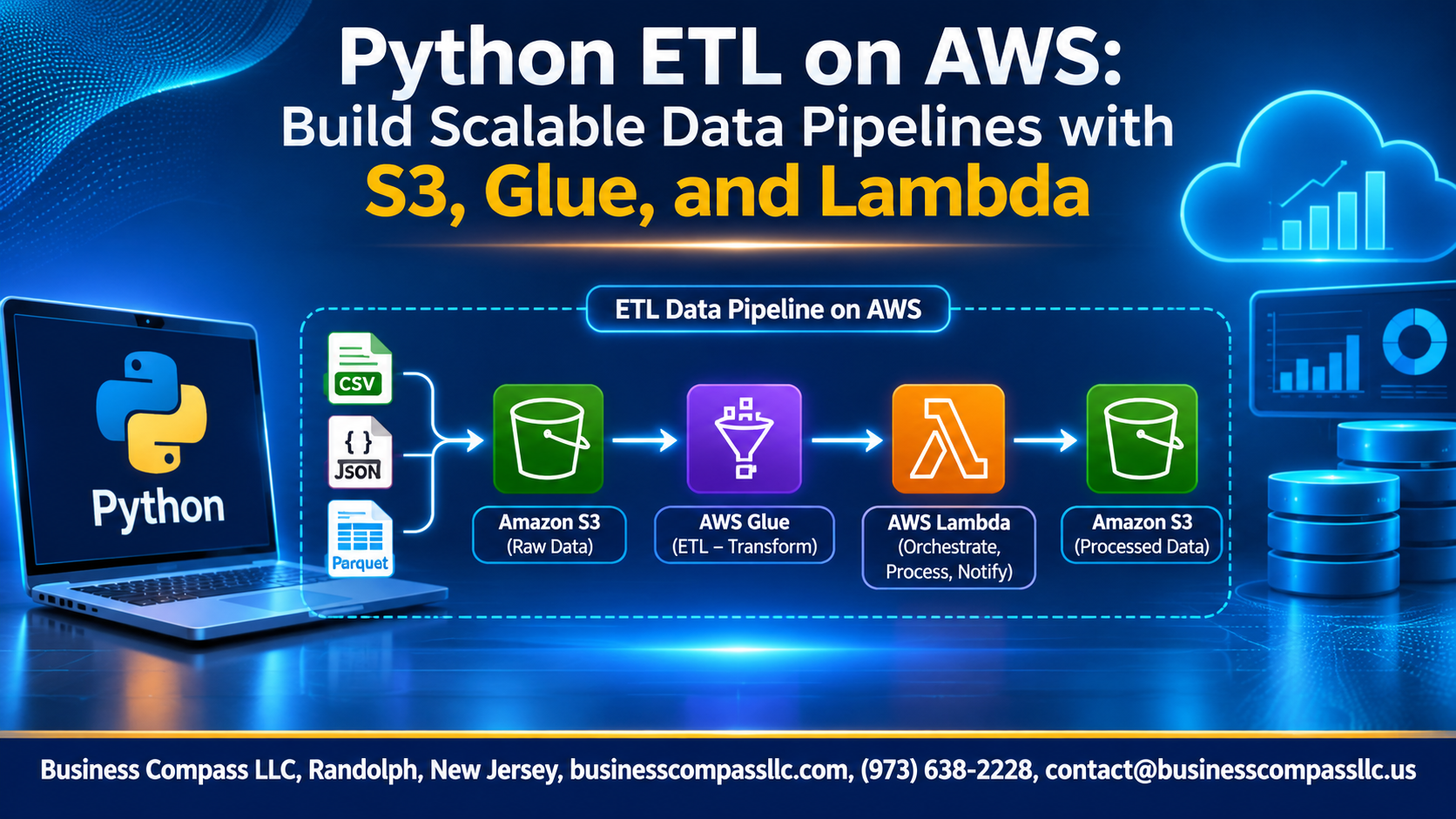
We’ll start with a scalable ETL architecture and an AWS data lake on S3. Then you’ll build a data pipeline with S3 and Lambda to pull in new files automatically. After that, we’ll use an AWS Glue Python tutorial approach, with AWS Glue PySpark ETL jobs, to clean and reshape your data at scale.
From there, we’ll orchestrate the ETL pipeline with AWS Step Functions and cover ETL pipeline best practices on AWS, like monitoring, testing, and troubleshooting. We’ll also show you how to optimize AWS Glue performance and cost, so your bill stays reasonable as you grow.
You’ll finish with a working pipeline you can deploy and scale.
Design a Scalable ETL Architecture

Map the Role of S3, Glue, and Lambda
S3 stores every data layer, Lambda reacts to new files, and Glue runs heavy PySpark transforms.
Choose Batch vs. Event-Driven Processing
Use events for small, frequent files; use scheduled batches for big, heavy jobs.
Plan Data Flow from Raw to Curated Layers
Land raw data, clean it into staging, then publish curated Parquet.
Set Up Your AWS and Python Environment

Configure IAM Roles with Least-Privilege Access
Give Lambda and Glue separate roles, each limited to specific S3 prefixes and the actions it needs.
Install Boto3 and Essential Python Libraries
Create a virtual environment, then install boto3, pandas, and pyarrow.
Prepare Local Development and Testing Tools
Use the AWS CLI, pytest, and moto for local testing.
Organize Your Project Structure for Easy Maintenance
Split code into lambda/, glue/, tests/, and infra/ folders.
Build a Reliable Data Lake with S3

Structure Buckets and Prefixes
Separate raw, curated, and analytics zones: s3://lake/raw/.
Partition Data
Use year=/month=/day= prefixes so Athena and Glue scan less.
Apply Lifecycle Policies
Move old raw files to Glacier; expire temp data.
Secure Data
Enable SSE-KMS, block public access, use least-privilege IAM.
Automate Ingestion with Lambda

Trigger Pipelines Instantly with S3 Events
Point S3 event notifications at Lambda so every new object starts your serverless ETL pipeline on AWS.
Write Lightweight Python Functions for Data Validation
Check schema, file size, and format before moving data on.
Handle Errors and Retries with Dead-Letter Queues
Send failed events to an SQS dead-letter queue for replay.
Overcome Lambda Limits on Memory and Runtime
Hand heavy files to AWS Glue.
Transform Data at Scale with AWS Glue

Discover Schemas Automatically with Glue Crawlers
Point a crawler at your S3 prefix and let it infer columns and partitions.
Manage Metadata Using the Glue Data Catalog
The Data Catalog becomes your single schema source for Athena and Glue jobs.
Write PySpark Jobs to Clean and Enrich Data
Use DynamicFrames to drop nulls, fix types, and join reference datasets.
Convert to Parquet for Faster Analytics
Write partitioned, Snappy-compressed Parquet to cut scan costs and speed queries.
Use Glue Job Bookmarks to Process Only New Data
Enable bookmarks so reruns skip processed files and save time and money.
Orchestrate the Pipeline End to End

Connect Lambda and Glue with Triggers
S3 events fire Lambda, and Lambda calls start_job_run through boto3 to launch Glue.
Coordinate Complex Workflows with Glue Workflows or Step Functions
Use Glue Workflows for simple Glue-only chains. Choose Step Functions when you need retries, branching, or alerts.
Schedule Recurring Jobs with EventBridge
EventBridge cron rules start Lambda, Glue, or Step Functions on a schedule.
Monitor, Test, and Troubleshoot with Confidence

Track Pipeline Health with CloudWatch Logs and Metrics
Send Lambda and Glue logs to CloudWatch, then track custom metrics like rows processed and job duration.
Set Up Alerts for Failures and Delays
Create CloudWatch alarms on errors and runtime, routed through SNS to email or Slack.
Validate Data Quality with Automated Checks
Run null, schema, and duplicate checks in Glue before writing output.
Debug Common Pipeline Issues Quickly
Start with logs, then check IAM permissions and timeouts.
Optimize Performance and Control Costs

Right-Size Glue Workers and Lambda Memory
Start small, then measure. Use Glue job metrics to cut idle workers, and try Lambda power tuning to find the cheapest memory setting.
Tune Partitioning and File Sizes for Speed
Partition by date, and compact tiny files into 128–512 MB Parquet files.
Monitor Spending with Cost Allocation Tags
Tag every Glue job, Lambda function, and bucket, then track costs in Cost Explorer.
Deploy and Scale for Production

A. Automate Deployments with Infrastructure as Code
Define S3, Lambda, Glue, and Step Functions in AWS CDK or Terraform, so every environment matches.
B. Build CI/CD Pipelines for Safer Releases
Run tests, then deploy through GitHub Actions or CodePipeline.
C. Scale to Larger Data Volumes with Minimal Changes
Add Glue workers and partitions.
D. Load Curated Data into Athena or Redshift for Insights
Query curated Parquet in Athena, or COPY it into Redshift.

Building a solid ETL pipeline on AWS comes down to a few smart moves. Start with a clear architecture, then use S3 as your data lake, Lambda to kick off ingestion, and Glue to handle the heavy transformations. Tie it all together with orchestration, and you’ve got a pipeline that runs on its own. Add monitoring, testing, and a little cost tuning, and it stays reliable without draining your budget.
The best way to learn this is to build it. Pick a small dataset, set up a bucket, write a simple Lambda function, and run a Glue job on it. Once that works, add alerts and tweak performance, then move it into production. Start small, fix what breaks, and scale from there. You’ll be surprised how fast it comes together.