


Why Your Kafka Bill Is Higher Than It Should Be
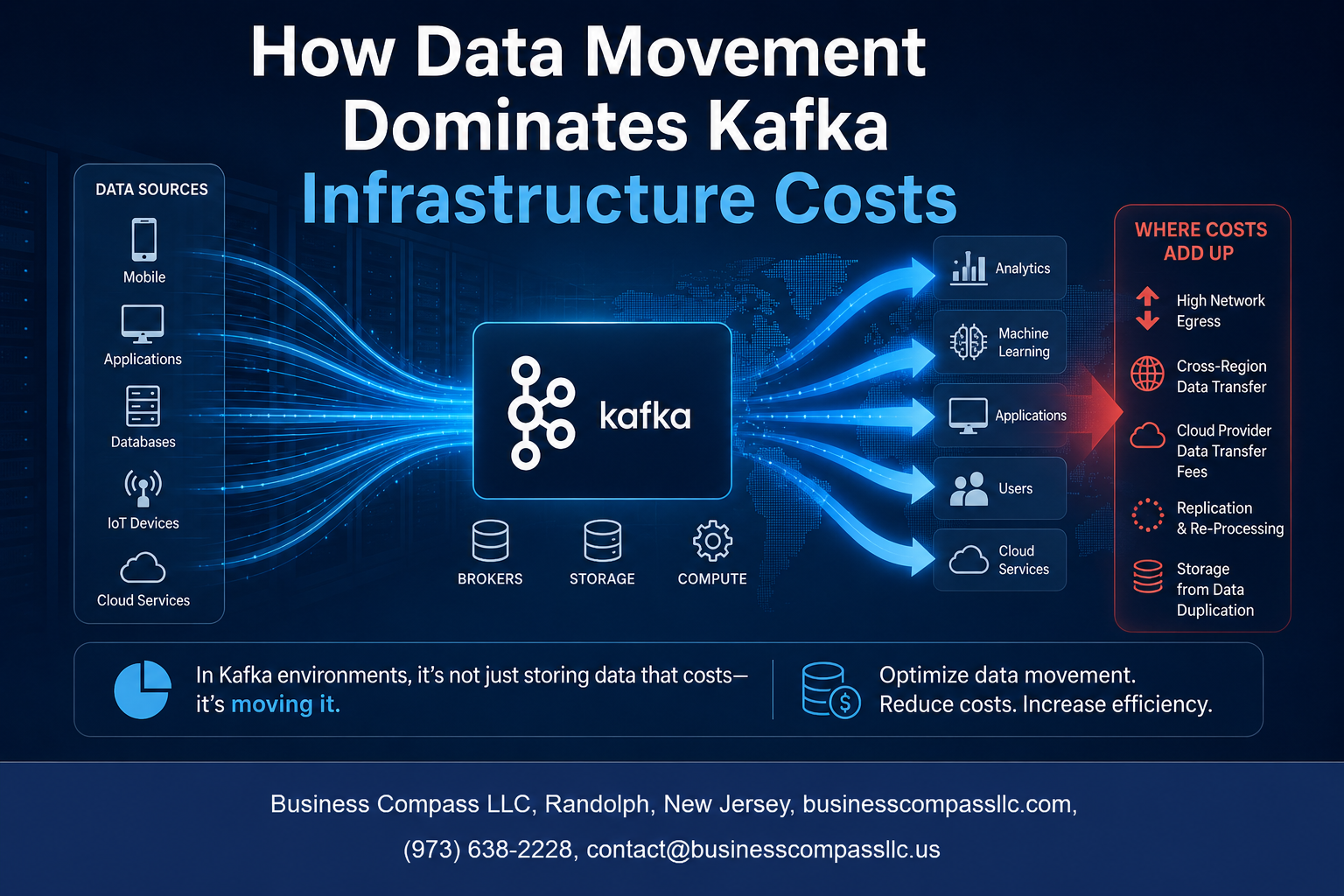
If you run Apache Kafka in production, you’ve probably noticed the costs creeping up faster than expected. The culprit isn’t usually what most people assume — it’s not storage, compute, or licensing. It’s data movement. And once you understand how Kafka infrastructure costs actually break down, the path to reducing your spending becomes a lot clearer.
This guide is for platform engineers, data architects, and engineering leaders who manage Kafka deployments at scale and want to make smarter decisions about where their budget is going.
Here’s what we’ll walk through:
- Where Kafka spending actually comes from — and why data movement quietly dominates the bill
- The specific cost drivers you should be tracking, from cross-AZ replication to egress fees that add up fast
- Practical ways to optimize your Kafka data pipeline without compromising reliability or throughput
By the end, you’ll have a clear picture of your Kafka cost efficiency, know what to measure, and have real strategies you can start testing right away.
Understanding the True Cost Structure of Kafka Infrastructure

Why Traditional Cost Estimates Miss the Bigger Picture
Most teams budget for Kafka by looking at broker instances and storage alone, but that only tells part of the story. The real Kafka infrastructure costs start piling up once you factor in replication traffic, cross-zone data transfers, and the compute needed to keep up with throughput demands at scale.
The Hidden Expenses Behind Running Kafka at Scale
Running Kafka in production quietly racks up costs in places most teams never think to check:
- Inter-broker replication – Every message gets copied across multiple brokers, multiplying your network I/O costs automatically
- Cross-availability-zone traffic – Cloud providers charge for data moving between zones, and Kafka clusters span zones by design
- Consumer fan-out – When multiple consumers read the same topic, that data moves repeatedly across your network
- Retention storage – Keeping data longer than needed burns storage dollars without delivering any real business value
- Monitoring and logging overhead – Metrics pipelines and log aggregation quietly add to your Kafka cloud infrastructure expenses
How Data Volume Amplifies Every Cost Component
Here’s the thing about Kafka cost management — every cost driver gets worse as your data volume grows. A replication factor of 3 means three times the storage and three times the network traffic. When you’re pushing terabytes daily, that multiplier effect turns a manageable bill into a serious financial problem, making Kafka data movement optimization a top priority.
How Data Movement Drives the Majority of Kafka Spending

The Role of Replication in Multiplying Data Transfer Costs
Kafka’s default replication factor of 3 means every byte you write gets copied across multiple brokers. That’s immediately 3x your storage and internal network traffic before a single consumer reads anything. When you’re running high-throughput topics, this replication overhead becomes one of the biggest line items in your Kafka infrastructure costs.
- Every produce request triggers replication across brokers
- Higher replication factors increase durability but directly multiply network I/O costs
- Reducing replication factor on low-criticality topics can meaningfully cut spending
Cross-Availability Zone Traffic and Its Impact on Bills
Cloud providers charge for data crossing availability zone boundaries, and Kafka clusters spread across multiple AZs generate a surprising amount of this traffic. Replication between brokers sitting in different AZs means you’re paying egress fees constantly, even during quiet periods. This is one of the sneakiest Apache Kafka pricing traps teams run into.
- AZ-to-AZ traffic costs typically range from $0.01–$0.02 per GB on major cloud providers
- Rack-aware broker placement can help reduce unnecessary cross-zone replication hops
- Consumer groups reading from non-local replicas amplify this cost further
How Consumer Lag Increases Unnecessary Data Retention Costs
When consumers fall behind, Kafka holds onto older messages longer than planned. This directly bloats storage costs because your retention window can’t clean up data that hasn’t been consumed yet. Slow or stalled consumers silently drive up your Kafka cloud infrastructure expenses without any obvious alerts firing.
- Lagging consumers force brokers to retain gigabytes of backlogged data
- Storage costs compound quickly on high-volume topics with long consumer lag
- Monitoring lag actively helps you spot cost spikes before they hit your bill
The Cost of Moving Data Between Kafka and External Systems
Streaming data out of Kafka into warehouses, databases, or S3 buckets adds egress costs on top of everything else. Connectors moving large volumes continuously can generate significant outbound traffic charges, especially when the destination sits outside your cloud region. Optimizing Kafka data pipelines to batch transfers or compress payloads before egress can meaningfully reduce data movement costs in Kafka environments.
- Kafka Connect pipelines to cloud storage generate continuous egress traffic
- Cross-region data movement carries the highest per-GB transfer fees
- Payload compression before egress is one of the simplest cost reduction levers available
Key Kafka Cost Drivers You Need to Measure

Network Egress Fees That Quietly Drain Budgets
Cross-region data transfers and consumer replication are among the sneakiest Kafka infrastructure costs you’ll encounter. Cloud providers charge per GB for data leaving a region, and with high-throughput Kafka pipelines, those charges stack up fast — often becoming the single largest line item in your monthly bill.
Storage Costs Tied to Retention Policies and Replication
Most teams set Kafka retention policies once and never revisit them. Keeping data for 7 days across 3 replicas triples your storage bill instantly. Auditing topic-level retention and matching replication factors to actual availability needs can dramatically reduce Kafka spending without touching your application logic.
- Over-replicated low-priority topics waste significant storage budget
- Long retention windows on high-volume topics compound costs daily
- Tiered storage options can shift cold data to cheaper object storage
Compute Overhead From High-Throughput Data Pipelines
Broker CPU and memory usage climbs sharply when consumers fall behind, triggering catch-up reads and increased disk I/O simultaneously. Poorly sized Kafka clusters running at 80%+ capacity burn compute dollars around the clock. Right-sizing brokers based on real throughput metrics — not peak estimates — is one of the fastest ways to optimize your Kafka data pipeline costs without sacrificing performance.
Proven Strategies to Reduce Data Movement Costs in Kafka

A. Optimize Partitioning to Minimize Unnecessary Data Shuffling
Getting partitioning wrong is one of the fastest ways to watch your Kafka infrastructure costs spiral out of control. When data lands on the wrong partitions, consumers end up fetching data they don’t need from brokers they shouldn’t be talking to.
- Choose partition keys carefully — pick keys that keep related data together so consumers read from fewer partitions
- Avoid hot partitions — uneven distribution forces some brokers to handle way more traffic, which drives up both compute and network costs
- Match partition count to consumer parallelism — too many partitions means more metadata overhead and unnecessary replication traffic across your cluster
B. Reduce Cross-Region and Cross-Zone Data Transfers
Cross-zone and cross-region data transfer fees are where a lot of teams get blindsided. Cloud providers charge for every byte that moves between availability zones, and those charges add up fast in a busy Kafka cluster.
- Co-locate brokers and consumers in the same zone whenever your architecture allows it
- Use rack-aware replica assignment to keep leader replicas close to the consumers that read from them most
- Audit your MirrorMaker replication — replicate only the topics that genuinely need to exist in multiple regions, not everything by default
- Consider managed Kafka offerings that handle cross-zone traffic transparently if the operational overhead of managing this yourself is too high
Reducing cross-region data movement in Kafka is one of the highest-impact levers you have for cutting Apache Kafka pricing surprises at the end of the month.
C. Compress Data Streams to Lower Network and Storage Expenses
Compression is one of the simplest wins available for Kafka cost management, and a lot of teams either skip it entirely or pick a codec without thinking it through.
- Use Snappy or LZ4 for latency-sensitive topics — they compress fast and decompress fast, so you get cost savings without adding noticeable lag
- Use Zstandard (zstd) for high-throughput, storage-heavy topics — it delivers better compression ratios than Snappy and handles large messages well
- Enable producer-side compression so data is compressed before it even hits the network, reducing both egress costs and broker storage consumption
- Compress at the batch level — Kafka’s batching behavior means compressing a batch of records together gives you much better ratios than compressing records individually
A solid compression strategy can cut storage costs by 40–70% depending on the data type, which has a direct knock-on effect on replication traffic across your Kafka cloud infrastructure expenses.
D. Right-Size Retention Policies to Avoid Storing Stale Data
Default retention settings in Kafka are a trap. Many teams ship a cluster to production with the default 7-day retention and never revisit it, even when most consumers catch up within minutes.
- Audit per-topic retention independently — not every topic needs the same retention window; set retention based on actual consumer lag patterns
- Use size-based retention alongside time-based retention — capping topic size prevents runaway storage growth when traffic spikes unexpectedly
- Implement log compaction for changelog topics — for topics where only the latest value per key matters, compaction replaces full retention and slashes storage costs
- Review retention quarterly — business requirements change, and a retention policy that made sense at launch might be massively over-provisioned six months later
Trimming retention where it isn’t needed is a direct way to reduce Kafka spending without touching your application code at all.
E. Consolidate Consumers to Eliminate Redundant Data Fetching
Every consumer group that reads the same topic creates a separate stream of data movement across your brokers. If three internal services each maintain their own consumer group reading the same high-volume topic, you’re paying three times for the same data movement.
- Identify overlapping consumer groups by auditing what each group actually does with the data it reads
- Build shared consumer services where multiple downstream needs can be served by a single consumer that fans data out internally
- Use consumer group offsets strategically — if replay is rare, don’t maintain separate groups just for occasional reprocessing needs; design a replay mechanism that doesn’t require persistent parallel consumption
- Evaluate stream processing frameworks like Kafka Streams or Flink that can handle multiple transformations in a single pass rather than spinning up separate consumers for each transformation step
Consolidating consumers is one of the most underrated strategies for Kafka data movement optimization, and it directly reduces the fetch request volume hitting your brokers every second.
Evaluating Whether Your Kafka Setup Is Cost-Efficient

Benchmarks That Reveal Wasteful Data Movement Patterns
Tracking consumer lag per topic partition is one of the fastest ways to spot wasteful data movement in your Kafka setup. When lag keeps climbing, consumers are pulling data they can’t process fast enough, which drives up both compute and egress costs. Watch these key benchmarks:
- Replication throughput vs. actual message rate — if replication traffic is significantly higher than your producer output, you likely have over-replicated topics
- Cross-AZ data transfer ratios — anything above 30–40% of total throughput moving between availability zones is a red flag for unnecessary Kafka cloud infrastructure expenses
- Consumer group fetch rates — multiple consumer groups reading the same topic independently instead of sharing a single stream multiplies your data movement costs fast
- Dead letter queue volume — high DLQ rates signal repeated reprocessing, which quietly inflates your Kafka cost drivers
Tools and Metrics That Surface Hidden Infrastructure Costs
Getting visibility into Kafka infrastructure costs requires the right toolset. Raw broker metrics alone won’t show you where money is leaking.
- Kafka’s built-in JMX metrics expose
BytesInPerSecandBytesOutPerSecper broker, giving you a starting point for data movement tracking - Prometheus + Grafana dashboards let you visualize network I/O trends over time and catch cost spikes before your cloud bill does
- Cloud provider cost explorer tools (AWS Cost Explorer, GCP Billing) broken down by VPC data transfer tags reveal exactly how much cross-region or cross-AZ movement is costing you
- Confluent Control Center or Redpanda Console offer topic-level throughput breakdowns that help you identify bloated pipelines eating into your Kafka cost efficiency
When to Consider Managed Kafka Services to Cut Overhead
Self-managed Kafka makes sense at scale when your team has deep operational expertise. But for many teams, the hidden labor and infrastructure overhead quietly exceed the sticker price of managed options. Managed Kafka services like Confluent Cloud, Amazon MSK, or Redpanda Cloud handle broker scaling, patching, and replication tuning automatically, which directly reduces data movement costs caused by misconfiguration. If your engineering team is spending more than 20% of its time on Kafka operations rather than building product, the math almost always favors moving to a managed service to reduce Kafka spending.

Data movement is the silent budget drain in most Kafka setups, and the costs add up faster than most teams realize. Between cross-zone replication, consumer fan-out, and bloated data pipelines, the real money isn’t going toward compute or storage — it’s going toward moving bytes from one place to another. Once you start measuring the right things, the patterns become pretty hard to ignore.
The good news is that cutting these costs doesn’t require a complete overhaul. Small changes — like co-locating consumers with producers, compressing data earlier in the pipeline, or auditing how many systems are pulling the same data — can make a real dent in your bill. Take a hard look at your current Kafka setup with fresh eyes and ask where data is traveling unnecessarily. Chances are, there’s money sitting right there waiting to be saved.









