


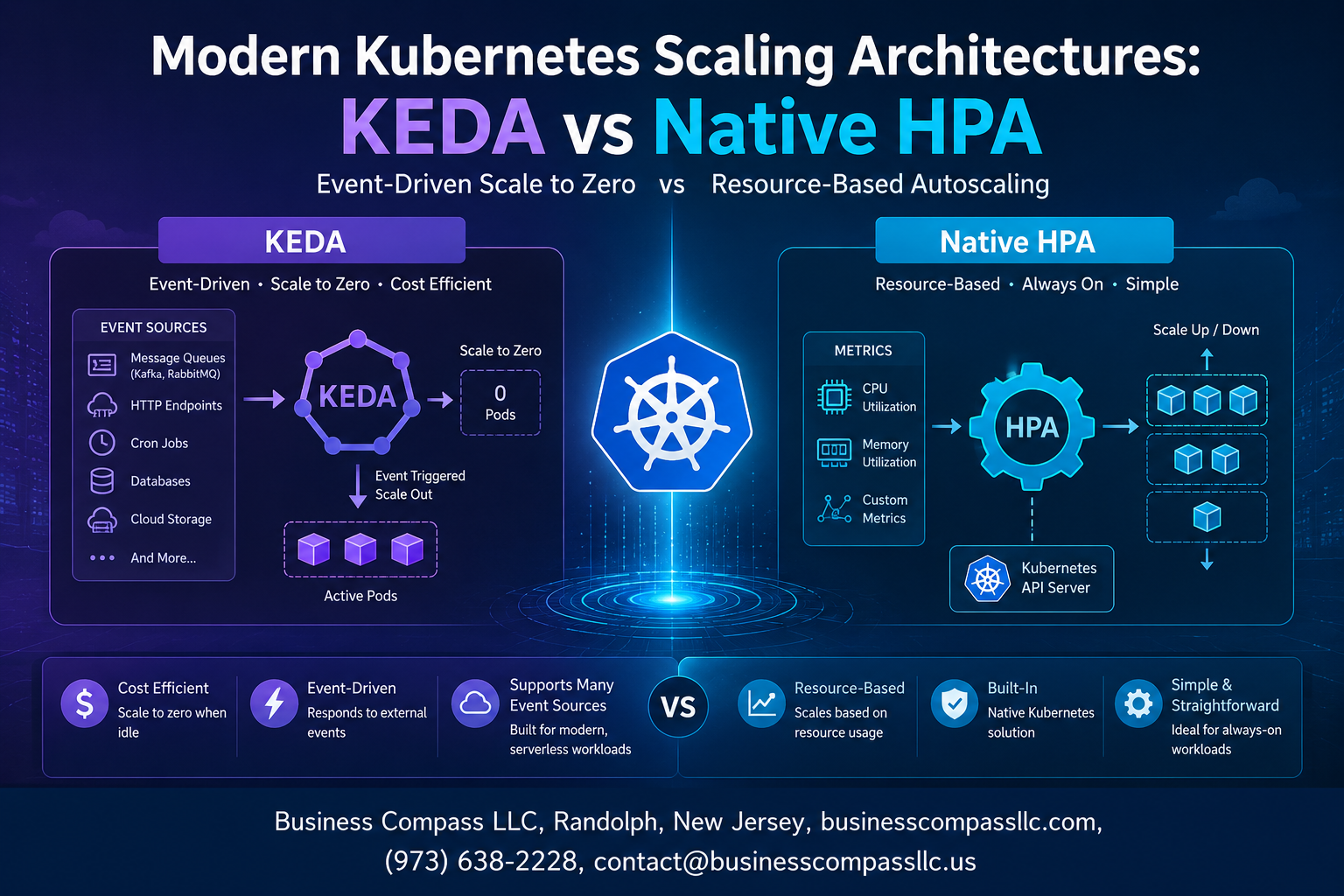
Modern Kubernetes Scaling Architectures: KEDA vs Native HPA
Scaling Kubernetes workloads sounds simple until your traffic spikes at 2 AM and your pods can’t keep up. If you’re a platform engineer, DevOps practitioner, or backend developer trying to build reliable, cost-efficient systems, picking the right Kubernetes scaling strategy matters more than most people realize.
This guide breaks down two of the most talked-about approaches right now — the Kubernetes Horizontal Pod Autoscaler (HPA) and KEDA (Kubernetes Event-Driven Autoscaling) — so you can stop guessing and start building with confidence.
Here’s what we’ll walk through:
- How Kubernetes autoscaling actually works under the hood, including the core concepts you need before touching any configuration
- Where native HPA wins and where it falls short, especially when CPU and memory metrics just don’t cut it for modern, async workloads
- How KEDA’s event-driven scaling model fills those gaps, connecting directly to queues, databases, and external triggers that HPA simply can’t see
By the end, you’ll have a clear picture of which tool fits your architecture — and a solid starting point for putting it into practice.
Understanding Kubernetes Scaling Fundamentals
How Horizontal Pod Autoscaling Drives Application Performance
The Kubernetes Horizontal Pod Autoscaler works by continuously watching your workload metrics and spinning up or removing pods based on thresholds you define. When traffic spikes hit your application, HPA detects the CPU or memory pressure and adds more pod replicas to distribute the load, keeping response times stable.
- HPA pulls metrics every 15 seconds by default through the Metrics Server
- Scaling decisions happen based on a simple ratio:
desired replicas = current replicas × (current metric value ÷ target metric value) - Cooldown periods prevent rapid thrashing between scale-up and scale-down events
Why Traditional Scaling Falls Short in Modern Workloads
Standard Kubernetes scaling strategies were built around CPU and memory signals, but modern applications don’t always behave that way. A queue-processing service sitting idle at 2% CPU could have 50,000 messages piling up — and HPA would never know. This is where HPA limitations in Kubernetes become a real operational headache.
- Reactive by nature: HPA only responds after resource pressure already exists, meaning latency spikes happen before scaling kicks in
- Blind to external signals: message queue depth, database connection counts, HTTP request backlogs — none of these are visible to native HPA without custom metric pipelines
- Binary scaling signals: CPU and memory are blunt instruments for applications driven by business logic events
Key Metrics That Determine Effective Scaling Decisions
Picking the right metrics is honestly the most important part of any Kubernetes autoscaling best practices conversation. The wrong metric sends your cluster scaling in completely the wrong direction.
- Resource metrics: CPU utilization, memory consumption — good for compute-bound workloads
- Custom metrics: request queue length, active database connections, cache hit ratios
- External metrics: messages in a Kafka topic, items in an SQS queue, Pub/Sub subscription backlog
- Per-pod vs aggregate metrics: scaling on per-pod request rate behaves very differently than scaling on total cluster throughput
Native HPA: Strengths and Limitations
Built-In CPU and Memory Scaling Made Simple
The Kubernetes Horizontal Pod Autoscaler does one thing really well — it watches your CPU and memory metrics and spins up or down pods based on thresholds you define. Setting it up takes maybe ten minutes, and it works straight out of the box with zero extra tooling.
- Monitors CPU utilization and memory pressure natively through the Metrics Server
- Scales pods up when resource thresholds are breached and back down during quiet periods
- Requires only a simple
HorizontalPodAutoscalermanifest to get running
Seamless Integration with Existing Kubernetes Clusters
Native HPA ships as a core Kubernetes component, meaning you get it automatically without installing anything extra. Your existing RBAC policies, namespaces, and kubectl workflows all work with it immediately. For teams already running Kubernetes scaling strategies, this zero-friction setup is genuinely hard to beat.
Where Native HPA Hits Its Ceiling in Complex Environments
HPA limitations in Kubernetes become obvious the moment your workloads go beyond simple CPU-hungry services:
- Cannot natively scale based on queue depth, database connections, or external API traffic
- Struggles with event-driven architectures where load spikes arrive faster than metric polling intervals
- No support for scaling to zero, which is critical for batch jobs and serverless-style workloads
Cost Implications of Relying Solely on Native HPA
Keeping pods running during low-traffic windows because HPA can’t scale to zero bleeds money quietly. Teams often over-provision buffers to handle sudden spikes that CPU metrics don’t predict fast enough, driving up cloud spend without improving reliability.
KEDA: Event-Driven Scaling for Modern Applications
How KEDA Extends Kubernetes Beyond Resource-Based Triggers
Native HPA watches CPU and memory — and that’s basically it. KEDA (Kubernetes Event-Driven Autoscaling) blows that ceiling wide open by letting your workloads scale based on what’s actually happening in your system, not just how hard the CPU is working. It acts as a bridge between external event sources and the Kubernetes autoscaler, sitting alongside HPA rather than replacing it. When a queue fills up, when a Kafka topic backs up, or when a scheduled job kicks off, KEDA reacts immediately — spinning pods up before your system starts sweating.
Supported Event Sources That Unlock Flexible Scaling
KEDA ships with 60+ built-in scalers, covering practically every tool in a modern data and cloud stack:
- Message queues: RabbitMQ, Azure Service Bus, AWS SQS, Google Pub/Sub
- Streaming platforms: Apache Kafka, AWS Kinesis, Azure Event Hubs
- Databases & caches: Redis, PostgreSQL, MySQL
- Observability tools: Prometheus, Datadog, New Relic
- Schedulers: Cron-based scaling for predictable traffic patterns
- Cloud-native services: AWS DynamoDB Streams, GCP Cloud Tasks
This list keeps growing through community-contributed scalers, meaning your team can build a custom scaler for any internal system that exposes metrics.
Scaling to Zero to Maximize Infrastructure Cost Savings
One of KEDA’s biggest wins over native HPA is its ability to scale workloads all the way down to zero pods when there’s nothing to process. HPA has a hard floor of one replica — always running, always costing money. KEDA removes that floor entirely.
For batch processing jobs, overnight data pipelines, or dev/staging environments that sit idle for hours, this single capability can shave a meaningful chunk off your monthly cloud bill. When a new message arrives or an event fires, KEDA scales from zero back up — fast enough that most asynchronous workflows never notice the gap.
Simplifying KEDA Deployment with ScaledObject Configuration
Getting started with KEDA Kubernetes setup is straightforward. After installing KEDA via Helm or the operator, you define a ScaledObject custom resource that wires your deployment to an event source:
apiVersion: keda.sh/v1alpha1
kind: ScaledObject
metadata:
  name: rabbitmq-scaler
spec:
  scaleTargetRef:
    name: message-processor
  minReplicaCount: 0
  maxReplicaCount: 30
  triggers:
    - type: rabbitmq
      metadata:
        queueName: orders
        queueLength: "20"
This config tells KEDA to scale the message-processor deployment based on how many messages are sitting in the orders queue — adding a replica for every 20 messages, scaling to zero when the queue empties. No custom metrics pipelines. No patching HPA manually. Just a clean, readable YAML file.
Real-World Use Cases Where KEDA Outperforms Native HPA
KEDA event-driven scaling shines brightest in workloads where CPU and memory are poor proxies for actual demand:
- E-commerce order processing: Scale workers based on SQS queue depth during flash sales, not CPU usage spikes that lag behind by minutes
- IoT data ingestion: React to Kafka partition lag in real time as device telemetry floods in unpredictably
- Nightly ETL pipelines: Spin up heavy data transformation pods on a cron schedule, then drop back to zero when done
- CI/CD job runners: Dynamically provision build agents based on pending pipeline queue length
- Multi-tenant SaaS platforms: Allocate processing capacity per-tenant based on their event backlog rather than shared resource averages
In each of these scenarios, native HPA would either over-provision (wasting money) or under-provision (dropping performance) because resource metrics simply don’t tell the full story. KEDA reads the actual signal — the queue, the stream, the schedule — and scales accordingly.
Head-to-Head Performance Comparison

Scaling Speed and Responsiveness Under High Traffic
When traffic spikes hit, every second counts. KEDA reacts to external event sources — think queue depth, Kafka lag, or HTTP request rates — pulling scaling decisions from the actual source of work rather than waiting for CPU or memory metrics to catch up. Native HPA typically has a 15–30 second scrape interval before it even begins evaluating whether new pods are needed. KEDA can trigger scale-out almost immediately when a queue starts filling up, cutting cold-start latency dramatically in high-throughput scenarios.
- HPA reaction time: 30–60 seconds end-to-end in many real-world setups
- KEDA reaction time: Can drop to under 10 seconds depending on the scaler and polling interval configured
Accuracy of Scale-Down Decisions to Prevent Over-Provisioning
Over-provisioning is expensive, and both tools handle scale-down differently. HPA uses a stabilization window (default 5 minutes) to avoid flapping, but this often leaves idle pods running longer than necessary. KEDA’s scale-to-zero capability is a genuine game-changer — when the event source goes quiet, KEDA can bring replicas all the way down to zero, slashing compute costs in low-traffic windows.
- KEDA supports scale-to-zero natively
- HPA minimum replica count is 1 by default, meaning you always pay for at least one pod
- KEDA’s decisions are tied directly to business-meaningful metrics, making scale-down far more precise
Handling Spiky and Unpredictable Workload Patterns
Spiky workloads are where the KEDA vs HPA conversation gets really interesting for modern Kubernetes architecture. HPA struggles here because it reacts to symptoms — high CPU — rather than the root cause. By the time CPU spikes, users are already experiencing slowdowns. KEDA reads leading indicators like pending jobs in a queue or unprocessed messages in an event stream, letting it get ahead of the curve instead of chasing it.
- Batch processing jobs: KEDA scales based on queue depth before processing even starts
- Streaming pipelines: KEDA monitors consumer lag in real time, scaling Kafka consumers proactively
- Scheduled traffic bursts: KEDA’s cron scaler lets teams pre-scale before anticipated peaks
Choosing the Right Scaling Strategy for Your Architecture
Matching Scaling Solutions to Your Application Type
Picking the right Kubernetes scaling strategy really comes down to understanding what your application actually does day-to-day. CPU-heavy workloads like ML inference servers or image processors are a natural fit for Kubernetes Horizontal Pod Autoscaler, since resource metrics directly reflect demand. Apps tied to queues, webhooks, or external event streams—think order processors, notification services, or data pipelines—are where KEDA event-driven scaling genuinely shines.
- Stateless web APIs with predictable traffic: Native HPA works great here
- Queue-driven microservices (Kafka, RabbitMQ, SQS): KEDA is the obvious pick
- Batch jobs triggered by external events: KEDA with job scalers handles this cleanly
- Mixed workloads with both CPU spikes and event bursts: You’ll likely need both
When to Combine KEDA and HPA for Maximum Flexibility
A common misconception is that KEDA vs HPA is a binary choice. In reality, running them together is a practical and increasingly common Kubernetes autoscaling best practice. KEDA can manage external event sources while HPA simultaneously monitors CPU and memory—giving your pods two independent signals to scale from. Just make sure you’re not targeting the same metric from both controllers, or you’ll end up with conflicting scaling decisions that cause erratic pod counts.
- Set KEDA to react to queue depth or custom metrics
- Let HPA handle CPU/memory thresholds independently
- Use
ScaledObjectin KEDA withminReplicaCountandmaxReplicaCountto stay within safe bounds - Test both controllers under load before going live to catch conflicts early
Evaluating Operational Complexity Before Committing to a Tool
Before locking in on a tool, be honest about your team’s capacity to manage it. KEDA Kubernetes setup introduces additional components—the KEDA operator, custom resources, and external scaler configurations—that your on-call engineers need to understand at 2am when something breaks. Native HPA is baked into Kubernetes, simpler to debug, and has broader community documentation. That simplicity has real value.
- Small team or early-stage product: Stick with HPA until you hit its limits
- Platform engineering team with Kubernetes expertise: KEDA’s flexibility is worth the overhead
- Hybrid cloud or multi-cloud setup: KEDA’s external scalers become a significant advantage
- Always factor in monitoring, alerting, and runbook creation as part of the true cost of adopting KEDA
Future-Proofing Your Scaling Architecture for Growth
Modern Kubernetes architecture trends are clearly moving toward event-driven patterns, and KEDA is well-positioned as that shift accelerates. That said, future-proofing doesn’t mean adopting every new tool—it means building a scaling layer that can evolve without requiring a full rewrite. Start with clean abstractions:
- Define scaling policies in version-controlled manifests from day one
- Avoid hardcoding replica counts in deployment specs—let your scalers own that
- Adopt KEDA incrementally, starting with one or two high-impact workloads
- Monitor Kubernetes scaling performance metrics over time and adjust thresholds based on real traffic patterns, not guesses
The teams that scale well long-term are the ones that treat scaling configuration as a living document, not a one-time setup task.

Kubernetes scaling has come a long way, and the choice between KEDA and Native HPA really comes down to what your workloads actually need. Native HPA is a solid, battle-tested option that works great for CPU and memory-driven scaling, but it starts showing its limits when your applications need to react to external events, message queues, or custom metrics. KEDA steps in to fill that gap, bringing event-driven scaling that feels purpose-built for modern, cloud-native applications.
There’s no universal winner here. If your workloads are straightforward and CPU/memory metrics tell the whole story, Native HPA gets the job done without adding complexity. But if you’re running microservices that respond to Kafka topics, SQS queues, or any other external triggers, KEDA gives you the flexibility and precision that Native HPA simply can’t match. Take a close look at your architecture, map out your scaling triggers, and pick the tool that fits the way your applications actually behave in production.









