


When Something Goes Wrong in AWS, Your Logs Tell the Story
A suspicious API call fires at 2 AM. An IAM role you don’t recognize starts spinning up EC2 instances. Your S3 bucket permissions changed — and nobody on your team did it.
This is what an AWS security incident looks like in the wild, and the first place you turn is your audit logs.
This guide is for cloud engineers, DevSecOps teams, and security analysts who need to move fast when something looks off in their AWS environment. If you’ve ever stared at a CloudTrail log wondering where to even start, you’re in the right place.
Here’s what we’ll walk through together:
- How AWS audit logs actually work — what CloudTrail captures, where it stores data, and how to read it without losing your mind
- How to spot an active AWS security incident — the behavioral patterns and red flags that show up in log data before things get worse
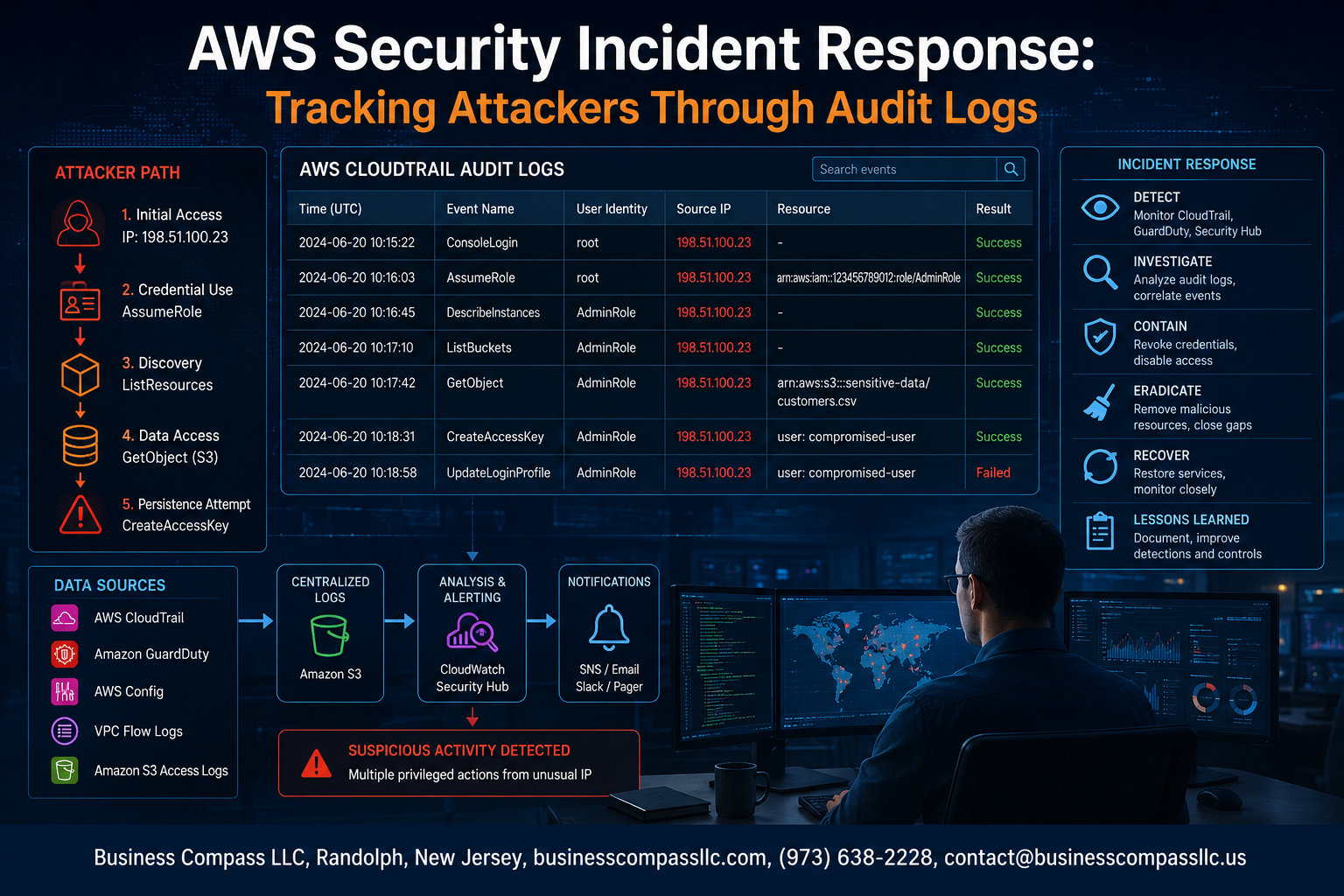
- How to trace attacker actions step by step — building a real investigation workflow that connects the dots from initial access to lateral movement
AWS security incident response isn’t just a checklist. It’s detective work, and your logs are the evidence. Let’s dig in.
Understanding AWS Audit Logs for Security Monitoring

What AWS CloudTrail Captures and Why It Matters
AWS CloudTrail is your go-to tool for AWS audit logs analysis and tracking every API call made within your account. It records who did what, when, and from where — covering actions taken through the AWS Console, CLI, SDKs, and services. During AWS security incident response, CloudTrail becomes your primary evidence trail, showing attacker movements across IAM, EC2, S3, and beyond.
Key details CloudTrail captures include:
- User identity (IAM user, role, or federated identity)
- Source IP address and user agent
- Event time and affected AWS region
- Request parameters and response elements
- Error codes that reveal failed access attempts
Key Log Sources Beyond CloudTrail: VPC Flow Logs, S3 Access Logs, and GuardDuty
CloudTrail alone won’t give you the full picture during cloud security incident response. You need multiple data sources working together:
- VPC Flow Logs — Capture network-level traffic patterns, helping you spot unusual outbound connections, lateral movement between instances, or data exfiltration attempts
- S3 Access Logs — Track every GET, PUT, and DELETE request against your buckets, critical for AWS log forensics when sensitive data exposure is suspected
- Amazon GuardDuty — Uses machine learning to flag suspicious behavior like credential abuse, crypto mining, and reconnaissance activity, giving your team pre-built threat detections without manual rule-writing
Setting Up Centralized Log Storage to Prevent Tampering
Attackers who gain sufficient access will try to cover their tracks by deleting or modifying logs. Centralizing your logs in a dedicated, locked-down S3 bucket with strict access controls stops that cold. Best practices include:
- Enable S3 Object Lock with compliance mode to make logs immutable
- Send logs to a separate AWS account isolated from your production environment
- Turn on CloudTrail log file validation to detect any tampering attempts
- Use AWS Security Hub to aggregate findings from GuardDuty, CloudTrail, and other sources into one place for faster AWS security monitoring
Recognizing the Signs of an Active AWS Security Incident

Common Attack Patterns Visible in Audit Logs
When digging through AWS CloudTrail logs during an AWS security incident response, certain attack patterns pop up repeatedly. Watch for:
- Credential stuffing attempts — bursts of failed
AssumeRoleorGetSessionTokencalls - Reconnaissance activity — rapid-fire
Describe*andList*API calls across multiple services - Data exfiltration signals — unexpected
GetObjectcalls on S3 buckets, especially from unfamiliar IP addresses - Resource creation spikes — sudden EC2 instance launches or Lambda function deployments outside normal business hours
High-Priority API Calls That Signal Malicious Activity
Not every API call carries the same weight. During AWS audit logs analysis, these calls should immediately grab your attention:
CreateAccessKey— attackers love creating new keys to maintain persistenceAttachUserPolicy/PutUserPolicy— classic privilege escalation movesDeleteTrailorStopLogging— a dead giveaway that someone wants to go darkModifySnapshotAttribute— often used to exfiltrate EBS snapshot data externallyCreateLoginProfile— enables console access on previously API-only accounts
Identifying Unusual IAM Behavior and Privilege Escalation
IAM is the crown jewel attackers target. When tracking attackers in AWS, focus on:
- A single IAM user suddenly calling APIs across regions they’ve never touched
- Role chains getting longer than normal — multiple
AssumeRolehops between accounts - New inline policies attached directly to users, bypassing managed policy controls
- Changes made to permission boundaries or SCPs at odd hours
Cross-reference user agents in CloudTrail — automated tools like aws-cli and custom scripts leave distinct fingerprints compared to legitimate console sessions.
Spotting Lateral Movement Across AWS Services
Lateral movement in AWS doesn’t look like traditional network pivoting. Instead, during cloud security incident response, you’re looking for:
- An IAM role tied to one service suddenly being used to call completely unrelated services
- Lambda functions invoking EC2, RDS, or Secrets Manager APIs without prior history
- Cross-account role assumptions from accounts that don’t fit normal organizational patterns
- Secrets Manager or SSM Parameter Store access pulling credentials for systems outside the attacker’s original entry point
AWS log forensics shines here — timeline correlation across services reveals the full attack chain that single-service analysis would completely miss.
Building an Effective Log Investigation Workflow

Prioritizing Which Logs to Analyze First During an Incident
When an AWS security incident hits, you don’t have time to read every log line. Start with the highest-signal sources first:
- CloudTrail management events – These capture API calls like
AssumeRole,CreateUser,AttachUserPolicy, andDeleteTrail. If an attacker is moving through your environment, these calls tell the story. - IAM-related events – Look at privilege escalation attempts, new access key creation, and policy changes before anything else.
- GuardDuty findings – These are pre-triaged alerts that point you toward suspicious behavior, saving hours of manual digging.
- VPC Flow Logs – Check these when you suspect data exfiltration or unusual outbound connections.
Start with the time window around the first known suspicious event, then expand outward as the picture gets clearer.
Using AWS Athena to Query Large Volumes of CloudTrail Data
CloudTrail logs stored in S3 can pile up fast — querying them manually is painful. Athena lets you run SQL directly against that S3 data, making AWS audit logs analysis genuinely fast and scalable.
A quick example — finding all AssumeRole calls from an unusual source IP:
SELECT eventtime, useridentity.arn, sourceipaddress, requestparameters
FROM cloudtrail_logs
WHERE eventname = 'AssumeRole'
AND sourceipaddress NOT IN ('10.0.0.1', '192.168.1.1')
ORDER BY eventtime DESC
LIMIT 100;
A few tips to get the most out of Athena during CloudTrail log investigation:
- Partition your tables by date and region to cut query costs and speed things up significantly.
- Use
eventnameanderrorcodefilters to zero in on failed authentication attempts or denied actions, which often signal attacker reconnaissance. - Save your queries — during an active incident, you’ll run variations of the same queries repeatedly across different time windows.
Athena isn’t just a convenience tool; during active cloud security incident response, it’s one of the fastest ways to pull meaningful answers from millions of log records.
Correlating Events Across Multiple Log Sources to Reconstruct the Attack Timeline
Tracking attackers in AWS means stitching together events from different log sources into one coherent timeline. No single log tells the whole story.
Here’s a practical way to approach the correlation:
- Anchor on a known bad indicator — a suspicious IP, a compromised access key ARN, or a flagged GuardDuty finding.
- Pull CloudTrail events tied to that indicator across all regions, not just your primary one. Attackers routinely pivot to less-monitored regions.
- Cross-reference with VPC Flow Logs to see if API activity lines up with unusual network connections.
- Check S3 access logs if sensitive buckets exist —
GetObjectcalls during odd hours with high data volume are a red flag. - Map the sequence chronologically — use a simple spreadsheet or a SIEM tool to lay out
eventtimevalues from all sources side by side.
This cross-log correlation during AWS log forensics is what separates a guess from a clear, defensible reconstruction of what actually happened during the attack.
Tracing Attacker Actions Step by Step Through Log Data

Mapping the Initial Entry Point Using Authentication Logs
When tracing attacker actions through AWS audit logs, start with CloudTrail’s ConsoleLogin and AssumeRole events to pinpoint where the breach began. Look for:
- Logins from unexpected IP addresses or geolocations
- Failed authentication attempts followed by a sudden success
- API calls made outside normal business hours
Following Resource Access and Data Exfiltration Clues
After identifying the entry point, track what the attacker touched. S3 GetObject and ListBuckets events paired with large data transfers in VPC Flow Logs are strong exfiltration signals. Cross-reference these with:
- Unusual
GetSecretValuecalls in AWS Secrets Manager - RDS snapshot creation followed by share permissions being modified
- Sudden spikes in outbound network traffic
Identifying Persistence Mechanisms Left Behind by Attackers
Attackers rarely leave without creating a backdoor. In CloudTrail, watch for:
- New IAM users or access keys created outside normal provisioning workflows
- Lambda functions deployed with broad execution roles
- EC2 instances launched with user data scripts that phone home
- Changes to SCPs or permission boundaries that quietly expand access
Uncovering Attempts to Cover Tracks and Delete Log Evidence
A smart attacker tries to erase their footprints. Key indicators include DeleteTrail, StopLogging, or DeleteLogGroup events. If CloudTrail itself gets disabled, that gap in logs is actually evidence. Check:
- S3 bucket policy changes that remove CloudTrail write permissions
- GuardDuty detector deletions
- CloudWatch alarm modifications that mute security alerts
Attributing Actions to Specific Compromised Credentials or Roles
Tie every suspicious event back to a specific identity by filtering CloudTrail on userIdentity.arn and sourceIPAddress. Build a timeline per credential to see exactly what each compromised role or access key did, making your AWS security incident response investigation clean, precise, and defensible.
Containing and Recovering From the Incident Using Log Insights

Using Log Evidence to Scope the Full Blast Radius
When you’re deep in an AWS security incident response situation, your first instinct might be to immediately shut everything down. Resist that urge. CloudTrail log investigation gives you the power to map out exactly what the attacker touched — every S3 bucket accessed, every IAM role assumed, every EC2 instance queried — before you make a single containment move. Run queries in CloudTrail Lake or Athena against your logs to pull every API call made by the suspicious principal across all regions:
- Filter by
userIdentity.arnorsourceIPAddressto group attacker activity - Check
eventNamevalues likeAssumeRole,GetSecretValue,DescribeInstances, andListBuckets - Cross-reference
eventTimetimestamps to build a clear attack timeline - Look for lateral movement signs — role chaining, cross-account calls, or new IAM user creation
This scoping work tells you how wide the blast radius actually is before you start pulling the fire alarm.
Revoking Compromised Credentials Based on Audit Trail Findings
Once your AWS audit logs analysis confirms which credentials were compromised, act fast and surgical. Your log data already shows you which access keys, roles, or sessions the attacker used — now use that to cut them off cleanly:
- Disable or delete the specific IAM access key identified in CloudTrail
userIdentity.accessKeyId - Attach an explicit Deny policy to the compromised IAM user or role immediately
- Invalidate active sessions using
aws sts revoke-temporary-security-credentialsfor role-based access - Rotate secrets in AWS Secrets Manager that the attacker may have pulled via
GetSecretValuecalls - Check for new IAM users or keys the attacker created — these are backdoors waiting to be used
Your audit trail findings are your checklist here. Don’t guess — let the logs tell you exactly what to revoke.
Automating Containment Actions With AWS Lambda and EventBridge
Manual containment works for one incident, but cloud security incident response at scale needs automation. Wire up AWS EventBridge to listen for specific CloudTrail patterns — like ConsoleLoginWithoutMFA, CreateAccessKey from an unusual IP, or PutBucketPolicy with public access grants — and trigger Lambda functions that automatically isolate the offending resource:
- EventBridge rule watches for suspicious
eventNamepatterns in real time - Lambda function fires immediately to attach a
Deny *policy to the flagged IAM principal - SNS notification pings your security team with the full event context pulled straight from the log
- Step Functions workflow can chain together multi-step responses — isolate, snapshot, notify, and ticket — all without human intervention
This setup cuts your mean time to contain (MTTC) from hours to seconds, which makes a massive difference when tracking attackers in AWS before they move deeper into your environment.
Strengthening AWS Security Posture to Prevent Future Incidents

Enabling Real-Time Alerting on Suspicious Log Activity
Set up CloudWatch Alarms tied directly to CloudTrail metric filters so your team gets notified the moment something unusual happens — like a root account login, a sudden spike in DeleteBucket calls, or IAM policy changes outside business hours.
- Use EventBridge rules to route high-severity CloudTrail events to SNS topics or PagerDuty
- Tag alerts by severity so on-call engineers know what needs immediate action versus what can wait
- Build a baseline of normal activity first, so your alerts fire on real anomalies rather than everyday noise
Enforcing Log Integrity and Immutability Across All Accounts
CloudTrail log file validation is your first line of defense against tampered evidence. Enable it on every trail, then lock down your S3 log buckets with Object Lock in compliance mode so no one — not even an admin — can delete or overwrite log files.
- Apply S3 bucket policies that deny
s3:DeleteObjectands3:PutObjectto all principals except your logging pipeline - Use AWS Organizations SCPs to prevent member accounts from disabling CloudTrail
- Replicate logs to a dedicated, isolated security account that your developers and application teams can’t touch
Implementing Least Privilege Policies Informed by Access Logs
Your AWS audit logs are a goldmine for right-sizing permissions. Pull IAM Access Analyzer findings alongside CloudTrail data to spot roles and users that have broad permissions they rarely use — then tighten those policies before an attacker exploits them.
- Use the IAM console’s Last accessed data to identify permissions unused for 90+ days
- Automate policy reviews with tools like
aws iam generate-service-last-accessed-details - Replace wildcard actions (
s3:*) with specific, scoped permissions based on what your logs show is actually needed
Conducting Regular Incident Response Drills Using Simulated Log Scenarios
Running tabletop exercises with real simulated CloudTrail log datasets keeps your team sharp and exposes gaps in your AWS security incident response playbooks before a real attacker does.
- Inject fake malicious activity into a sandbox environment and challenge your team to detect and trace it using CloudTrail log investigation techniques
- Time your team from detection to containment — use that metric to track improvement over quarters
- Document every drill finding and feed lessons learned directly back into your alerting rules, runbooks, and IAM policies
When a security incident hits your AWS environment, audit logs are your best friend. They tell you who did what, when they did it, and where they went next. From spotting the early warning signs to tracing an attacker’s every move, a solid log investigation workflow can mean the difference between a minor disruption and a full-blown catastrophe. And once you’ve contained the damage, those same logs hand you the roadmap you need to lock things down and stop history from repeating itself.
The work doesn’t stop when the incident is over. Use what you’ve learned to tighten your AWS security posture, fill the gaps attackers exploited, and build smarter monitoring for the future. Start by making sure CloudTrail is fully enabled, your alerts are tuned to catch suspicious behavior early, and your team knows exactly what to do when something looks off. The more prepared you are before an attack, the faster and cleaner your response will be when one actually happens.









