


Deploy Machine Learning Models at Scale Without the Headaches
If you’ve ever spent weeks manually moving a machine learning model from a notebook into production, you already know how painful that process can be. Things break, environments don’t match, and scaling becomes a full-time job on its own.
This guide is for ML engineers, DevOps teams, and cloud architects who want a faster, more reliable way to ship models into production on AWS. Whether you’re managing your first ML pipeline or trying to bring order to a growing mess of models, this walkthrough gives you a clear path forward.
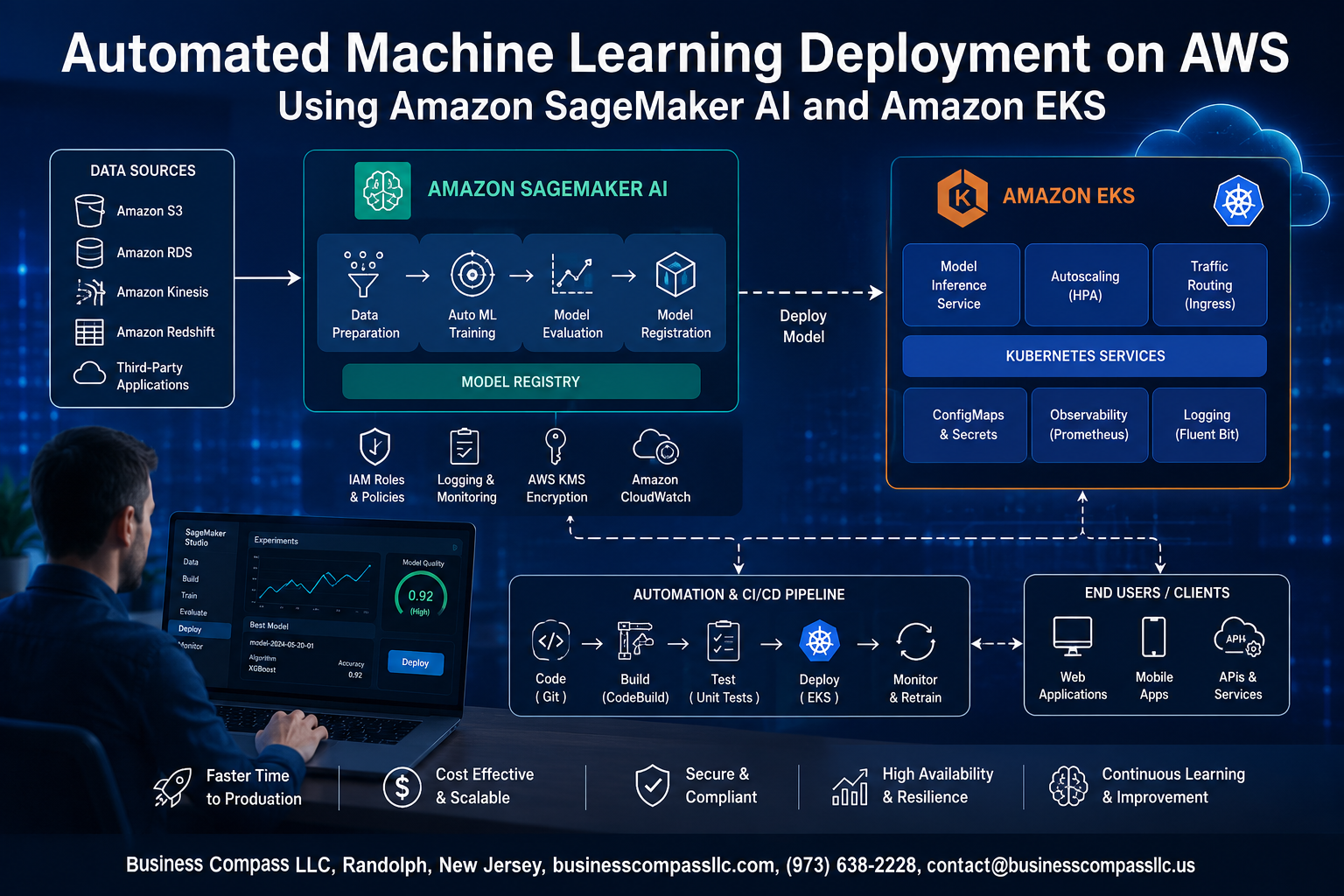
We’ll cover how Amazon SageMaker AI deployment and Amazon EKS machine learning infrastructure work together to remove the manual steps from your workflow. You’ll see how to build a solid ML deployment pipeline automation that handles training, packaging, and serving without you babysitting every stage. We’ll also dig into cost optimization for machine learning on AWS, so your infrastructure doesn’t quietly drain your budget while you sleep.
By the end, you’ll have a working mental model — and real steps — for running scalable ML workloads on AWS that actually hold up in production.
Let’s get into it.
Understanding the Core Technologies Behind Automated ML Deployment

What Amazon SageMaker AI Brings to Machine Learning Workflows
Amazon SageMaker AI is a fully managed service that handles the heavy lifting across the entire ML lifecycle — from data prep and SageMaker model training optimization to deployment and monitoring. It gives data scientists and engineers a single place to build, train, and ship models without wrestling with infrastructure.
Key capabilities include:
- Built-in algorithms and frameworks — supports TensorFlow, PyTorch, Scikit-learn, and more out of the box
- SageMaker Pipelines — lets you define end-to-end ML deployment pipeline automation workflows as code
- Managed training jobs — automatically provisions and tears down compute, so you only pay for what you use
- Model Registry — tracks model versions, approval status, and deployment history in one place
- SageMaker Experiments — logs and compares training runs so you can identify the best-performing model quickly
The real advantage here is speed. Teams that previously spent weeks provisioning infrastructure and managing dependencies can now go from raw data to a production-ready endpoint in days.
How Amazon EKS Enables Scalable Container Orchestration
Amazon EKS machine learning workloads benefit from Kubernetes’ native strengths — portability, scheduling intelligence, and horizontal scaling — without the pain of managing the control plane yourself. EKS runs Kubernetes at scale on AWS, making it a natural home for containerized ML inference services.
Here’s what EKS brings to the table:
- Node group autoscaling — automatically adds or removes EC2 instances based on workload demand
- GPU node support — works with
p3,p4d, andg5instance families for compute-intensive inference - Kubernetes-native tooling — Helm charts, custom resource definitions (CRDs), and operators slot right in
- Cluster isolation — separate namespaces keep dev, staging, and production environments clean
- Spot instance integration — dramatically cuts costs on non-critical or batch inference jobs
For teams already running microservices on Kubernetes, adding ML inference containers to EKS feels natural. The operational model stays consistent, and platform teams don’t need to learn an entirely new toolset.
Why Combining SageMaker AI and EKS Accelerates Deployment Pipelines
The SageMaker EKS integration isn’t just a technical checkbox — it’s a genuine productivity multiplier. SageMaker handles the model-building side of the house, while EKS takes ownership of how those models run in production at scale. Together, they eliminate the gap that usually slows teams down: the handoff between data science and platform engineering.
A typical accelerated pipeline looks like this:
- Train — SageMaker managed training jobs pull data from S3 and output model artifacts
- Register — SageMaker Model Registry stores the versioned artifact with metadata
- Package — A CI/CD pipeline (CodePipeline or GitHub Actions) builds a Docker inference image
- Deploy — The image ships to an EKS cluster via a Kubernetes Deployment or Knative service
- Scale — Horizontal Pod Autoscaler (HPA) or KEDA handles traffic spikes automatically
This pattern supports automated machine learning AWS deployments where human intervention is minimal. Approval gates in SageMaker Pipelines can trigger EKS deployments automatically once a model clears accuracy thresholds, keeping the whole process tight and auditable.
Key AWS Services That Support the Integrated Architecture
No production-grade Amazon SageMaker AI deployment runs in isolation. A handful of supporting AWS services tie the whole thing together and make the architecture reliable, observable, and cost-efficient.
| Service | Role in the Architecture |
|---|---|
| Amazon S3 | Stores training data, model artifacts, and pipeline outputs |
| Amazon ECR | Hosts Docker images for SageMaker training jobs and EKS inference pods |
| AWS CodePipeline | Orchestrates the CI/CD flow from model registration to cluster deployment |
| Amazon CloudWatch | Captures logs and metrics from both SageMaker endpoints and EKS pods |
| AWS IAM | Controls fine-grained permissions across services and workloads |
| AWS Step Functions | Coordinates multi-step deployment workflows with branching logic |
| Amazon VPC | Keeps network traffic private between SageMaker, EKS, and data sources |
Getting these services wired up correctly from the start pays off fast. Teams that invest in a clean foundation — solid IAM roles, centralized logging, and consistent tagging — find that scalable ML workloads AWS becomes far less painful to manage as the number of models in production grows.
Setting Up Your AWS Environment for Automated ML Deployment
Configuring IAM Roles and Permissions for Secure Access
Getting your IAM setup right from the start saves a ton of headaches later. Create dedicated roles for SageMaker AI and EKS with least-privilege policies, so each service only touches what it actually needs.
- Create a SageMaker execution role with policies like
AmazonSageMakerFullAccess,AmazonS3FullAccess(scoped to your ML buckets), andAmazonECR_FullAccessfor container image pulls - Set up an EKS node instance role granting permissions to pull ECR images and write CloudWatch logs
- Attach
AWSXRayDaemonWriteAccessif you plan to trace inference requests end-to-end - Use IAM permission boundaries to cap maximum privilege escalation across automated ML deployment pipelines
- Enable AWS STS AssumeRole chaining between SageMaker and EKS so cross-service calls stay authenticated without hardcoding credentials anywhere
Preparing Your Amazon EKS Cluster for ML Workloads
Your EKS cluster needs a few deliberate configurations before it can reliably handle scalable ML workloads on AWS.
- Spin up GPU-backed node groups using
p3,p4d, org5instance families depending on your training and inference demands - Install the NVIDIA device plugin as a DaemonSet so Kubernetes can schedule GPU-aware pods correctly
- Configure Cluster Autoscaler with separate node groups for CPU and GPU workloads — this keeps cost optimization tight by scaling down idle GPU nodes fast
- Add the AWS Load Balancer Controller and EFS CSI driver for persistent storage that survives pod restarts during long training jobs
- Apply Kubernetes taints and tolerations on GPU nodes so only ML workloads land there, preventing general-purpose pods from wasting expensive compute
tolerations:
  - key: "nvidia.com/gpu"
    operator: "Exists"
    effect: "NoSchedule"
- Enable Amazon VPC CNI with prefix delegation to support the high pod density typical in ML deployment pipeline automation scenarios
Connecting SageMaker AI to Your EKS Infrastructure
The SageMaker EKS integration works through SageMaker HyperPod and the SageMaker Operator for Kubernetes, which lets you trigger training jobs directly from Kubernetes manifests — no context switching between consoles.
- Install the SageMaker Operator for Kubernetes via Helm:
helm install sagemaker-operator \
  sagemaker/sagemaker-operator \
  --namespace sagemaker-k8s-operator-system \
  --create-namespace
- Create a
TrainingJobcustom resource that references your ECR container image and S3 data paths — SageMaker AI picks this up and orchestrates the job on managed infrastructure while your EKS cluster handles orchestration logic - Map SageMaker execution IAM roles to Kubernetes service accounts using IRSA (IAM Roles for Service Accounts) so pods authenticate to AWS without node-level credentials
- Point SageMaker model training optimization configs (instance type, volume size, checkpoint paths) directly inside the Kubernetes manifest for clean GitOps-style deployments
- Set up Amazon EFS as a shared volume mounted across both EKS pods and SageMaker jobs, giving both environments access to the same preprocessed datasets without redundant S3 transfers
Building and Training Models Efficiently with SageMaker AI
Automating Data Preprocessing and Feature Engineering
SageMaker AI gives you a clean way to handle messy data without burning hours on manual cleanup. Using SageMaker Data Wrangler and SageMaker Processing Jobs, you can build reusable preprocessing pipelines that run automatically every time new data lands in S3.
Key steps typically covered in automated preprocessing:
- Handling missing values and outliers with built-in transforms
- Normalizing and encoding categorical features
- Splitting datasets into train, validation, and test sets consistently
- Exporting feature definitions directly into SageMaker Pipelines for end-to-end automation
SageMaker Feature Store takes this a step further by letting you store, share, and reuse features across multiple models and teams, cutting down on redundant work and keeping your training data consistent across projects.
Leveraging SageMaker Autopilot to Reduce Manual Model Development
SageMaker Autopilot is genuinely one of the best tools for automated machine learning on AWS. You drop in a dataset, pick a target column, and Autopilot handles algorithm selection, hyperparameter tuning, and model evaluation — no manual guessing needed.
What Autopilot actually does under the hood:
- Runs multiple candidate pipelines in parallel
- Generates editable notebooks so you can see exactly what choices it made
- Ranks models by your chosen metric (accuracy, AUC, F1, etc.)
- Supports tabular classification and regression out of the box
This dramatically speeds up the early stages of SageMaker model training optimization, especially when you’re exploring a new problem space and don’t want to spend weeks hand-tuning algorithms.
Optimizing Training Jobs with Managed Spot Instances
Training large models on on-demand instances gets expensive fast. SageMaker Managed Spot Training lets you run training jobs on spare AWS capacity at up to 90% cost savings compared to on-demand pricing — a huge win for cost optimization in machine learning on AWS.
Here’s how to get the most out of spot training:
- Always enable checkpointing so interrupted jobs resume from where they stopped rather than restarting from scratch
- Set a
MaxWaitTimeto cap how long a job waits for spot capacity - Pair spot training with smaller instance types during experimentation, then scale up for final training runs
- Monitor spot interruption rates per instance type in your region before committing to long jobs
Most training workloads — especially iterative deep learning jobs — are a natural fit for spot instances because checkpointing handles interruptions gracefully.
Tracking Experiments and Comparing Model Performance
Skipping experiment tracking is one of the fastest ways to lose hours trying to reproduce results. SageMaker Experiments gives you a structured way to log every training run, capture hyperparameters, metrics, and artifacts, and compare runs side by side without digging through scattered log files.
Practical things you can track with SageMaker Experiments:
- Hyperparameter values per run (learning rate, batch size, regularization)
- Training and validation loss curves over epochs
- Final evaluation metrics for direct model comparison
- Artifact locations in S3 for each run
When you’re running automated ML deployment pipelines on AWS, having this tracking baked in means your team can always trace back which model version made it to production and exactly how it was trained — no guesswork, no lost configs.
Automating the Model Deployment Pipeline

A. Packaging Models as Containers for EKS Compatibility
Getting your trained model ready for Amazon EKS starts with containerization. You wrap your model artifacts, inference code, and dependencies into a Docker image that runs consistently across any environment.
Key steps in this process:
- Export your SageMaker-trained model artifacts from S3
- Write a serving script that loads the model and handles prediction requests
- Build a Docker image using a base framework image (PyTorch, TensorFlow, or scikit-learn)
- Push the image to Amazon ECR (Elastic Container Registry) so EKS can pull it during deployment
A clean container structure keeps your inference logic portable and reproducible, which is the backbone of any solid ML deployment pipeline automation strategy.
B. Creating CI/CD Pipelines to Streamline Model Releases
Manually pushing model updates is slow and error-prone. A proper CI/CD pipeline automates the entire release cycle — from code commit to live endpoint — so your team ships updates faster and with more confidence.
Tools that work well here:
- AWS CodePipeline for orchestrating the overall release flow
- AWS CodeBuild for building and testing Docker images automatically
- GitHub Actions as an alternative trigger mechanism linked to your model registry
- Amazon ECR image scanning to catch vulnerabilities before deployment
When a new model version clears evaluation thresholds in SageMaker Model Registry, the pipeline automatically kicks off, builds a fresh container, runs integration tests, and queues the deployment — zero manual handoffs needed.
C. Deploying Models to EKS Endpoints for Real-Time Inference
Once your container is in ECR, deploying it to Amazon EKS for real-time inference is straightforward. You define Kubernetes manifests that describe how your model server runs as a pod, what resources it needs, and how traffic reaches it.
A typical deployment setup includes:
- A Deployment manifest specifying replicas, container image, CPU/GPU resource requests, and environment variables
- A Service manifest exposing the model server internally or externally through a load balancer
- A Horizontal Pod Autoscaler (HPA) to scale pods based on request volume or CPU load
- Optional: AWS Load Balancer Controller for routing HTTPS traffic to your inference service
This approach gives you full control over your serving infrastructure, which is a big win when you need custom networking rules or want to co-locate multiple models in the same cluster.
D. Using SageMaker Pipelines to Orchestrate End-to-End Workflows
SageMaker Pipelines acts as your workflow engine, chaining together data preprocessing, training, evaluation, and deployment steps into a single, repeatable pipeline that you can trigger manually or on a schedule.
Each step in the pipeline is a discrete unit:
- Processing Step — runs data transformation or feature engineering jobs
- Training Step — kicks off a SageMaker training job with your chosen algorithm and instance type
- Evaluation Step — runs a custom script to score model performance against a validation dataset
- Condition Step — only moves forward if the model hits a minimum accuracy or F1 threshold
- Register Step — pushes the approved model to SageMaker Model Registry
- Lambda Step — triggers downstream actions like updating an EKS deployment or sending a Slack notification
The whole pipeline is defined in Python using the SageMaker SDK, so you can version-control it alongside your model code.
E. Enabling Blue/Green Deployments to Minimize Downtime
Switching model versions in production without taking down your endpoint is where blue/green deployments shine. You run two environments side by side — the current stable version (blue) and the new candidate version (green) — and shift traffic between them gradually or all at once.
Here’s how this works in practice on EKS:
- Deploy the new model version as a separate set of pods (green environment) alongside the existing one (blue)
- Use AWS Load Balancer or a service mesh like AWS App Mesh to control the traffic split
- Start with a small traffic percentage (say 10%) routed to the green environment and monitor latency, error rates, and prediction quality
- Gradually increase traffic to the green environment as confidence builds
- If something breaks, flip all traffic back to blue instantly — no scrambling, no downtime
Combining this with SageMaker shadow testing lets you run the new model on a copy of live traffic without affecting real users, giving you solid performance data before you commit to a full rollout.
Scaling and Monitoring ML Workloads in Production

Implementing Auto Scaling Policies on EKS for Dynamic Demand
Running scalable ML workloads on AWS means your infrastructure needs to grow and shrink based on real traffic patterns. With Amazon EKS, you can set up Horizontal Pod Autoscaler (HPA) and Cluster Autoscaler together to handle spikes without over-provisioning:
- HPA watches CPU, memory, or custom metrics and adjusts pod replicas automatically
- Cluster Autoscaler adds or removes EC2 nodes when pods can’t be scheduled or nodes sit idle
- Use Karpenter as a modern alternative for faster, more cost-aware node provisioning
- Set cooldown periods carefully to avoid rapid scale-up/scale-down oscillation during traffic bursts
Monitoring Model Performance with SageMaker Model Monitor
SageMaker Model Monitor continuously watches your deployed endpoints and flags when real-world data stops matching what your model was trained on. You schedule monitoring jobs that capture endpoint traffic, run statistical analysis, and publish results to CloudWatch — no manual inspection needed. Key checks include data quality (missing values, schema mismatches) and model quality (precision, recall against ground truth labels when available).
Detecting and Responding to Model Drift Automatically
Model drift quietly kills prediction accuracy in AWS machine learning production environments. SageMaker Model Monitor’s bias drift and feature attribution drift detectors catch these shifts early. Wire CloudWatch Alarms to SNS topics so your team gets notified the moment drift thresholds are breached, then trigger an automated retraining pipeline through AWS Step Functions to keep your model sharp without waiting for a human to notice the degradation.
Optimizing Cost and Performance Across the Deployment Lifecycle

Right-Sizing EKS Node Groups to Reduce Infrastructure Spend
Matching your EKS node groups to actual workload demands is one of the fastest ways to cut unnecessary cloud spend. Running oversized instances around the clock burns money without adding value. Instead, set up separate node groups for different workload types:
- CPU-optimized nodes for lightweight inference tasks
- GPU nodes with autoscaling enabled so they only spin up when needed
- Spot instances for non-critical batch jobs to slash costs by up to 70%
Cluster Autoscaler and Karpenter both work well here — Karpenter especially shines because it provisions nodes based on actual pod requirements rather than pre-defined group limits.
Choosing the Right SageMaker Instance Types for Each Workload
Not every ML job needs a beefy GPU. Picking the wrong instance type for your Amazon SageMaker AI deployment is one of the most common and expensive mistakes teams make.
- Use ml.m5 or ml.c5 instances for feature engineering and data preprocessing
- Reserve ml.p3 or ml.g4dn instances for deep learning training jobs
- For real-time inference with low traffic, ml.t3.medium gets the job done without wasting budget
- Batch Transform jobs run well on compute-optimized instances since latency isn’t a concern
SageMaker Inference Recommender can automatically benchmark your model across multiple instance types and surface the best price-performance option — worth running before you commit to any production endpoint configuration.
Applying Resource Quotas and Budget Alerts to Control Costs
Without guardrails, automated ML workloads can quietly rack up massive bills. Setting hard limits prevents runaway jobs from becoming a nasty surprise at month end.
- AWS Budgets lets you set spending thresholds and trigger alerts or even automated actions when costs spike
- Apply Kubernetes ResourceQuotas at the namespace level to cap CPU and memory requests per team or project
- Use LimitRanges to set default resource requests on pods so nothing runs unconstrained
- Tag every SageMaker training job, endpoint, and pipeline with cost allocation tags so you can break down spend by team, environment, or model version
Pair these with AWS Cost Anomaly Detection to catch unexpected spikes early — it’s far easier to address a cost issue when you catch it on day one rather than at the end of a billing cycle.
Measuring ROI Through Deployment Efficiency Metrics
Cost optimization for cost optimization machine learning AWS only makes sense when you’re measuring outcomes, not just spend. Track these metrics to understand whether your deployment pipeline is actually delivering value:
- Time-to-deploy: How long does it take from a trained model to a live production endpoint?
- Model utilization rate: Are your SageMaker endpoints actually processing requests, or sitting idle?
- Cost per prediction: Total inference spend divided by prediction volume gives you a real unit economics number
- Retraining frequency vs. accuracy lift: Is the compute cost of frequent retraining justified by measurable model improvements?
- Pipeline failure rate: High failure rates in your ML deployment pipeline automation mean wasted compute and delayed value delivery
Pulling these numbers into a shared dashboard — CloudWatch Metrics, Grafana, or even a simple QuickSight view — gives your team a shared language for making smarter infrastructure decisions over time.

Deploying machine learning models at scale doesn’t have to be a painful, manual process. By combining Amazon SageMaker AI with Amazon EKS, you get a powerful setup that handles everything from model training to production deployment — all within a well-structured AWS environment. The key pieces covered here — setting up your environment correctly, building efficient training pipelines, automating deployments, and keeping a close eye on scaling and costs — all work together to help your ML workflows run smoother and faster.
The real win here is building a system that does the heavy lifting for you, so your team can focus on improving models rather than wrestling with infrastructure. Start small if you need to — pick one part of your pipeline to automate first, get comfortable with the tooling, then expand from there. The combination of SageMaker AI and EKS gives you the flexibility and firepower to grow your ML operations without things getting out of hand. Now’s a great time to dig in and start building.









