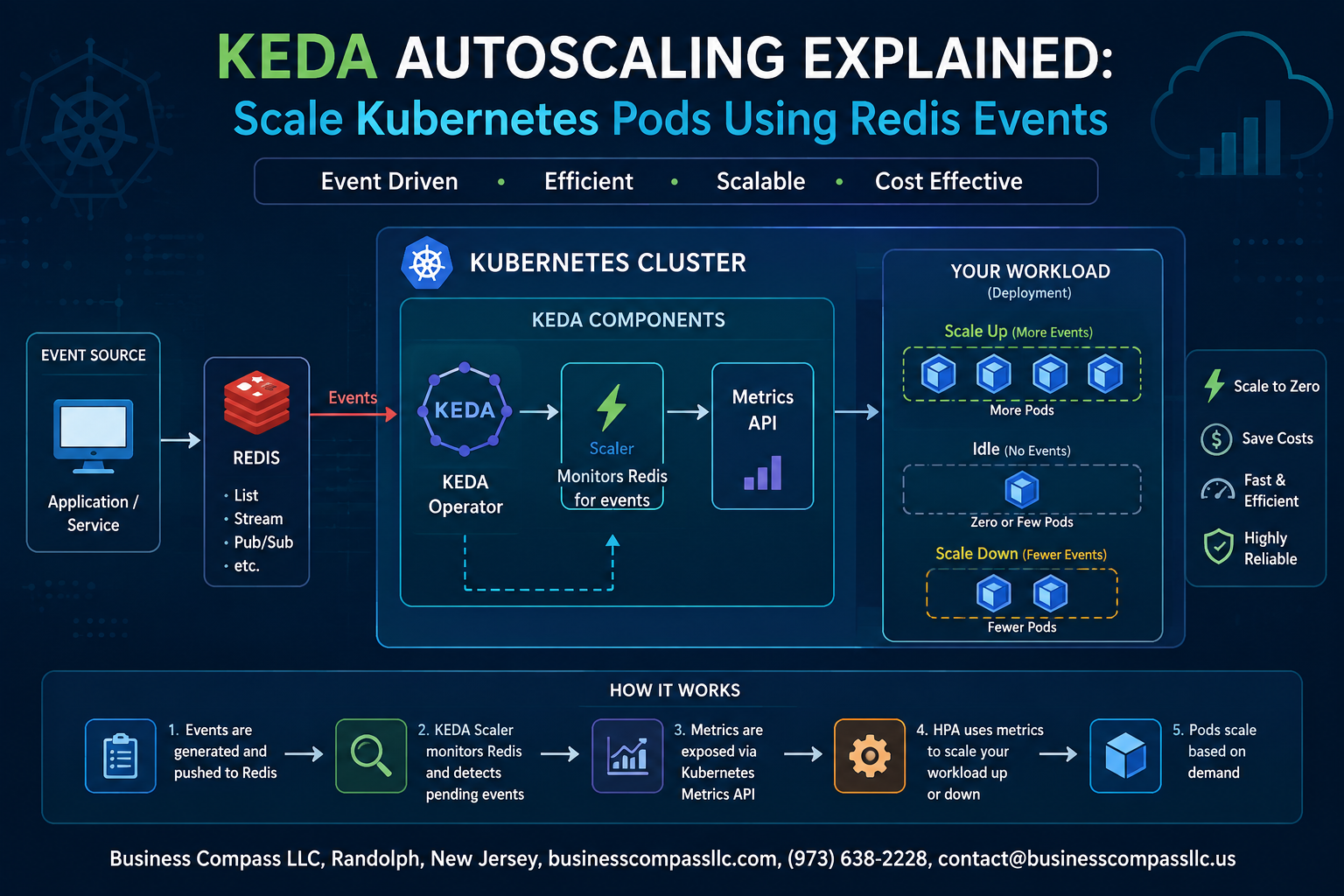
Stop Letting Your Pods Sit Idle — KEDA and Redis Are About to Change That
If you’ve ever watched your Kubernetes cluster burn through resources during quiet periods or scramble to keep up during traffic spikes, you already know the pain of traditional autoscaling. CPU and memory metrics only tell part of the story. What if your pods could scale based on what’s actually happening in your system — like messages piling up in a Redis queue?
That’s exactly what KEDA autoscaling makes possible. Kubernetes Event-Driven Autoscaling lets you scale Kubernetes pods with Redis events, queues, or any external trigger — not just infrastructure metrics. This guide is for backend engineers, DevOps folks, and platform teams who want smarter, more responsive scaling without hacking together custom solutions.
Here’s what we’ll walk through together:
- How KEDA works and why it fits into Kubernetes autoscaling better than HPA alone
- KEDA Redis integration — connecting your Redis event source to drive real scaling decisions
- KEDA ScaledObject configuration and how to tune it so your setup holds up in production, not just in demos
By the end, you’ll have a working KEDA and Redis setup you can actually ship — not just a toy example that falls apart under real load. Let’s get into it.
Understanding KEDA and Its Role in Kubernetes Autoscaling

What KEDA Is and Why It Outperforms Native Kubernetes Autoscaling
KEDA (Kubernetes Event-Driven Autoscaling) goes beyond the basic CPU/memory limits of the Horizontal Pod Autoscaler by reacting to real-world signals like queue depth, Redis streams, or custom metrics — giving teams precise, demand-driven pod scaling without manual intervention.
Why Redis Is a Powerful Event Source for KEDA Autoscaling
Redis Features That Make It Ideal for Triggering Autoscaling
Redis delivers speed, flexibility, and built-in data structures — Lists, Streams, Pub/Sub — that KEDA reads directly to decide scaling. When your Redis queue depth grows, KEDA autoscaling responds instantly, spinning up Kubernetes pods to match real workload demand without any manual intervention or guesswork.
Setting Up Your Environment for KEDA and Redis Integration
Prerequisites and Tools You Need Before Getting Started
- Kubernetes cluster (v1.24+), kubectl, Helm
Installing KEDA in Your Kubernetes Cluster the Right Way
- Run:
helm install keda kedacore/keda --namespace keda --create-namespace
Deploying and Configuring Redis for Event-Based Scaling
- Deploy Redis via Helm, expose it internally, then connect KEDA’s ScaledObject to your Redis list for smooth Kubernetes event-driven autoscaling.
Configuring KEDA to Scale Pods Using Redis Events

Understanding ScaledObject and TriggerAuthentication Resources
KEDA autoscaling relies on two key resources: ScaledObject links your deployment to a Redis scaler, while TriggerAuthentication safely stores credentials. Together, they drive Kubernetes event-driven autoscaling by monitoring Redis list lengths and spinning pods up or down automatically based on your defined thresholds.
Testing and Observing KEDA Autoscaling in Action

Simulating Redis Events to Trigger Automatic Pod Scaling
Push messages to your Redis list using redis-cli LPUSH myqueue job1.
Monitoring Pod Count Changes in Real Time
Run kubectl get pods -w to watch KEDA autoscaling spin up new pods instantly.
Interpreting KEDA Metrics to Confirm Correct Scaling Behavior
Check kubectl get scaledobject to verify queue depth drives Kubernetes pod scaling accurately.
Optimizing KEDA and Redis Autoscaling for Production Workloads

Tuning Polling Intervals and Cooldown Periods for Efficiency
Set pollingInterval to 15–30 seconds and cooldownPeriod to 60–120 seconds to avoid thrashing.
Preventing Over-Scaling and Under-Scaling With Smart Thresholds
Match listLength thresholds to realistic queue depths.
Handling Redis Failures Without Disrupting Autoscaling
- Use Redis Sentinel or Cluster mode
- Set
fallback.replicasin ScaledObject

KEDA makes Kubernetes autoscaling a lot more practical by letting your pods respond to real workload signals instead of just CPU and memory metrics. Pairing it with Redis gives you a fast, reliable event source that can drive scaling decisions the moment demand shifts — no guesswork, no over-provisioning. From setting up your environment to fine-tuning for production, the pieces fit together in a way that actually makes sense once you see it running.
If you’re managing event-driven workloads on Kubernetes, this combo is worth adding to your toolkit. Start small, test your scaling triggers with realistic data, and keep an eye on your Redis queue depths as you move toward production. The setup does take some care upfront, but once it’s dialed in, you get autoscaling that moves with your traffic instead of lagging behind it.