Stop Overpaying for AI Responses You Could Get for a Fraction of the Cost
If you’re running generative AI workloads on AWS, you’ve probably already felt the sting of an unexpectedly large bill. Not every prompt needs a frontier model. Sending a simple classification task to the same large language model you use for complex reasoning is like hiring a surgeon to put on a bandage — technically works, but wildly expensive.
This guide is for ML engineers, cloud architects, and AI product teams who are building on AWS and want smarter control over what they spend on GenAI without sacrificing output quality.
Here’s what we’ll walk through together:
- The real cost problem behind GenAI workloads on AWS and why a one-model-fits-all approach quietly drains your budget
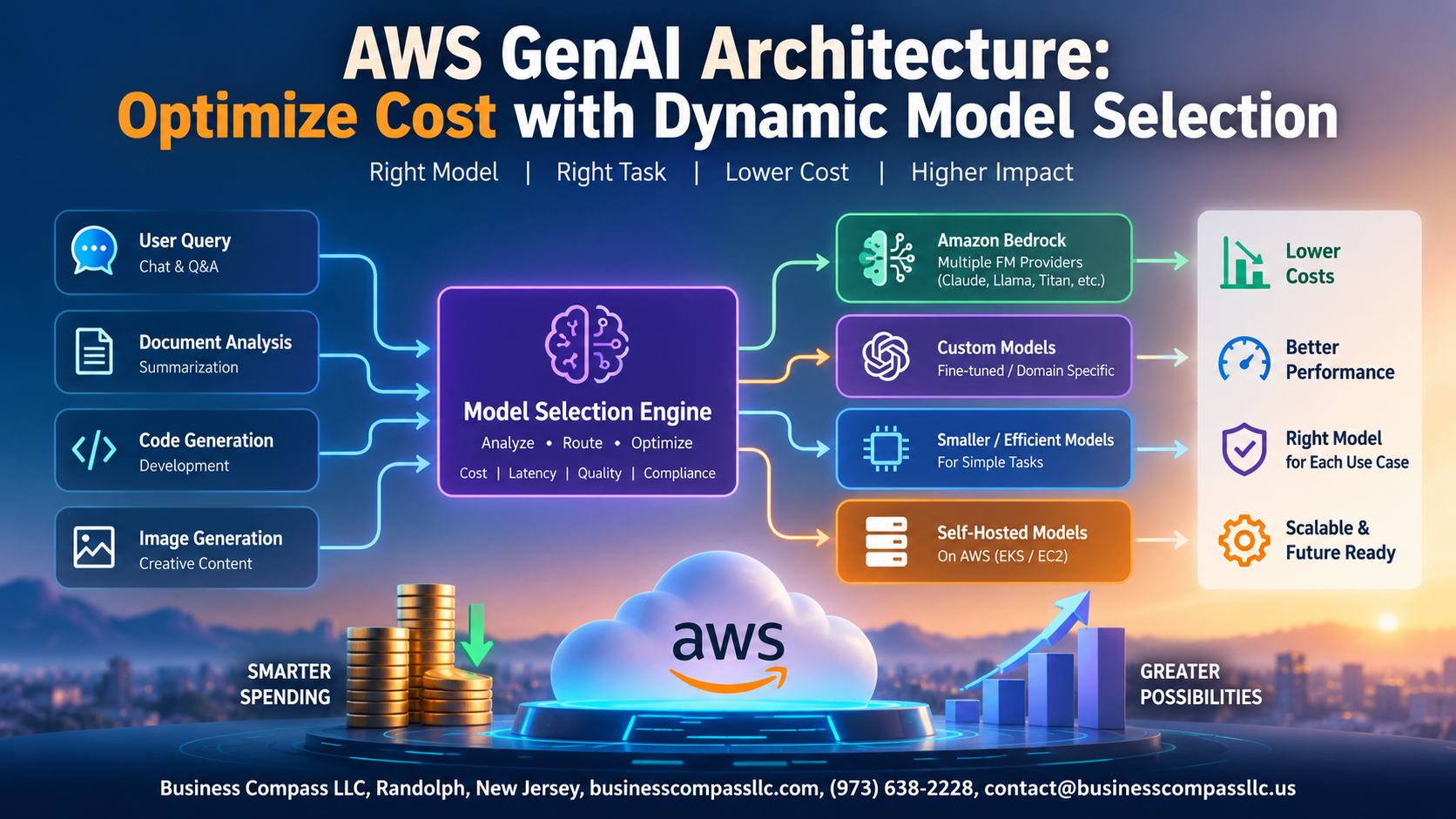
- How to design a dynamic model selection architecture using AWS Bedrock and related services to route each request to the right model at the right price
- Practical cost optimization strategies you can layer into your existing setup — plus how to measure whether your AWS GenAI cost optimization efforts are actually working
No fluff, no theory for theory’s sake. Just a straightforward look at building a smarter, leaner generative AI architecture on AWS that scales without the runaway costs.
Understanding the Cost Challenge in GenAI Workloads on AWS

Why Model Selection Directly Impacts Your AWS Bill
Running every query through GPT-4-class models is like hiring a surgeon to change a lightbulb—wildly expensive for simple tasks. On AWS Bedrock, token costs vary dramatically across models, so routing simple classification tasks to lightweight models while reserving Claude or Titan for complex reasoning slashes your GenAI spending fast.
Key AWS Services That Power Dynamic Model Selection

Amazon Bedrock as the Central Hub for Multi-Model Access
AWS Bedrock gives you single-API access to models from Anthropic, Meta, and Amazon—cutting integration overhead dramatically.
AWS Lambda for Intelligent Request Routing Logic
Lambda evaluates request complexity and routes traffic to cost-appropriate models instantly.
Amazon CloudWatch for Real-Time Cost and Performance Monitoring
Tracks spend per model invocation live.
AWS Step Functions for Orchestrating Complex Model Workflows
Chains multi-model tasks seamlessly.
Designing a Dynamic Model Selection Architecture

A. Define Task Complexity Tiers
- Simple queries → lightweight models
- Complex reasoning → frontier models
B. Build a Routing Layer
Classify requests by token count, intent, and complexity before dispatching.
C. Integrate Fallback Logic
Retry failed requests on cheaper models automatically.
D. Secure with IAM
Apply least-privilege roles per model endpoint.
E. Enable Logging
Track spending via CloudWatch.
Selecting the Right Models for Each Use Case

Use Lightweight Models for Simple Tasks
Route high-volume, repetitive queries to smaller models like Claude Haiku or Amazon Titan Lite.
Reserve Premium Models for Complex Needs
Save GPT-4 or Claude Opus for deep reasoning tasks.
Leverage Open-Source Models
Deploy Llama 3 on SageMaker to cut licensing costs dramatically.
Implementing Cost Optimization Strategies Within the Architecture

Set Spending Guardrails with AWS Budgets and Alerts
Configure AWS Budgets to trigger alerts before costs spiral, automatically throttling expensive model calls.
Apply Caching to Avoid Redundant Model Calls
Use Amazon ElastiCache to store frequent responses, slashing repeated inference costs dramatically.
Use Batch Processing to Lower Per-Request Costs
Amazon Bedrock batch APIs cut per-token pricing significantly for non-real-time GenAI workloads.
Continuously Tune Routing Rules Based on Cost Analytics
CloudWatch cost dashboards reveal routing inefficiencies, helping teams refine dynamic model selection thresholds regularly.
Measuring the Success of Your Dynamic Model Selection Strategy

Define KPIs That Reflect Both Cost Savings and Output Quality
Track cost-per-query, model latency, and user satisfaction scores together.
Use A/B Testing to Validate Routing Decisions
Compare routed vs. fixed-model responses to confirm quality holds.
Calculate ROI to Justify Architecture Investment
- Cost saved vs. baseline spend
- Quality retention rate

Getting the most out of GenAI on AWS without burning through your budget comes down to one thing: being smart about which model you use and when. By leaning on services like Amazon Bedrock and building a dynamic model selection architecture, you can match the right model to the right task every single time, keeping costs in check while still delivering solid results. Pairing that with clear cost optimization strategies and consistent performance tracking means you’re not just saving money today, you’re building a system that stays efficient as your workloads grow and change.
The biggest takeaway here is that not every prompt needs your most powerful, most expensive model. Start by mapping out your use cases, set up the routing logic to send each request where it makes the most sense, and track your metrics so you know what’s actually working. Small shifts in how you assign workloads can add up to serious savings over time. If you haven’t started exploring dynamic model selection yet, now is a great time to dig in and see how much room there is to optimize your GenAI spend on AWS.