


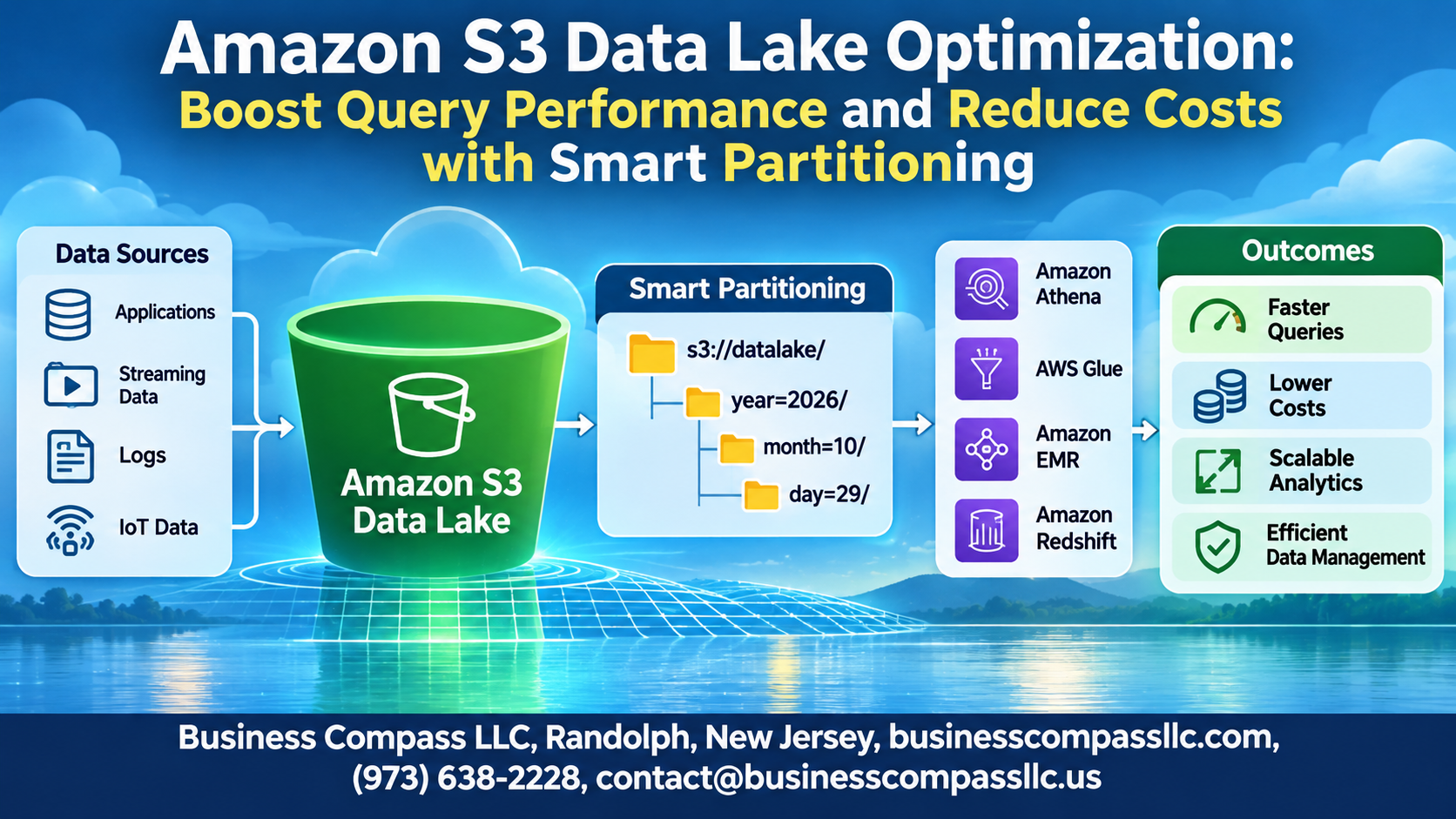
Amazon S3 Data Lake Optimization: Boost Query Performance and Reduce Costs with Smart Partitioning
If your AWS Athena queries are taking forever to run and your S3 bills keep climbing, the fix is probably not what you think. Most teams assume they need more compute power or a bigger budget — but the real problem is usually how their data lake is organized under the hood.
This guide is for data engineers, cloud architects, and AWS practitioners who are tired of slow queries and surprise costs eating into their projects. If you’re managing a data lake on AWS and want to actually get value out of it, you’re in the right place.
Here’s what we’ll dig into:
- S3 partitioning strategies that cut query times dramatically by making sure Athena only scans the data it actually needs
- S3 file format best practices — because Parquet and ORC aren’t just buzzwords; picking the right format can slash both storage costs and read times
- Common partitioning mistakes that quietly kill performance and drive up your AWS S3 query costs, even when everything looks fine on the surface
Amazon S3 data lake optimization doesn’t have to be complicated. With the right data lake partitioning techniques, you can make your queries faster, your bills smaller, and your team a lot less frustrated.
Understanding Amazon S3 Data Lakes and Their Performance Challenges
What Makes S3 an Ideal Foundation for a Data Lake
S3 offers virtually unlimited storage, strong durability, and pay-as-you-go pricing — making it a natural fit for data lakes.
Common Query Performance Bottlenecks
- Full dataset scans slow down AWS Athena queries
- Small, unorganized files increase processing overhead
How Poor Data Organization Drives Up S3 API Charges
Bad partitioning means more API calls, higher costs.
Core Partitioning Strategies That Accelerate Query Speed

A. Time-Based Partitioning
Organize data by year/month/day so queries scan only relevant dates.
B. Category-Based Partitioning
Isolate segments like region or product_type to skip irrelevant data entirely.
C. Hive-Style Naming
Use key=value format for seamless AWS Athena query optimization.
D. Multi-Level Partitioning
Combine time and category for maximum S3 partitioning precision.
Choosing the Right File Formats to Maximize Performance

Why Columnar Formats Like Parquet and ORC Outperform CSV
Parquet and ORC read only needed columns, skipping irrelevant data entirely — slashing AWS Athena query costs dramatically. CSV scans everything, wasting money.
Compression Options
- Snappy: Fast reads, moderate compression
- GZIP: Smaller files, slower queries
Match Format to Query Patterns
Parquet fits analytical workloads; JSON suits semi-structured data.
Leveraging AWS Services to Enhance Partitioning Efficiency

Using AWS Glue Crawlers to Automate Partition Discovery
AWS Glue Crawlers automatically detect new S3 partitions, keeping your Glue Data Catalog fresh without manual intervention.
Accelerating Queries with Amazon Athena Partition Pruning
Athena skips irrelevant partitions during scans, directly cutting AWS Athena query optimization costs.
Monitoring Partition Health with AWS CloudWatch Metrics
Track partition-related latency and scan volumes through CloudWatch dashboards.
Streamlining Partition Updates with AWS Lake Formation
Lake Formation manages partition-level permissions and updates cleanly across your Amazon S3 data lake optimization workflows.
Avoiding Costly Partitioning Mistakes That Hurt Performance

How Over-Partitioning Creates Small File Problems
Too many partitions generate thousands of tiny files, crushing AWS Athena query performance and hiking S3 costs.
Fixing Skewed Partitions
Uneven data distribution overloads single nodes. Rebalance using composite partition keys.
Balancing Partition Granularity
Target 128MB–1GB file sizes to minimize metadata overhead and keep S3 data lake optimization sustainable.
Measuring and Sustaining Long-Term Cost and Performance Gains

Key Metrics to Track Query Efficiency and Storage Savings
Track these to know what’s actually working:
- Data scanned per query (AWS Athena query optimization goal: under 1GB)
- S3 GET request costs
- Query runtime trends
Smart partitioning for S3 cuts scanned data dramatically, directly shrinking your AWS S3 query costs over time.

Getting the most out of your Amazon S3 data lake comes down to making smart choices — the right partitioning strategy, the right file formats, and the right AWS tools working together. When you nail these decisions, queries run faster, storage costs drop, and your whole data pipeline feels less like a bottleneck and more like a well-oiled machine. The difference between a data lake that drains your budget and one that actually delivers value often comes down to these foundational optimizations.
The good news is that you don’t have to overhaul everything at once. Start by auditing your current partitioning structure, fix the most common mistakes, and track your performance metrics over time. Small, deliberate changes compound into serious long-term gains. So pick one area from this post, put it into practice, and build from there — your future self (and your cloud bill) will thank you.