AWS Data Stack Explained: Databases, Data Lakes, Warehouses, and Analytics
If you’re building on AWS and trying to figure out where your data should actually live — and how to make sense of it — you’re in the right place.
This guide is for developers, data engineers, and tech leads who want a clear picture of how the AWS data stack fits together. No fluff, no hand-waving — just a straight breakdown of the tools and when to reach for them.
Here’s what we’ll cover:
- AWS databases explained — RDS, DynamoDB, Aurora, and how to pick the right one for your workload
- Data lakes vs. data warehouses on AWS — what each one does, why they’re different, and when you need both
- Amazon Redshift analytics and AWS analytics services — how to turn raw data into decisions your team can actually act on
By the end, you’ll have a solid foundation for building a scalable data architecture on AWS without second-guessing every choice along the way.
Understanding the AWS Data Stack and Why It Matters

How the AWS Data Stack Fits Into Modern Cloud Architecture
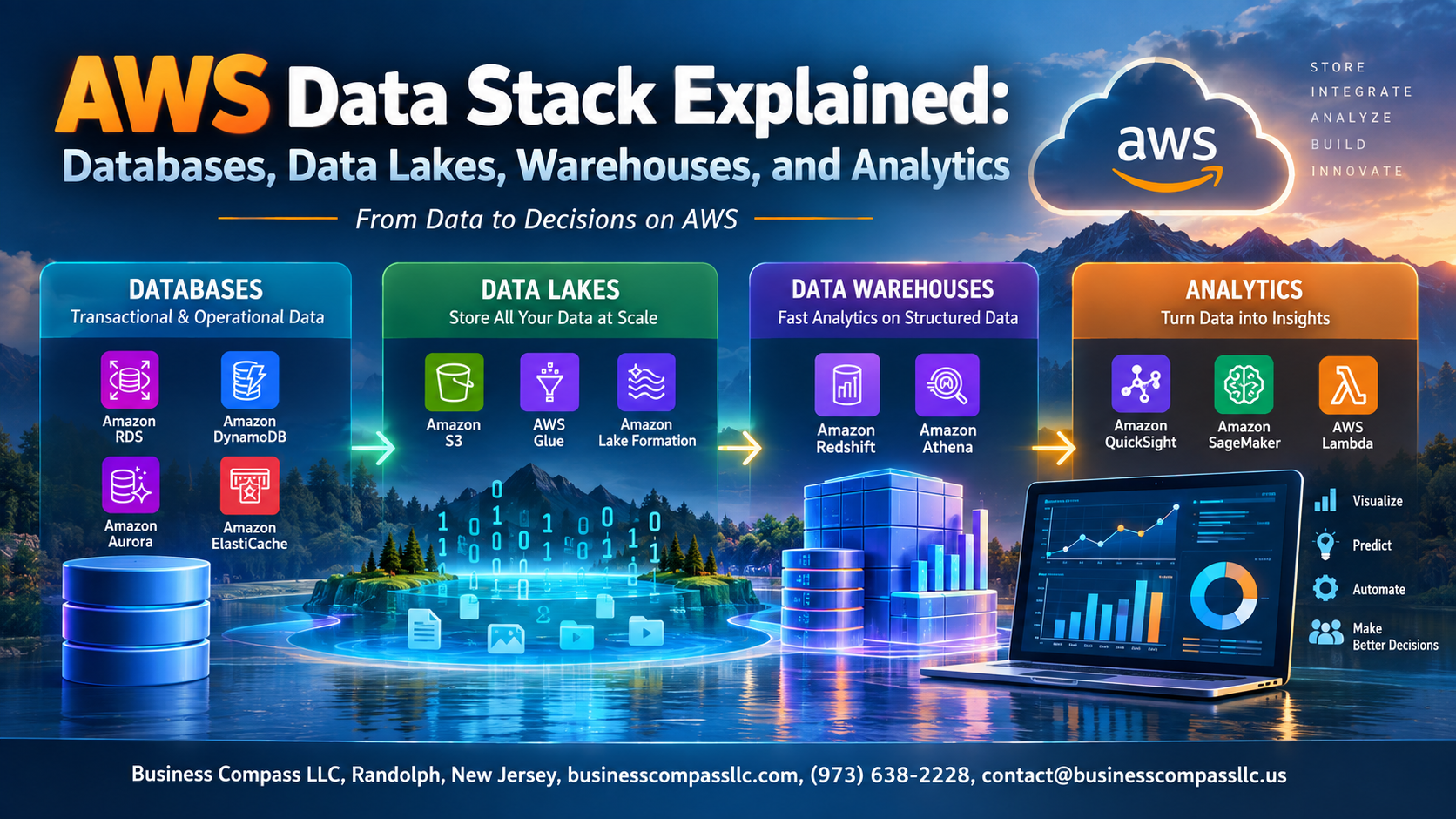
The AWS data stack combines databases, data lakes, warehouses, and analytics into one scalable ecosystem. It handles everything from raw storage to real-time insights, letting teams skip building custom infrastructure and focus on what matters — turning data into decisions that actually drive business growth.
AWS Databases: Choosing the Right Storage for Your Data

Relational databases with Amazon RDS and Aurora
RDS and Aurora handle structured data beautifully, supporting MySQL, PostgreSQL, and more.
NoSQL options with DynamoDB
DynamoDB scales effortlessly for flexible, high-traffic workloads.
In-memory performance with ElastiCache
ElastiCache delivers microsecond latency for caching needs.
Purpose-built databases
AWS offers graph, time-series, and ledger databases for specialized use cases.
Data Lakes on AWS: Centralizing Raw Data at Scale

What a Data Lake Is and When to Use One
Data lakes on AWS store raw, unstructured data at massive scale — perfect when you don’t know yet how you’ll analyze it.
Building a Scalable Data Lake with Amazon S3
- S3 is your foundation: cheap, durable, infinitely scalable
Organizing and Cataloging Data with AWS Glue
- Glue crawls and catalogs your data automatically
Controlling Access and Securing Your Data Lake
- Use IAM policies and Lake Formation for fine-grained access control
Data Warehouses on AWS: Powering Fast Analytical Queries

Why Amazon Redshift is the Go-To Cloud Data Warehouse
Amazon Redshift handles massive analytical workloads fast, making it a core part of any AWS data warehouse strategy. It uses columnar storage and parallel processing to query billions of rows in seconds.
Optimizing Redshift Performance for Large Datasets
- Use sort keys and distribution keys smartly
- Enable result caching for repeated queries
Connecting Your Data Lake and Warehouse with Redshift Spectrum
Query data lakes on AWS directly from Redshift without moving data.
AWS Analytics Services: Turning Data into Actionable Insights

Processing Big Data, Querying, Streaming, and Visualizing with AWS Analytics Services
AWS big data solutions cover every angle:
- Amazon EMR handles massive data processing using Spark and Hadoop
- Amazon Athena runs serverless SQL queries directly on your data lake
- Amazon Kinesis powers real-time streaming analytics
- Amazon QuickSight turns data into sharp visual dashboards
- Amazon SageMaker makes building ML models surprisingly straightforward
Building a Cost-Effective and Scalable AWS Data Strategy

Matching the Right AWS Service to Each Data Workload
Building a smart AWS data strategy means pairing workloads with the right tools:
- Transactional data → RDS or DynamoDB
- Raw storage → S3-based data lakes
- Analytics → Amazon Redshift
Automate pipelines with AWS Glue, and use S3 tiering to cut storage costs significantly.

The AWS data stack gives you a powerful set of tools to handle just about any data challenge you can throw at it. From picking the right database for your workload to centralizing raw data in a lake, running fast analytical queries in a warehouse, and pulling meaningful insights from all of it — each piece of the stack plays a specific role. The key is understanding how they fit together so you’re not just collecting data, but actually doing something useful with it.
The good news is you don’t have to adopt everything at once. Start with what your business needs right now, keep an eye on costs as you scale, and layer in additional services as your data strategy matures. Take a closer look at your current setup, identify the gaps, and pick the AWS services that make the most sense for where you’re headed. The right data stack won’t just store your information — it’ll help you make smarter decisions, faster.