


Cloud infrastructure automation has transformed how teams deploy, manage, and scale their applications. If you’re a DevOps engineer, cloud architect, or developer tired of manual deployments and configuration drift, understanding your automation options is crucial for building reliable, scalable systems.
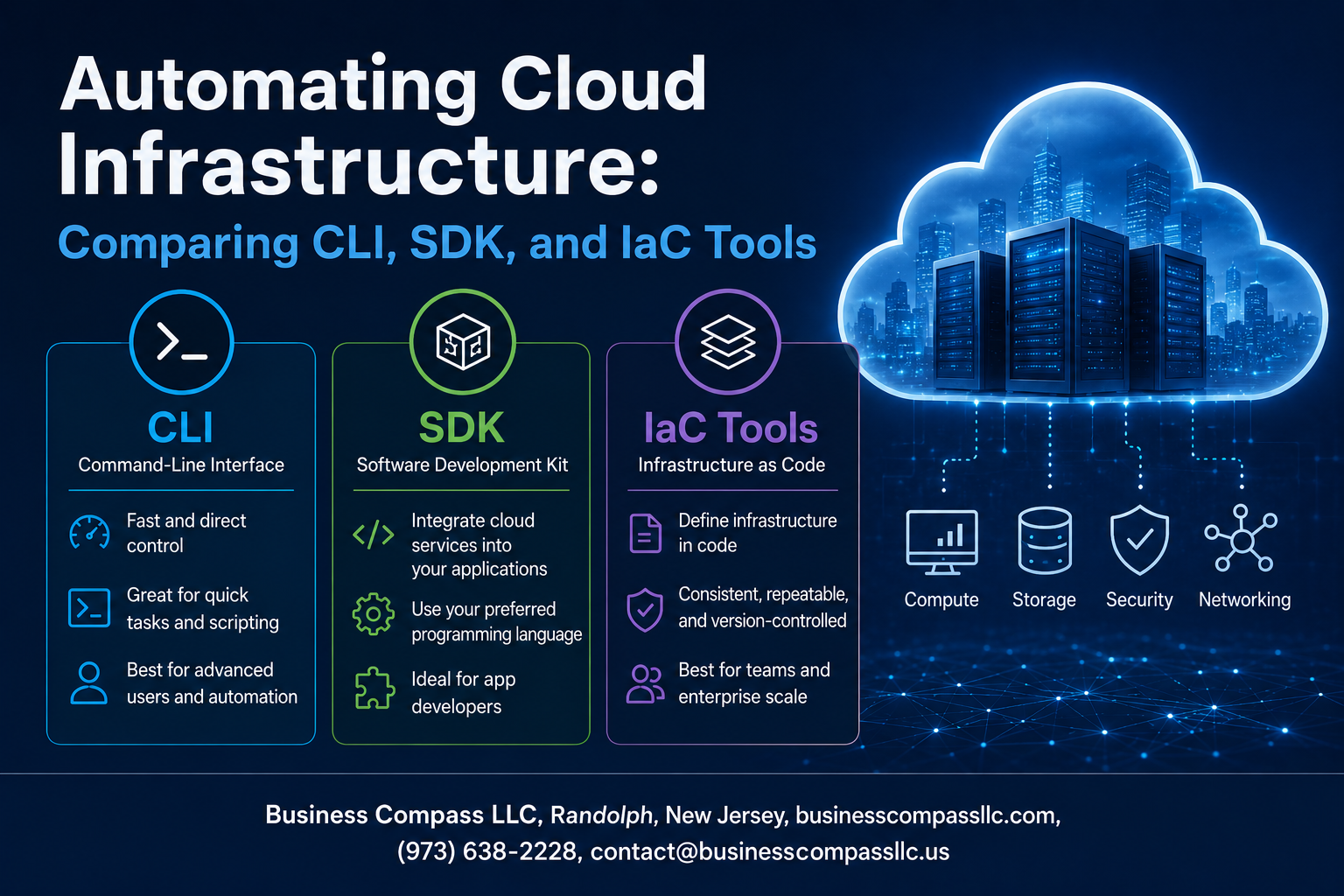
This guide compares three main approaches to cloud infrastructure automation: CLI tools cloud management, SDK programmatic control, and infrastructure as code solutions. Each method offers different strengths for automating your cloud deployment processes.
We’ll explore how CLI tools cloud management provides quick, scriptable access to cloud resources, examine how SDK programmatic control enables complex automation workflows within your applications, and dive into IaC tools comparison to help you choose the right infrastructure automation frameworks for your team. You’ll also learn practical implementation strategies and see real performance differences between these cloud automation tools approaches.
Understanding Cloud Infrastructure Automation Fundamentals

Defining cloud automation and its business impact
Cloud infrastructure automation transforms how organizations deploy, manage, and scale their digital resources by replacing manual processes with programmatic control. Companies using automation see up to 40% reduction in operational costs and 75% faster deployment times, while minimizing human errors that cause costly downtime and security breaches.
Key challenges of manual cloud management
Manual cloud management creates bottlenecks through repetitive tasks, inconsistent configurations, and human error risks. Teams spend countless hours on routine provisioning, scaling, and monitoring activities that drain productivity. Configuration drift becomes inevitable when multiple administrators make changes without standardized processes, leading to security vulnerabilities and compliance gaps.
Essential automation principles for scalable infrastructure
Effective cloud automation relies on idempotency, ensuring operations produce identical results regardless of execution frequency. Version control tracks all infrastructure changes, enabling rollbacks and audit trails. Declarative configuration describes desired states rather than step-by-step procedures, while immutable infrastructure replaces components instead of modifying them in place for greater reliability and predictability.
Cost savings and efficiency gains through automation
Organizations achieve 30-60% cost reductions through automated resource optimization, right-sizing instances, and scheduled scaling based on demand patterns. Automation eliminates over-provisioning by dynamically adjusting resources, while automated testing and deployment pipelines reduce time-to-market from weeks to hours, accelerating revenue generation and competitive advantage.
Command Line Interface Tools for Cloud Management

Popular CLI tools across major cloud platforms
Major cloud providers offer robust CLI tools for infrastructure automation. AWS CLI handles everything from EC2 instances to S3 buckets with comprehensive command sets. Azure CLI provides cross-platform management for Azure resources with intuitive syntax. Google Cloud CLI delivers powerful scripting capabilities for GCP services. These CLI tools cloud management solutions support JSON output formatting, making them perfect for automation scripts and CI/CD pipelines.
Scripting capabilities and automation potential
Cloud CLI tools excel at batch operations and repetitive tasks through shell scripting. You can create deployment scripts that provision multiple resources, configure networking, and set up monitoring in minutes. Advanced features like parameter files, environment variables, and conditional logic enable sophisticated cloud infrastructure automation workflows. Many teams integrate CLI scripts into Jenkins pipelines or GitHub Actions for streamlined deployments.
Learning curve and skill requirements
Getting started with CLI tools requires basic command-line knowledge and understanding of cloud service concepts. Most developers pick up essential commands within days, though mastering advanced scripting takes weeks. The steepest learning involves understanding service dependencies, IAM permissions, and error handling patterns. Documentation quality varies between providers, with AWS offering the most comprehensive resources and examples.
Best use cases for CLI-based automation
CLI tools shine for quick prototyping, one-off deployments, and developer workstation automation. They’re ideal for creating development environments, running data migration scripts, and performing administrative tasks. DevOps teams use CLI automation for backup scripts, security audits, and resource cleanup jobs. However, complex infrastructure with interdependent resources often benefits more from dedicated infrastructure as code tools rather than pure CLI scripting approaches.
Software Development Kits for Programmatic Control

SDK advantages for custom application integration
Software Development Kits provide seamless integration capabilities that CLI tools and basic IaC frameworks can’t match. SDKs enable developers to embed cloud infrastructure automation directly into existing applications, creating custom workflows that respond dynamically to business logic. Unlike command-line interfaces, SDKs offer real-time feedback loops, allowing applications to make intelligent decisions based on infrastructure state changes. This tight integration eliminates the need for external scripts or manual interventions, creating truly automated systems that scale with application demands.
Language support and development flexibility
Modern cloud providers offer SDKs across multiple programming languages, from Python and JavaScript to Go and Java. This language diversity allows development teams to work within their existing technology stacks without learning new tools. SDK programmatic control enables developers to leverage familiar programming paradigms like object-oriented design, functional programming, and asynchronous operations. Teams can build sophisticated automation logic using native language features, libraries, and frameworks they already know, reducing development time and improving code quality.
Error handling and advanced logic implementation
SDKs excel at implementing complex error handling strategies that simple CLI scripts cannot achieve. Developers can implement retry mechanisms with exponential backoff, circuit breakers for failing services, and custom error recovery procedures. Advanced logic implementation becomes straightforward with SDKs, enabling features like conditional resource provisioning, dynamic scaling based on metrics, and multi-step workflows with rollback capabilities. This level of control allows teams to build resilient cloud infrastructure automation that handles edge cases gracefully.
Performance optimization for complex workflows
When managing large-scale infrastructure deployments, SDKs provide significant performance advantages through features like connection pooling, request batching, and parallel processing. Unlike sequential CLI commands, SDK-based solutions can execute multiple operations concurrently, reducing deployment times dramatically. Built-in caching mechanisms and optimized API calls minimize network overhead, while streaming responses enable real-time monitoring of long-running operations. These optimizations become critical when automating complex workflows across multiple cloud regions or managing thousands of resources simultaneously.
Maintenance considerations for SDK-based solutions
SDK-based infrastructure automation requires ongoing maintenance as cloud providers update their APIs and release new SDK versions. Teams must establish update schedules to incorporate security patches and new features while testing for breaking changes. Version pinning strategies help maintain stability, but teams need processes for evaluating and migrating to newer SDK releases. Documentation becomes essential for SDK implementations, as complex programmatic logic can be harder to understand than declarative configuration files, requiring clear code comments and architectural documentation for long-term maintainability.
Infrastructure as Code Tools and Frameworks

Declarative vs Imperative IaC Approaches
Declarative infrastructure as code defines the desired end state of your cloud resources, letting the IaC tools figure out how to achieve it. Think of it like ordering a meal at a restaurant – you specify what you want, not how to cook it. Tools like Terraform and CloudFormation work this way, making infrastructure automation more predictable and less error-prone. Imperative approaches require step-by-step instructions for every action, similar to writing a detailed recipe. While imperative methods offer more control over the provisioning process, declarative IaC frameworks reduce complexity and improve maintainability for most cloud infrastructure management scenarios.
Popular IaC Tools Comparison and Selection Criteria
Terraform leads the multi-cloud infrastructure automation space with its vendor-neutral approach and extensive provider ecosystem. AWS CloudFormation excels for AWS-specific deployments, offering deep integration with native services. Pulumi stands out by supporting familiar programming languages like Python and JavaScript, making it attractive for development teams. Ansible combines configuration management with infrastructure provisioning, while Azure Resource Manager templates provide native Azure automation capabilities. Selection criteria include cloud platform compatibility, team expertise, community support, and integration requirements with existing cloud automation tools and deployment pipelines.
Version Control Integration and Collaboration Benefits
Infrastructure as code transforms infrastructure provisioning into a collaborative software development process. Git integration enables teams to track changes, review modifications through pull requests, and maintain complete audit trails of infrastructure evolution. Branching strategies allow safe testing of infrastructure changes in isolated environments before production deployment. This approach eliminates configuration drift and enables rapid rollbacks when issues arise. Team collaboration improves significantly as infrastructure definitions become readable code that developers, operations teams, and security professionals can review, understand, and contribute to using familiar development workflows and cloud infrastructure automation practices.
State Management and Infrastructure Drift Prevention
State files serve as the single source of truth for your cloud infrastructure’s current configuration, tracking resource relationships and dependencies. Terraform maintains detailed state information locally or in remote backends like S3, enabling accurate change detection and preventing resource conflicts. Regular state refresh operations identify infrastructure drift by comparing actual cloud resources against recorded state. Automated drift detection through CI/CD pipelines ensures infrastructure remains aligned with code definitions. Proper state management prevents accidental resource deletion, enables accurate cost tracking, and supports collaborative infrastructure automation by providing shared visibility into resource ownership and configuration history across teams.
Performance and Scalability Comparison

Execution speed across different automation methods
CLI commands typically execute fastest for individual operations due to their direct API calls and minimal overhead. However, they become inefficient for complex deployments requiring multiple sequential operations. SDKs offer moderate execution speeds with better batch processing capabilities through programmatic loops and parallel operations. Infrastructure as code tools initially appear slower due to planning phases but excel in large-scale deployments by executing multiple resources concurrently and managing dependencies efficiently.
Resource management efficiency
CLI tools consume minimal local resources but require constant operator attention, making them resource-intensive from a human perspective. SDKs provide balanced resource usage with built-in error handling and retry mechanisms that reduce failed deployments. IaC tools demonstrate superior efficiency by maintaining state files, preventing resource drift, and enabling precise resource lifecycle management. Tools like Terraform optimize memory usage through lazy loading and selective resource targeting.
Scaling capabilities for enterprise environments
Enterprise-scale cloud infrastructure automation demands tools that handle thousands of resources across multiple environments simultaneously. CLI approaches break down at enterprise scale due to manual coordination requirements and lack of dependency management. SDKs scale better through custom orchestration frameworks but require significant development investment. Infrastructure as code tools excel at enterprise scaling with features like remote state management, workspace isolation, and modular configurations that support team collaboration.
Monitoring and observability features
Modern cloud automation tools integrate comprehensive monitoring capabilities that track deployment progress, resource health, and configuration drift. CLI tools rely on external monitoring solutions and manual log analysis. SDKs enable custom observability implementations with detailed logging and metrics collection. IaC platforms provide built-in monitoring through plan outputs, state change tracking, and integration with cloud-native monitoring services. Advanced IaC tools offer drift detection, compliance scanning, and automated remediation workflows.
Security and Compliance Considerations

Authentication and Authorization Mechanisms
CLI tools typically use access keys or service accounts for authentication, while SDK programmatic control relies on credential providers and IAM roles. Infrastructure as code platforms integrate with identity providers through service principals and managed identities. Each approach requires proper role-based access control (RBAC) configuration to prevent unauthorized resource modifications.
Audit Trails and Compliance Reporting
Cloud infrastructure automation tools generate different audit footprints. CLI commands create detailed logs in cloud provider audit services, capturing user actions and resource changes. SDKs produce application-level logging that tracks programmatic operations. IaC tools maintain state files and deployment histories, providing comprehensive change tracking for compliance reporting and regulatory requirements.
Secret Management Across Different Tools
CLI tools store credentials in configuration files or environment variables, creating potential security risks. SDKs support secure credential retrieval through key vaults and secret management services. Infrastructure as code frameworks integrate with external secret stores, enabling secure parameter injection during deployment. Proper secret rotation and encryption remain critical across all cloud automation tools.
Risk Mitigation Strategies for Each Approach
CLI environments require strict access controls and session management to prevent credential exposure. SDK implementations benefit from least-privilege principles and automated credential rotation. IaC tools need version control integration and approval workflows to prevent unauthorized infrastructure changes. Multi-factor authentication and network-level security controls enhance protection across all cloud infrastructure management approaches.
Implementation Strategy and Tool Selection

Organizational Readiness Assessment Criteria
Before implementing cloud infrastructure automation, evaluate your team’s technical expertise and current infrastructure maturity. Assess existing workflows, documentation practices, and staff familiarity with cloud automation tools. Consider budget constraints, compliance requirements, and organizational change management capabilities to ensure successful adoption of CLI tools, SDK frameworks, or infrastructure as code solutions.
Hybrid Approaches Combining Multiple Tools
Smart organizations blend different cloud automation tools to maximize efficiency and flexibility. Start with CLI tools for quick manual tasks while developing SDK-based applications for complex orchestration. Layer infrastructure as code tools like Terraform for foundational provisioning alongside configuration management tools. This approach leverages each tool’s strengths while providing fallback options during transitions and reducing vendor lock-in risks.
Migration Planning from Manual to Automated Processes
Begin migration by documenting current manual processes and identifying automation candidates with high repetition and low complexity. Phase the transition gradually, starting with development environments before moving to production systems. Establish proper testing protocols, rollback procedures, and staff training programs. Create infrastructure automation frameworks that maintain compatibility with existing systems while building toward fully automated cloud deployment automation workflows.

Cloud infrastructure automation has transformed from a nice-to-have into an absolute necessity for modern organizations. Each approach—CLI tools, SDKs, and Infrastructure as Code—brings unique strengths to the table. CLI tools offer quick wins and immediate control, SDKs provide deep programmatic integration, while IaC frameworks deliver consistency and scalability at enterprise levels. The performance differences matter less than finding the right fit for your team’s skills and project requirements.
Your choice shouldn’t be about picking the “best” tool, but rather selecting the right combination for your specific needs. Start small with CLI automation for immediate tasks, graduate to SDKs when you need custom integrations, and embrace IaC when managing complex, multi-environment deployments. Remember that security and compliance requirements will often drive your decision more than performance metrics. The most successful teams typically use all three approaches strategically, letting each tool handle what it does best while building a robust, automated infrastructure that scales with their business.









