


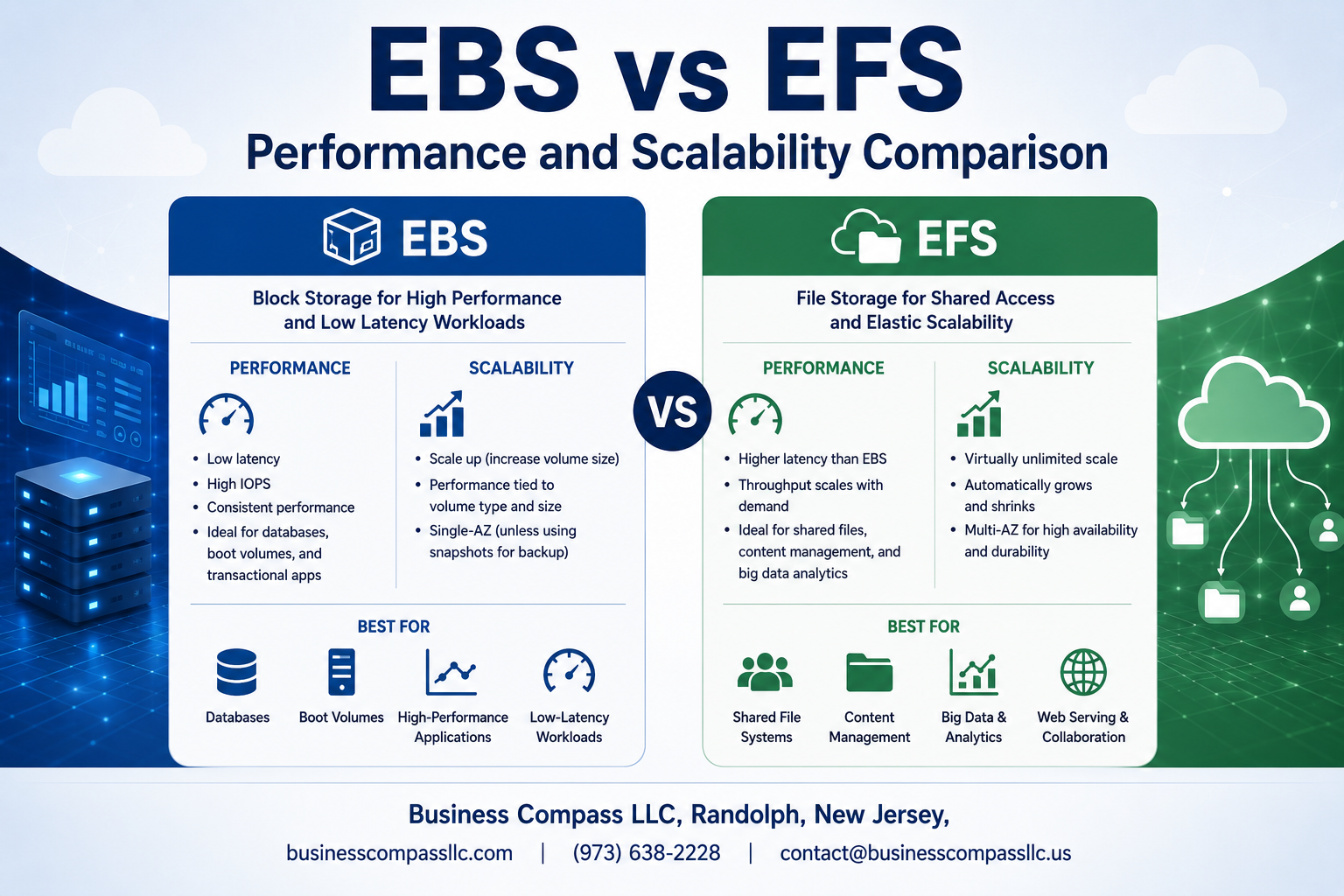
Choosing the right AWS storage solution can make or break your application’s performance. This EBS vs EFS performance comparison helps cloud architects, DevOps engineers, and system administrators understand which Amazon storage solution fits their specific needs.
AWS block storage vs file storage each excel in different scenarios, but the performance gaps might surprise you. EBS delivers consistent, high-speed access for single instances, while EFS provides shared file access across multiple instances with different performance trade-offs.
We’ll break down real-world EBS performance benchmarks and EFS scalability limits to show you exactly what to expect. You’ll also get a detailed AWS storage cost analysis that reveals when paying more actually saves money in the long run, plus proven AWS storage best practices that experienced engineers use to optimize both performance and budget.
Understanding AWS Storage Solutions Architecture

EBS Block-Level Storage Fundamentals
Amazon EBS operates as raw block-level storage that attaches directly to EC2 instances, functioning like traditional hard drives or SSDs. Each EBS volume provides persistent storage with configurable IOPS performance, offering different volume types including gp3, io2, and st1 to match specific workload requirements. EBS volumes exist independently of EC2 instances and can be detached, reattached, or snapshotted for backup purposes.
EFS Network File System Structure
Amazon EFS delivers a fully managed NFS that multiple EC2 instances can access simultaneously across different Availability Zones. The distributed architecture automatically scales storage capacity up or down based on file additions and deletions, eliminating manual provisioning. EFS uses a hierarchical file system structure that supports POSIX permissions, making it compatible with existing Linux applications and workflows.
Key Architectural Differences That Impact Performance
The fundamental difference between EBS vs EFS lies in their access patterns and network overhead. EBS provides direct block access with minimal latency since it connects at the instance level, while EFS requires network traversal for file operations, introducing additional latency. EBS offers predictable performance through provisioned IOPS, whereas EFS performance depends on file size, with larger files achieving higher throughput. These architectural distinctions directly affect AWS storage performance comparison outcomes and influence scalability decisions.
Performance Benchmarks and Speed Comparisons

IOPS Capabilities and Throughput Metrics
EBS vs EFS performance comparison reveals stark differences in IOPS delivery. EBS io2 Block Express volumes deliver up to 256,000 IOPS with 4,000 MB/s throughput, while EFS General Purpose mode provides 7,000 IOPS baseline with bursting capabilities. EBS performance benchmarks show consistent low-latency access for database workloads, whereas EFS excels in concurrent file access scenarios with its distributed architecture.
Latency Performance Under Different Workloads
Database applications experience sub-millisecond latency with EBS gp3 and io2 volumes, making them ideal for transactional workloads. EFS typically shows 1-3ms latency for file operations, which works well for content management and shared file systems. AWS storage performance testing demonstrates that EBS maintains consistent latency under high load, while EFS latency varies based on file size and concurrent connections.
Real-World Speed Test Results
Cloud storage performance testing across various workloads shows EBS dominating in single-instance database scenarios with 99.9% latency consistency. EFS shines in distributed computing environments where multiple EC2 instances need simultaneous file access. Sequential read speeds reach 1,750 MB/s for EFS Max I/O mode, while EBS io2 achieves up to 4,000 MB/s for single-instance access patterns.
Performance Optimization Strategies
AWS storage best practices recommend using EBS Multi-Attach for shared block storage needs and EFS Intelligent Tiering for cost-effective file storage. Enable EBS-optimized instances to maximize throughput, configure appropriate volume types based on workload patterns, and implement EFS Performance mode selection carefully. Monitoring CloudWatch metrics helps identify bottlenecks and optimize Amazon storage solutions for specific application requirements.
Scalability Features and Limitations

EBS Volume Size and Performance Scaling Options
EBS scaling operates differently based on volume type, with GP3 and io2 volumes offering the most flexible scaling capabilities. GP3 volumes can scale from 1 GiB to 16 TiB while allowing independent adjustment of IOPS (3,000-16,000) and throughput (125-1,000 MiB/s) without changing volume size. io2 Block Express volumes push boundaries even higher, supporting up to 64 TiB with 256,000 IOPS and 4,000 MiB/s throughput. GP2 volumes follow a linear scaling model where IOPS increases with volume size (3 IOPS per GiB baseline), making larger volumes necessary for higher performance. Performance modifications require volume modifications, which can happen online but may take time to complete. EBS scaling requires manual intervention and planning, as you must provision specific capacity and performance levels upfront. Cold HDD (sc1) and Throughput Optimized HDD (st1) volumes scale throughput with size but maintain consistent baseline performance patterns, making them predictable for sequential workloads.
EFS Automatic Scaling and Elasticity Benefits
EFS delivers true elastic scaling that automatically adjusts capacity as files are added or removed, eliminating the need for capacity planning or manual intervention. Storage capacity can grow from gigabytes to petabytes seamlessly, with the file system expanding and contracting based on actual usage. Performance scaling in EFS follows two distinct modes: General Purpose mode provides up to 7,000 file operations per second with burst capabilities, while Max I/O mode supports higher levels of aggregate throughput and operations per second for applications that can tolerate slightly higher latencies. Throughput performance scales automatically with file system size in bursting mode, or you can switch to provisioned throughput mode for consistent performance regardless of storage size. EFS Regional storage classes offer different performance characteristics, with Standard storage providing the lowest latency and Infrequent Access storage optimizing costs for less frequently accessed files. The elastic nature means you never run out of space or need to migrate data to larger volumes, making it perfect for unpredictable growth patterns.
Multi-Instance Access and Concurrent User Support
The architectural differences between EBS vs EFS create vastly different multi-access capabilities that directly impact scalability scenarios. EBS volumes traditionally attach to single EC2 instances, though Multi-Attach functionality now allows multiple instances to access the same volume simultaneously with specific limitations and requirements for cluster-aware file systems. EBS Multi-Attach works only with Provisioned IOPS SSD volumes and requires applications designed for shared storage environments. EFS naturally supports thousands of concurrent connections from multiple EC2 instances, containers, and on-premises servers simultaneously without additional configuration. NFS protocol enables this concurrent access pattern, allowing multiple clients to read and write files simultaneously with built-in file locking mechanisms. EFS can handle up to 7,000 file operations per second in General Purpose mode across all connected clients, while Max I/O mode removes this limit for applications requiring higher aggregate performance. Cross-AZ access makes EFS ideal for distributed applications and microservices architectures where multiple instances across different availability zones need shared file access.
Cost Analysis for Performance and Scale Requirements

Performance-Based Pricing Models Comparison
EBS and EFS follow completely different pricing approaches that directly impact your AWS storage cost analysis. EBS charges based on provisioned capacity and IOPS, meaning you pay for allocated storage regardless of actual usage. EFS uses a pay-as-you-go model, billing only for consumed storage space, making it more cost-effective for variable workloads. EBS gp3 volumes offer predictable costs starting at $0.08 per GB monthly, while EFS Standard storage costs $0.30 per GB but eliminates overprovisioning waste. For high-performance scenarios, EBS io2 volumes can reach $0.125 per provisioned IOPS, while EFS Max I/O mode adds no extra charges beyond storage consumption.
Scaling Cost Implications and Budget Planning
Budget planning differs significantly between these AWS storage solutions due to their scaling behaviors. EBS requires manual intervention and potential downtime for capacity increases, often leading to overprovisioning and wasted spend. Organizations typically provision 30-40% extra capacity to avoid frequent resizing operations. EFS automatically scales without intervention, eliminating capacity planning challenges but potentially creating cost surprises during usage spikes. EFS Infrequent Access storage reduces costs to $0.025 per GB for rarely accessed data. Smart budget planning involves setting CloudWatch alarms for EFS usage thresholds and implementing lifecycle policies to transition data between storage classes automatically.
ROI Optimization Strategies for Different Use Cases
Maximizing ROI requires matching storage characteristics to specific workload patterns in your AWS block storage vs file storage decision. High-traffic databases achieve better ROI with EBS due to consistent performance and lower per-GB costs for frequently accessed data. Content repositories and shared file systems benefit from EFS’s automatic scaling and multi-AZ accessibility, reducing operational overhead costs. Hybrid approaches often deliver optimal ROI – using EBS for primary databases and EFS for shared application assets. Implement EFS Intelligent Tiering to automatically move data between storage classes, potentially reducing costs by 92% for infrequently accessed files while maintaining instant accessibility when needed.
Use Case Scenarios and Best Practices

High-Performance Database Storage Requirements
Production databases running Oracle, SQL Server, or MongoDB need consistent low-latency storage that EBS delivers better than EFS. EBS performance benchmarks show sub-millisecond response times with provisioned IOPS volumes, making them ideal for transactional workloads. AWS block storage vs file storage becomes clear here – databases require direct-attached storage semantics that EBS provides, while EFS adds network overhead that can impact query performance. For high-throughput analytics databases, EBS gp3 volumes offer up to 16,000 IOPS and 1,000 MiB/s throughput per volume, with the ability to stripe multiple volumes for even greater performance.
Shared File System and Collaborative Applications
Content management systems, shared development environments, and media workflows benefit from EFS’s native file sharing capabilities. EFS scalability limits become less of a concern when multiple EC2 instances need concurrent access to the same datasets. Video editing teams can mount EFS volumes across multiple workstations, enabling real-time collaboration without complex file synchronization. Web applications serving static content see improved performance when using EFS with CloudFront caching. The automatic scaling of EFS eliminates capacity planning headaches that come with traditional shared storage solutions.
Backup and Archive Performance Considerations
AWS storage performance comparison reveals that backup strategies should match storage characteristics to recovery requirements. EBS snapshots provide point-in-time recovery with incremental backup efficiency, while EFS backup integrates with AWS Backup for centralized policy management. For disaster recovery scenarios, EBS volumes can be quickly restored from snapshots in different availability zones, providing faster RTO than file-level restores from EFS backups. Long-term archival works better with EFS Infrequent Access storage class, which automatically moves unused files to lower-cost tiers while maintaining immediate accessibility.
Hybrid Cloud Storage Performance Strategies
Hybrid cloud storage performance strategies require careful consideration of data locality and access patterns. AWS Storage Gateway bridges on-premises environments with Amazon storage solutions, using EBS as the cloud-side storage for volume gateways. File gateways work well with EFS for shared file access across hybrid environments. AWS storage best practices recommend using DataSync for one-time migrations and ongoing synchronization between on-premises NFS shares and EFS. For applications requiring burst performance, combining local caching with cloud storage provides the best of both worlds – low latency for hot data and unlimited cloud capacity for cold data.

After diving deep into EBS and EFS performance characteristics, the choice between these AWS storage solutions comes down to your specific workload requirements. EBS delivers superior performance for single-instance applications that need consistent, low-latency access, while EFS shines when you need shared storage across multiple instances with automatic scaling capabilities. The performance benchmarks clearly show EBS winning in raw speed, but EFS offers unique advantages for distributed applications and collaborative environments.
Your storage strategy should align with both your current needs and future growth plans. Consider EBS for databases, boot volumes, and applications requiring predictable performance, especially when you can optimize costs through different volume types. Choose EFS when building microservices architectures, content management systems, or any application requiring simultaneous access from multiple instances. Don’t forget to factor in your team’s operational preferences and the total cost of ownership, including management overhead. Start with a pilot project to test performance in your real-world environment before making large-scale commitments.









