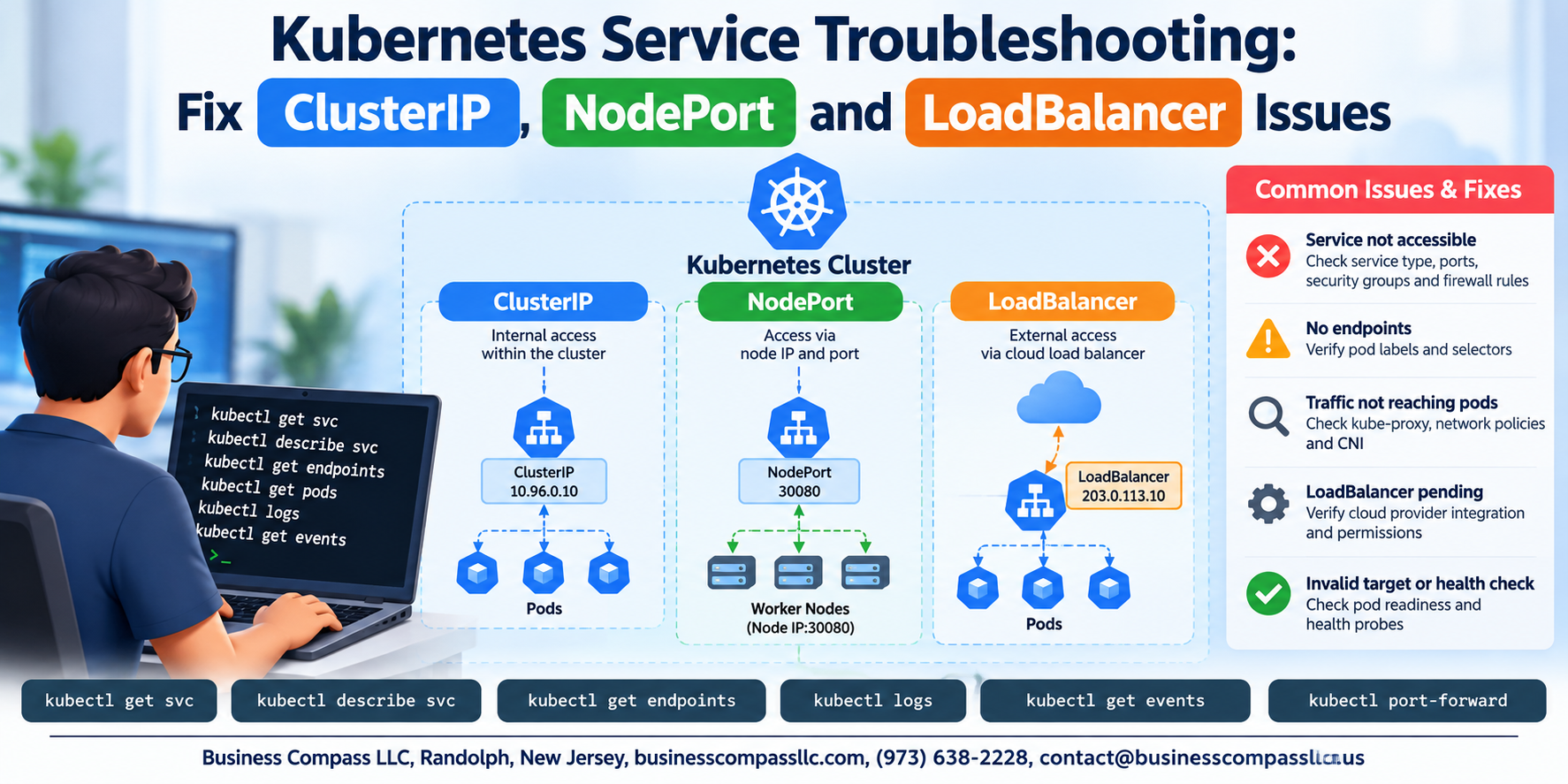
Kubernetes Service Troubleshooting: Fix ClusterIP, NodePort, and LoadBalancer Issues
Kubernetes services break. Pods stop talking to each other, external traffic never reaches your app, and that LoadBalancer sits in a permanent “pending” state while you stare at your terminal wondering what went wrong. If you’re a DevOps engineer, platform engineer, or developer managing workloads on Kubernetes, you’ve almost certainly been there.
This guide is built for people who need real fixes, not theory. You’ll get a clear breakdown of why ClusterIP, NodePort, and LoadBalancer services fail, how to diagnose Kubernetes networking errors quickly without guessing, and the exact steps to debug Kubernetes services and get traffic flowing again. Along the way, you’ll also pick up some cluster networking best practices that help you avoid these headaches in the first place.
No fluff. Just the stuff that actually works.
Understanding Kubernetes Service Types and Their Common Failure Points

How ClusterIP, NodePort, and LoadBalancer Work
Kubernetes services break down into three types: ClusterIP handles internal pod traffic, NodePort opens external access through node ports, and LoadBalancer routes cloud traffic automatically. Most Kubernetes service troubleshooting issues stem from misconfigured selectors, wrong port mappings, or missing cloud provider integration.
Diagnosing Kubernetes Service Problems Efficiently

Use kubectl to Spot Broken Services Fast
Run kubectl get svc, kubectl describe svc <name>, and kubectl get endpoints to quickly debug Kubernetes service troubleshooting issues. Check pod connectivity, DNS resolution with nslookup, and scan logs using kubectl logs. Missing endpoints usually mean label selector mismatches causing Kubernetes pod connectivity issues.
Fixing ClusterIP Service Failures

Resolve Label Selector Mismatches, Port Errors, and kube-proxy Issues
When fixing Kubernetes ClusterIP issues, check three things fast:
- Label selectors — run
kubectl get endpointsto confirm pods are targeted - Port mismatches — verify
targetPortmatches your container’s actual listening port - kube-proxy — restart it if iptables rules are missing or routing breaks silently
Resolving NodePort Service Issues

A. Open Firewall Rules to Allow NodePort Traffic Through
Check your cloud provider’s security groups or firewall rules — blocked ports kill NodePort access instantly.
B. Correct Node IP and Port Misconfigurations
Verify kubectl get nodes -o wide shows correct IPs and your NodePort falls within 30000-32767.
C. Ensure Nodes Are Reachable
Run kubectl get nodes — NotReady nodes drop traffic silently.
D. Handle Port Range Conflicts
Avoid duplicate NodePort assignments across services.
Troubleshooting LoadBalancer Service Problems

Fix Cloud Provider Integration Errors Blocking IP Assignment
Check your cloud provider credentials and IAM permissions — missing roles often block IP assignment. Verify kubectl describe svc for error events.
Resolve Pending LoadBalancer Status in On-Premises Environments
Deploy MetalLB to handle Kubernetes LoadBalancer problems on bare-metal clusters lacking native cloud integration.
Correct Health Check Failures That Drop Backend Nodes
Match health check ports to actual container ports exactly.
Applying Best Practices to Prevent Future Service Failures

Enforce Consistent Labeling, Monitoring, and Documentation
Prevent Kubernetes service troubleshooting headaches by standardizing labels across pods and services so selectors always match. Set up Prometheus alerts for endpoint failures, apply Network Policies to lock down unexpected traffic, and keep service configuration docs updated — saving your team hours when Kubernetes networking errors inevitably appear.

Kubernetes service troubleshooting doesn’t have to feel like searching for a needle in a haystack. By understanding how ClusterIP, NodePort, and LoadBalancer services work and where they typically break down, you can cut through the noise and get straight to the root cause. Whether it’s a misconfigured selector, a blocked port, or a cloud provider hiccup, having a clear diagnostic approach makes all the difference between hours of frustration and a quick fix.
The best part? Most of these issues are preventable. Sticking to solid practices like regular health checks, proper label management, and keeping an eye on your cloud provider’s load balancer quotas can save you a ton of headaches down the road. Bookmark your go-to kubectl commands, document your fixes, and share what you learn with your team. The more familiar you get with these patterns, the faster you’ll spot and squash service issues before they turn into bigger problems.