AWS IAM Without the Confusion: How Roles, Policies, and Permissions Really Work
If you’ve ever stared at an AWS IAM error and had no idea why access was denied, you’re not alone. IAM — AWS Identity and Access Management — is one of those things that looks simple on the surface but gets messy fast once you’re actually working with it.
This guide is for developers, cloud engineers, and anyone setting up AWS for the first time who wants a clear, no-nonsense breakdown of how IAM actually works — not just what the docs say.
Here’s what we’ll cover:
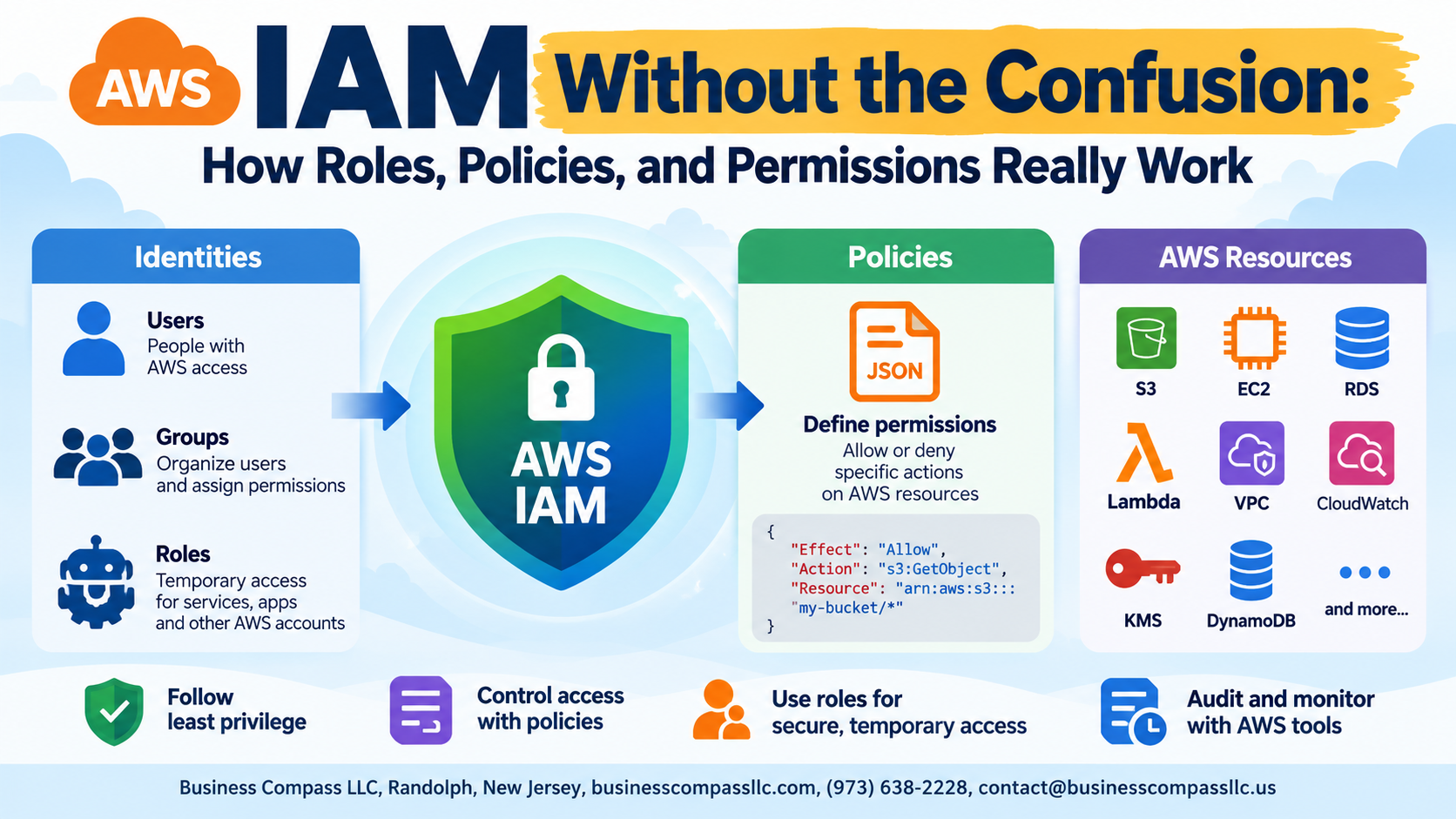
- The core building blocks — users, groups, roles, and policies — and how they connect to each other
- How IAM roles and policies work together to control who can do what inside your AWS account
- The least privilege principle and the most common IAM mistakes that leave accounts either locked down too tight or dangerously wide open
By the end, AWS permissions management will feel a lot less like guesswork and a lot more like something you can actually control.
Why AWS IAM Feels Overwhelming and How to Change That

The Most Common Misconceptions That Confuse Beginners
Most people assume IAM roles and users are the same thing — they’re not. Roles are temporary, assumable identities, while users are permanent.
How Thinking in Layers Makes IAM Instantly Clearer
Think: who needs access → what they can do → where those permissions apply.
What You’ll Be Able to Do After Understanding IAM Properly
- Build secure AWS environments confidently
- Avoid costly permission mistakes
The Core Building Blocks of AWS IAM Explained Simply
What IAM Users, Groups, and Roles Actually Do
AWS IAM has four building blocks: users (real people needing console access), groups (bundles of users sharing permissions), roles (temporary access for services or apps), and policies (the rules tying everything together). Roles are your most flexible tool — they power cross-account access, EC2 permissions, and Lambda functions seamlessly.
IAM Policies Demystified: The Rules That Drive Everything

What a Policy Is and Why It Controls All Access in AWS
In AWS, a policy is a JSON document that defines who can do what to which resources. Every action — reading an S3 bucket, launching an EC2 instance — gets checked against attached policies. No policy means no access, plain and simple.
IAM Roles in Action: Real Use Cases That Make It Click

How EC2 Instances Use Roles to Access AWS Services Securely
EC2 instances use attached IAM roles to access S3, DynamoDB, or other services—no hardcoded credentials needed.
How Cross-Account Access Works With Roles
Roles let users from Account A assume permissions in Account B securely.
Why Lambda Functions Depend on Roles to Function Properly
Lambda’s execution role defines exactly what it can touch.
Permission Boundaries and the Principle of Least Privilege

What Permission Boundaries Are and Why They Matter for Security
Permission boundaries cap what an IAM identity can do, even if attached policies allow more — think of them as a safety ceiling.
How to Apply Least Privilege Without Crippling Productivity
Grant only what’s needed right now, then expand access based on real requests.
Practical Steps to Audit Existing Permissions
- Run IAM Access Analyzer
- Review last-accessed data
Common IAM Mistakes and How to Avoid Them

Why Attaching Admin Policies Is a Dangerous Shortcut
Slapping AdministratorAccess on everything breaks AWS IAM best practices instantly — one compromised account means full cloud exposure.
How Unused Roles and Users Create Unnecessary Security Risks
- Delete dormant IAM users and roles regularly
The Problem With Hardcoding Credentials Instead of Using Roles
Always use IAM roles, never hardcoded keys.
How to Use IAM Access Analyzer to Catch Risky Configurations
Access Analyzer flags overly permissive policies automatically.

AWS IAM doesn’t have to feel like a puzzle with missing pieces. Once you understand that it all comes down to identities, policies, and roles working together, the whole system starts to make a lot more sense. From writing your first policy to setting up roles that let your services talk to each other securely, every concept builds on the last.
The biggest wins come from keeping things simple and intentional — granting only what’s needed, avoiding wildcards, and regularly auditing who has access to what. Start small, get comfortable with the basics, and layer in things like permission boundaries as your environment grows. The more you work with IAM, the more natural it becomes. So go ahead, open up your AWS console, and start putting these concepts into practice.