


Stop Migrating IAM Users Manually — Here’s a Better Way
If you’re managing AWS environments at scale, moving IAM users between accounts by hand is slow, error-prone, and honestly painful. One missed permission policy or forgotten access key can break production workflows or leave a security gap wide open.
This guide is for AWS engineers, cloud architects, and DevOps teams who need a reliable, repeatable way to handle AWS IAM user migration without touching every user individually.
Here’s what we’ll walk through:
- Why manual IAM migration breaks down at scale and what a solid automated IAM framework looks like instead
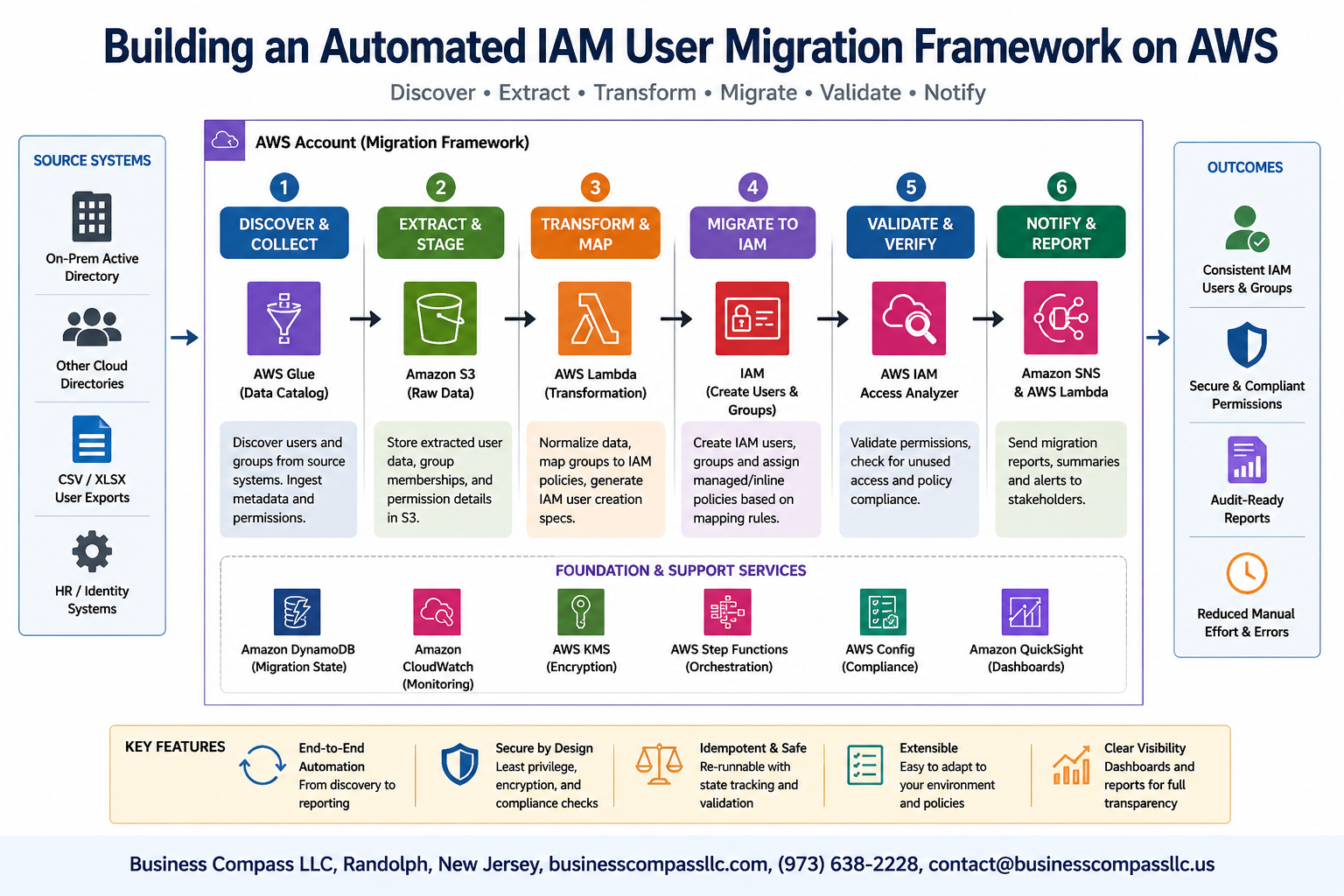
- How to design the IAM migration workflow — from mapping existing users and roles to automating the handoff with tools like AWS Lambda, Step Functions, and the CLI
- How to keep security and compliance locked in throughout the move, so your AWS identity management automation doesn’t introduce new risks while solving old ones
By the end, you’ll have a clear blueprint for building a framework you can actually run in production — not just in a sandbox.
Understanding the Need for IAM User Migration on AWS

Common Challenges with Manual IAM User Management
Managing AWS IAM users by hand is a slow, error-prone process that grows messier as your organization scales. Teams often struggle with:
- Inconsistent permissions — different admins apply different policies, creating security gaps
- Missed deprovisioning — former employees retain access long after leaving
- Audit nightmares — tracking who has what access across hundreds of users becomes nearly impossible
- Human error — a single typo in a policy document can expose sensitive resources or lock out critical teams
Key Benefits of Automating the Migration Process
Switching to an automated IAM framework removes the guesswork and brings real, measurable improvements to your AWS identity management automation efforts:
- Speed — migrate dozens or hundreds of IAM users in minutes rather than days
- Consistency — every user gets the exact permissions defined by your policy templates
- Auditability — automated logs give you a clear, timestamped trail for compliance reviews
- Reduced risk — automated validation catches misconfigurations before they hit production
When to Prioritize an Automated Framework
You should seriously consider building an IAM migration workflow when:
- Your organization is merging AWS accounts or consolidating multi-account environments
- You’re onboarding a large workforce and need repeatable, scalable user provisioning
- Compliance requirements demand consistent, documented access controls
- Your team keeps running into the same manual errors during routine IAM user migrations
Core Components of a Robust IAM Migration Framework

AWS Tools and Services That Power the Framework
Building a solid AWS IAM user migration framework means picking the right tools from the start. These services work together to make the whole process smooth and repeatable:
- AWS Organizations – manages accounts at scale and applies service control policies (SCPs) across the board
- AWS IAM Identity Center (SSO) – centralizes user access and simplifies credential management during migration
- AWS Lambda – runs migration scripts automatically without needing a dedicated server
- AWS Step Functions – orchestrates multi-step migration workflows with built-in error handling
- AWS Systems Manager Parameter Store – securely stores configuration values and secrets used during the migration
- Amazon S3 – holds migration artifacts, policy templates, and backup snapshots
Structuring IAM Policies for Seamless Migration
When you’re working on automated IAM framework design, policy structure can make or break the whole thing. Start by auditing existing permissions using IAM Access Analyzer to spot overly permissive policies before migration begins.
Key structuring principles:
- Apply least privilege from day one — only grant what’s actually needed
- Group permissions into reusable managed policies instead of inline policies, so updates are easier down the road
- Tag every policy with metadata like team, environment, and migration batch ID
- Use policy conditions (like
aws:RequestedRegionoraws:PrincipalTag) to add contextual access controls without bloating the policy count
Role-Based Access Control Design for Migrated Users
Good IAM migration workflow design always centers around roles, not individual users. Assigning permissions directly to users creates a mess that scales terribly. Instead:
- Map existing users to job function roles (e.g., Developer, ReadOnly, Admin) before migration kicks off
- Create a role matrix that documents which teams get which roles
- Use permission boundaries on migrated roles to cap the maximum permissions any user can ever have
- Separate human roles from service roles to keep the AWS identity management automation clean and auditable
Audit and Logging Mechanisms to Track Changes
Every change during migration needs a paper trail. Set up these mechanisms before migrating a single IAM user:
- AWS CloudTrail – logs every API call, so you know exactly who changed what and when
- AWS Config – tracks configuration changes to IAM resources and flags drift from your desired state
- Amazon CloudWatch Logs – captures Lambda execution logs and Step Functions state transitions in real time
- Amazon EventBridge – triggers alerts when specific IAM events happen, like a policy being attached to a user directly instead of through a role
- Store all logs in a dedicated, tamper-resistant S3 bucket with Object Lock enabled to protect audit records from accidental deletion
Designing the Automated Migration Workflow

Mapping Existing IAM Users and Permissions Before Migration
Before touching anything in your AWS environment, you need a clear picture of what you’re working with. Pull a complete inventory of every IAM user, their attached policies, inline policies, group memberships, and active access keys. AWS Config and the IAM credential report are your best starting points here.
- Run
aws iam generate-credential-reportto capture user activity and key age - Use
aws iam get-account-authorization-detailsto dump all policies and attachments in one call - Tag users by team, application, or environment to make grouping easier during the AWS IAM user migration process
Building a Scalable Migration Pipeline with AWS Lambda
An automated IAM framework built on Lambda lets you process hundreds of users without manual intervention. Each Lambda function handles a discrete task — pulling user data, validating policies, creating new identities, and sending notifications — so failures are isolated and easy to debug.
- Trigger migrations from an SQS queue to control throughput and avoid API throttling
- Store migration state in DynamoDB so you can resume from any point without reprocessing completed users
- Use Step Functions to chain Lambda tasks into a reliable IAM migration workflow with built-in retry logic
Handling Edge Cases and Permission Conflicts Automatically
During AWS identity management automation, conflicts happen — duplicate policy names, circular group memberships, or overly broad wildcard permissions that flag compliance rules. Build detection logic directly into your pipeline rather than handling these manually after the fact.
- Flag any
*:*or resource-level wildcards for human review before migration proceeds - Auto-resolve duplicate managed policy names by appending environment suffixes
- Log every conflict with full context to S3 so your security team has a complete audit trail
Implementing the Framework Step by Step

Setting Up the Migration Environment Safely
Before touching any live IAM users, spin up a dedicated AWS migration account or isolated environment where you can test everything without risking production access. Use AWS Organizations to create a sandbox account, apply strict SCPs, and make sure your migration scripts only have the minimum permissions needed to read, validate, and write IAM configurations.
Writing Infrastructure as Code with AWS CloudFormation or Terraform
Hardcoding IAM changes manually is a recipe for inconsistency. Instead, define every IAM user, group, policy attachment, and permission boundary inside CloudFormation templates or Terraform modules. This way, your automated IAM framework becomes version-controlled, repeatable, and auditable — three things that matter a lot when regulators come knocking.
- Use Terraform workspaces to separate dev, staging, and prod migrations
- Store state files in encrypted S3 buckets with DynamoDB locking
- Tag every resource with migration metadata for traceability
Automating User Validation and Permission Verification
A core piece of AWS IAM user migration is making sure users land in the new environment with exactly the right permissions — no more, no less. Write Lambda functions or Python scripts using Boto3 to compare source and destination IAM policies, flag mismatches, and generate a validation report before anything moves.
Running Dry Runs to Minimize Migration Risk
Always run a dry-run pass first. Simulate the full AWS identity management automation workflow without making real changes, log every action that would happen, and review the output carefully. This catches permission conflicts, missing group memberships, or broken policy references before they cause real downtime.
Executing the Live Migration with Zero Downtime
During the live IAM migration workflow, keep old IAM users active until the new ones are fully validated and tested. Use a blue-green approach — both identities coexist temporarily, access logs confirm the new user works correctly, and only then do you decommission the old one.
Ensuring Security and Compliance Throughout Migration

Enforcing Least Privilege Principles During Migration
During AWS IAM user migration, keep permissions tight from day one. Audit existing policies, strip out anything unnecessary, and assign only what each user actually needs to do their job.
- Use AWS IAM Access Analyzer to spot overly permissive policies before migration starts
- Apply permission boundaries to cap what migrated users can do, even if their policies are broad
- Separate duties across roles so no single IAM user holds too much power
Integrating AWS Config Rules for Continuous Compliance
AWS Config rules act like a watchdog running 24/7 during your automated IAM migration workflow, checking that every migrated user lands in a compliant state.
- Enable managed rules like
iam-user-no-policies-checkandiam-password-policyautomatically - Tag Config rules to track compliance per migration batch
- Set up AWS Config conformance packs to enforce org-wide standards across all AWS identity management automation pipelines
Detecting and Remediating Security Gaps Automatically
Your IAM user migration isn’t done just because users are moved over — gaps can appear post-migration.
- Use AWS Security Hub to aggregate findings from GuardDuty, Config, and IAM Access Analyzer
- Trigger Lambda-based auto-remediation for common violations like unused credentials or missing MFA
- Build SNS alerts that ping your team the moment a compliance drift is detected during migration
Testing, Monitoring, and Optimizing the Framework

Validating Migrated Users with Automated Test Suites
After running your AWS IAM user migration, you need to know everything landed correctly. Automated test suites check that each migrated user has the right permissions, group memberships, and access keys without anyone manually clicking through the console.
- Run assertion-based tests comparing source and destination IAM configurations
- Validate policy attachments match the original user profile exactly
- Test login flows and permission boundaries using AWS STS assume-role calls
- Flag any discrepancies immediately so your team can patch them before go-live
Leveraging AWS CloudWatch for Real-Time Migration Monitoring
CloudWatch becomes your best friend during an automated IAM framework rollout. Set up custom metrics that track migration progress, error rates, and rollback events so you always know what’s happening.
- Create CloudWatch dashboards showing migrated user counts per batch
- Set alarms on Lambda function errors tied to your IAM migration workflow
- Stream CloudTrail logs into CloudWatch Logs Insights for quick querying
- Build metric filters that catch permission-denied events during cutover
Identifying Bottlenecks and Improving Framework Performance
Slow migrations usually come down to API throttling or poorly structured batch jobs. AWS IAM user migration pipelines hit rate limits fast when you’re moving thousands of users, so batching and exponential backoff are non-negotiable.
- Profile Lambda execution times to spot slow policy-attachment calls
- Adjust batch sizes dynamically based on API error response patterns
- Cache repeated policy lookups to cut redundant API calls significantly
Scaling the Framework for Large Enterprise Environments
Enterprise-scale AWS identity management automation needs a different mindset than a small team migration. Parallel processing, multi-account orchestration through AWS Organizations, and SQS-backed queuing turn a fragile script into a production-grade framework that handles tens of thousands of users cleanly.

Migrating IAM users on AWS doesn’t have to be a stressful, error-prone process. By building a well-structured automated framework, you can move users efficiently while keeping security and compliance firmly in check. From mapping out the core components to designing a smart workflow and testing every step along the way, each piece plays a critical role in making the migration smooth and reliable.
The real win here is automation — it cuts down on manual mistakes, saves time, and gives you a repeatable process you can trust every single time. If you’re gearing up for an IAM migration, start small, test thoroughly, and keep monitoring even after the migration is complete. A little upfront planning goes a long way in making sure your AWS environment stays secure, organized, and ready to scale.









