


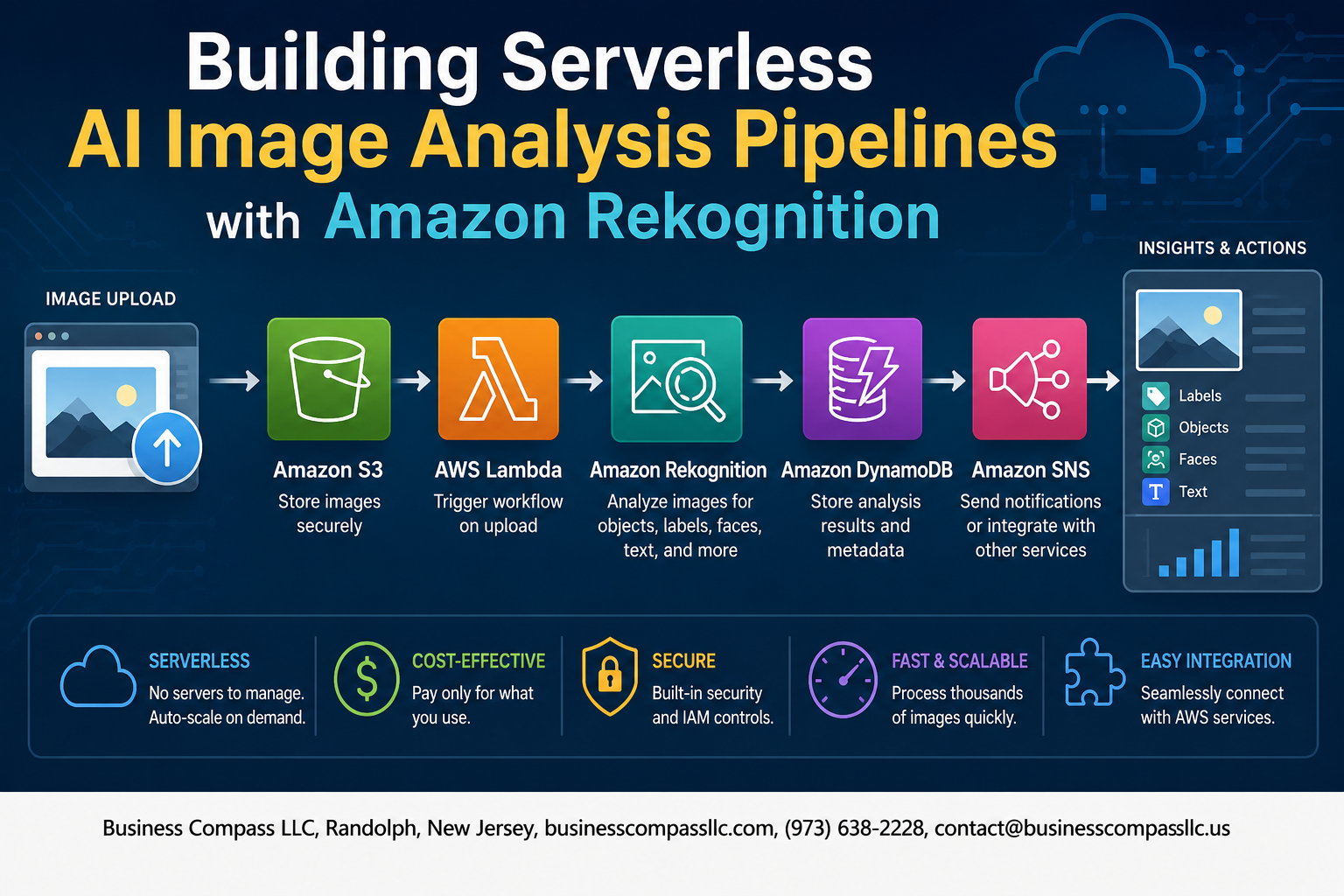
Stop Managing Servers Just to Analyze Images
If you’re a developer or cloud architect who wants to add AI-powered image recognition to your apps without babysitting infrastructure, this Amazon Rekognition tutorial is exactly what you need.
Amazon Rekognition lets you run powerful AWS image recognition AI — think object detection, facial analysis, and content moderation — without training a single model yourself. Pair that with serverless architecture using AWS Lambda, and you’ve got a fully automated image analysis pipeline that scales on its own and only charges you for what it actually processes.
In this guide, you’ll get a clear Amazon Rekognition setup guide that walks through connecting the service to a real pipeline, a practical look at how serverless architecture on AWS Lambda keeps your costs low and your code lean, and a breakdown of Amazon Rekognition use cases that go beyond demos and into actual business problems worth solving.
No fluff, no deep ML background required — just a working knowledge of AWS and a project that needs smart, cloud-based image analysis at scale.
Understanding Amazon Rekognition and Its Core Capabilities

Key Image and Video Analysis Features That Drive Business Value
Amazon Rekognition is one of those AWS services that quietly does a massive amount of heavy lifting for businesses dealing with visual data at scale. Whether you’re running an e-commerce platform, a media company, or a security operation, this service covers several high-value capabilities:
- Object and scene detection — Automatically identifies thousands of objects, scenes, and activities in images and videos, so you don’t have to manually tag anything.
- Facial analysis and recognition — Detects faces, analyzes emotions, estimates age ranges, and can match faces against a stored collection for identity verification workflows.
- Content moderation — Flags unsafe or inappropriate content automatically, which is a game-changer for user-generated content platforms trying to stay compliant without hiring large moderation teams.
- Text in image (OCR) — Extracts printed and handwritten text from images, useful for document processing pipelines and receipt scanning.
- Video analysis — Processes stored or streaming video to detect people, objects, and activities over time.
Supported AI Models for Object Detection, Facial Analysis, and Text Recognition
Rekognition runs on pre-trained deep learning models that AWS manages and continuously improves — so you’re getting solid, production-grade AI without needing a machine learning team to maintain it.
- DetectLabels — The go-to API for general object and scene detection. It returns labels with confidence scores, so you can filter results based on how certain the model is.
- DetectFaces / IndexFaces / SearchFacesByImage — A trio of APIs that handle facial analysis and recognition.
DetectFacesgives you facial attributes, whileIndexFacesandSearchFacesByImagepower face matching against a stored collection. - RecognizeCelebrities — Identifies well-known public figures, which is surprisingly useful for media archiving and entertainment workflows.
- DetectText — Handles text recognition in natural scenes, not just clean scanned documents, making it reliable for real-world image inputs.
- DetectModerationLabels — Specifically built to flag explicit or suggestive content, with a hierarchical taxonomy so you can tune sensitivity to match your moderation policy.
- Custom Labels — If the built-in models don’t quite fit your use case, Rekognition Custom Labels lets you train a custom model on your own dataset directly inside the service, with no ML expertise needed.
How Rekognition Integrates with the Broader AWS Ecosystem
This is where building a serverless image analysis pipeline on AWS really starts to shine. Rekognition doesn’t work in isolation — it plugs naturally into the AWS services you’re probably already using:
- Amazon S3 — The natural trigger point for any serverless AI pipeline. When an image lands in an S3 bucket, it fires off the rest of the workflow automatically.
- AWS Lambda — Handles the compute layer between S3 and Rekognition, calling the right API, processing the response, and routing results wherever they need to go — all without managing servers.
- Amazon SNS / SQS — Useful for decoupling pipeline stages and handling async video analysis jobs, since video processing in Rekognition is asynchronous by design.
- Amazon DynamoDB / Aurora — Stores analysis results for fast querying and downstream application use.
- AWS Step Functions — Orchestrates more complex multi-step pipelines, especially when you need conditional logic between analysis stages.
- Amazon EventBridge — Routes events across the pipeline and can trigger workflows based on specific Rekognition output conditions.
- AWS IAM — Controls exactly which services and users can call Rekognition APIs, keeping your pipeline secure by default.
The tight native integration across these services means you can build a fully automated, event-driven, cloud-based image analysis workflow that scales from a handful of images to millions — without touching any infrastructure.
Designing a Serverless Architecture for Image Analysis

Choosing the Right AWS Services to Build a Fully Serverless Pipeline
Building a serverless image analysis pipeline means picking AWS services that work together without you managing any servers. Here’s what your core stack typically looks like:
- Amazon S3 – stores incoming images and triggers downstream processing
- AWS Lambda – runs your analysis logic on demand, scaling automatically
- Amazon Rekognition – handles the actual AI image recognition work
- Amazon SQS – buffers requests between services to prevent bottlenecks
- Amazon DynamoDB – stores analysis results for fast retrieval
- AWS Step Functions – orchestrates multi-step workflows cleanly
Structuring Event-Driven Workflows with S3 and Lambda
The backbone of any serverless AI image processing pipeline on AWS is the S3-to-Lambda event trigger. When an image lands in an S3 bucket, S3 fires an event notification that kicks off a Lambda function automatically. That Lambda function then calls the Amazon Rekognition API, passing the S3 object reference directly — no downloading or re-uploading needed.
A clean event-driven setup looks like this:
- Image uploaded to S3 trigger bucket
- S3 event notification fires to Lambda (or SQS queue)
- Lambda invokes Rekognition with the S3 object key
- Results get written to DynamoDB or pushed to SNS for downstream systems
Optimizing Scalability and Cost Efficiency in Your Pipeline Design
Keeping costs under control while scaling is where smart pipeline design really pays off:
- Use S3 event filtering – only trigger Lambda for specific prefixes or file extensions like
.jpgor.png, avoiding unnecessary invocations - Right-size Lambda memory – Rekognition API calls are mostly network I/O, so 256–512MB memory is often enough
- Batch with SQS – instead of one Lambda invocation per image, batch SQS messages to process multiple images per execution
- Set concurrency limits – prevent runaway Lambda scaling by capping reserved concurrency during traffic spikes
- Use S3 Intelligent-Tiering – for storing original images long-term without paying full S3 Standard prices
Handling Asynchronous Processing for Large-Scale Image Workloads
When you’re dealing with thousands of images hitting your automated image recognition pipeline at once, synchronous processing breaks down fast. Asynchronous patterns keep things running smoothly:
- Drop image references into an SQS queue instead of calling Lambda directly from S3 — this decouples ingestion from processing
- Use Lambda event source mapping with SQS to pull messages in controlled batches
- For video or multi-page document analysis, lean on Rekognition’s async APIs (
StartLabelDetection,StartFaceDetection) which return a JobId you poll or receive via SNS callback - Implement Dead Letter Queues (DLQ) to catch failed processing jobs without losing data
- Track job status in DynamoDB with timestamps so you can monitor pipeline health and retry stale jobs automatically
Setting Up Amazon Rekognition for Your Pipeline
Configuring IAM Roles and Permissions for Secure Access
Getting your IAM setup right is the foundation of a secure Amazon Rekognition pipeline. You’ll want to create a dedicated IAM role for your Lambda function with only the permissions it actually needs — nothing more.
Key permissions to include:
rekognition:DetectLabelsrekognition:DetectFacesrekognition:DetectModerationLabelss3:GetObject(scoped to your specific bucket)logs:CreateLogGroupandlogs:PutLogEventsfor CloudWatch
Attach this role directly to your Lambda execution role using least-privilege principles. Avoid using wildcard (*) permissions — tightly scoped policies keep your serverless image analysis pipeline locked down and audit-friendly.
Enabling the Right Rekognition APIs for Your Use Case
Amazon Rekognition offers several APIs, and picking the right ones matters for both performance and cost control.
| API | Best For |
|---|---|
DetectLabels |
General object and scene detection |
DetectFaces |
Facial analysis and attribute extraction |
DetectModerationLabels |
Content moderation workflows |
RecognizeCelebrities |
Media and entertainment apps |
DetectText |
Extracting text from images |
For a general AWS image recognition AI pipeline, DetectLabels is your go-to starting point. If you’re building a moderation system, layer in DetectModerationLabels. Matching the API to your actual goal avoids unnecessary API calls and keeps your costs predictable.
Connecting Rekognition to S3 Triggers for Automated Processing
This is where your automated image recognition pipeline really comes to life. When a new image lands in your S3 bucket, an event notification fires off your Lambda function automatically — zero manual intervention needed.
Here’s how to wire it up:
- Go to your S3 bucket → Properties → Event Notifications
- Create a new notification triggered by
s3:ObjectCreated:* - Set the destination to your Lambda function ARN
- Filter by prefix/suffix (e.g.,
uploads/and.jpg) to avoid processing unintended files - In your Lambda code, parse the S3 event, pull the bucket name and object key, then pass them directly into your Rekognition API call
rekognition.detect_labels(
    Image={'S3Object': {'Bucket': bucket, 'Name': key}},
    MaxLabels=10,
    MinConfidence=75
)
This setup means every image upload kicks off analysis automatically — no polling, no scheduled jobs, just clean event-driven processing that scales on its own.
Building and Deploying the Serverless Image Analysis Pipeline

Writing Lambda Functions to Invoke Rekognition APIs
Your Lambda function is the engine that drives the entire serverless image analysis pipeline. When an image lands in S3, an event trigger fires your function, which then calls Rekognition APIs like DetectLabels, DetectFaces, or RecognizeCelebrities depending on your use case.
Here’s a clean Python example to get you started:
import boto3

def lambda_handler(event, context):
    rekognition = boto3.client('rekognition')
    bucket = event['Records'][0]['s3']['bucket']['name']
    key = event['Records'][0]['s3']['object']['key']

    response = rekognition.detect_labels(
        Image={'S3Object': {'Bucket': bucket, 'Name': key}},
        MaxLabels=10,
        MinConfidence=75
    )
    return response['Labels']
Key things to keep in mind:
- Always set
MinConfidencethresholds to filter out low-quality predictions - Use environment variables to store region and bucket names instead of hardcoding them
- Handle API throttling with exponential backoff retries
Storing and Managing Analysis Results with DynamoDB or S3
Once Rekognition returns its analysis, you need somewhere smart to put that data.
- DynamoDB works best when you need fast lookups — for example, querying all images tagged with “vehicle” or “outdoor scene”
- S3 with JSON files is better for raw storage of full Rekognition responses, especially when results are large or you plan to run batch analytics later
A practical pattern many teams use is a dual-write approach — store the full response as a JSON file in S3, and write a flattened summary (image key, top labels, confidence scores, timestamp) into DynamoDB. This gives you both cheap bulk storage and quick query capability without sacrificing either.
Using AWS Step Functions to Orchestrate Complex Workflows
When your AI image processing on AWS grows beyond a single Lambda function, Step Functions becomes your best friend. Instead of chaining Lambda calls inside each other (which gets messy fast), Step Functions lets you define a clear workflow visually.
A typical multi-step workflow might look like this:
- Validate Image — check file format and size before calling Rekognition
- Run Label Detection — call
DetectLabelsfor general content tagging - Check for Moderation Flags — call
DetectModerationLabelsin parallel - Route Results — send flagged images to a human review queue, clean images to the main pipeline
- Store Results — write to DynamoDB and notify downstream services via SNS
Step Functions handles retries, error states, and parallel branches natively, which means your automated image recognition pipeline becomes much more resilient without you writing a ton of extra error-handling code.
Deploying Your Pipeline Reliably with AWS SAM or CloudFormation
Clicking through the AWS console works for testing, but for anything production-ready, you want your infrastructure defined as code. AWS SAM (Serverless Application Model) is built on top of CloudFormation but designed specifically for serverless workloads, making it a natural fit for this kind of pipeline.
A basic SAM template for your image analysis setup would define:
- S3 bucket with event notifications pointing to your Lambda
- Lambda function with the right IAM role to call Rekognition and write to DynamoDB
- DynamoDB table with appropriate partition keys
- Step Functions state machine if you’re running multi-step workflows
Resources:
  ImageAnalysisFunction:
    Type: AWS::Serverless::Function
    Properties:
      Handler: app.lambda_handler
      Runtime: python3.11
      Events:
        ImageUpload:
          Type: S3
          Properties:
            Bucket: !Ref ImageBucket
            Events: s3:ObjectCreated:*
Deploy with a single command:
sam build && sam deploy --guided
This approach keeps your serverless architecture on AWS Lambda repeatable, version-controlled, and easy to roll back if something breaks.
Testing and Validating Pipeline Accuracy Before Going Live
Shipping an Amazon Rekognition tutorial-style prototype is one thing — trusting it with real business data is another. Testing happens at multiple levels:
Unit Testing Lambda Functions:
- Mock Rekognition API responses using
motoorunittest.mock - Test edge cases like corrupted images, empty S3 events, or oversized files
Integration Testing:
- Use a dedicated staging S3 bucket with a curated test image set
- Include images that represent your real-world distribution — not just clean stock photos
Accuracy Validation:
- Build a labeled test dataset and measure precision and recall against Rekognition’s output
- Set minimum confidence thresholds based on your actual tolerance for false positives
- Track accuracy metrics in CloudWatch as a custom metric so you can catch drift over time
Load Testing:
- Simulate burst uploads using tools like Artillery or a simple Python script pushing images to S3 rapidly
- Watch for Lambda concurrency limits and DynamoDB write throttling under load
A pre-launch checklist worth running through:
- IAM permissions follow least privilege
- Dead-letter queues configured for failed Lambda invocations
- CloudWatch alarms set on error rates and duration
- Rekognition API costs estimated against expected image volume
Practical Use Cases That Deliver Real Business Impact

Automating Content Moderation for User-Generated Media
Platforms drowning in user-uploaded photos and videos can lean on Amazon Rekognition’s content moderation API to automatically flag explicit, violent, or otherwise unsafe material before it ever goes live. By wiring an S3 upload trigger to a Lambda function, every new image runs through Rekognition’s DetectModerationLabels action, returning confidence scores for categories like:
- Explicit Nudity
- Violence
- Hate Symbols
- Visually Disturbing Content
You set a confidence threshold — say, 80% — and anything above it gets quarantined in a separate S3 bucket or routed to a human review queue via Amazon SQS. This cuts moderation costs dramatically compared to fully manual review teams, and your serverless image analysis pipeline scales automatically during traffic spikes without any infrastructure headaches.
Enhancing E-Commerce with Automated Product Image Tagging
Manually tagging thousands of product images is slow, inconsistent, and expensive. With an automated image recognition pipeline built on AWS Lambda and Rekognition’s DetectLabels API, every product photo uploaded by a seller gets analyzed instantly, generating rich, structured metadata like:
- Category tags (e.g., “sneakers,” “running shoes,” “athletic footwear”)
- Color attributes
- Scene context (indoor/outdoor)
- Brand logos (via
DetectText)
This metadata flows directly into your product database or search index, powering better search relevance, smarter recommendations, and faster catalog onboarding — all without a human touching the image.
Strengthening Security Systems with Facial Recognition Workflows
Building access control or identity verification on top of Amazon Rekognition’s facial recognition capabilities is straightforward with a serverless architecture. You create a Rekognition Collection — basically a stored database of face vectors — and compare incoming images against it using SearchFacesByImage. A typical workflow looks like this:
- A camera or app captures an image and uploads it to S3
- S3 triggers a Lambda function
- Lambda calls
SearchFacesByImageagainst your Collection - A match above your similarity threshold (typically 95%+) grants access or triggers an alert
- Results get logged to DynamoDB for audit trails
This approach powers everything from employee badge-free entry systems to fraud detection during online account creation, all running on a fully managed, pay-per-use AWS image recognition AI stack with no servers to babysit.
Monitoring, Securing, and Optimizing Your Pipeline

Tracking Pipeline Performance with Amazon CloudWatch
Hook up CloudWatch dashboards to monitor your serverless image analysis pipeline in real time. Track these key metrics:
- Lambda invocation errors and duration
- Rekognition API throttling rates
- S3 trigger latency
Set alarms to catch bottlenecks before they snowball into bigger problems.
Enforcing Data Privacy and Compliance Best Practices
When running AI image processing on AWS, keep privacy tight:
- Enable S3 server-side encryption (SSE-KMS) for all image storage
- Use IAM least-privilege roles so Lambda only accesses what it needs
- Enable AWS CloudTrail to audit every Rekognition API call
- If handling faces, stay compliant with GDPR and BIPA regulations by avoiding unnecessary storage of facial data
Reducing Costs by Fine-Tuning Lambda and Rekognition Usage
Your Amazon Rekognition tutorial doesn’t stop at deployment — cost control matters:
- Right-size Lambda memory (128MB–512MB works for most image routing tasks)
- Use S3 Intelligent-Tiering for input/output image storage
- Batch low-priority images using SQS queues instead of triggering Rekognition on every single upload
- Call only the Rekognition features you actually need — don’t run full label detection when moderation-only suffices
Scaling Your Pipeline to Handle Growing Image Volumes Efficiently
Your automated image recognition pipeline should grow without breaking a sweat:
- Configure Lambda reserved concurrency to prevent runaway costs during traffic spikes
- Use SQS as a buffer between S3 uploads and Lambda invocations to smooth out volume surges
- Enable Rekognition’s asynchronous APIs (like
StartLabelDetection) for high-volume batch workloads - Deploy across multiple AWS regions if your users are globally distributed

Amazon Rekognition takes the heavy lifting out of image analysis, and when you pair it with a serverless architecture, you get a pipeline that scales automatically, costs less to run, and doesn’t require you to babysit a fleet of servers. From setting up your environment to deploying a fully functional pipeline, the steps are straightforward enough that you can go from idea to production without a massive engineering effort. Add in the real-world use cases — content moderation, facial recognition, object detection — and it becomes clear why so many teams are moving in this direction.
The last piece of the puzzle is keeping your pipeline healthy over time. Monitoring your functions, locking down access with the right IAM policies, and fine-tuning performance will make sure your pipeline stays fast, secure, and cost-effective as your needs grow. If you haven’t started building yet, now is a great time to spin up a free AWS account, follow the steps covered here, and see firsthand how quickly you can get a serverless AI image analysis pipeline up and running.









