


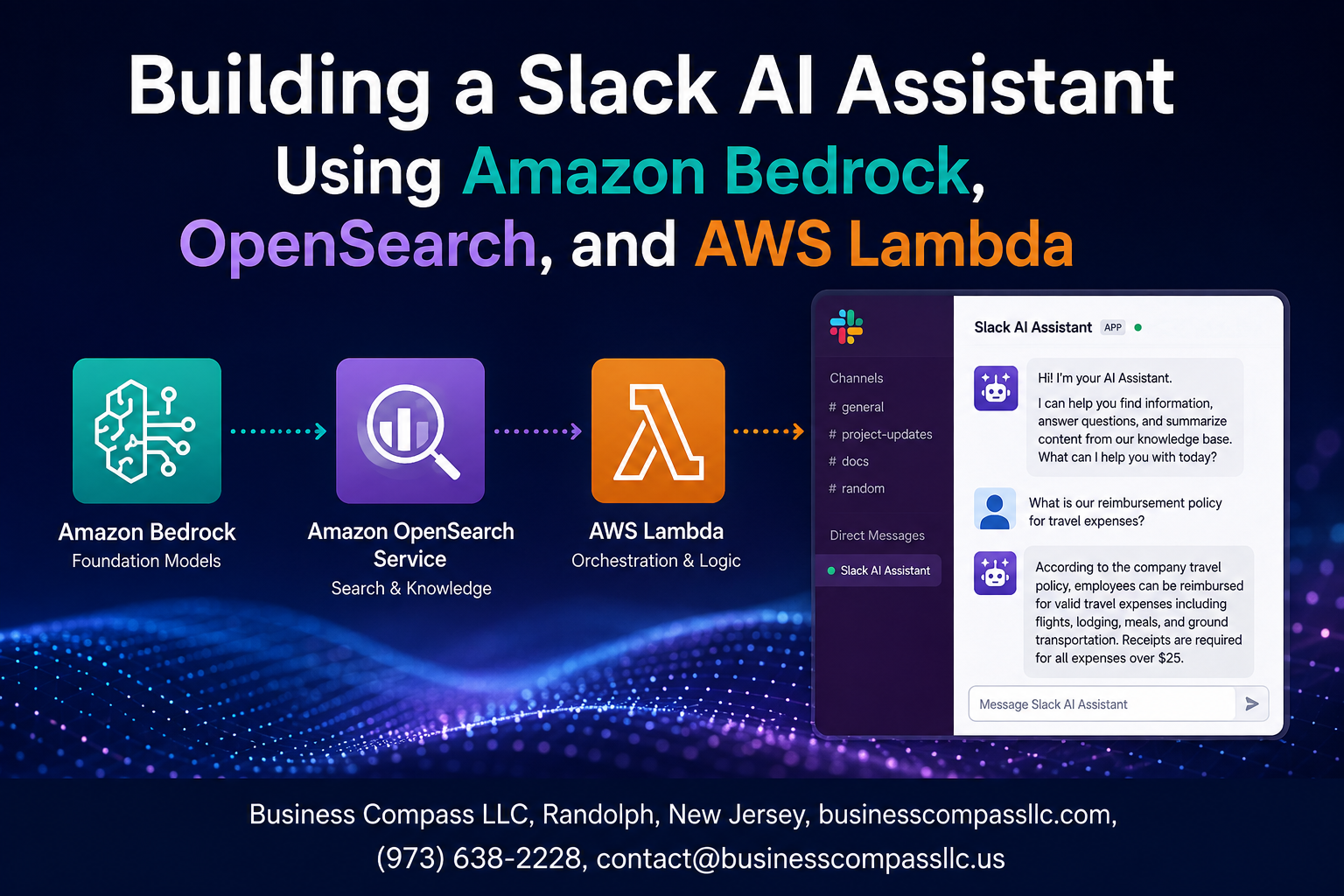
Build a Slack AI Assistant with Amazon Bedrock, OpenSearch, and AWS Lambda
If your team lives in Slack, putting an AI assistant right inside it just makes sense. This Slack AI assistant tutorial walks you through connecting Amazon Bedrock, OpenSearch, and AWS Lambda into a working serverless AI architecture — one that answers questions, searches documents, and gets smarter over time.
This guide is for developers and solutions architects who are comfortable with AWS basics and want to ship something real, not just follow along with a toy project.
Here’s what we’ll cover:
- How the core components fit together — what Amazon Bedrock handles, where OpenSearch semantic search fits in, and why Lambda ties it all together
- Building and connecting the pieces — from setting up your Slack bot to writing the Lambda function that drives intelligent responses
- Keeping it lean and reliable — AI assistant cost optimization on AWS, plus testing and monitoring so the thing actually holds up in production
No fluff. By the end, you’ll have a Slack bot with generative AI capabilities running on AWS that your team can actually use.
Understanding the Core Components and Their Roles
How Amazon Bedrock Powers AI-Driven Responses
Amazon Bedrock gives you instant access to foundation models like Claude, handling natural language generation without managing infrastructure.
Why OpenSearch Is Ideal for Knowledge Retrieval
OpenSearch’s vector database enables semantic search, matching user queries to relevant documents accurately.
How AWS Lambda Enables Serverless Event Handling
Lambda processes Slack events on-demand, scaling automatically.
How These Services Work Together
Slack triggers Lambda, which queries OpenSearch, then Bedrock generates responses.
Setting Up Your AWS Environment for Success
Configuring IAM Roles and Permissions Securely
Create a least-privilege IAM role granting Lambda access only to Bedrock and OpenSearch.
Enabling Amazon Bedrock Models for Your Use Case
Request model access via the Bedrock console for Claude or Titan.
Deploying and Indexing Data in OpenSearch
- Create an index with k-NN vector mappings
- Upload embeddings for semantic search
Building the Slack App and Connecting It to AWS
Creating a Slack App with the Right Bot Permissions
Register your app at api.slack.com, enabling app_mentions:read and chat:write scopes.
Setting Up Event Subscriptions to Capture User Messages
Enable Events API, subscribing to app_mention events.
Routing Slack Events to AWS Lambda via API Gateway
Point your Request URL to your API Gateway endpoint triggering Lambda.
Securing the Integration with Slack Request Verification
Validate every request using Slack’s signing secret to block spoofed payloads.
Designing the Lambda Function for Intelligent Processing

Parsing and Cleaning Incoming Slack Message Payloads
Strip noise from raw Slack events—remove bot mentions, whitespace, and special characters before processing.
Querying OpenSearch to Retrieve Relevant Knowledge
Run semantic search against your OpenSearch vector database to pull context matching user intent.
Sending Enriched Context to Amazon Bedrock for Response Generation
Feed cleaned query plus retrieved chunks into Amazon Bedrock for grounded, accurate answers.
Formatting and Returning AI Responses Back to Slack
Structure responses using Slack’s Block Kit for readable, well-formatted replies.
Handling Errors Gracefully
Return friendly fallback messages when OpenSearch or Bedrock calls fail.
Optimizing Performance and Controlling Costs
Reducing Latency with Efficient OpenSearch Query Design
Use k-NN filters to narrow vector searches before scoring, cutting query time significantly.
Tuning Bedrock Model Parameters for Faster Responses
Lower maxTokens and temperature values speed up responses without sacrificing quality.
Using Lambda Concurrency Settings to Handle Traffic Spikes
- Set reserved concurrency to prevent throttling
- Enable provisioned concurrency for consistent cold-start performance
Testing, Monitoring, and Iterating for Long-Term Reliability

Writing Unit Tests to Validate Each Integration Point
Mock Bedrock and OpenSearch calls using unittest.mock to isolate Lambda logic cleanly.
Using CloudWatch Logs to Diagnose and Debug Issues
- Set structured JSON logging
- Filter by
ERRORlevel instantly
Tracking Usage Metrics to Identify Optimization Opportunities
Watch token consumption and OpenSearch query latency to catch cost spikes early.

Building a Slack AI assistant with Amazon Bedrock, OpenSearch, and AWS Lambda might sound like a big undertaking, but breaking it down into manageable steps makes it very achievable. From setting up your AWS environment and connecting your Slack app to designing a smart Lambda function and keeping costs in check, each piece plays a specific role in making the whole system work smoothly. Throw in solid testing and monitoring practices, and you have got an assistant that can hold up reliably over time.
Now it is your turn to start building. Pick up the components that make the most sense for your use case, experiment with the setup, and do not be afraid to tweak things as you learn what works best for your team. The tools are all there — you just need to put them together.









