

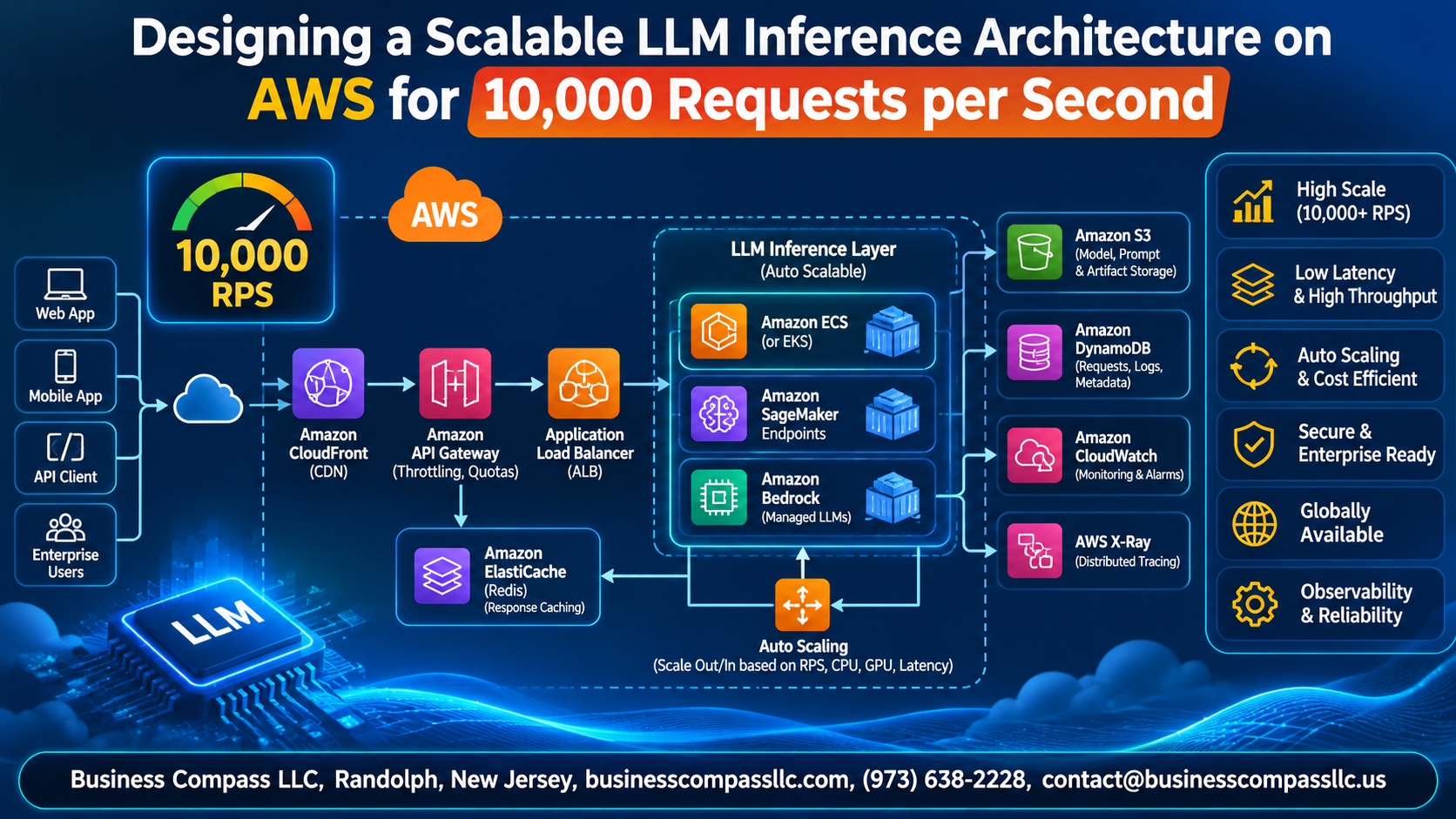
Handling 10,000 requests per second with an LLM sounds wild, but it’s doable on AWS if you plan it right. This guide walks you through a scalable LLM inference architecture on AWS, built for ML engineers, platform teams, and cloud architects who need to ship a production-ready setup.
We’ll start with the basics: setting clear performance goals and picking the right model and GPU foundation. Then we’ll get into high throughput LLM serving, using vLLM on AWS or Amazon SageMaker LLM inference to squeeze more out of every GPU. Finally, we’ll cover LLM autoscaling on AWS and smart caching and routing, so you can reduce LLM inference cost without hurting speed.
You’ll also get quick tips on keeping things available, secure, and easy to monitor as traffic grows.
Define Performance Goals and Workload Requirements

Translate 10,000 RPS into tokens and concurrency
Multiply RPS by average input and output tokens to get tokens per second. At 500 in and 300 out, that’s 8M tokens/sec. Use Little’s Law (concurrency = RPS × latency) to size GPUs.
Set latency, throughput, and availability SLOs
Target p95 time-to-first-token under 500ms, plus 99.9% availability.
Profile prompt and response patterns
Log real traffic, then size capacity from p95 lengths, not averages.
Choose the Right Model and Compute Foundation

Bedrock, SageMaker, or Self-Managed
Bedrock launches fastest; SageMaker with vLLM adds control.
Matching GPU Instances
P5 for huge models, G6 mid-size, Inf2/Trn1 cheaper.
Quantization and Compression
FP8 or INT4 shrinks memory, boosting batch size.
Capacity Planning
Savings Plans cover baseline; Capacity Blocks handle spikes.
Maximize Throughput with an Optimized Inference Engine

Continuous Batching
vLLM or TensorRT-LLM slots new requests in instantly, keeping GPUs busy.
Paged KV Cache
PagedAttention stops memory waste, fitting far more sequences per GPU.
Speculative Decoding, Prefix Caching
Draft models and cached prefixes cut latency on repeated prompts.
Tensor, Pipeline Parallelism
Split big models across GPUs to fit them.
Build a Scalable Serving Layer

EKS or ECS Orchestration
Run vLLM pods on EKS, with GPU node groups scaling independently.
API Gateway and ALB
ALB spreads traffic; API Gateway adds auth and throttling.
Queues and Rate Limiting
SQS buffers bursts; rate limits protect GPUs.
Response Streaming
Stream tokens over SSE so users see answers instantly.
Scale Automatically and Cost-Effectively

Autoscale on GPU utilization, queue depth, and tokens per second
- Queue depth wins.
Use Karpenter to provision GPU nodes quickly
- Nodes in minutes.
Reduce cold starts with warm pools and fast model loading from S3 or FSx
- Preload weights.
Lower costs with Spot Instances and mixed fleets
- Spot for bursts.
Reduce Load with Smart Caching and Routing

Semantic Caching on ElastiCache
Embed prompts, store them in ElastiCache, and return cached answers for near-duplicates, so repeat queries skip the GPU entirely.
Route by Complexity
Use a lightweight classifier to send simple requests to small models and complex ones to larger models.
Multi-Model Fallback
Retry timeouts on backup models.
Deliver High Availability and Resilience

Spread workloads across multiple Availability Zones
Run GPU nodes in at least three AZs behind an Application Load Balancer, so one zone failing doesn’t take you down.
Expand to multi-region for failover and lower global latency
Use Route 53 latency routing with health-checked failover across regions.
Protect users with health checks, retries, and circuit breakers
Add deep health checks, capped retries with backoff, and circuit breakers.
Roll out updates safely with canary and blue-green deployments
Shift 5% of traffic first, then roll back fast if errors spike.
Secure and Govern Your Inference Platform

A. Control access with IAM, VPC endpoints, and PrivateLink
Use least-privilege IAM roles, and keep SageMaker traffic off the public internet with VPC endpoints and PrivateLink.
B. Encrypt data in transit and at rest with KMS
Enforce TLS everywhere, and encrypt model artifacts, logs, and EBS volumes with KMS keys.
C. Filter harmful content and sensitive data with guardrails
Add Bedrock Guardrails to block toxic output and redact PII.
Monitor, Test, and Continuously Optimize

Track key metrics with CloudWatch, Prometheus, and Grafana
- Watch p99 latency, tokens/second, queue depth, and GPU utilization.
Validate 10,000 RPS with realistic load testing
- Replay production prompt lengths with k6 or Locust.
Trace bottlenecks using distributed tracing and GPU profiling
- Use X-Ray and Nsight to find slow hops.
Control spend with cost-per-token dashboards and budgets
- Set AWS Budgets alerts per model endpoint.
Iterate on performance with ongoing benchmarking
- Rebenchmark vLLM versions, batch sizes, and quantization monthly.

Hitting 10,000 requests per second with an LLM isn’t about one big trick. It comes down to getting a bunch of pieces right. Start with clear goals for latency, throughput, and traffic patterns. Pick a model and GPU setup that fit those goals, then squeeze every bit of performance out of your inference engine with batching and smart memory use. From there, a solid serving layer, autoscaling, and caching and routing keep things fast and your bill under control.
Don’t skip the unglamorous stuff, either. High availability, tight security, and good governance keep your platform running and trusted when things go sideways. Monitoring and load testing tell you what’s actually happening, so you can keep tuning as traffic and models change.
So start small. Set your targets, run a load test on a single setup, and fix the biggest bottleneck first. Then repeat. Scaling to 10,000 requests per second happens one smart improvement at a time.