

Your contact form goes live, and a week later your inbox is full of junk. Bots love open forms. If you want to prevent contact form spam without running a server, this guide is for you.
It’s for developers, indie hackers, and small teams who want a secure contact form on a serverless contact form AWS setup, without a big budget or a security degree.
Here’s what we’ll cover:
- Traffic limits: How API Gateway throttling and API Gateway rate limiting keep floods from hitting your backend and your bill.
- Bot protection for forms: How to add Cloudflare Turnstile, then run Cloudflare Turnstile verification inside your AWS Lambda contact form.
- Locking it down: Input checks, tight permissions, and monitoring, so your serverless form security holds up over time.
Grab a coffee and let’s get started.
Understand the Threats to Your Contact Form

Spot Common Abuse Patterns Like Spam and Bot Floods
Bots hammer public forms with spam, fake leads, and request floods.
Measure the Cost and Risk of an Unprotected Endpoint
Every junk request triggers Lambda, email, and logging charges, and it buries real messages.
Plan a Layered Defense Strategy
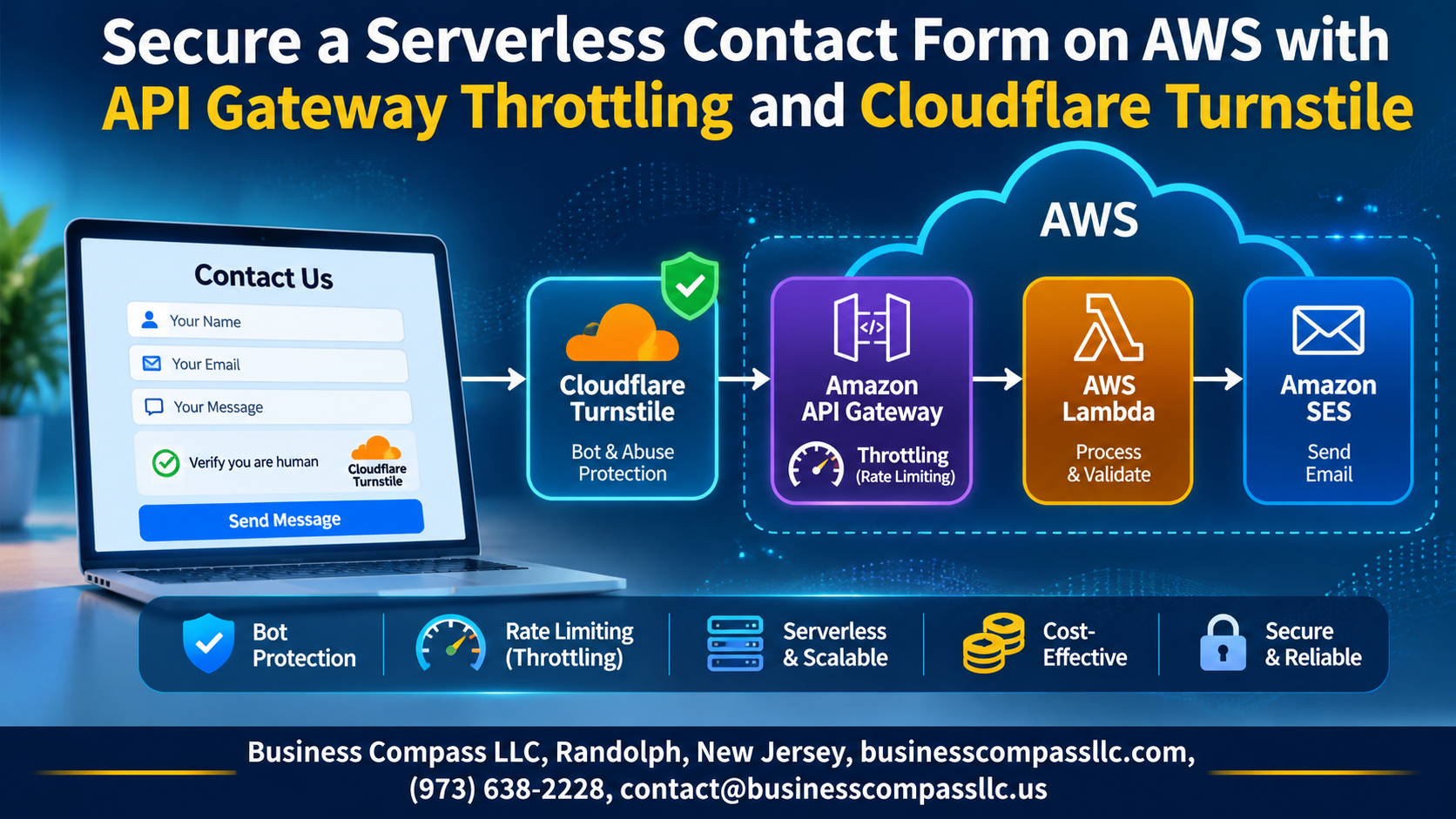
Combine API Gateway throttling, Cloudflare Turnstile, and strict validation.
Build the Serverless Contact Form Foundation

Design the Architecture with API Gateway, Lambda, and SES
Your form posts to API Gateway, which triggers Lambda, which sends the email through SES. Keep it that simple.
Create the Lambda Function to Process Submissions
Validate fields, then call SES.
Configure API Gateway to Expose a Clean Endpoint
Add a POST /contact route.
Enable CORS for Safe Browser Requests
Allow only your own domain.
Control Traffic with API Gateway Throttling

Choose Between Stage-Level and Method-Level Limits
Stage default, tighter POST /contact.
Set Rate and Burst Values That Fit Real Usage
Try 2 requests/second, burst 5.
Use Usage Plans and API Keys for Extra Control
Add per-key quotas.
Test Throttling to Confirm Abusive Traffic Gets Blocked
Spam it; expect 429s.
Block Bots with Cloudflare Turnstile

Create a Turnstile Widget and Get Your Site Keys
In the Cloudflare dashboard, add a Turnstile widget, enter your domain, and copy the site key (public) and secret key (private).
Add the Widget to Your Contact Form Frontend
Load Cloudflare’s script and drop in a cf-turnstile div with your site key.
Handle Token Generation Without Hurting User Experience
Use managed mode so most visitors never see a challenge, and send the token with the form.
Verify Turnstile Tokens on the Backend

Send the Token to Siteverify
POST the token and secret to Cloudflare’s Siteverify endpoint from Lambda.
Store the Secret Safely
Keep the secret in Secrets Manager or Parameter Store, never in code.
Reject Bad Tokens
Return a clear 400 for invalid or expired tokens.
Stop Replay
Cache used tokens in DynamoDB with a TTL, and log failures.
Harden Input Handling and Permissions

Validate and Sanitize Form Fields
Check length, type, and email format in Lambda, and escape anything you echo back.
Apply Least-Privilege IAM Roles to Lambda
Give the function only ses:SendEmail on your verified identity, plus basic logging.
Restrict Allowed Origins and Add Request Validation in API Gateway
- Limit CORS to your domain.
- Enforce a JSON schema model.
Monitor, Test, and Fine-Tune Your Protection

Track and Alert
CloudWatch shows throttled requests (429s), 4XX/5XX errors, and Lambda failures. Set alarms on spikes.
Test and Tune
Test valid, bot, and flood submissions end to end. Then adjust throttling limits and Turnstile settings as traffic grows.

A contact form is a simple thing, but it’s also an easy target. Bots love open forms, and a bit of spam can quickly turn into a surprise AWS bill or a flooded inbox. The good news is you don’t need a complicated setup to fix that. API Gateway throttling keeps traffic in check, Cloudflare Turnstile filters out the bots without annoying real people, and a quick token check on the backend makes sure nobody sneaks around the front door.
Add tight input handling and least-privilege permissions, and you’ve got a solid, layered defense. Then keep an eye on it. Watch your logs and metrics, test the form now and then, and adjust your limits as real traffic shows up. Protection like this isn’t a one-and-done job.
So go ahead and add these layers to your own form today. Start with throttling and Turnstile, and build from there. Your future self (and your inbox) will thank you.