


Blue Green Deployment AWS EKS: Your Complete Guide to Zero-Downtime Production Deployments
Deploying new versions of your applications to production without breaking things is every DevOps engineer’s dream. Blue green deployment strategy makes this possible by running two identical production environments and switching traffic between them. For teams managing AWS EKS production workloads, this approach delivers zero downtime deployment while reducing the risk of customer-facing failures.
This guide is for DevOps engineers, platform teams, and cloud architects who want to implement Kubernetes blue green deployment patterns on AWS EKS. Whether you’re managing a few microservices or complex distributed systems, you’ll learn how to build reliable AWS container deployment best practices that scale with your business.
We’ll walk through setting up blue green deployment pipeline infrastructure using AWS native services, show you how to build a production-ready deployment pipeline that integrates with your existing CI/CD workflows, and share monitoring and observability best practices that help you catch issues before they impact users. You’ll also discover cost optimization strategies to keep your EKS production workloads scaling efficiently without breaking your budget.
Understanding Blue/Green Deployment Strategy Fundamentals

Zero-downtime deployment methodology explained
Blue/green deployment AWS EKS creates two identical production environments where only one serves live traffic at any time. The “blue” environment runs your current application version while the “green” environment hosts the new release. Once testing confirms the green environment works perfectly, traffic switches instantly from blue to green. This AWS EKS production deployment strategy eliminates downtime because users never experience service interruptions during updates.
Risk mitigation through parallel environment management
Managing parallel environments provides a safety net that traditional deployment methods can’t match. When issues arise in the new environment, you can instantly rollback by redirecting traffic to the previous version. This Kubernetes blue green deployment approach keeps both environments running until you confirm the new version performs correctly. Teams can thoroughly test the green environment with real production data while the blue environment continues serving customers without any risk.
Traffic switching mechanisms for seamless transitions
EKS zero downtime deployment relies on load balancers and DNS updates to redirect user requests between environments. AWS Application Load Balancer target groups make switching traffic between blue and green clusters straightforward. You can also use weighted routing policies to gradually shift traffic percentages, allowing real-world validation before complete cutover. Service mesh solutions like Istio provide even more granular control over traffic distribution patterns.
Key differences from rolling updates and canary deployments
Rolling updates gradually replace pods one by one within the same cluster, while blue/green maintains completely separate environments. Canary deployments send small traffic percentages to new versions alongside old ones, but blue/green keeps environments isolated until the full switch. This AWS container deployment best practices approach requires more infrastructure resources but offers cleaner rollbacks and better testing isolation. Rolling updates can cause mixed-version states, while blue/green ensures consistent environments throughout the deployment process.
AWS EKS Infrastructure Requirements for Blue/Green Deployments
Cluster Architecture Considerations for Dual Environments
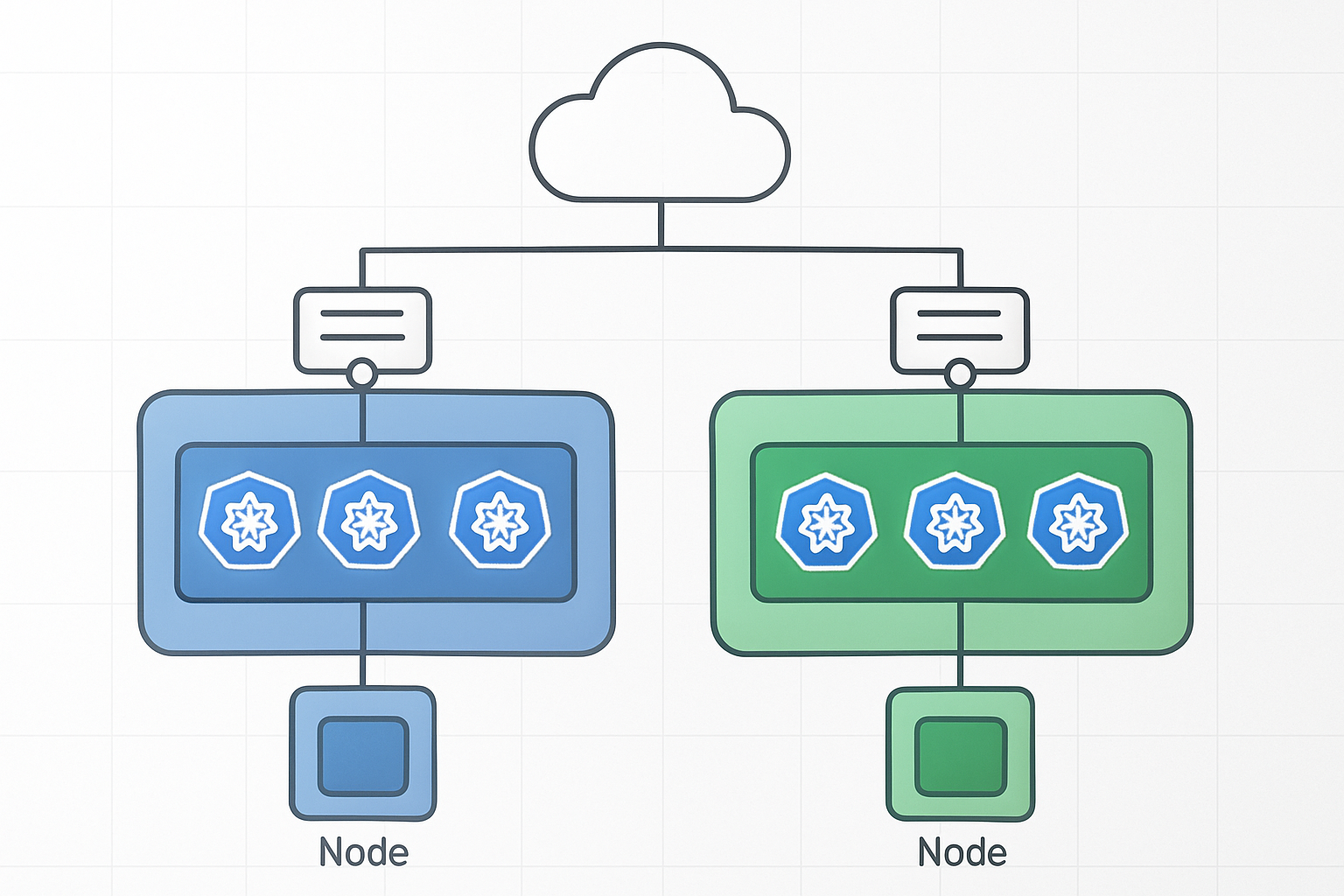
Setting up AWS EKS for blue green deployment requires careful planning of your cluster architecture. You can choose between running two separate EKS clusters or using a single cluster with namespace isolation. The dual-cluster approach offers complete environment separation but increases costs and management overhead. Single-cluster deployments with namespace-based separation provide resource efficiency while maintaining adequate isolation for most production workloads.
Resource allocation becomes critical when designing your EKS infrastructure for blue green deployments. Each environment needs sufficient compute capacity to handle peak traffic loads. Auto Scaling Groups should be configured to support rapid scaling events during traffic switches. Consider using spot instances for cost optimization, but ensure your production workloads can tolerate potential interruptions during deployment phases.
Load Balancer Configuration for Traffic Routing
Application Load Balancers serve as the traffic control mechanism for your blue green deployment strategy. Configure target groups for both blue and green environments, enabling seamless traffic switching through weighted routing rules. AWS ALB Controller automatically manages target group registration as pods come online, ensuring smooth transitions between deployment versions.
Network Load Balancers provide an alternative for applications requiring ultra-low latency or handling TCP traffic. The key advantage lies in their ability to preserve client IP addresses and handle millions of requests per second. Configure health checks with appropriate thresholds to prevent routing traffic to unhealthy instances during deployment transitions.
Container Registry Setup for Image Management
Amazon ECR provides the foundation for your blue green deployment image management strategy. Create separate repositories for different application components and implement proper tagging conventions. Use semantic versioning combined with environment tags to track deployments across blue and green environments. Enable image scanning to catch vulnerabilities before they reach production workloads.
Image lifecycle policies help manage storage costs by automatically removing old container images. Set retention rules that keep recent versions while cleaning up outdated builds. Consider cross-region replication for disaster recovery scenarios and faster image pulls in distributed deployments.
Network Policies and Security Group Configurations
Network policies define traffic flow rules between pods in your EKS cluster, creating microsegmentation for blue green environments. Implement policies that allow communication within each environment while restricting cross-environment traffic during deployments. Use Kubernetes NetworkPolicy resources with CNI plugins like Calico or AWS VPC CNI for granular traffic control.
Security groups act as virtual firewalls controlling traffic at the instance level. Create separate security groups for blue and green environments with identical rules but different targets. This approach enables quick traffic switches while maintaining security boundaries. Configure ingress rules for load balancer health checks and egress rules for database and external service connections.
Implementing Blue/Green Strategy with AWS Native Services

Application Load Balancer weighted target groups
AWS Application Load Balancer provides sophisticated traffic distribution capabilities for blue green deployment AWS EKS environments through weighted target groups. Configure two target groups representing your blue and green environments, starting with 100% traffic directed to the stable blue environment. During deployments, gradually shift traffic using weighted routing – begin with 10% to the green environment while monitoring application metrics and error rates. This approach enables safe validation of new releases before committing full traffic, supporting EKS zero downtime deployment objectives.
The weighted target group configuration integrates seamlessly with EKS services through proper health checks and service discovery mechanisms. Set up health check endpoints that accurately reflect application readiness, ensuring traffic routes only to healthy pods. Configure connection draining to handle in-flight requests gracefully during traffic shifts, preventing request failures during the transition period.
Route 53 DNS-based traffic switching
Route 53 weighted routing policies offer DNS-level traffic management for AWS EKS production deployment strategy implementations. Create multiple DNS records with identical names but different weights, allowing precise traffic distribution between blue and green environments. Start with weight values of 100 for blue and 0 for green, then adjust weights incrementally during deployments. This DNS-based approach provides an additional layer of control beyond load balancer routing, particularly valuable for multi-region deployments.
DNS-based switching works exceptionally well for canary releases and A/B testing scenarios within Kubernetes blue green deployment patterns. Configure low TTL values (60 seconds or less) to ensure rapid DNS propagation during traffic shifts. Monitor DNS resolution metrics and client-side caching behavior to verify traffic distribution accuracy across your user base.
AWS CodeDeploy integration for automated deployments
AWS CodeDeploy Blue/Green deployment configuration automates the entire traffic switching process for EKS workloads through native integration capabilities. Define deployment configurations specifying traffic shifting patterns, rollback triggers, and health check requirements. CodeDeploy orchestrates the creation of new target groups, registration of healthy targets, and gradual traffic migration according to your specified timeline – whether linear shifts over hours or immediate cutover scenarios.
The service provides built-in safety mechanisms including automatic rollback when health checks fail or CloudWatch alarms trigger. Configure deployment hooks to run custom validation scripts during traffic shifting phases, ensuring application-specific health criteria are met. This automation reduces manual intervention while maintaining strict safety controls for AWS container deployment best practices.
EKS service mesh implementation with AWS App Mesh
AWS App Mesh enhances blue green deployment pipeline capabilities by providing advanced traffic management at the service mesh level. Deploy virtual services with route configurations that direct traffic between blue and green versions of your applications. App Mesh enables fine-grained traffic splitting based on HTTP headers, request paths, or other routing criteria, offering more sophisticated deployment strategies than traditional load balancer approaches.
The mesh architecture provides comprehensive observability into traffic patterns and application performance during deployments. Configure distributed tracing and metrics collection to monitor request latency, success rates, and error patterns across both environments. App Mesh automatically handles service discovery and load balancing within the mesh, simplifying the operational complexity of managing multiple application versions during AWS EKS deployment automation workflows.
Production-Ready Deployment Pipeline Setup

CI/CD pipeline design for automated blue/green workflows
Modern AWS EKS production deployment strategy requires sophisticated automation that handles blue/green transitions seamlessly. GitLab CI/CD, AWS CodePipeline, or Jenkins can orchestrate EKS zero downtime deployment workflows by automatically provisioning green environments, running comprehensive test suites, and managing traffic switching between cluster versions.
The pipeline architecture should integrate AWS Load Balancer Controller for weighted traffic distribution, enabling gradual migration from blue to green environments. AWS EKS deployment automation tools like Argo CD or Flux provide GitOps capabilities, ensuring deployment consistency while maintaining rollback readiness through automated cluster state management.
Health check and readiness probe configuration
Kubernetes blue green deployment success depends on robust health verification mechanisms that prevent traffic routing to unhealthy pods. Configure readiness probes with appropriate initial delays and failure thresholds, typically setting initialDelaySeconds: 30 and periodSeconds: 10 for application startup validation.
Liveness probes should complement readiness checks by monitoring application health post-deployment, while startup probes handle slow-initializing containers in EKS production workloads scaling scenarios. AWS Application Load Balancer health checks must align with Kubernetes probe configurations, creating multiple validation layers that ensure traffic only reaches fully operational services.
Rollback mechanisms and failure detection systems
Automated rollback triggers should activate when deployment metrics exceed predefined thresholds, such as error rates above 1% or response times exceeding baseline performance. AWS EKS DevOps pipeline implementations can leverage CloudWatch alarms, Prometheus alerts, or custom metrics to detect deployment failures and initiate immediate traffic redirection to stable blue environments.
Database schema rollbacks require careful planning with backward-compatible migrations, feature flags for graceful degradation, and snapshot restoration procedures. AWS container deployment best practices include maintaining deployment history, implementing circuit breaker patterns, and establishing clear escalation procedures when automated rollback mechanisms encounter edge cases requiring manual intervention.
Database migration strategies for stateful applications
Blue green deployment pipeline complexity increases significantly with stateful applications requiring database schema changes. Implement migration strategies that maintain data consistency across environments, using techniques like dual-write patterns, database replication, or shared database approaches depending on application architecture and consistency requirements.
Kubernetes production deployment strategy for stateful workloads often employs database migration containers that run as pre-deployment jobs, applying schema changes before application updates. Consider using tools like Flyway or Liquibase for version-controlled migrations, paired with backup procedures and tested rollback scripts that handle schema downgrades when green environment deployment fails.
Monitoring and Observability Best Practices

Real-time metrics collection during deployment phases
Capturing granular performance data during blue/green deployment phases enables proactive identification of issues before they impact production traffic. Deploy CloudWatch Container Insights alongside Prometheus to monitor CPU, memory, and network metrics across both environments. Configure custom metrics dashboards to track deployment progression, including pod readiness times, application startup duration, and resource consumption patterns. Set up automated alerts for threshold breaches during the switching process to ensure immediate response to anomalies.
Application performance monitoring across environments
Monitor application health across blue and green environments using AWS X-Ray for distributed tracing and Application Performance Monitoring (APM) tools. Track key performance indicators like response times, error rates, and throughput differentials between environments. Implement synthetic monitoring to validate application functionality before traffic cutover, ensuring your AWS EKS production deployment strategy maintains service quality standards.
Log aggregation and distributed tracing setup
Centralize log collection using Fluent Bit or Fluentd to stream logs from both environments to CloudWatch Logs or Amazon OpenSearch. Configure structured logging with correlation IDs to trace requests across microservices during deployment transitions. Set up distributed tracing with AWS X-Ray or Jaeger to visualize request flows and identify bottlenecks. Create log-based alerts for error patterns and anomalies that could indicate deployment issues requiring immediate attention.
Cost Optimization and Resource Management

Dynamic scaling strategies for blue/green environments
Blue/green deployments on AWS EKS demand smart resource allocation to prevent cost overruns during parallel environment operations. Implement Horizontal Pod Autoscaler (HPA) and Vertical Pod Autoscaler (VPA) to automatically adjust resources based on actual traffic patterns rather than maintaining fixed capacity across both environments. Configure cluster autoscaling with different node groups for blue and green environments, allowing each to scale independently based on workload demands.
Resource cleanup automation for unused environments
Automated cleanup prevents zombie resources from accumulating costs after successful deployments. Use AWS Lambda functions triggered by deployment completion events to terminate unused blue/green environments, ensuring only active traffic-serving infrastructure remains operational. Implement resource tagging strategies with TTL (time-to-live) values and scheduled cleanup jobs that automatically decommission environments after predetermined periods.
Spot instance utilization for cost-effective deployments
Spot instances can reduce EKS production workloads scaling costs by up to 90% for non-critical blue/green environments during testing phases. Configure mixed instance types using AWS Node Groups with spot instances for development and staging blue/green deployments, while reserving on-demand instances for production traffic. Implement spot instance interruption handling through node draining and graceful pod rescheduling to maintain deployment reliability.
Multi-AZ deployment considerations for high availability
Multi-AZ blue green deployment AWS EKS configurations ensure business continuity while managing additional infrastructure costs. Deploy blue and green environments across multiple availability zones using EKS managed node groups, balancing high availability requirements with resource optimization. Configure cross-AZ load balancing and implement zone-aware pod scheduling to minimize inter-AZ data transfer costs while maintaining fault tolerance for AWS EKS production deployment strategy implementations.

Blue/green deployments give you the confidence to ship production changes without the sleepless nights. You’ve seen how AWS EKS makes this strategy manageable with its native services, from setting up dual environments to automating your deployment pipeline. The monitoring and observability tools help you catch issues early, while smart resource management keeps your costs under control.
Start small with a non-critical application to get comfortable with the process. Once your team masters the blue/green workflow, you’ll wonder how you ever deployed without this safety net. Your users get zero-downtime updates, your team gets peace of mind, and your business gets the agility it needs to stay competitive.









