

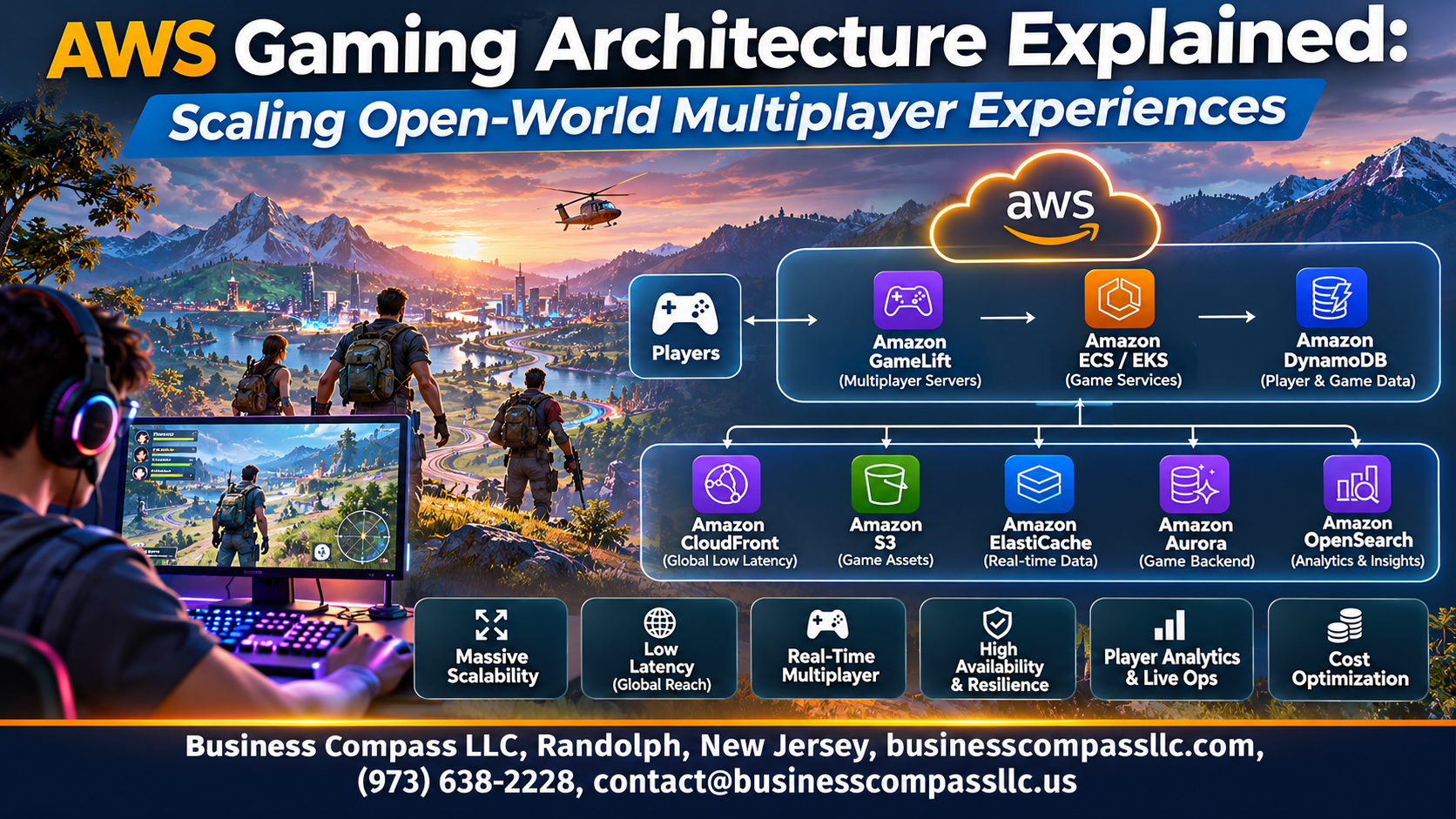
AWS Gaming Architecture Explained: Scaling Open-World Multiplayer Experiences
Building an open-world multiplayer game is tough. Thousands of players share one map, and every lag spike or crash gets noticed. This guide to AWS gaming architecture is for game developers, backend engineers, and technical leads who want a clear picture of how the pieces fit together.
We’ll cover three things:
- Low-latency compute: how dedicated game servers and Amazon GameLift keep gameplay smooth.
- Scaling for surges: how to handle launch-day crowds without overspending.
- Persistent world data: how to store player progress and world state so nothing gets lost.
We’ll also touch on networking, analytics, and security along the way. Let’s get into it.
Build a Strong Foundation for Open-World Multiplayer

Understand Core Requirements for Persistent Worlds
Persistent worlds need low latency, constant state, and room for sudden player spikes.
Map Key AWS Services to Gaming Workloads
- Amazon GameLift: dedicated game servers
- DynamoDB: player data
- ElastiCache: fast state
Choose the Right Architecture Pattern for Your Game
Pick sharded, seamless, or instanced designs based on player density.
Deliver Low-Latency Compute with Dedicated Game Servers

Host Game Sessions with Amazon GameLift
Amazon GameLift runs dedicated game servers, handling matchmaking, session placement, and autoscaling.
Optimize Instance Selection
Pick compute-optimized or Graviton instances, and mix in Spot to cut costs.
Place Servers Closer to Players
Deploy across Regions and Local Zones to cut latency.
Use Containers and Kubernetes
Run flexible fleets on EKS or GameLift containers.
Scale Seamlessly to Handle Player Surges

Configure Auto Scaling for Predictable and Sudden Demand
Use scheduled scaling for known peaks and target-tracking policies for surprise spikes in Amazon GameLift.
Use Fleet Management and Spot Instances to Cut Costs
Run Spot Instances for most capacity, backed by On-Demand for stability.
Shard and Partition the World for Smooth Population Growth
Split regions into zones so no server gets overloaded.
Load Test Early to Prevent Launch-Day Failures
Simulate thousands of bots before launch to find weak spots.
Keep Players Connected with Optimized Networking

Reduce Latency with Global Accelerator and Edge Locations
Global Accelerator routes players onto AWS’s backbone at the nearest edge, cutting jitter and lag.
Match Players Quickly with FlexMatch Matchmaking
FlexMatch groups players by skill, latency, and rules.
Protect Gameplay with DDoS Defense Using Shield
Shield Advanced absorbs attacks before they hit servers.
Maintain Stable Sessions Across Unreliable Connections
Use reconnect tokens and session caching so dropped players rejoin seamlessly.
Manage Persistent World Data Reliably

Store Player Profiles and Inventories in DynamoDB
Use DynamoDB for fast, scalable persistent world data storage, with player IDs as partition keys.
Accelerate State Access with ElastiCache
Put hot data in ElastiCache for Redis to cut read latency.
Sync Real-Time World State Across Servers
Use Redis pub/sub or streams to share updates between servers.
Safeguard Progress with Backup and Recovery Strategies
Turn on point-in-time recovery and AWS Backup.
Power Smarter Gameplay with Analytics and Live Operations

Stream Telemetry Data with Kinesis
Send player events to Kinesis Data Streams for real-time game analytics.
Gain Player Insights with Data Lakes and Analytics Tools
Store raw data in S3, then query it with Athena or Redshift.
Detect Issues Faster with Monitoring and Observability
Use CloudWatch alarms and dashboards to catch lag spikes early.
Personalize Experiences Using Machine Learning
Train SageMaker models for matchmaking, offers, and churn prediction.
Secure and Optimize Your Game Backend

Authenticate Players Safely with Amazon Cognito
Use Cognito for sign-in, social logins, and short-lived tokens.
Prevent Cheating and Fraud with Backend Controls
Keep game logic server-authoritative and validate every client action.
Control Spending with Cost Monitoring and Optimization
Track spend with Cost Explorer, budgets, and Spot Instances.
Automate Deployments Using CI/CD and Infrastructure as Code
Ship safely with CodePipeline and CloudFormation.

Building an open-world multiplayer game on AWS comes down to a few things working together. You need a solid foundation, dedicated servers that keep lag low, and scaling that handles player surges without a hiccup. Add smart networking to keep everyone connected, reliable storage for your persistent world, and analytics to guide your live updates. Then wrap it all in strong security so your backend stays safe and cost-efficient.
You don’t have to get everything perfect on day one. Start small, load test early, and watch how real players behave. Then tweak your setup as your world grows. Pick one area from this list, like scaling or data, and improve it this week. Your players will notice the difference long before they ever think about what’s running behind the scenes.