

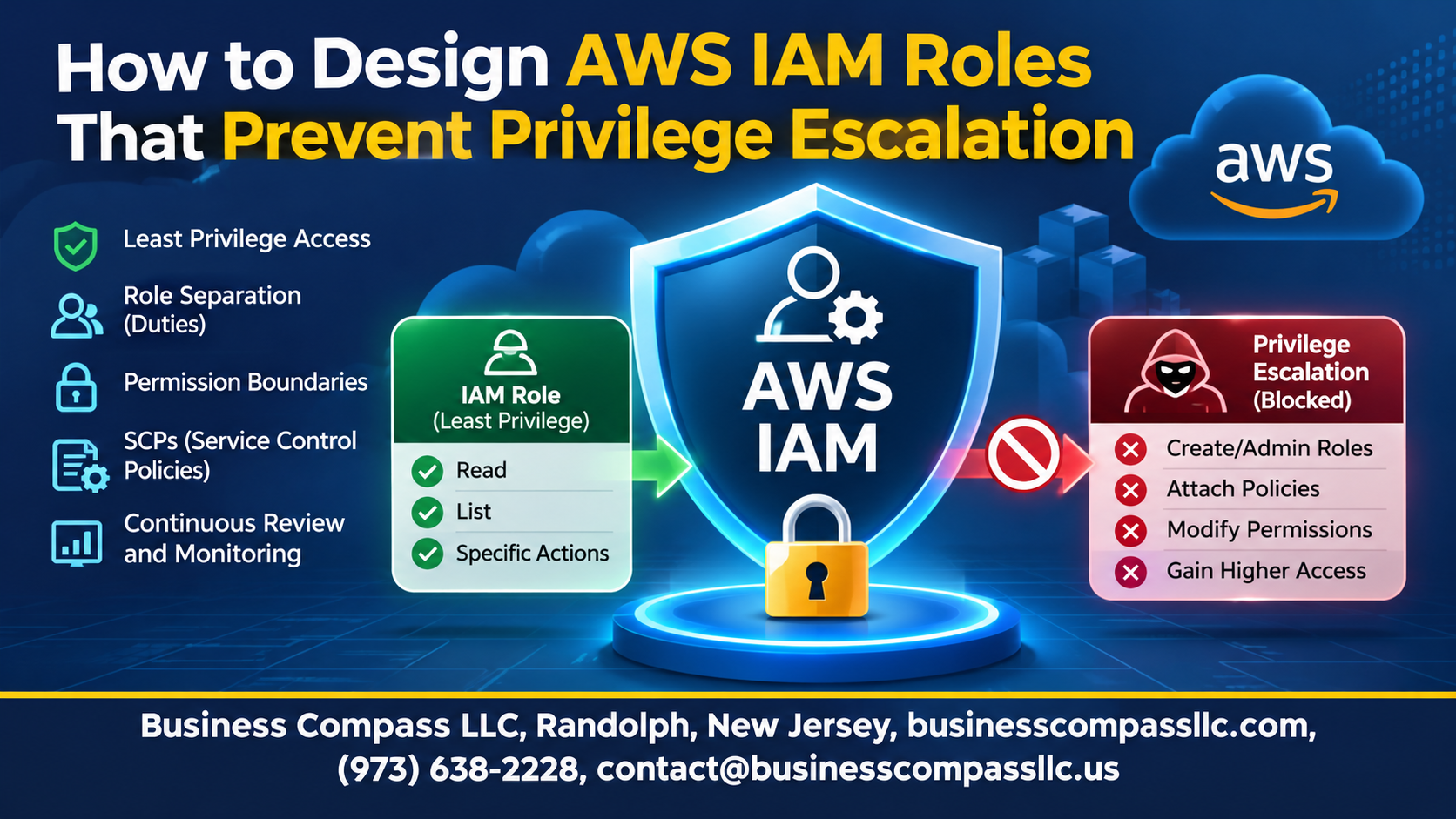
If you’ve ever wondered how one over-permissioned role can turn into full admin access, you’re in the right place. This guide is for cloud engineers, DevOps teams, and security folks who build and manage AWS IAM roles and want to prevent privilege escalation in AWS before it bites.
AWS IAM privilege escalation usually isn’t a big, flashy hack. It’s a small permission, like iam:PassRole or iam:CreatePolicyVersion, that lets someone grant themselves more than they should have. The fix starts with solid IAM role design best practices.
Here’s what we’ll cover:
- How escalation happens and how to apply AWS least privilege. You’ll learn the common paths attackers use and how to shrink permissions so those paths close.
- How to build guardrails. We’ll tighten each IAM role trust policy and set limits with IAM permissions boundaries and AWS SCP guardrails.
- How to catch problems early. You’ll see how to detect privilege escalation in AWS through monitoring, testing, and automation.
Follow along and you’ll walk away with a practical checklist of AWS IAM security best practices you can use this week.
Understand How Privilege Escalation Happens in AWS

Spot the Risky IAM Permissions Attackers Exploit
Watch for iam:PassRole, iam:CreatePolicyVersion, iam:AttachRolePolicy, and sts:AssumeRole.
Recognize Common Escalation Paths Before They Strike
Attackers chain these permissions to grant themselves admin access.
Assess the Business Impact of Unchecked Role Permissions
One loose role can mean data breaches, downtime, and compliance failures.
Build a Strong Foundation with Least Privilege

Start Minimal
Grant nothing at first, then add permissions only when something breaks.
Use Access Analyzer
Generate policies from CloudTrail activity and trim unused permissions.
Ditch Wildcards
Name exact actions and resource ARNs instead of “*”.
Separate Duties
Give deployers, auditors, and admins their own roles.
Lock Down Dangerous IAM Actions

A. Restrict iam:PassRole to Approved Roles and Services
- Scope PassRole to specific role ARNs, and add iam:PassedToService conditions.
B. Limit Policy and Role Modification Rights
- Deny CreatePolicyVersion, AttachRolePolicy, and PutRolePolicy for everyone except admins.
C. Control sts:AssumeRole Access with Precise Conditions
- Require trusted principals, MFA, and external IDs.
D. Block Creation of New Users, Keys, and Login Profiles
- Deny CreateUser, CreateAccessKey, and CreateLoginProfile outside break-glass roles.
E. Guard Against Lambda and EC2 Role-Passing Abuse
- Limit lambda:CreateFunction and ec2:RunInstances to approved roles.
Secure Trust Relationships

Define Narrow Trust Policies
- Name exact role ARNs as principals, never account roots.
Require External IDs and Conditions
- Add ExternalId and aws:PrincipalOrgID for third parties.
Block Unintended Principals
- Avoid wildcards; require matching conditions.
Use Session Tags and Source Identity
- Tag sessions and set SourceIdentity to trace actions.
Set Guardrails with Permissions Boundaries and SCPs

A. Apply Permissions Boundaries to Cap Delegated Admin Power
Boundaries set the maximum permissions a role can ever hold, even if someone attaches AdministratorAccess.
B. Enforce Organization-Wide Limits with Service Control Policies
SCPs block risky actions across accounts, like disabling CloudTrail.
C. Require Boundaries on Any Role Created by Developers
Use iam:CreateRole conditions requiring your boundary ARN.
D. Test Guardrails to Confirm They Cannot Be Bypassed
Try removing boundaries and creating unbounded roles. Both should fail.
Strengthen Role Usage with Conditions and Short-Lived Access

Enforce MFA for Sensitive Role Assumptions
Require aws:MultiFactorAuthPresent in trust policies for admin roles, so stolen keys alone can’t assume them.
Restrict Access by IP, VPC, and Region
Use aws:SourceIp, aws:SourceVpc, and aws:RequestedRegion conditions to limit where role activity can come from.
Shorten Session Durations to Reduce Exposure
Set short MaxSessionDuration values, so leaked credentials expire fast.
Monitor, Detect, and Respond to Escalation Attempts

Track IAM Changes with CloudTrail and EventBridge
Send CloudTrail events to EventBridge and watch for PutRolePolicy, AttachRolePolicy, and UpdateAssumeRolePolicy.
Alert on Suspicious Role Assumptions and Policy Edits
Flag unusual AssumeRole calls and policy edits to catch AWS IAM privilege escalation early.
Automate Remediation of Risky Permission Changes
Trigger Lambda to revert risky changes automatically.
Review Access Regularly with Last-Accessed Data
Use last-accessed data to trim unused permissions.
Validate Your Design Through Testing and Automation

A. Simulate Escalation Paths with Policy Simulator and Pentesting Tools
Test roles like an attacker would. Use IAM Policy Simulator for risky actions like iam:PassRole, then run Pacu or PMapper to map escalation paths.
B. Scan Infrastructure as Code for Risky IAM Patterns
Run Checkov or cfn-nag on Terraform and CloudFormation to catch wildcard permissions.
C. Add IAM Policy Checks to CI/CD Pipelines
Add IAM Access Analyzer policy validation to pipelines, and fail builds on risky changes.

Privilege escalation in AWS usually isn’t one big mistake. It’s a handful of small ones stacking up: a role that can pass other roles, a trust policy that’s too loose, or a permission nobody remembered to remove. The fix is just as down to earth. Stick to least privilege, lock down risky IAM actions like iam:PassRole and iam:AttachRolePolicy, and keep your trust relationships tight. Then add guardrails with permissions boundaries and SCPs so even a bad policy can’t do much damage.
Don’t stop at the design, though. Use conditions and short-lived credentials to limit how roles get used, and keep an eye on CloudTrail and alerts so you catch odd behavior early. Test your setup regularly and automate the checks so problems don’t creep back in.
So pick one thing today. Review your most powerful roles, see who can assume them, and trim what they don’t need. Small cleanups add up fast, and they make it much harder for anyone to climb where they shouldn’t.