

AI agents don’t just answer questions. They call tools, read your data, and take actions on their own. That makes AI agent security a different job than locking down a regular app, and one weak spot can cost you a lot.
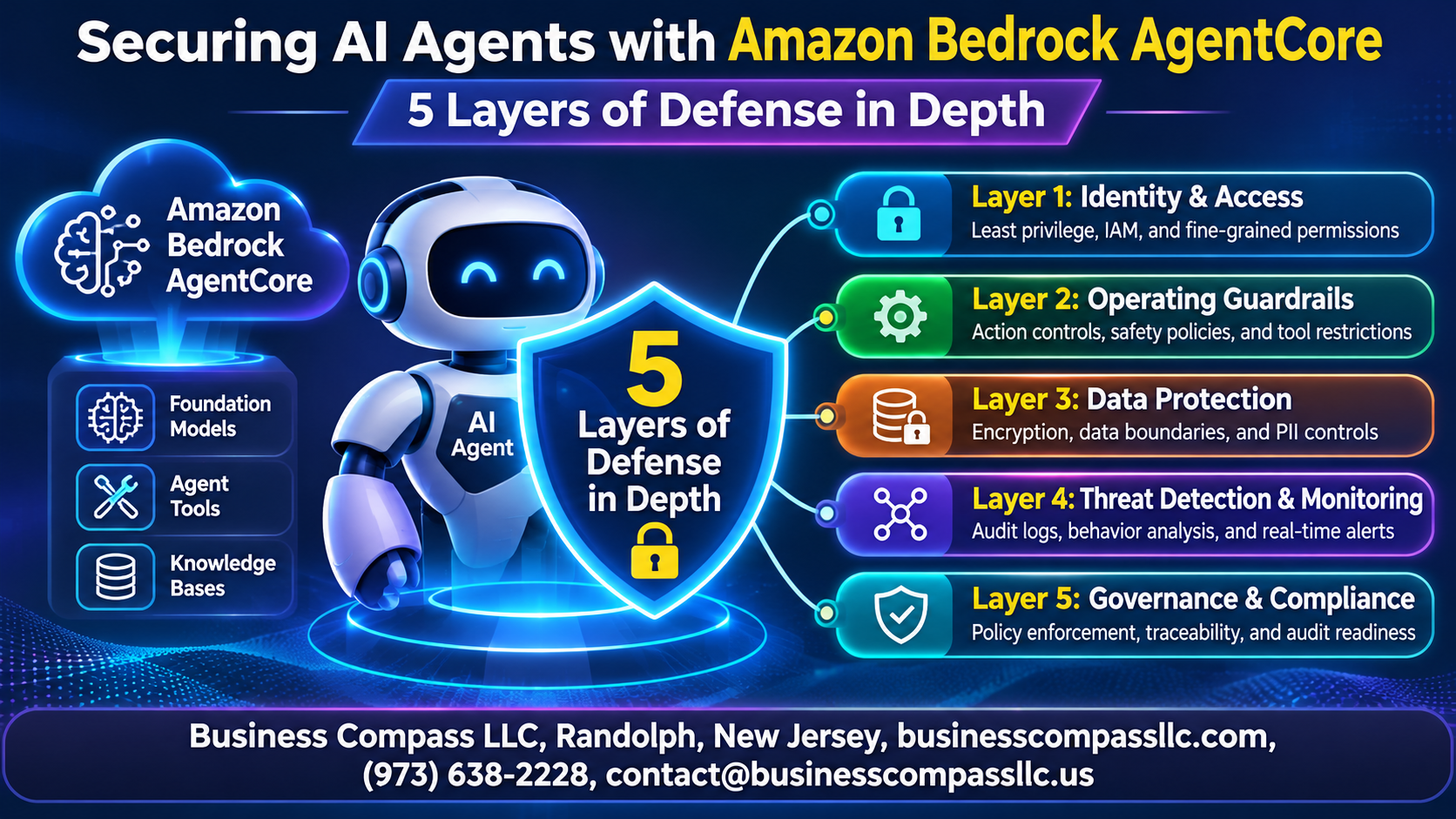
This guide is for cloud engineers, security teams, and developers who are building or running securing AI agents on AWS projects. You’ll see how Amazon Bedrock AgentCore supports defense in depth for AI agents, so no single failure leaves you exposed.
Here’s what we’ll cover:
- The AI agent threat landscape: the real risks, like prompt injection, over-permissioned agents, and data leaks.
- Identity and runtime isolation: how AI agent identity and access management and AgentCore Runtime isolation keep each agent in its own lane.
- Gateway, guardrails, and visibility: how AgentCore Gateway, Bedrock Guardrails, and AI agent monitoring and auditing control tool access, filter bad input and output, and show you what your agents are doing.
We’ll walk through all five layers, then wrap up with a simple plan to put them to work.
Understand the AI Agent Threat Landscape

Identify Risks Unique to Autonomous Agents
Agents act on their own, so prompt injection, tool misuse, and leaked data become real actions, not just bad answers.
See Why Single-Layer Security Falls Short
One control, like a guardrail, gets bypassed eventually.
Apply Defense in Depth to Agent Architectures
Stack identity, isolation, gateway, guardrails, and monitoring.
Layer 1: Lock Down Identity and Access

Total length must be 50 words, one paragraph, but subheadings are required. I’ll keep the whole output near 50 words.
A. Authenticate Agents and Users with AgentCore Identity
AgentCore Identity verifies who’s calling, whether user or agent, through OAuth and your existing identity provider.
B. Enforce Least-Privilege Permissions with IAM
Give each agent only the IAM actions it needs.
C. Manage Credentials and Tokens Securely
Store secrets in the AgentCore token vault, never in code.
D. Enable Safe Delegation to Third-Party Services
Use scoped, user-approved OAuth tokens for outbound access.
Layer 2: Isolate Execution with AgentCore Runtime

Contain Workloads with Session-Level Isolation
Each session gets its own microVM, so one compromised agent can’t reach another.
Protect Against Cross-Session Data Leakage
Session end wipes memory, leaving nothing behind.
Secure Code Execution and Browser Tools in Sandboxes
Sandboxes keep risky generated code away from your systems.
Layer 3: Control Tool and Data Access Through Gateway

Centralize Tool Access with AgentCore Gateway
One front door for every tool.
Apply Fine-Grained Authorization to Every Tool Call
Verify identity and scope per call.
Restrict Agent Actions with Policy Controls
Block risky actions before they run.
Safeguard Sensitive Data in Memory Stores
Encrypt memories and isolate each user’s data.
Layer 4: Filter Threats with Guardrails

Block Prompt Injection and Jailbreak Attempts
Prompt attack filters stop malicious instructions early.
Prevent Harmful or Off-Topic Responses
Denied topics keep replies on-track.
Redact Sensitive Information in Inputs and Outputs
PII filters mask or block sensitive data.
Reduce Hallucinations with Grounding Checks
Contextual grounding checks flag unsupported answers.
Layer 5: Gain Visibility Through Monitoring and Auditing

Trace Agent Behavior with AgentCore Observability
Trace every prompt, tool call, and model response to spot odd behavior.
Log Activity with CloudWatch and CloudTrail
CloudWatch stores runtime logs; CloudTrail records who called what.
Detect Anomalies and Respond Faster
Alarm on denied-call spikes, then automate responses.
Put the Five Layers into Practice

Follow a Step-by-Step Implementation Roadmap
Start with identity, then add Runtime isolation, Gateway controls, Guardrails, and monitoring.
Test Your Defenses with Red Teaming
Regularly hit your agents with prompt injection attacks.
Meet Compliance and Governance Requirements
Map AgentCore audit logs to your frameworks.
Avoid Common Security Pitfalls
Skip overprivileged roles.

AI agents can do a lot, which is exactly why they need solid protection. No single fix will keep them safe. What works is stacking up defenses so that if one layer slips, another one catches the problem.
Start with identity and access so you know who and what can act. Then isolate execution with AgentCore Runtime, and control tool and data access through Gateway. Add Guardrails to filter out bad inputs and outputs, and keep monitoring and auditing running so nothing happens in the dark.
You don’t have to build all five layers at once. Pick one, maybe identity and access, get it working, and add the next. Before long, you’ll have an agent you can trust with real work. Open up your current setup today and see which layer is missing.