


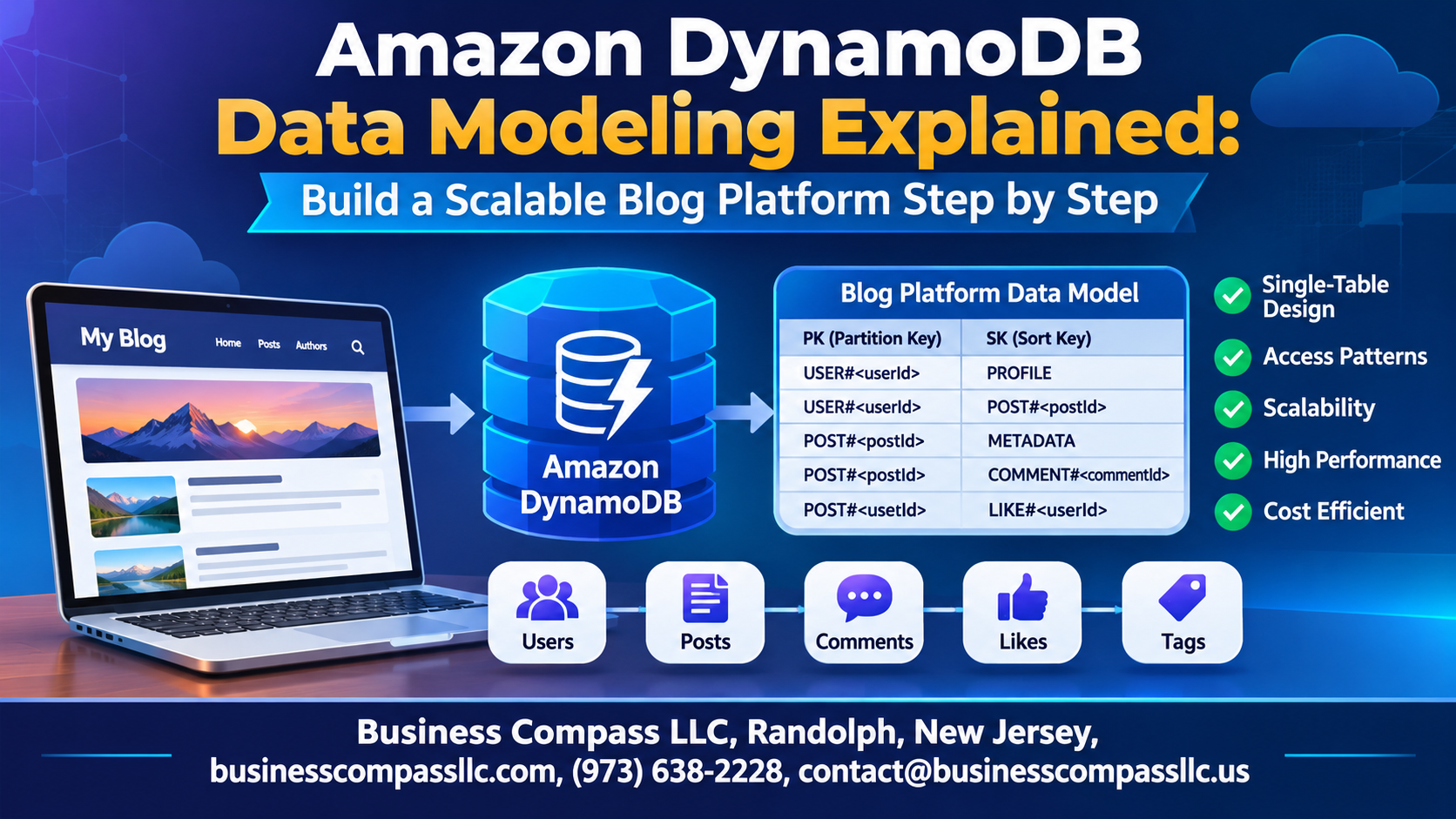
Stop Overcomplicating Your Database — DynamoDB Data Modeling Done Right
If you’ve ever tried to design a NoSQL database and ended up with a tangled mess of tables, slow queries, and a growing AWS bill, you’re not alone. Most developers hit the same wall when they first work with Amazon DynamoDB — they bring relational database thinking into a NoSQL world, and things fall apart fast.
This guide is for backend developers, cloud engineers, and developers building real-world applications who want a straight path through DynamoDB data modeling without the hand-wavy theory. You don’t need a computer science degree to follow along — just a basic understanding of AWS and a project you actually want to build.
We’re using a blog platform as the hands-on example throughout, because it touches everything you’ll run into on a real project: users, posts, comments, tags, and relationships between them all.
Here’s what we’ll walk through together:
- DynamoDB single table design — why cramming everything into one table is actually the smart move, not a lazy one
- Partition key design and schema planning — how to structure your data so queries stay fast no matter how much traffic hits your app
- Global secondary indexes — how to unlock query patterns that your base table can’t handle on its own
By the end, you’ll have a production-ready DynamoDB schema for a scalable blog platform and a mental model you can carry into your next project.
Let’s get into it.
Why DynamoDB Is Built for Scale and Speed

Key Differences Between DynamoDB and Traditional Relational Databases
DynamoDB skips rigid schemas and JOIN operations, storing data as flexible key-value or document pairs. Unlike SQL databases, it scales horizontally across partitions automatically.
When to Choose DynamoDB Over SQL
Pick DynamoDB when traffic spikes unpredictably and low-latency reads matter most.
Core Benefits for a Blog Platform
- Millisecond response times
- Auto-scaling storage
Essential DynamoDB Concepts You Must Understand First

Tables, Items, and Attributes Explained Simply
DynamoDB stores data in tables, containing items (rows) with flexible attributes (fields). Unlike SQL, each item can have different attributes.
Primary Keys, Partition Keys, and Sort Keys Demystified
- Partition key: routes data to storage nodes
- Sort key: enables range queries within a partition
Read/Write Capacity and Indexes
Choose on-demand or provisioned capacity based on traffic predictability. Global Secondary Indexes unlock alternative query patterns beyond your primary key.
Defining the Data Requirements for Your Blog Platform

Identifying Core Entities
Your blog needs users, posts, comments, and tags.
Mapping Access Patterns
- Fetch posts by user
- List comments per post
- Filter posts by tag
Why Planning Access Patterns Matters
Skipping this step in DynamoDB data modeling forces painful, expensive schema rewrites later — your NoSQL schema design must follow your queries, not the other way around.
Designing the Single-Table Schema for Maximum Efficiency

Why Single-Table Design Outperforms Multi-Table Approaches
DynamoDB shines brightest when you collapse all entity types—users, posts, comments—into one table. This cuts expensive cross-table joins, slashes latency, and keeps costs low. Use generic keys like PK and SK with prefixes (USER#, POST#) to separate entities cleanly while supporting flexible, lightning-fast queries.
Leveraging Global Secondary Indexes to Unlock Powerful Queries

When and Why to Add a Global Secondary Index
Add a GSI when your DynamoDB single table design can’t answer a query without scanning everything. For a blog platform, fetching posts by author or tag requires GSIs—your base table’s partition key won’t cut it.
Designing GSIs for Author and Tag-Based Lookups
- AuthorIndex:
AuthorIDas partition key,CreatedAtas sort key - TagIndex:
Tagas partition key,PostIDas sort key
Balancing Index Costs Against Performance
Each GSI replicates data, raising storage and write costs—only index attributes you actively query.
Implementing Pagination and Sorting for a Better User Experience

Using LastEvaluatedKey to Paginate Posts Efficiently
DynamoDB returns LastEvaluatedKey when results exceed your page limit. Pass it as ExclusiveStartKey in your next query to fetch the next page.
Sorting Blog Posts by Date Using Sort Key Design
Prefix sort keys with timestamps: POST#2024-01-15T10:00:00Z enables chronological DynamoDB query optimization automatically.
Displaying Results in Reverse Chronological Order
Set ScanIndexForward: false — done.
Writing and Reading Data Efficiently in Your Blog Platform

Using PutItem and UpdateItem to Manage Posts and Comments
Use PutItem for creating new posts and UpdateItem for editing content or incrementing comment counts atomically.
Fetching Data with GetItem and Query
GetItempulls a single post by partition keyQueryretrieves all comments under a post efficiently
Avoiding Expensive Scans
Never run Scan in production — it reads every item, destroying performance and budget.
Condition Expressions
Prevent duplicate slugs using attribute_not_exists(PK) before writing.
Testing, Monitoring, and Optimizing Your DynamoDB Setup

Using DynamoDB Local
Run DynamoDB Local on your laptop to test schemas and queries for free.
Reading CloudWatch Metrics
Watch throttled requests and consumed capacity to catch hot partitions early.
Applying Auto Scaling
Set target utilization around 70% so traffic spikes don’t crash your blog.

DynamoDB can feel weird at first, especially if you’re used to relational databases. But once you get the basics down, it all starts to click. Know your access patterns up front, build a single-table schema around them, and add Global Secondary Indexes for the queries that don’t fit your main keys. Pagination and sorting keep your blog feeling fast for readers, and smart reads and writes keep your costs in check.
Your work doesn’t stop once the tables are live, though. Test your queries, watch your metrics, and tweak things as your blog grows. Small fixes early on can save you big headaches later.
So fire up the AWS console and build a small version of this blog platform. Start with a few posts and comments, play with the queries, and see what breaks. That’s the fastest way to make DynamoDB data modeling feel natural.