

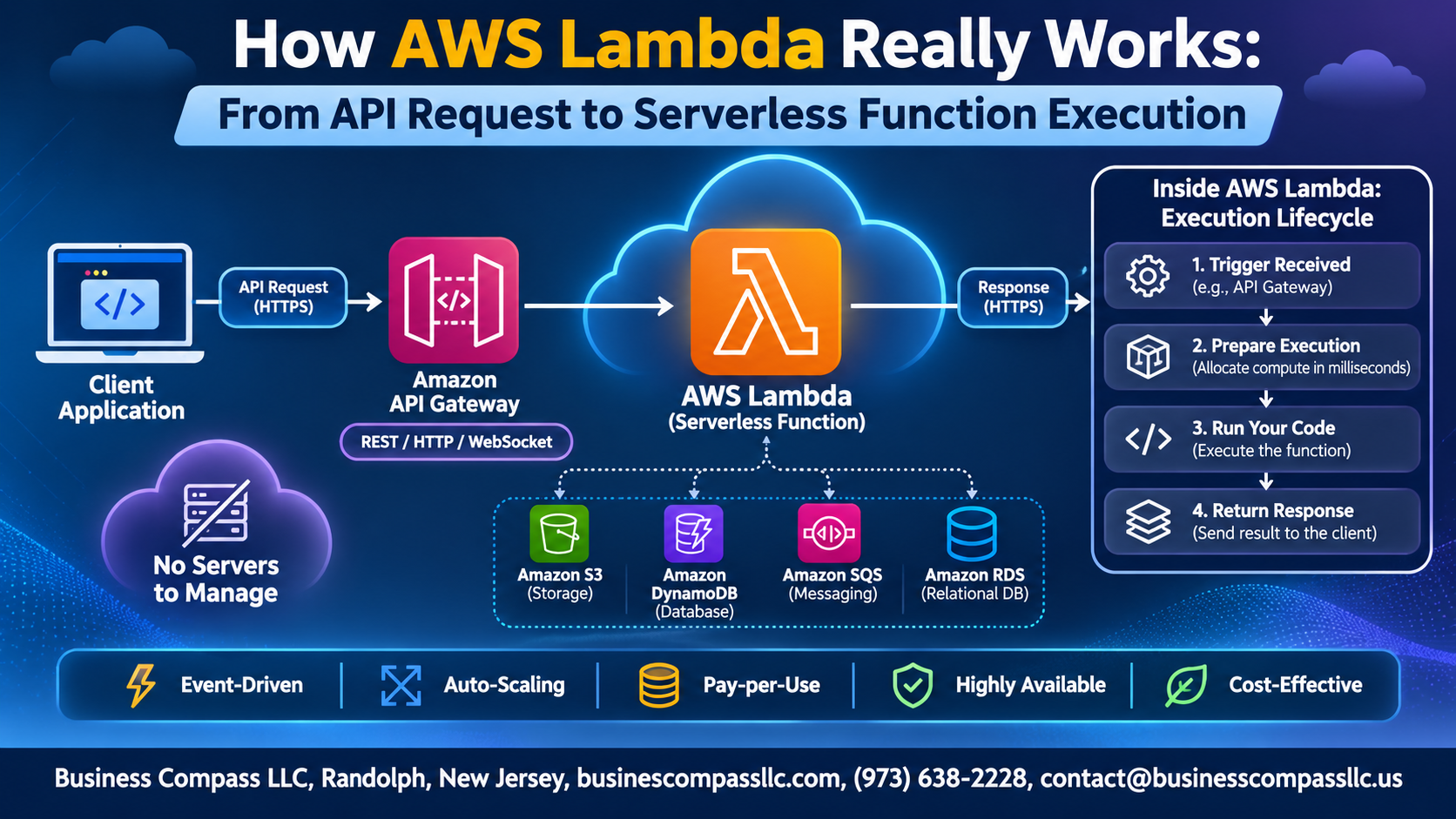
Ever hit “deploy” on an AWS Lambda function and wondered what actually happens when a request comes in? You’re not alone. This guide explains how AWS Lambda works, step by step, from the first API call to serverless function execution.
It’s written for developers, DevOps engineers, and tech leads who use Lambda but want to understand what’s going on behind the scenes.
Here’s what we’ll cover:
- The request path: How an API Gateway Lambda integration passes a request along, and how Lambda decides where to run it.
- Inside the Lambda execution environment: What happens when your code starts up, why an AWS Lambda cold start slows things down, and how to fix it.
- Running it in the real world: How AWS Lambda scaling and cost work, how error handling and retries behave, and how to monitor AWS Lambda with CloudWatch.
By the end, you’ll have a clear picture of the AWS Lambda architecture, so you can build faster, cheaper, and more reliable functions.
Understand the Lambda Foundation Before You Build

Learn What Serverless Really Means
Servers still exist; AWS just runs them for you.
See How Lambda Fits Into the AWS Ecosystem
Lambda connects services like API Gateway, S3, and DynamoDB.
Grasp the Event-Driven Model Behind Every Function
Every function runs only when an event, like an API request, triggers it.
Follow the Request From Client to AWS Entry Point

Trace How API Gateway Receives and Validates Requests
API Gateway accepts the HTTPS call, checks the route, method, and payload against your rules, and throttles extras.
Understand Authentication and Authorization at the Edge
IAM, Cognito, or Lambda authorizers verify callers before your function ever runs.
See How Requests Map to Lambda Integrations
Proxy integration passes the whole request to Lambda as an event.
Compare Synchronous and Asynchronous Invocation Paths
- Synchronous: the caller waits for the response.
- Asynchronous: Lambda queues the event and retries on failure.
Discover How Lambda Routes and Schedules Your Invocation

Explore the Lambda Invoke API and Control Plane
Lambda’s Invoke API authenticates your call, then hands it to the data plane for routing.
Learn How Lambda Finds or Creates Capacity
Lambda reuses a warm execution environment or starts a new one.
Understand Internal Queues and Event Pollers
Async events wait in internal queues. Pollers pull from SQS, Kinesis, and similar sources.
See How Throttling and Concurrency Limits Protect Your Workloads
Concurrency limits cap runaway scaling and return 429 throttles.
Uncover What Happens Inside the Execution Environment

Inside the Execution Environment
Lambda runs your code in Firecracker microVMs for tight isolation. During init, it downloads your code, starts the runtime, and runs setup code. Each invoke then calls your handler. Afterward, the environment freezes, gets reused for warm starts, and eventually shuts down.
Tame Cold Starts for Faster Responses

Identify What Causes Cold Starts
Cold starts happen when Lambda builds a new execution environment: downloading code, starting the runtime, and running init code.
Reduce Latency With Provisioned Concurrency
Provisioned concurrency keeps environments warm and ready.
Speed Up Startup With SnapStart and Lean Packages
SnapStart restores cached snapshots; smaller packages load faster.
Choose Runtimes and Memory Settings That Boost Performance
Pick lightweight runtimes, and add memory for more CPU.
Manage Resources, Scaling, and Cost With Confidence

Match Memory and CPU Allocation to Your Workload
Lambda ties CPU to memory, so more memory means faster execution. Test with power-tuning tools to find your sweet spot.
Scale Automatically Without Overspending
Lambda adds environments as traffic grows. Use reserved concurrency to cap spikes and protect downstream databases.
Understand the Billing Model Down to the Millisecond
You pay per request plus GB-seconds, billed by the millisecond.
Apply Timeouts and Limits to Prevent Surprises
Set realistic timeouts, up to 15 minutes, to stop runaway functions.
Handle Responses, Errors, and Retries Reliably

Return Results Back Through API Gateway
Lambda’s return value flows to API Gateway, which maps it to an HTTP response, so include statusCode, headers, and body.
Manage Errors and Automatic Retries
Async invocations retry twice; stream sources retry until success or expiry.
Capture Failures With Dead-Letter Queues and Destinations
Send failed events to SQS, SNS, or EventBridge.
Design Idempotent Functions for Safe Reprocessing
Use unique request IDs so retries don’t duplicate work.
Monitor and Troubleshoot Executions Like a Pro

Use CloudWatch Logs and Metrics for Instant Visibility
Lambda sends every log line and metric to CloudWatch automatically. Watch Errors, Duration, Throttles, and ConcurrentExecutions.
Trace End-to-End Requests With AWS X-Ray
Turn on active tracing to see each hop, from API Gateway to downstream calls, and spot slow segments.
Debug Common Performance and Permission Issues
Slow? Check memory, cold starts, timeouts. Access denied? Fix the execution role.

Lambda can feel like magic until you see what’s going on behind the curtain. A request hits an AWS entry point, gets routed and scheduled, then lands in an execution environment that spins up (or reuses) just enough to run your code. Cold starts, memory settings, scaling, and cost all tie back to that simple flow. Once you get it, the quirks stop being surprises.
The same goes for what happens after your function runs. Responses, errors, and retries each have their own rules, and logs and metrics are your best friends when something goes sideways. Knowing where to look saves you hours of guessing.
So here’s your next step: open one of your own Lambda functions and trace its path from request to response. Check the cold start time, tweak the memory, and peek at the logs in CloudWatch. A little hands-on poking will teach you more than any diagram ever could.