One Misconfigured IAM Policy Can Hand Attackers the Keys to Your AWS Account
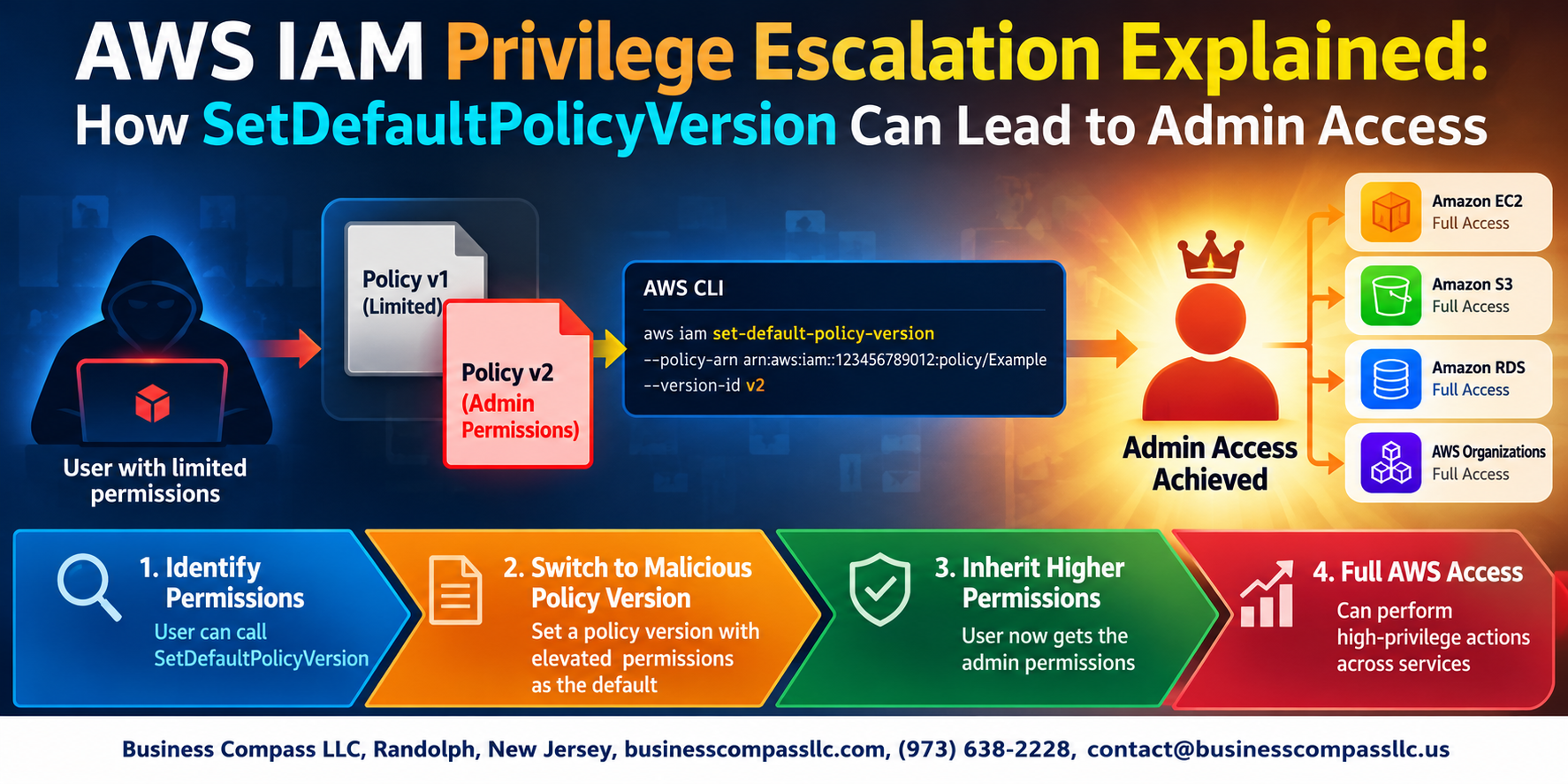
If you manage AWS environments, this is something you need to know about. AWS IAM privilege escalation through SetDefaultPolicyVersion is one of those attack paths that looks harmless on the surface but can quietly give an attacker full admin access — without ever touching your root credentials.
This guide is for cloud engineers, DevOps teams, and security practitioners who want to understand exactly how IAM policy versioning can be weaponized and what to do about it.
Here’s what we’ll walk through:
- How the SetDefaultPolicyVersion attack actually works — including a step-by-step breakdown of how an attacker moves from limited permissions to admin access
- How to spot this abuse in your environment — the specific logs, events, and signals that tell you something’s off
- Practical ways to prevent AWS privilege escalation — covering IAM security best practices you can implement right now
No fluff, no theory for theory’s sake. Just clear, actionable information so you can understand the risk, catch it early, and lock things down before someone else does it for you.
Let’s get into it.
Understanding AWS IAM and Policy Versioning

What AWS IAM Is and Why It Matters for Cloud Security
AWS IAM controls who can do what inside your AWS account. Without tight IAM controls, attackers can quietly escalate privileges. IAM policy versioning lets you maintain up to five policy versions, and SetDefaultPolicyVersion switches the active version — a capability that opens a serious AWS IAM privilege escalation path when misused.
The Privilege Escalation Threat Explained

What Privilege Escalation Means in AWS Environments
Privilege escalation happens when a low-permission user gains higher access than intended.
Why SetDefaultPolicyVersion Creates a Security Loophole
This permission lets users swap in older, permissive policy versions—potentially granting admin access silently.
The Conditions That Make This Attack Possible
- Existing policy with a permissive version
iam:SetDefaultPolicyVersiongranted to the attacker
Step-by-Step Walkthrough of the Attack

A. Identifying a Vulnerable IAM Configuration
An attacker with iam:SetDefaultPolicyVersion permission can silently escalate privileges by switching to an older, more permissive policy version — no new resources needed.
- Check attached policies using
aws iam list-attached-user-policies - Spot policies with multiple versions via
aws iam list-policy-versions
Detecting SetDefaultPolicyVersion Abuse in Your Environment

Key AWS CloudTrail Events to Monitor
iam:SetDefaultPolicyVersioniam:CreatePolicyVersion
Using AWS Config Rules to Flag Risky Changes
Set up Config rules detecting policy version switches on high-privilege roles.
Behavioral Indicators of IAM Admin Access Exploit
Watch for rapid version changes on existing policies, especially outside business hours — a classic AWS IAM privilege escalation signal.
Proven Strategies to Prevent This Privilege Escalation

A. Least Privilege for IAM Roles
Grant only what’s needed—nothing extra.
B. Restrict SetDefaultPolicyVersion
Explicitly deny this action for non-admin roles to block IAM policy versioning security gaps.
C. Permission Boundaries
Cap blast radius so even compromised roles can’t escalate.
D. Audit Policy Versions
Delete unused versions regularly to eliminate hidden IAM admin access exploit paths.
Building a Stronger IAM Security Posture Long Term

Automating IAM Compliance Checks with Security Tools
Use AWS Config rules and Security Hub to flag risky IAM changes automatically.
Training Development and DevOps Teams on IAM Best Practices
Regular training cuts AWS IAM privilege escalation risks significantly.
Establishing a Continuous Monitoring Framework for IAM Changes
CloudTrail alerts on SetDefaultPolicyVersion activity keep IAM policy versioning security tight around the clock.

AWS IAM privilege escalation through SetDefaultPolicyVersion is one of those attack paths that looks harmless on the surface but can hand an attacker full admin access if the right guardrails aren’t in place. By understanding how policy versioning works, recognizing the signs of abuse, and tightening up who can actually call that API, you dramatically cut the risk of this being used against your environment.
The good news is that this isn’t an impossible problem to solve. With solid least-privilege practices, continuous monitoring, and regular IAM audits baked into your routine, you can stay ahead of this kind of threat. Start by reviewing who in your AWS account has SetDefaultPolicyVersion permissions today — that one step alone could make all the difference.