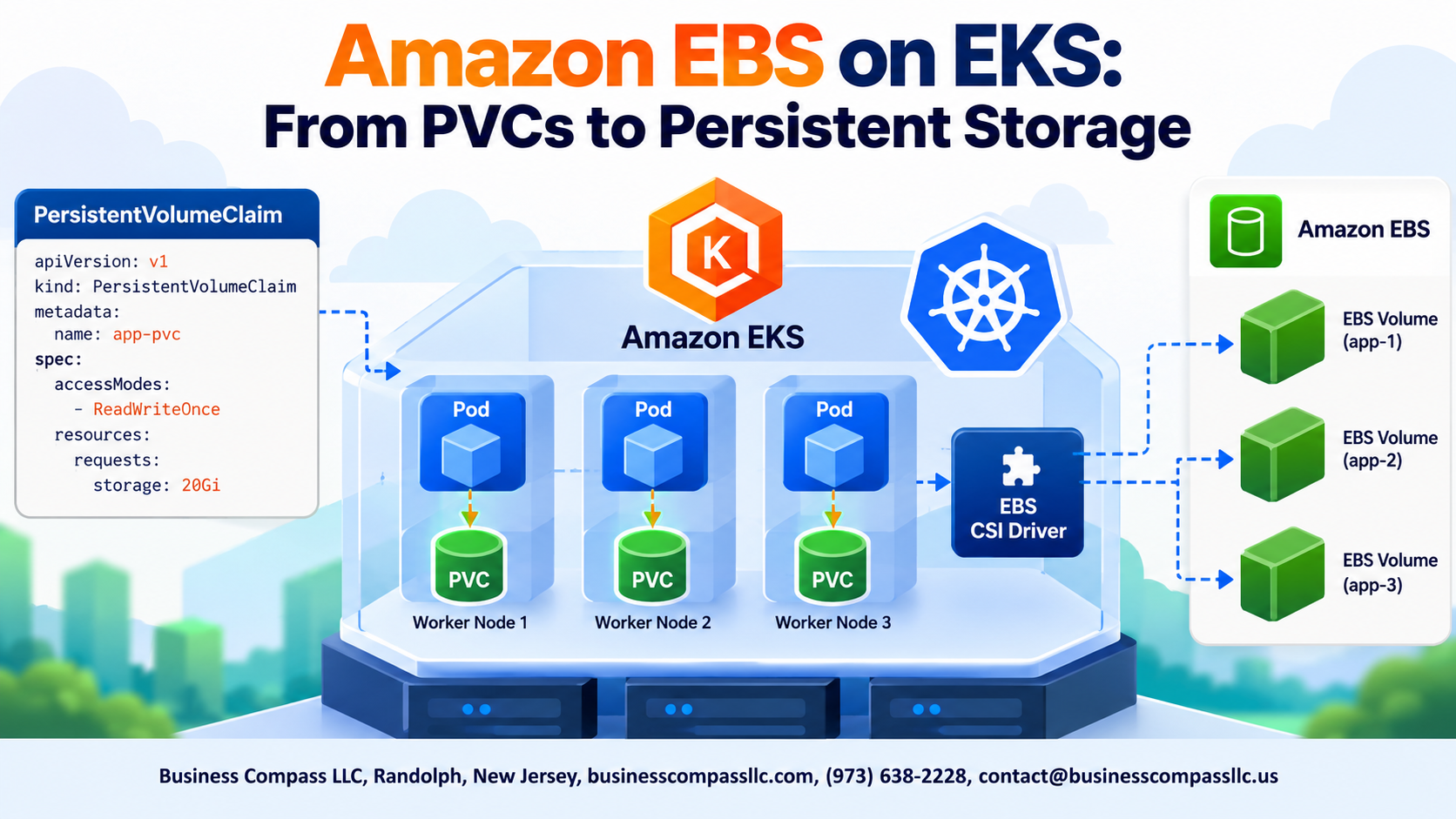
Amazon EBS on EKS: From PVCs to Persistent Storage
Running stateful apps on Kubernetes means you need storage that sticks around — even when pods restart or reschedule. That’s exactly where Amazon EBS on EKS comes in, giving your workloads reliable, block-level storage that Kubernetes can manage dynamically.
This guide is for DevOps engineers, platform teams, and Kubernetes practitioners who are wiring up production-grade storage on AWS and want to get it right the first time.
Here’s what we’ll walk through:
- Setting up the EBS CSI driver so Kubernetes can actually talk to Amazon EBS and handle dynamic provisioning
- Designing storage classes and managing Persistent Volume Claims on EKS so your apps get the right storage, sized and configured correctly
- Protecting your EBS data with backup and recovery strategies built for Kubernetes environments
No fluff — just the practical stuff you need to get EKS persistent volume management working cleanly in real workloads.
Understanding the Core Components of Persistent Storage on EKS

What Amazon EBS Offers for Containerized Workloads
Amazon EBS on EKS delivers block-level storage that persists beyond pod lifecycles, supporting databases and stateful apps needing reliable I/O.
How EKS Manages Storage Through Kubernetes Primitives
EKS handles Kubernetes persistent storage via PersistentVolumes, PersistentVolumeClaims, and StorageClasses—automating dynamic EBS provisioning seamlessly.
Key Differences Between Ephemeral and Persistent Storage
Ephemeral storage vanishes when pods restart; EKS persistent volume management ensures your data survives restarts, reschedules, and node failures.
Setting Up the Amazon EBS CSI Driver on EKS

Why the EBS CSI Driver Is Essential for Modern EKS Clusters
The EBS CSI driver bridges Kubernetes and AWS storage, enabling dynamic EBS provisioning directly from your cluster.
Installing and Configuring the CSI Driver Step by Step
- Run:
eksctl create addon --name aws-ebs-csi-driver --cluster your-cluster
Assigning the Right IAM Permissions for Secure Access
Attach the AmazonEBSCSIDriverPolicy to your node IAM role.
Verifying a Successful Driver Deployment
Check pods: kubectl get pods -n kube-system | grep ebs-csi
Designing Storage Classes for Flexible EBS Provisioning

Choosing the Right EBS Volume Types for Your Workloads
Pick gp3 for most workloads—it’s cost-effective and flexible. Use io2 for databases needing high IOPS.
Configuring Dynamic Provisioning With Custom Storage Classes
provisioner: ebs.csi.aws.com
parameters:
  type: gp3
reclaimPolicy: Retain
Optimizing Performance Parameters Like IOPS and Throughput
Set iops: "3000" and throughput: "125" directly in your EKS storage classes.
Creating and Managing Persistent Volume Claims

Writing Effective PVC Manifests for Your Applications
Craft PVCs by specifying storageClassName, accessModes, and resources.requests.storage. Kubernetes auto-binds matching PVs via dynamic EBS provisioning. Watch status with kubectl get pvc—Pending signals binding failures, often caused by mismatched storage classes. Expand capacity online by editing spec.resources.requests.storage without pod restarts.
Attaching Persistent Storage to EKS Workloads

Mounting EBS Volumes Into Pods Reliably
Reference your PVC directly in the pod spec under volumes and volumeMounts. Kubernetes EBS workload storage binds automatically when the CSI driver is active.
Handling Single-Node Attachment Constraints With StatefulSets
EKS stateful application storage works best with StatefulSets — each pod gets its own dedicated EBS volume, avoiding multi-attach conflicts.
Ensuring Data Persistence Across Pod Restarts and Rescheduling
EBS volumes retain data through restarts automatically.
Protecting and Recovering EBS Data in EKS Environments

Automating Snapshots to Safeguard Critical Application Data
Schedule EBS snapshots using VolumeSnapshotClass with the EBS CSI driver, triggering automatic backups via Kubernetes CronJobs or AWS Backup.
Restoring Volumes From Snapshots During Disaster Recovery
Restore by referencing snapshot IDs in new PersistentVolumeClaims, getting stateful apps back online fast.
Implementing Backup Policies Aligned With Compliance
Use AWS Backup with retention rules matching your compliance needs.
Volume Cloning for Testing Workflows
Clone existing PVCs instantly—no snapshot wait time needed.

Getting persistent storage right on EKS can feel like a lot to take in, but once you break it down, it all fits together. From understanding how PVCs, PVs, and Storage Classes work together, to setting up the EBS CSI Driver, designing flexible storage configurations, and keeping your data protected — each piece plays a clear role in building a reliable storage setup for your Kubernetes workloads.
The good news is you don’t have to tackle it all at once. Start with the basics, get your CSI driver running, and build from there. Make sure your backup and recovery plan is in place before you go to production — that’s the one thing people tend to leave for later and regret. With the right setup, Amazon EBS on EKS gives your applications the dependable, scalable storage they need to run without a hitch.