Stop Finding Out About AWS Outages After Your Users Do
If you’ve ever learned about an AWS service disruption from a frustrated user instead of your own monitoring system, this guide is for you.
DevOps engineers, cloud architects, and platform teams who run workloads on AWS need real-time AWS Health alerts the moment something goes wrong — not minutes later when the damage is already done. Setting up an AWS Lambda notification pipeline that pushes AWS Health event notifications directly into Slack or Microsoft Teams puts your team in the driver’s seat, every time.
Here’s what we’ll walk through:
- How AWS Health monitoring actually works and why polling dashboards manually just doesn’t cut it for fast-moving incidents
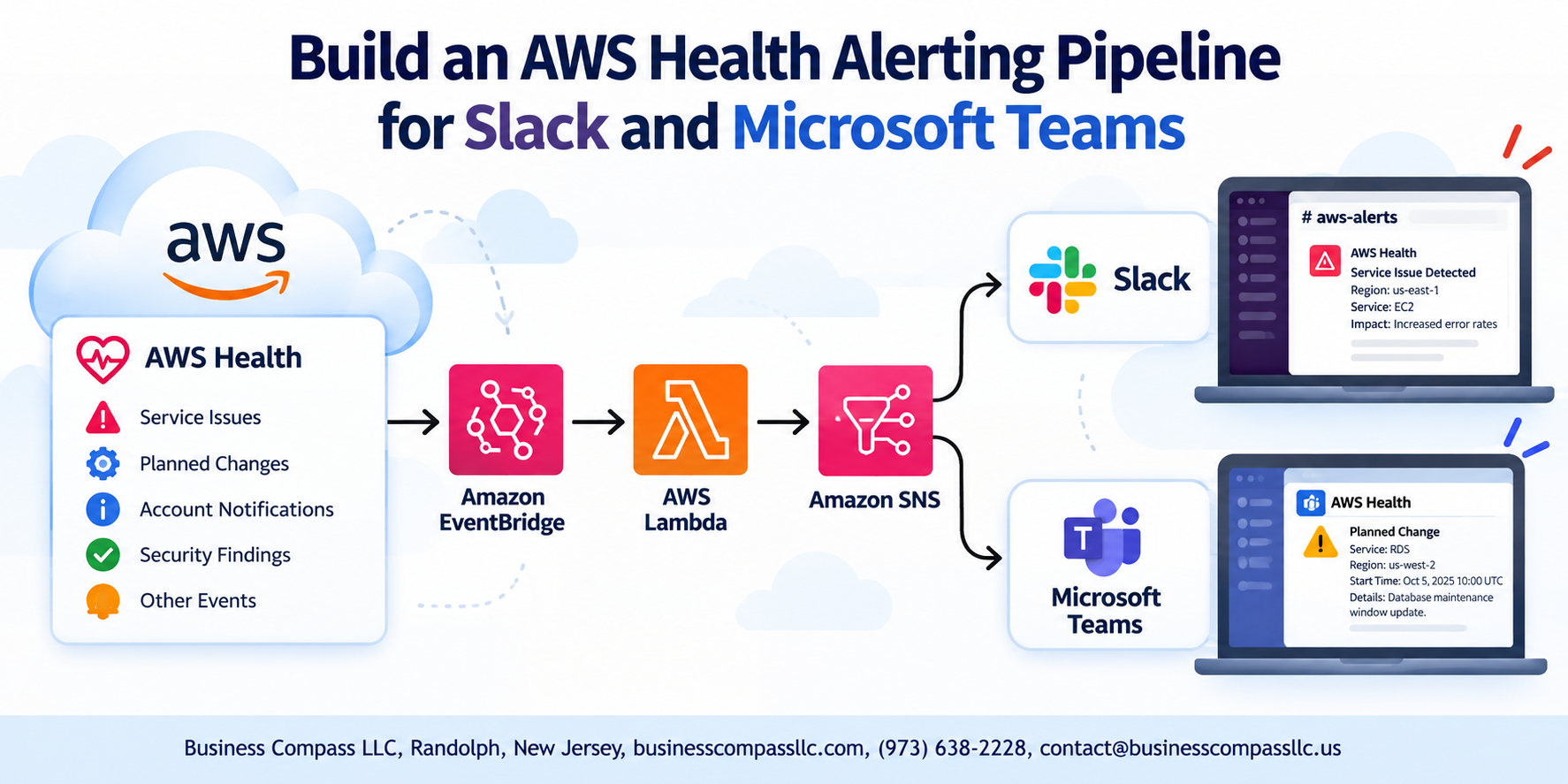
- Building the event-driven notification pipeline using AWS Lambda, EventBridge, and the AWS Health API to capture and route alerts automatically
- Connecting everything to Slack and Microsoft Teams using webhooks so your team gets the right context, in the right channel, without switching tools
By the end, you’ll have a fully working cloud alerting automation setup that catches AWS Health events before they catch you.
Understanding AWS Health and Why Real-Time Alerts Matter
What AWS Health API Provides and How It Works
Real-time AWS Health monitoring gives you direct visibility into service disruptions, scheduled maintenance, and account-specific issues before they impact users.
Common AWS Health Event Types You Should Never Miss
- Service disruptions affecting EC2, RDS, Lambda
- Scheduled maintenance windows
- Account-level security notifications
Designing the Alerting Pipeline Architecture

Overview of the End-to-End Pipeline Flow
AWS Health events trigger Amazon EventBridge rules, which invoke an AWS Lambda function. Lambda processes the payload and routes real-time AWS Health alerts to Slack via webhooks or Microsoft Teams channels—giving your team instant visibility into outages, scheduled maintenance, and account-specific AWS Health event notifications without manual monitoring.
Setting Up AWS Health Event Detection
Enabling AWS Health API Access
Activate AWS Business or Enterprise Support—Health API requires it. Use IAM policies to grant health:Describe* permissions.
Configuring Amazon EventBridge
Create a rule targeting aws.health as the event source to capture AWS Health event notifications automatically.
Filtering Events
Match specific detail-type values like AWS Health Event to cut noise and keep real-time AWS Health monitoring focused.
Building the Notification Logic with AWS Lambda

Creating and Deploying the Lambda Function
Deploy a Python-based Lambda function triggered by EventBridge, granting it IAM permissions to read AWS Health events.
Formatting Health Event Data Into Readable Alert Messages
Parse event.detail fields — service, region, status — into clean, human-readable blocks for Slack or Teams webhooks.
Handling Errors and Retries
- Add try/except blocks
- Configure dead-letter queues for failed deliveries
Integrating Alerts With Slack
Creating a Slack App and Generating an Incoming Webhook
Head to api.slack.com, create a new app, and enable Incoming Webhooks. Activate it for your target channel to get a unique webhook URL.
Connecting Lambda to Your Slack Channel
Add the webhook URL as a Lambda environment variable, then use Python’s requests library to POST AWS Health alerts directly.
Customizing Slack Message Layouts
Use Block Kit for clean, scannable alerts:
- Bold event type
- Color-coded severity
Integrating Alerts With Microsoft Teams
Setting Up an Incoming Webhook in Microsoft Teams
Go to your Teams channel, click Connectors, and add Incoming Webhook. Copy the generated URL.
Adapting the Lambda Function to Support Teams Message Format
Replace Slack’s payload with Teams’ MessageCard JSON schema, posting to your webhook URL.
Sending and Verifying Test Alerts in Your Teams Channel
Trigger a test AWS Health event and confirm Microsoft Teams AWS alerts appear instantly.
Optimizing and Maintaining the Pipeline Long-Term
Monitoring Pipeline Health With CloudWatch
Track Lambda errors, invocation counts, and SNS delivery failures using CloudWatch alarms.
Scaling Across Multiple AWS Accounts and Regions
Use AWS Organizations with EventBridge event buses to aggregate real-time AWS Health monitoring centrally.
Keeping Costs Low
- Lambda stays within free tier for most workloads
- EventBridge charges are minimal at scale
Getting real-time AWS Health alerts into Slack or Microsoft Teams doesn’t have to be complicated. By combining AWS Health event detection with Lambda’s notification logic and straightforward webhook integrations, you can build a pipeline that keeps your team informed the moment something goes wrong — without anyone having to manually check dashboards or dig through logs.
The key is keeping the setup clean and thinking ahead about maintenance. A well-designed pipeline today saves you from scrambling during an outage tomorrow. Start small, test your alerts thoroughly, and tweak the setup as your infrastructure grows. Your team will thank you the next time AWS has a hiccup and they already know about it before it becomes a problem.