


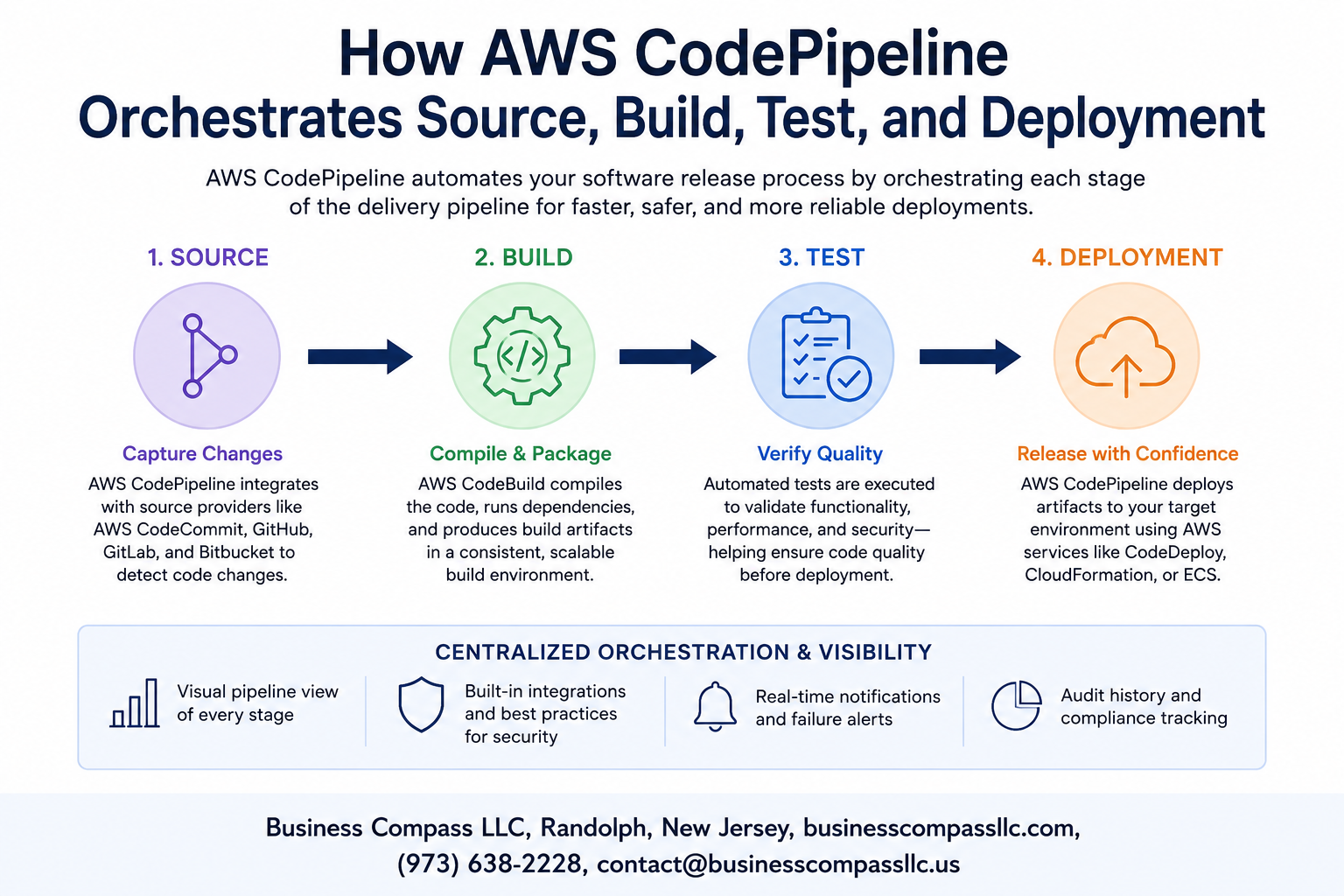
How AWS CodePipeline Orchestrates Source, Build, Test, and Deployment
If you’ve ever pushed code and then spent the next hour manually running builds, checking test results, and deploying to multiple environments, you already know why AWS CodePipeline exists. This AWS DevOps pipeline tool takes that entire workflow off your plate by automating every step from the moment code lands in your repository to the second it goes live.
This guide is for developers, DevOps engineers, and cloud architects who want a clear, practical look at how CI/CD pipeline automation works inside AWS — no fluff, just the parts that actually matter.
Here’s what we’ll walk through:
- How the source stage works — what triggers your pipeline and how CodePipeline listens for changes across services like GitHub, S3, or CodeCommit
- How build and test stages connect — turning raw code into tested, deployable artifacts without manual handoffs
- How multi-environment deployment works — pushing changes from dev to staging to production with the right guardrails in place
By the end, you’ll have a solid mental model of AWS CodePipeline orchestration and enough practical knowledge to start building or improving your own automated build and deployment workflow on AWS.
Let’s get into it.
Understanding AWS CodePipeline and Its Core Purpose

What AWS CodePipeline Does for Modern Software Delivery
AWS CodePipeline automates your entire release process — from code commit to production deployment. It connects source, build, test, and deploy stages into one smooth CI/CD pipeline automation workflow, eliminating manual handoffs and reducing human error across every release cycle your team runs.
Setting Up the Source Stage to Trigger Automated Workflows

A. Connecting Your Code Repository to CodePipeline
Link your GitHub, CodeCommit, or S3 repo directly inside the CodePipeline console under Source settings.
B. Supported Source Providers
- GitHub, Bitbucket, CodeCommit, ECR, S3
C. Configuring Triggers
Set webhooks to auto-start on every commit.
D. Managing Artifacts
CodePipeline packages source files, passing them downstream automatically.
Streamlining the Build Stage for Faster, Reliable Compilations

Integrating AWS CodeBuild to Compile and Package Your Application
AWS CodeBuild plugs directly into your AWS DevOps pipeline, handling compilation and packaging without managing servers.
Defining Build Specifications to Control the Build Environment
Your buildspec.yml controls every build phase and environment variable.
Caching Dependencies to Speed Up Build Times
- Cache S3 layers to slash automated build and deployment AWS times dramatically.
Strengthening Software Quality Through Automated Testing

Adding Unit and Integration Tests to Catch Bugs Early
CodePipeline testing automation lets you run unit and integration tests automatically, catching bugs before they reach production.
Reducing Risk by Enforcing Quality Thresholds Before Deployment
- Gate pipeline progress using pass/fail thresholds
- Plug in tools like Selenium or Jest
- Block deployments when coverage drops below set limits
Orchestrating Seamless Deployments Across Environments

Deploying to Staging and Production With AWS CodeDeploy
AWS CodeDeploy handles CodePipeline multi-environment deployment smoothly, pushing builds to staging first, then production automatically.
Leveraging Blue-Green and Canary Deployment Strategies to Minimize Downtime
- Blue-green swaps environments instantly
- Canary routes small traffic percentages first
Rolling Back Failed Deployments Automatically to Protect Users
Failed deployments trigger instant automatic rollbacks, keeping users protected.
Monitoring, Optimizing, and Scaling Your Pipeline Over Time

Tracking Pipeline Execution History to Identify Bottlenecks
Check CloudWatch metrics and CodePipeline execution history regularly to spot slow stages.
Setting Up Notifications and Alerts for Pipeline Events
Use Amazon SNS to get instant alerts on failures.
Using Parallel Actions to Cut Overall Pipeline Execution Time
Run independent actions simultaneously across stages.
Scaling Pipeline Configurations as Your Application Grows
Add stages, actions, and environments as needed.
Controlling Access and Security Across All Pipeline Stages
Apply IAM roles per stage to lock down permissions tightly.

AWS CodePipeline takes the chaos out of software delivery by connecting every step of your workflow into one smooth, automated process. From pulling source code and running builds to executing tests and pushing deployments across environments, each stage works together so your team spends less time firefighting and more time shipping features that actually matter.
The real win here is consistency. When your pipeline is set up well and monitored over time, you stop worrying about broken builds or failed deployments catching you off guard. Start small, get your stages working reliably, and keep refining as your needs grow. The sooner you get AWS CodePipeline working for you, the sooner your entire delivery process runs on autopilot.









