


The Modern AI SaaS Stack: Infrastructure Choices That Actually Matter
Building an AI SaaS product is nothing like building a traditional web app. The infrastructure decisions you make early — compute, data pipelines, model serving — will either carry your product forward or quietly drain your runway.
This guide is for founders, CTOs, and engineering leads who are past the “proof of concept” stage and actively making real infrastructure calls for their AI products.
Here’s what we’ll get into:
- Compute choices for AI workloads — GPUs, CPUs, serverless, and when each one actually makes sense for your use case
- Model serving and scalable AI deployment — how to ship models that hold up under real traffic without blowing your budget
- AI observability tools and cost optimization — because shipping is only half the job; keeping things running reliably and affordably is the other half
No fluff, no vendor pitches. Just a clear breakdown of the modern AI SaaS stack so you can make smarter infrastructure decisions faster.
Understanding the Core Components of an AI SaaS Stack
Why Traditional SaaS Infrastructure Falls Short for AI Workloads
Standard SaaS infrastructure was built around predictable, stateless request-response cycles. AI workloads break that model completely. Running inference on a large language model or processing high-dimensional embeddings demands GPU acceleration, massive memory bandwidth, and burst compute capacity that typical CPU-based cloud setups simply weren’t designed to handle. Latency profiles are wildly different too — a traditional API might respond in milliseconds, while an AI inference call can spike unpredictably based on input complexity, model size, and batching behavior. Autoscaling policies that work perfectly for a CRUD application can leave AI workloads either over-provisioned (burning cash) or under-provisioned (killing user experience).
Key Layers Every Modern AI SaaS Platform Needs
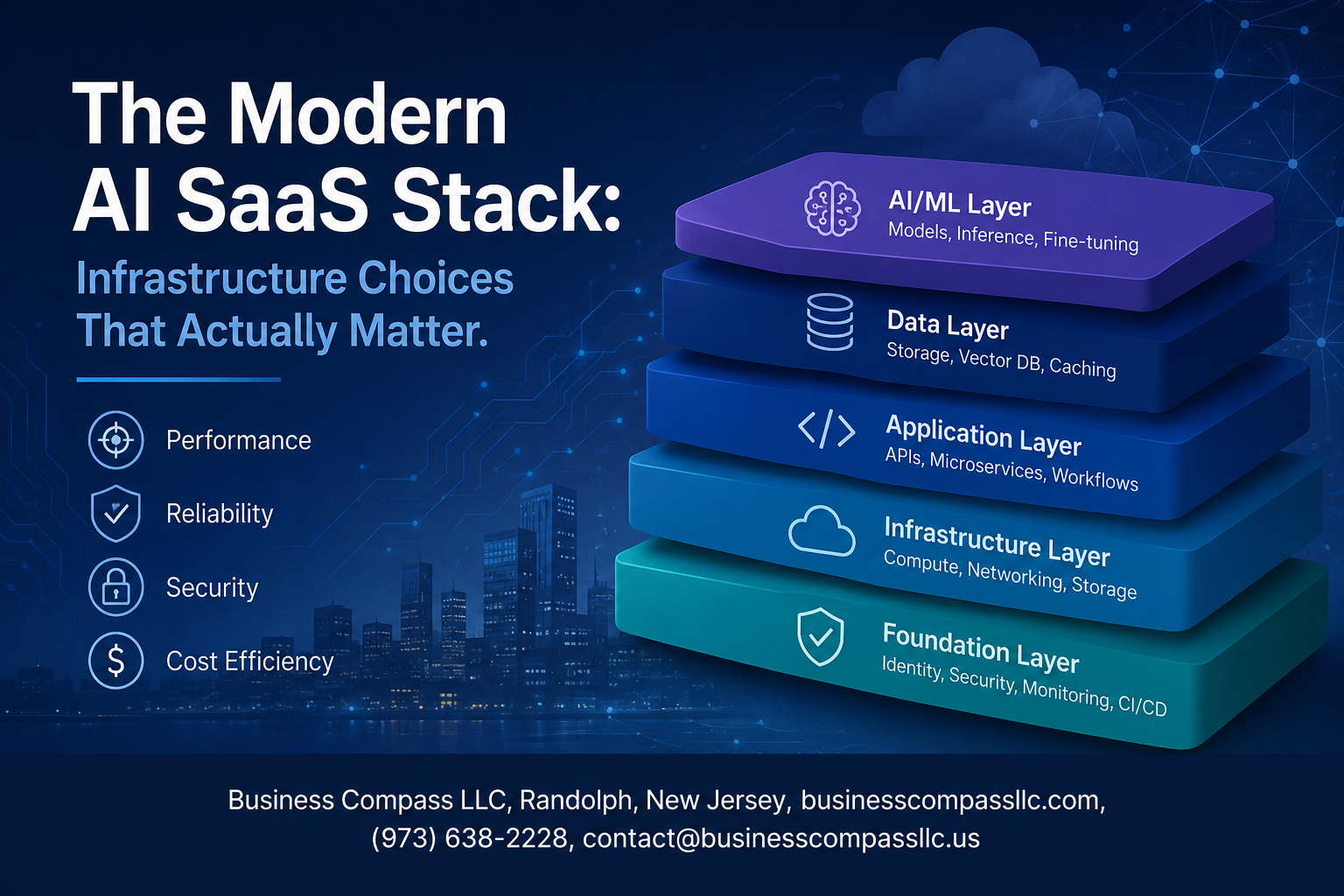
A solid AI SaaS stack isn’t just a cloud VM with a Python script running on it. It’s a deliberate combination of specialized layers working together:
- Compute Layer — GPU clusters or accelerated instances (like AWS Inferentia, NVIDIA A100s, or Google TPUs) tuned specifically for AI workloads compute requirements
- Data Infrastructure Layer — Vector databases, feature stores, and low-latency data pipelines that feed models with clean, structured inputs
- Model Serving Layer — Dedicated serving frameworks (Triton, vLLM, Ray Serve) that handle batching, concurrency, and model versioning at scale
- Orchestration Layer — Kubernetes-based or managed ML platforms that coordinate training, fine-tuning, and deployment workflows
- Observability Layer — AI-specific monitoring tools that track not just uptime and latency but model drift, token costs, and output quality
- Security & Compliance Layer — Controls built around data residency, PII handling, and model access governance
Skipping any one of these layers creates compounding problems down the road — gaps that get increasingly expensive to patch after your product is already in production.
How Infrastructure Choices Directly Impact Product Performance and Costs
Every decision made at the infrastructure level shows up directly in two places: your product’s performance and your AWS bill. Choosing the wrong serving strategy — say, running a 70B parameter model on a single GPU instance without proper batching — can push inference costs to a point where the unit economics of your SaaS product never make sense. On the flip side, leaning too heavily on third-party model APIs without caching or request optimization can quietly drain margins as usage scales. Cloud infrastructure for AI products needs to be designed with cost-per-inference in mind from day one, not retrofitted after growth hits. Decisions around model quantization, hardware selection, and scalable AI deployment patterns all feed directly into whether your gross margins stay healthy or collapse under load.
Choosing the Right Compute Infrastructure for AI Workloads

GPUs vs CPUs: Picking the Right Processing Power for Your Use Case
Picking between GPUs and CPUs comes down to what your AI workload actually looks like day-to-day. GPUs shine when you’re running parallel matrix operations — think model training, batch inference, or anything involving deep learning. CPUs still hold their ground for lighter tasks like feature engineering, small model inference, or preprocessing pipelines.
- GPU sweet spots: Training large language models, real-time image processing, high-throughput batch inference
- CPU sweet spots: Classical ML models (XGBoost, Random Forest), low-latency single-request inference, data transformation tasks
- Mixed workloads: Many production AI SaaS stacks run both — GPUs handle the heavy lifting while CPUs manage orchestration and preprocessing
Cloud Providers Compared: AWS, GCP, and Azure for AI Workloads
Each major cloud provider brings something different to the table when you’re building cloud infrastructure for AI products.
- AWS offers the broadest instance variety — from A100-powered p4d instances to cost-efficient Inferentia chips for inference. Great ecosystem, but GPU availability during peak demand can get frustrating.
- GCP is a strong pick if you’re leaning into TPUs or want tight integration with Vertex AI and BigQuery ML. Google’s tensor processing hardware gives you a real edge for transformer-based workloads.
- Azure wins on enterprise compliance features and seamless integration with Microsoft’s tooling stack — solid choice if your customers already live in the Microsoft ecosystem.
When Bare Metal Beats Cloud for Scaling AI Applications
Cloud flexibility is great early on, but at a certain scale, the economics flip. Bare metal starts making real sense when:
- Your GPU utilization is consistently above 70-80% — you’re essentially renting expensive hardware at a premium for sustained periods
- You need predictable latency without noisy-neighbor issues common in virtualized environments
- Compliance requirements demand full hardware isolation
- You’re running proprietary model training jobs that need maximum memory bandwidth
Providers like CoreWeave, Lambda Labs, and Vultr now offer dedicated GPU bare metal that sits somewhere between full cloud flexibility and owning your own data center — a practical middle ground for scaling AI SaaS platforms without blowing the budget.
Reducing Compute Costs Without Sacrificing Model Performance
AI workloads compute costs can spiral fast if you’re not watching closely. A few approaches that genuinely move the needle:
- Spot/preemptible instances for training jobs — save 60-80% with proper checkpointing in place
- Model quantization (INT8, FP16) cuts memory footprint and speeds up inference without meaningful accuracy loss for most use cases
- Autoscaling inference endpoints so you’re not paying for idle GPU capacity at 3am
- Right-sizing instances — it’s surprisingly common to find teams running A100s for workloads that run fine on A10Gs at a fraction of the cost
- Caching frequent inference requests reduces redundant compute, especially for SaaS products with repetitive query patterns
AI SaaS cost optimization at the infrastructure layer isn’t about cutting corners — it’s about matching the right hardware to the right job at the right time.
Data Infrastructure That Powers Reliable AI Products
Vector Databases and Why They Are Essential for Modern AI Apps
Pinecone, Weaviate, and Qdrant aren’t just trendy tools — they’re the backbone of any serious data infrastructure for AI. When your app needs to find semantically similar content, power a recommendation engine, or run retrieval-augmented generation (RAG), a vector database handles what traditional relational databases simply can’t:
- Similarity search at scale — query millions of embeddings in milliseconds
- Native support for high-dimensional data — perfect for storing outputs from embedding models like OpenAI’s text-embedding-3 or open-source alternatives
- Real-time updates — add new vectors without rebuilding the entire index
Building Efficient Data Pipelines for Real-Time AI Processing
Real-time AI processing lives or dies by your pipeline design. Tools like Apache Kafka, AWS Kinesis, or Redpanda handle high-throughput event streaming, while transformation layers built on dbt or Apache Flink keep data clean and usable before it ever touches a model. Key things to get right:
- Schema validation early — bad data upstream creates garbage predictions downstream
- Idempotent processing — avoid duplicate records corrupting your model inputs
- Low-latency ingestion — target sub-100ms end-to-end for user-facing AI features
Balancing Data Storage Costs with Speed and Accessibility
Cold storage is cheap; fast storage isn’t. A tiered approach works best — hot data sits in something like Redis or a managed PostgreSQL instance for immediate access, warm data moves to object storage like S3 with intelligent tiering, and archival data drops into Glacier or equivalent. This directly feeds into AI SaaS cost optimization without sacrificing the response speed your users expect.
Model Serving and Deployment Strategies That Scale

Self-Hosted Models vs Third-Party APIs: Making the Smart Choice
Picking between self-hosted models and third-party APIs comes down to three things: control, cost, and complexity. APIs like OpenAI or Anthropic get you moving fast with zero infrastructure headaches, but you’re locked into someone else’s pricing, rate limits, and uptime. Self-hosting gives you full control over latency, data privacy, and long-term costs — but you’re taking on GPU infrastructure, model updates, and scaling challenges yourself.
A practical framework for making this call:
- Use third-party APIs when you’re in early-stage development, your request volume is unpredictable, or your use case doesn’t involve sensitive customer data
- Go self-hosted when you’re processing high volumes consistently, need strict data sovereignty, or want to fine-tune models on proprietary data
- Consider a hybrid approach — route simple, high-volume tasks through cheaper APIs while running specialized or sensitive workloads on your own infrastructure
Optimizing Latency and Throughput for Production AI Systems
Latency kills user experience faster than almost anything else in a scalable AI deployment. A few techniques that actually move the needle:
- Model quantization — reducing model precision from FP32 to INT8 can cut inference time dramatically with minimal quality loss
- Batching requests — grouping multiple inference calls together squeezes more throughput out of the same GPU
- Caching common outputs — for repetitive queries, semantic caching with tools like GPTCache can slash redundant compute costs
- Async inference pipelines — for non-real-time tasks, offloading to background workers frees up your API layer and improves perceived responsiveness
Tracking p95 and p99 latency metrics matters more than averages here — your worst-case response times define your user’s actual experience.
Versioning and Rolling Updates to Keep AI Models Reliable
Shipping a new model version is nothing like deploying a code update. Behavior can shift in subtle ways that only surface at scale, so treating model updates like regular software releases is a recipe for production incidents.
What works well in practice:
- Shadow deployments — run the new model alongside the old one, compare outputs without exposing users to changes
- Canary releases — gradually shift traffic (5% → 25% → 100%) while monitoring key quality metrics at each stage
- Model registries — tools like MLflow or Weights & Biases let you tag, version, and roll back models the same way Git handles code
- Behavioral regression testing — maintain a golden dataset of inputs and expected outputs; any new version should be benchmarked against it before going live
Rollback capability isn’t optional — it’s something you need to build in from day one.
Containerization and Orchestration Tools Built for AI Workloads
Standard Kubernetes setups weren’t designed with GPU scheduling or model serving in mind, but the ecosystem has caught up fast. Here’s what teams running cloud infrastructure for AI products are actually reaching for:
- Docker + NVIDIA Container Toolkit — containerizing models with GPU support is now straightforward and portable across environments
- Kubernetes with GPU node pools — GKE, EKS, and AKS all support GPU-specific node configurations; pair with the NVIDIA device plugin for proper resource allocation
- Ray Serve — purpose-built for serving ML models at scale, with built-in support for batching, replicas, and multi-model pipelines
- KServe (formerly KFServing) — a strong choice for teams already in the Kubernetes ecosystem who want standardized model serving across frameworks like TensorFlow, PyTorch, and ONNX
- Triton Inference Server — NVIDIA’s open-source serving platform handles multi-framework models and dynamic batching out of the box
The key difference from standard app orchestration is resource awareness — your scheduler needs to understand GPU availability, memory constraints, and model warm-up times to avoid degraded performance during scaling events.
Observability and Monitoring for AI-Driven Applications

Why Standard Monitoring Tools Miss Critical AI-Specific Failures
Traditional monitoring tools track uptime, latency, and error rates — but AI applications break in ways that never trigger a single alert. A model can return a 200 OK response while quietly serving garbage predictions, and your dashboards will look perfectly healthy. Standard APM tools simply weren’t built to catch silent model failures, data pipeline shifts, or embedding quality degradation, which are the exact failure modes that matter most in a modern AI SaaS stack.
- Semantic failures go undetected: A model outputting confident but wrong answers looks identical to a correct one at the infrastructure level
- Input distribution shifts: When incoming data stops matching training data, no traditional alert fires
- Latency alone isn’t enough: A slow model is obvious; a confidently wrong model is invisible without AI observability tools specifically designed for this
Tracking Model Drift and Performance Degradation in Production
Model drift is the slow, silent killer of AI product quality. Unlike a server crash, drift happens gradually — user behavior changes, real-world data evolves, and your model’s accuracy quietly erodes over weeks. Catching this requires tracking prediction distributions, confidence scores, and ground-truth feedback loops continuously.
- Data drift monitoring: Compare incoming feature distributions against your training baseline regularly
- Concept drift detection: Watch for cases where the relationship between inputs and correct outputs shifts even if raw data looks similar
- Shadow scoring: Run a newer model version in parallel to compare outputs before fully deploying
- Feedback loops: Collect user signals — thumbs down, corrections, churn — and tie them back to specific model versions
Building Effective Alerting Systems Around AI Behavior
Good AI alerting isn’t about setting thresholds on CPU usage — it’s about defining what “good” looks like for your model’s behavior and screaming when it drifts from that. The best teams build layered alert systems that catch both fast failures and slow degradation before customers feel the impact.
- Tiered alerts by severity: Separate alerts for hard failures (model unavailable), soft failures (confidence dropping below threshold), and trend warnings (gradual accuracy decline over 7 days)
- Business-metric anchors: Tie model performance metrics directly to product KPIs — conversion rates, resolution rates, engagement — so engineering and product teams speak the same language
- Anomaly-based alerting: Use statistical baselines rather than hardcoded thresholds so alerts adapt as your traffic patterns change
- On-call runbooks for AI: Document exactly what to do when a specific alert fires — which model version to roll back to, who owns the retraining pipeline, and what data to pull for diagnosis
Security and Compliance Considerations for AI SaaS Platforms

Protecting Sensitive Data Used in AI Training and Inference
AI SaaS security compliance starts with knowing exactly where your sensitive data lives — during training, fine-tuning, and real-time inference. Encrypt data at rest and in transit, apply strict data minimization practices, and avoid feeding raw PII into model pipelines without tokenization or anonymization layers first.
- Use differential privacy techniques when training on user data
- Separate training datasets from production inference environments
- Audit data lineage so you always know what went into a model
Meeting Regulatory Requirements Without Slowing Down Development
GDPR, HIPAA, SOC 2, and emerging AI-specific regulations don’t have to kill your shipping velocity. The trick is baking compliance into your CI/CD pipeline rather than bolting it on at the end.
- Automate compliance checks using tools like Drata or Vanta
- Maintain model cards and data documentation as living artifacts
- Run privacy impact assessments early in the feature design phase
Implementing Access Controls Across Multi-Tenant AI Systems
Multi-tenant AI infrastructure needs rock-solid isolation. One tenant’s data should never bleed into another’s context window or training batch.
- Enforce tenant-scoped API keys and namespaced data stores
- Apply role-based access control (RBAC) at every layer — storage, model endpoints, and logging
- Log every inference request with tenant identifiers for audit trails
Managing Third-Party Model and API Risks Responsibly
Plugging into external model APIs like OpenAI or Anthropic introduces supply-chain risk. You’re trusting a third party with your users’ data and your product’s reliability.
- Review each provider’s data retention and usage policies carefully
- Use API gateway layers to scrub sensitive fields before they leave your system
- Build fallback routing so a third-party outage doesn’t take your product down
Cost Optimization Strategies for Sustainable AI SaaS Growth

Identifying and Eliminating Hidden Infrastructure Waste
Hidden waste in an AI SaaS stack quietly bleeds budgets dry. Idle GPU instances, over-provisioned vector databases, and forgotten staging environments running 24/7 are common culprits. Run a regular audit targeting:
- Zombie resources – instances with near-zero utilization for 7+ days
- Oversized embeddings pipelines that run on expensive compute when a smaller instance handles the load just fine
- Redundant data transfers between cloud regions that rack up egress fees nobody budgeted for
Tools like AWS Cost Explorer, GCP’s Cost Management dashboard, or third-party platforms like Spot.io surface these leaks fast.
Rightsizing Resources Based on Actual AI Usage Patterns
AI workloads are rarely flat — they spike during batch inference jobs, drop overnight, and surge unpredictably during product launches. Matching compute to actual demand, rather than worst-case assumptions, is where real savings happen. Practical steps include:
- Profile real traffic patterns over 30-day windows before committing to reserved instances
- Use spot or preemptible instances for non-latency-sensitive training jobs — cuts costs by up to 70%
- Set autoscaling policies tied to queue depth or GPU utilization metrics, not just CPU thresholds
- Downgrade model serving infrastructure during off-peak hours using scheduled scaling rules
Building a FinOps Culture to Keep AI Costs Predictable
AI SaaS cost optimization stops being a one-time fix the moment you build shared ownership across engineering, product, and finance teams. A FinOps culture means every team sees the cost impact of their infrastructure decisions in near real-time. Start with:
- Tagging everything — models, experiments, customer tenants — so cost attribution is clear
- Setting per-team budgets with automated alerts before limits are hit, not after
- Running weekly cost reviews as part of sprint rituals, not quarterly finance meetings
- Making unit economics visible — track cost-per-inference or cost-per-user-session so growth and spending scale together sensibly

Building an AI SaaS product that actually works at scale comes down to making smart infrastructure decisions from the start. From picking the right compute setup and data infrastructure to nailing your model serving strategy, every choice you make shapes how reliable, secure, and cost-efficient your platform becomes. Throw in solid observability practices and a clear handle on compliance requirements, and you’ve got a stack that can grow without falling apart at the seams.
The good news is you don’t have to get everything perfect on day one. Start by understanding where your biggest bottlenecks are, make deliberate choices about the components that matter most to your use case, and keep a close eye on your costs before they spiral. The teams that build lasting AI SaaS products aren’t necessarily the ones with the biggest budgets — they’re the ones who think carefully about their infrastructure and keep iterating. So take what fits your situation, start building, and adjust as you learn.









