


S3 File Storage Deep Dive: Upload, Permissions, and Access Control
Amazon S3 has become the backbone of cloud storage for millions of applications, but many developers struggle with getting uploads, permissions, and security right. This comprehensive guide is designed for cloud engineers, DevOps professionals, and developers who need to master AWS S3 file storage beyond the basics.
You’ll discover how to architect scalable S3 storage solutions, optimize S3 upload methods for different use cases, and implement bulletproof S3 permissions configuration that protects your data without breaking functionality. We’ll also dive deep into advanced AWS S3 access control strategies using IAM policies, explore S3 bucket security best practices, and show you practical S3 file upload optimization techniques that can dramatically improve performance.
By the end of this deep dive, you’ll have the knowledge to build secure, efficient S3 storage architecture that scales with your applications while maintaining strict security controls.
Understanding S3 File Storage Architecture and Core Benefits
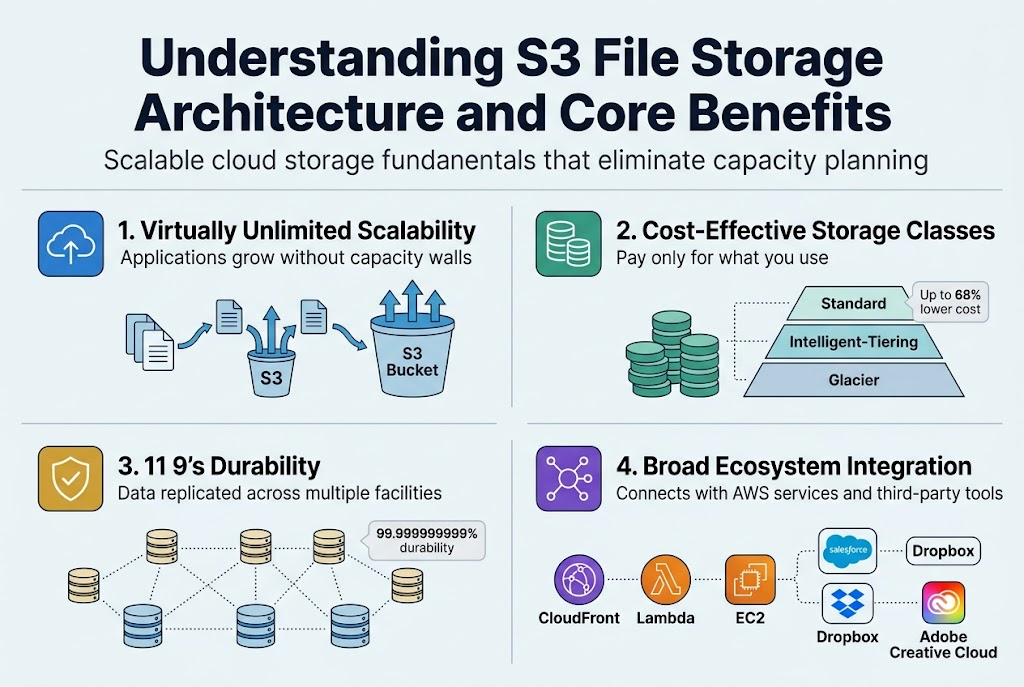
Scalable cloud storage fundamentals that eliminate capacity planning
AWS S3 file storage operates on a virtually unlimited storage model where your applications can grow without hitting capacity walls. Unlike traditional on-premises solutions that require forecasting storage needs months ahead, S3 storage architecture automatically scales to accommodate everything from small files to massive datasets. You simply upload files to S3 buckets and pay only for what you use, removing the headache of purchasing additional hardware or managing storage provisioning.
Cost-effective pricing models that reduce infrastructure overhead
S3 offers multiple storage classes designed to optimize costs based on access patterns. Frequently accessed data stays in Standard class, while infrequently used files can move to cheaper Glacier tiers. This intelligent tiering system can reduce storage costs by up to 68% compared to maintaining your own data centers. The pay-as-you-go model eliminates upfront hardware investments and ongoing maintenance expenses that traditionally drain IT budgets.
High availability and durability guarantees for mission-critical data
Amazon guarantees 99.999999999% (11 9’s) durability by automatically replicating your data across multiple facilities within a region. This means if you store 10,000,000 objects, you might lose one every 10,000 years. S3’s built-in redundancy ensures your mission-critical data remains accessible even during hardware failures or natural disasters, providing enterprise-grade reliability without complex backup configurations.
Integration capabilities with existing AWS services and third-party tools
AWS S3 file management seamlessly connects with CloudFront for content delivery, Lambda for serverless processing, and EC2 for compute workloads. Popular third-party applications like Salesforce, Dropbox, and Adobe Creative Cloud integrate directly with S3 through standardized APIs. This ecosystem approach means you can build sophisticated data pipelines and applications without worrying about compatibility issues or custom integration development.
Mastering File Upload Methods and Optimization Techniques
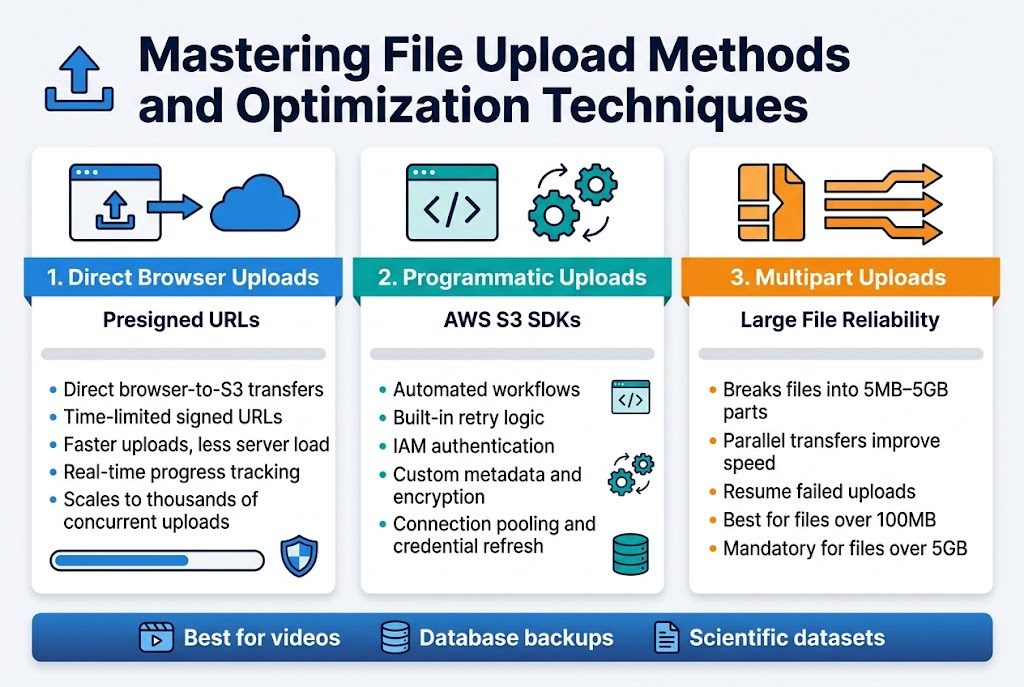
Direct browser uploads that improve user experience and reduce server load
Presigned URLs revolutionize S3 file upload optimization by enabling direct browser-to-S3 transfers. This approach eliminates server bottlenecks while maintaining security through time-limited, cryptographically signed URLs that grant temporary upload permissions. Users enjoy faster uploads without consuming your server’s bandwidth or processing power.
Browser-based uploads with presigned URLs also provide better error handling and progress tracking. JavaScript can monitor upload progress in real-time, giving users immediate feedback. This method scales automatically with your user base since each upload happens independently, making it perfect for applications handling thousands of concurrent file transfers.
Programmatic uploads using SDKs for automated workflows
AWS S3 SDKs streamline programmatic uploads across multiple programming languages, offering built-in retry logic and error handling. These libraries handle authentication automatically using IAM credentials, making integration seamless for automated workflows like batch processing, data migration, or content management systems.
SDK-based uploads excel in server-side applications where you need fine-grained control over S3 upload methods. Features like custom metadata assignment, server-side encryption configuration, and storage class selection become straightforward. The SDKs also provide connection pooling and automatic credential refresh, ensuring reliable uploads even during long-running operations.
Multipart upload strategies for large files and improved reliability
Multipart uploads break large files into smaller chunks, typically 5MB to 5GB each, enabling parallel transfers that dramatically improve upload speeds. This S3 file upload optimization technique allows resumption of failed uploads without starting over, making it essential for files larger than 100MB or unreliable network connections.
The strategy shines when handling video files, database backups, or scientific datasets. Each part uploads independently, and if one fails, only that specific chunk needs retry. Amazon recommends using multipart uploads for files over 100MB, and it becomes mandatory for files exceeding 5GB. Smart applications can dynamically adjust part sizes based on file size and network conditions.
Implementing Robust Permission Models and Security Controls
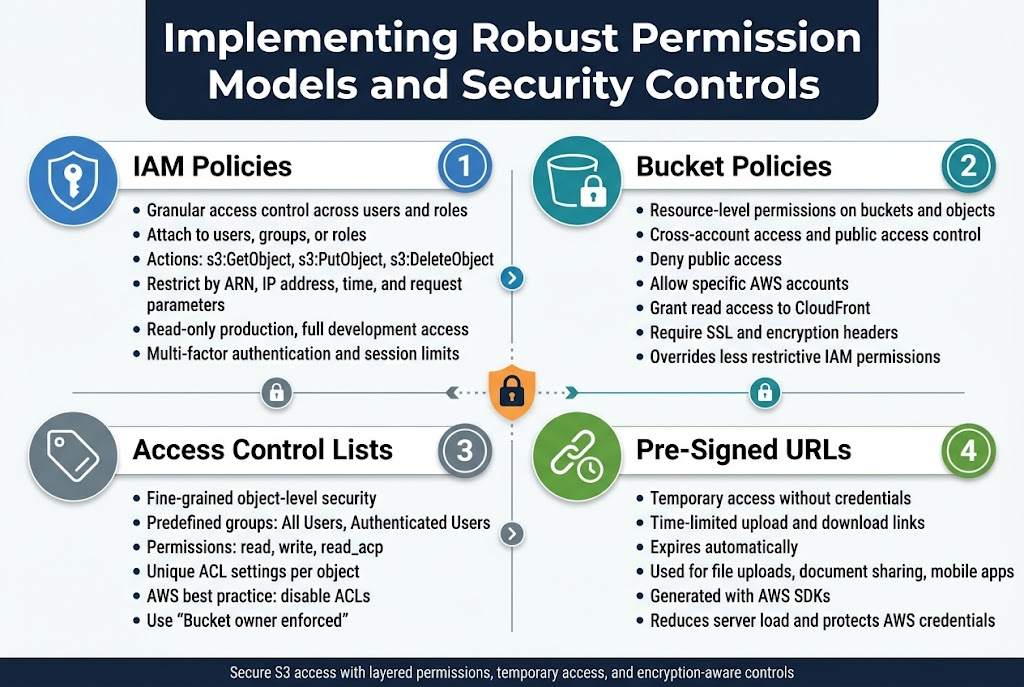
IAM Policies That Provide Granular Access Control Across Users and Roles
AWS S3 IAM policies deliver precise control over who can access your S3 resources and what actions they can perform. These JSON-based policies attach to users, groups, or roles, defining specific permissions like s3:GetObject, s3:PutObject, or s3:DeleteObject. You can restrict access by resource ARN, IP address, time conditions, or request parameters, creating highly targeted security rules that match your organizational needs.
IAM policies work seamlessly with AWS S3 access control by evaluating permissions before allowing any S3 operations. For example, you might grant developers read-only access to production buckets while allowing full access to development environments. Multi-factor authentication requirements and session duration limits add extra security layers to sensitive S3 file storage operations.
Bucket Policies for Resource-Level Permissions and Cross-Account Access
S3 bucket policies attach directly to buckets and control access at the resource level, making them perfect for cross-account scenarios and public access configurations. These policies use the same JSON syntax as IAM policies but apply specifically to bucket and object operations. You can deny all public access, allow specific AWS accounts to upload files, or grant read permissions to CloudFront distributions.
Bucket policies excel when managing S3 permissions configuration for external partners or third-party applications. They override IAM permissions when more restrictive, creating a robust defense-in-depth security model. Common patterns include allowing uploads from specific IP ranges, requiring SSL connections, or automatically denying requests that lack proper encryption headers.
Access Control Lists for Fine-Grained Object-Level Security
Access Control Lists (ACLs) provide object-level granular control over individual S3 files, though AWS recommends bucket policies for most use cases. ACLs offer predefined groups like “All Users” or “Authenticated Users” and standard permissions including read, write, and read_acp. Each object can have unique ACL settings, allowing different access rules for files within the same bucket.
While ACLs seem straightforward, they create complexity in AWS S3 file management when combined with IAM and bucket policies. Modern S3 security best practices favor disabling ACLs entirely through the “Bucket owner enforced” setting, which simplifies permission management and reduces security risks from misconfigured object-level permissions.
Pre-Signed URLs That Enable Secure Temporary Access Without Credentials
Pre-signed URLs solve the challenge of granting temporary S3 access without sharing AWS credentials or creating permanent permissions. These time-limited URLs embed authentication information and specific operation permissions, allowing users to upload or download files directly to S3 without backend intervention. The URL expires automatically, ensuring access remains controlled and temporary.
Applications commonly use pre-signed URLs for user file uploads, secure document sharing, and mobile app integrations. You generate these URLs programmatically using AWS SDKs, specifying expiration times from minutes to days. This approach reduces server load, improves performance, and maintains security by keeping your AWS credentials protected while enabling seamless S3 file upload optimization.
Advanced Access Control Strategies and Best Practices
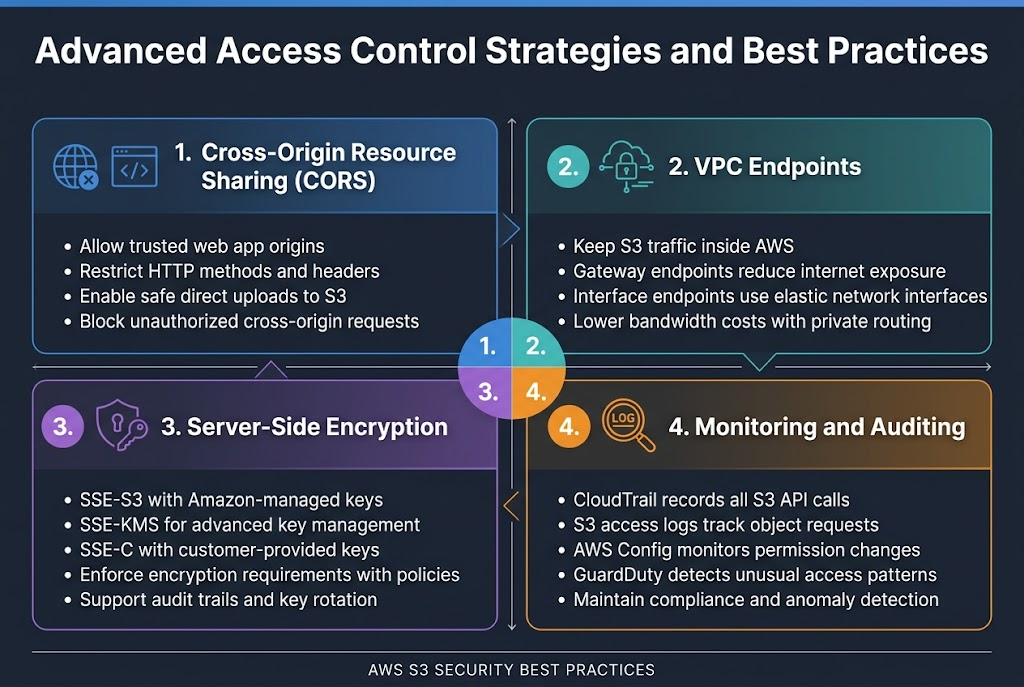
Cross-origin resource sharing configuration for web application integration
CORS configuration in AWS S3 bucket security allows web applications to access S3 resources from different domains safely. You can specify allowed origins, HTTP methods, and headers through the S3 console or API. This setup prevents unauthorized cross-origin requests while enabling legitimate web applications to upload files directly to your buckets.
VPC endpoints that secure traffic and reduce data transfer costs
VPC endpoints create private connections between your VPC and S3 storage architecture, keeping traffic within AWS infrastructure. Gateway endpoints route S3 traffic through your VPC without internet gateways, reducing bandwidth costs and improving security. Interface endpoints provide direct access through elastic network interfaces with specific DNS names for granular control.
Server-side encryption options that protect data at rest
S3 offers multiple encryption methods including SSE-S3 with Amazon-managed keys, SSE-KMS for advanced key management, and SSE-C for customer-provided encryption keys. AWS S3 access control policies can enforce encryption requirements automatically. KMS integration provides detailed audit trails and rotation capabilities for enhanced AWS S3 file management compliance.
Monitoring and auditing tools that ensure compliance and detect anomalies
CloudTrail captures all S3 API calls for comprehensive audit logging, while S3 access logs track object-level requests. AWS Config monitors S3 permissions configuration changes automatically. GuardDuty detects unusual access patterns and potential security threats. These tools work together to maintain S3 security best practices and regulatory compliance requirements.
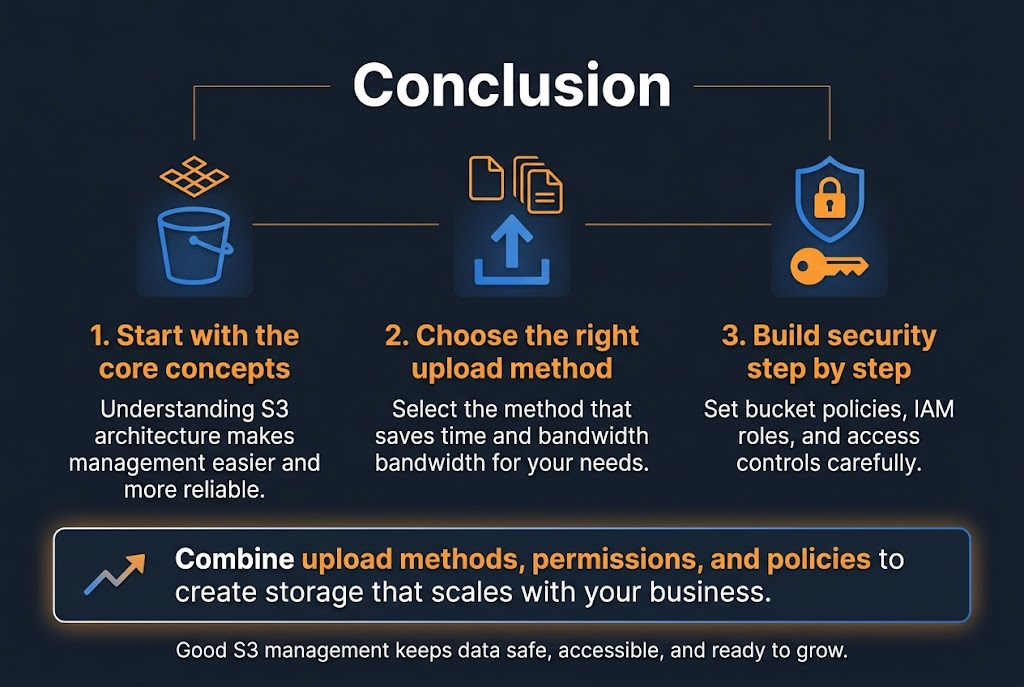
Managing files in S3 doesn’t have to be overwhelming once you understand the core concepts. We’ve walked through the fundamental architecture that makes S3 so reliable, explored different upload methods that can save you time and bandwidth, and covered the permission models that keep your data secure. The key is starting with a solid foundation and building your security controls step by step.
The real power of S3 comes from combining these elements effectively. Set up your bucket policies and IAM roles carefully, choose the right upload method for your needs, and regularly review your access controls. Your future self will thank you for taking the time to implement these practices correctly from the start. Remember, good S3 management isn’t just about storing files – it’s about creating a system that scales with your business while keeping your data safe and accessible.









