


Kubernetes Gateway API is replacing Ingress-NGINX as the new standard for traffic management, and many teams are ready to make the switch. This comprehensive Gateway API migration guide walks platform engineers, DevOps professionals, and Kubernetes administrators through the complete process of migrating from Ingress-NGINX to Gateway API.
Who this guide is for: Teams currently running Ingress-NGINX who want to modernize their traffic routing with Gateway API’s enhanced features and better resource management.
You’ll learn how to assess your current setup for migration readiness and execute a smooth transition without downtime. We’ll also cover converting your existing Ingress resources to Gateway API format and implementing advanced features like traffic splitting and header-based routing. By the end, you’ll have a production-ready Gateway API deployment that’s more flexible and maintainable than your previous Ingress controller setup.
Understanding the Key Differences Between Ingress-NGINX and Gateway API
Architecture and design philosophy comparison
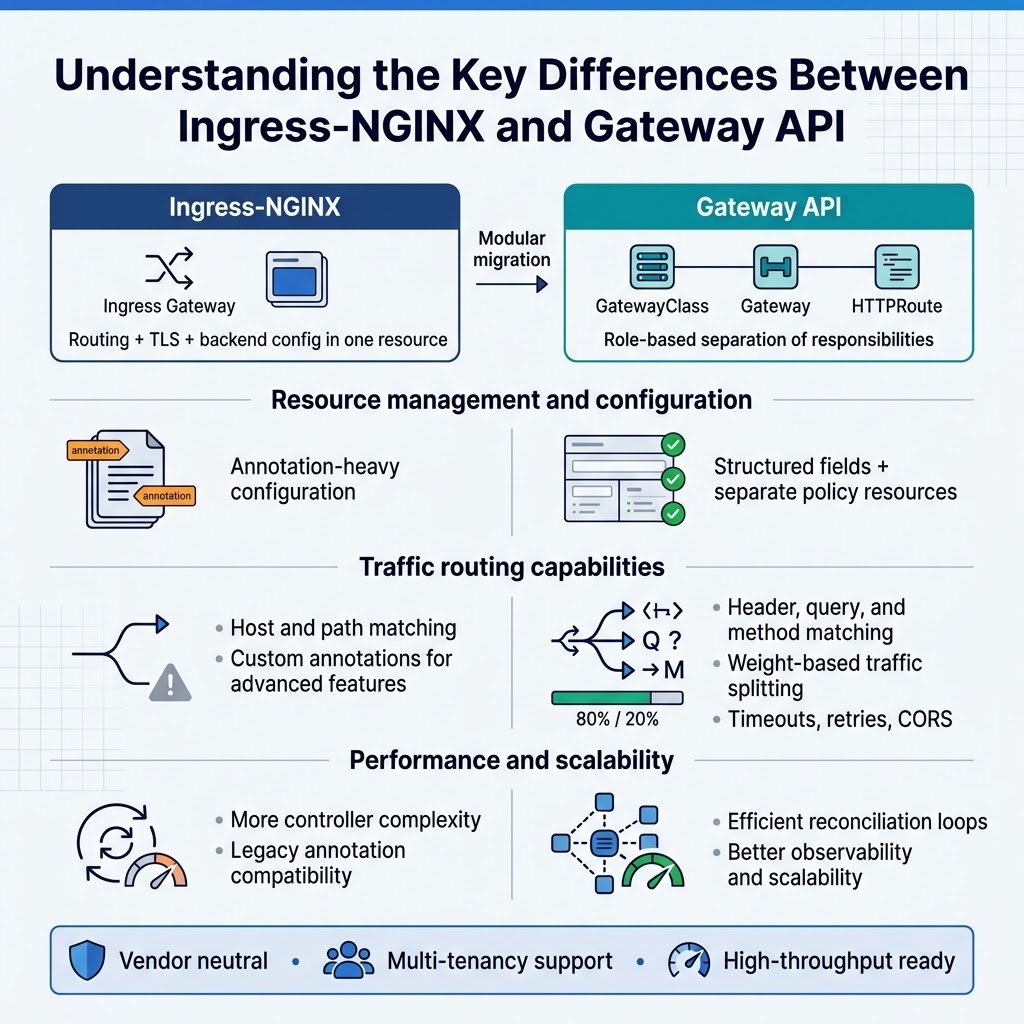
Gateway API migration represents a shift from traditional ingress patterns to role-based resource separation. Ingress-NGINX combines routing, TLS termination, and backend configuration into single resources, while Gateway API splits responsibilities across Gateway, HTTPRoute, and GatewayClass resources. This modular approach enables better multi-tenancy support and clearer ownership boundaries between platform teams and application developers.
The Gateway API vs Ingress NGINX architectural difference centers on extensibility and vendor neutrality. Gateway API provides standardized CRDs that work across different implementations, eliminating vendor lock-in concerns. The design emphasizes progressive disclosure, where basic routing remains simple while advanced features become available through additional resource types and fields.
Resource management and configuration approaches
Kubernetes Gateway API tutorial concepts show how resource management differs significantly from traditional ingress controllers. Gateway API introduces hierarchical resource relationships where GatewayClass defines infrastructure templates, Gateways configure listeners and protocols, and Routes handle traffic routing rules. This separation allows platform administrators to control infrastructure while developers manage application-specific routing independently.
Configuration approaches in Gateway API implementation provide more granular control over traffic policies. Unlike Ingress-NGINX’s annotation-heavy configuration model, Gateway API uses structured fields and separate policy resources. This approach reduces configuration drift and enables better validation, making Ingress to Gateway conversion more predictable and maintainable.
Traffic routing capabilities and limitations
Kubernetes ingress migration guide principles highlight Gateway API’s enhanced routing capabilities beyond simple host and path matching. Gateway API supports header-based routing, query parameter matching, and method-based rules natively. Weight-based traffic splitting enables advanced deployment patterns like canary releases and A/B testing without external tools.
Migrate Ingress controller scenarios often reveal limitations in traditional ingress patterns. Ingress-NGINX requires custom annotations for advanced features, while Gateway API provides standardized mechanisms for timeout configuration, retry policies, and cross-origin resource sharing. The API’s typed fields prevent configuration errors common in annotation-based approaches.
Performance and scalability advantages
Gateway API configuration improvements deliver better performance through optimized resource processing and reduced controller complexity. The API’s structured approach enables more efficient reconciliation loops and reduces unnecessary configuration reloads. Gateway implementations can optimize for specific traffic patterns without maintaining compatibility with legacy annotation formats.
Kubernetes traffic management migration to Gateway API often results in improved scalability characteristics. The separation of concerns allows independent scaling of different components, while standardized interfaces enable better observability and debugging capabilities. Gateway API’s design anticipates high-throughput environments and provides hooks for performance optimization that weren’t available in traditional ingress patterns.
Assessing Your Current Ingress-NGINX Setup for Migration Readiness
Inventory existing ingress resources and configurations
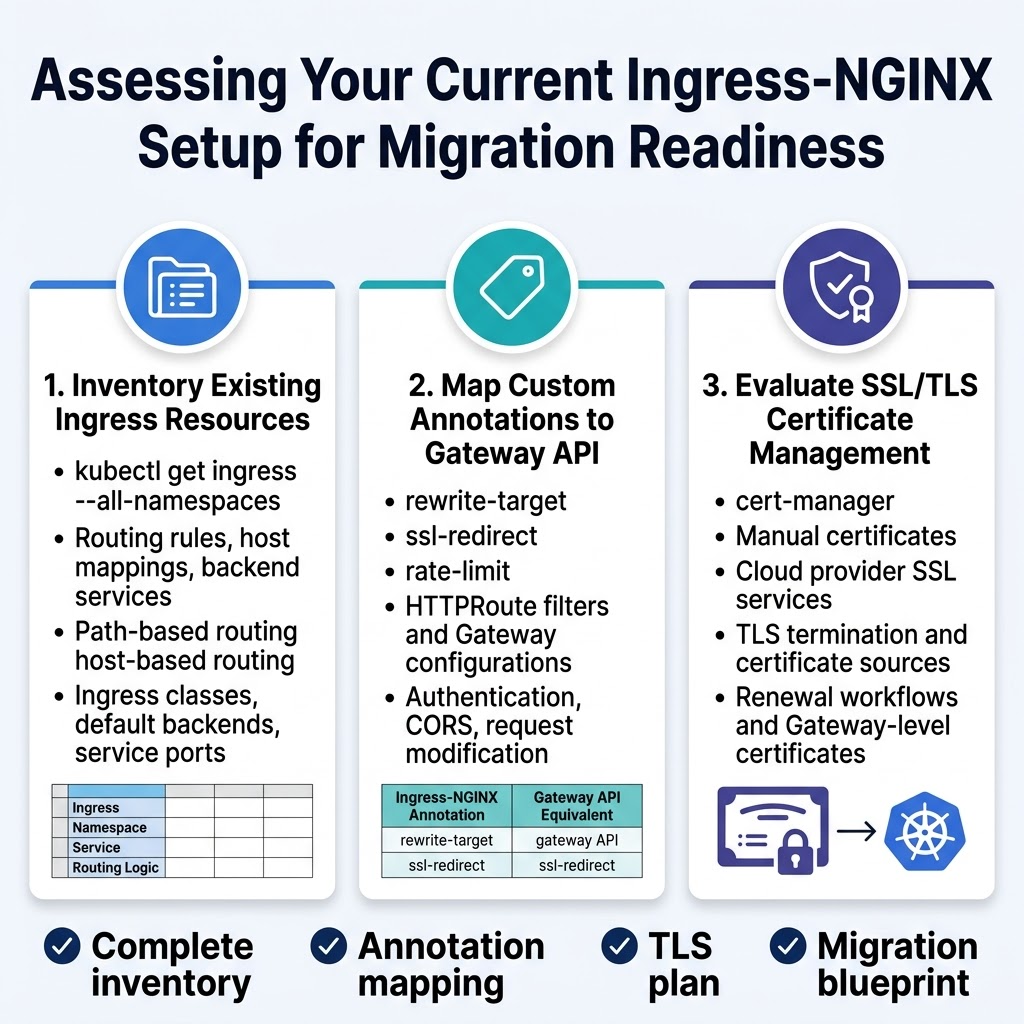
Start your Gateway API migration by cataloging all ingress resources across your Kubernetes cluster. Use kubectl get ingress --all-namespaces to list every ingress resource, then examine each configuration file to understand routing rules, host mappings, and backend services. Document path-based routing, host-based routing, and any complex traffic distribution patterns you’ve implemented.
Pay special attention to ingress classes, default backends, and service port configurations. Create a comprehensive spreadsheet or documentation that maps each ingress resource to its corresponding services, namespaces, and routing logic. This inventory becomes your migration blueprint when converting to Gateway API format.
Identify custom annotations and their Gateway API equivalents
Ingress-NGINX relies heavily on annotations for advanced features like rate limiting, SSL redirects, and custom headers. Review your ingress resources for annotations such as nginx.ingress.kubernetes.io/rewrite-target, nginx.ingress.kubernetes.io/ssl-redirect, and nginx.ingress.kubernetes.io/rate-limit. Many of these annotations have direct Gateway API equivalents through HTTPRoute filters and Gateway configurations.
Create a mapping document that translates each annotation to its Gateway API counterpart. Some features like authentication, CORS policies, and request modification translate to HTTPRoute filters, while others become Gateway-level configurations. This mapping ensures you don’t lose functionality during your Kubernetes ingress migration guide implementation.
Evaluate SSL/TLS certificate management requirements
Examine your current certificate management strategy, whether you’re using cert-manager, manual certificates, or cloud provider SSL services. Document which ingress resources use TLS termination, the certificate sources, and any automated renewal processes. Gateway API handles TLS differently, often requiring certificates to be referenced at the Gateway level rather than individual routes.
Review your certificate lifecycle management and determine if you need to modify your cert-manager configuration or certificate provisioning workflows. Consider how Gateway API’s TLS configuration will affect your existing certificate automation and plan any necessary adjustments to maintain seamless SSL/TLS operations throughout your Gateway API migration.
Planning Your Gateway API Migration Strategy
Choose the appropriate Gateway API implementation
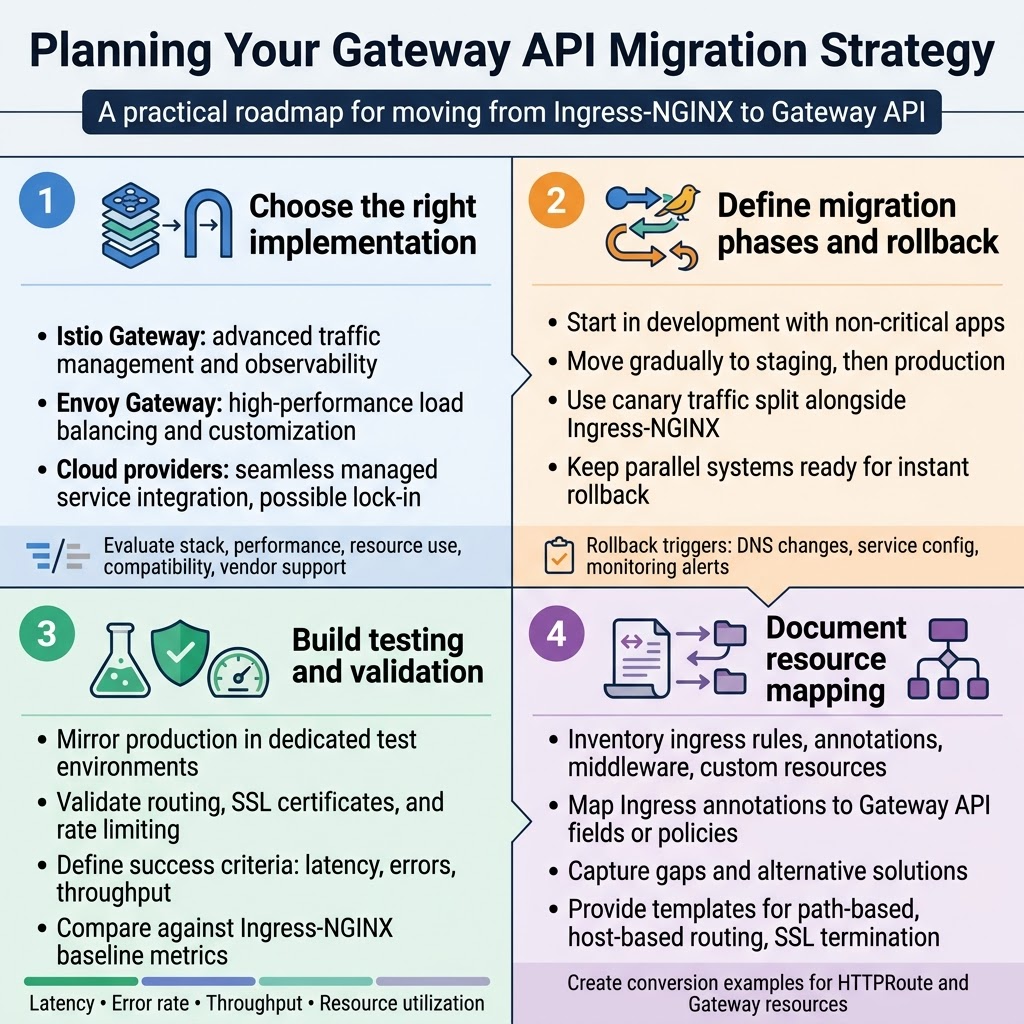
Different Gateway API implementations offer unique strengths depending on your infrastructure requirements. Istio Gateway provides advanced traffic management and observability features, making it ideal for complex microservices architectures. Envoy Gateway delivers high-performance load balancing with extensive customization options. Cloud provider implementations like AWS Load Balancer Controller or Google Cloud Gateway integrate seamlessly with managed services but may lock you into specific platforms.
Consider your existing technology stack, performance requirements, and operational expertise when selecting an implementation. Evaluate factors like resource consumption, feature compatibility with your current Ingress-NGINX configuration, and long-term vendor support. Most teams benefit from starting with a vendor-neutral option before exploring cloud-specific features.
Define migration phases and rollback procedures
Break your Gateway API migration into manageable phases to minimize risk and operational disruption. Start with non-critical applications in development environments, then gradually move to staging and production workloads. Implement canary deployments that route a small percentage of traffic through Gateway API while maintaining Ingress-NGINX as the primary path.
Establish clear rollback triggers and procedures before beginning each migration phase. Document the exact steps to revert traffic routing, including DNS changes, service configurations, and monitoring alert adjustments. Keep both systems running in parallel during transition periods, enabling instant rollback if performance degrades or errors spike unexpectedly.
Establish testing environments and validation criteria
Create dedicated testing environments that mirror your production setup as closely as possible for Gateway API validation. Deploy identical application workloads, network policies, and security configurations to catch integration issues early. Set up automated testing pipelines that verify routing behavior, SSL certificate handling, and rate limiting functionality matches your current Ingress-NGINX performance.
Define measurable success criteria including response time thresholds, error rate limits, and throughput benchmarks. Monitor key metrics like request latency, connection success rates, and resource utilization during testing phases. Establish baseline measurements from your existing Ingress-NGINX setup to compare against Gateway API performance and identify any regressions before production deployment.
Create resource mapping documentation
Document the exact mapping between your current Ingress-NGINX resources and their Gateway API equivalents to streamline the conversion process. Create a comprehensive inventory of all ingress rules, annotations, middleware configurations, and custom resources currently in use. Map each Ingress annotation to its corresponding Gateway API field or policy resource, noting any functionality gaps that require alternative solutions.
Maintain detailed conversion templates and examples for common patterns like path-based routing, host-based routing, and SSL termination. Include specific examples of how complex Ingress-NGINX configurations translate to Gateway API HTTPRoute and Gateway resources. This documentation becomes invaluable for troubleshooting and ensures consistent migration approaches across different teams and applications.
Installing and Configuring Gateway API Components
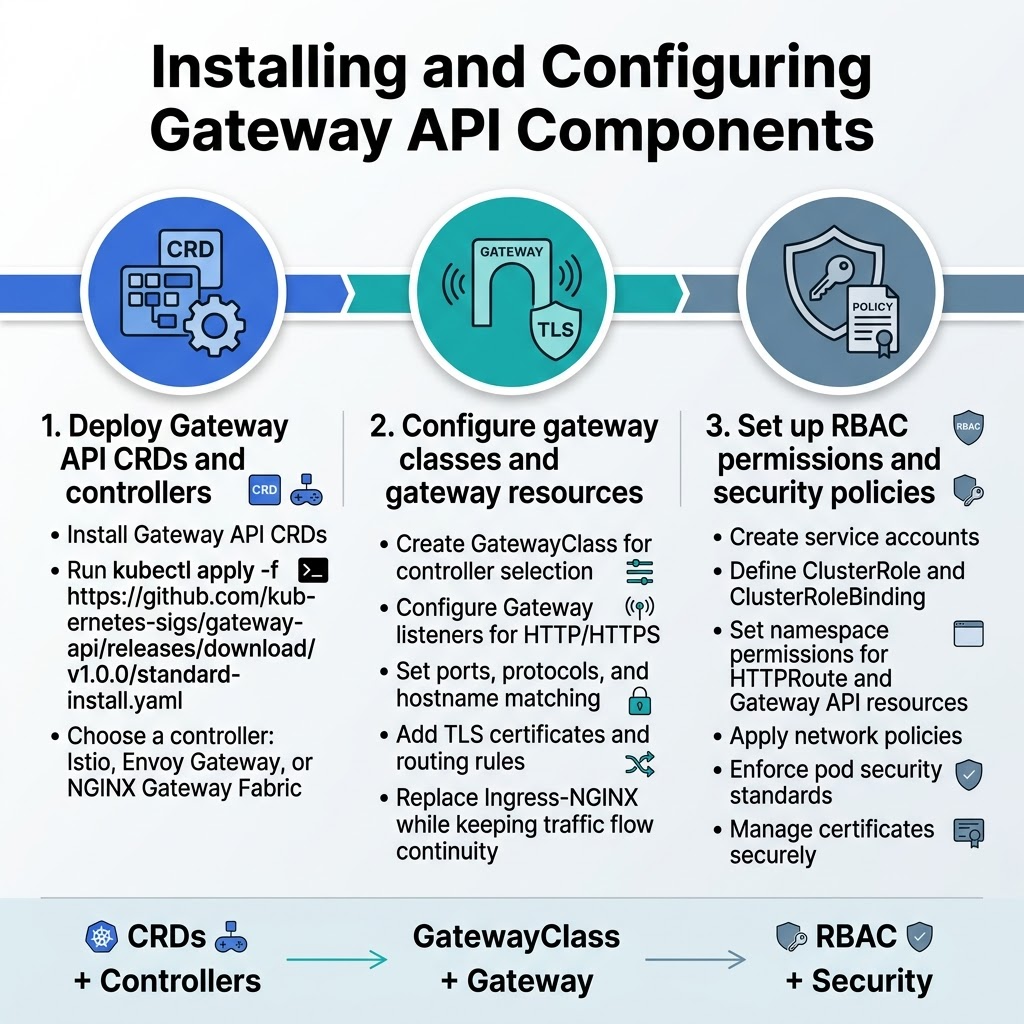
Deploy Gateway API CRDs and controllers
Installing Gateway API requires deploying the core Custom Resource Definitions and selecting an appropriate controller. Start by installing the Gateway API CRDs using kubectl apply -f https://github.com/kubernetes-sigs/gateway-api/releases/download/v1.0.0/standard-install.yaml. Choose from controllers like Istio, Envoy Gateway, or NGINX Gateway Fabric based on your specific requirements and existing infrastructure.
Configure gateway classes and gateway resources
Create a GatewayClass resource that defines the controller responsible for managing your gateways. Configure your Gateway resource with proper listeners for HTTP/HTTPS traffic, specifying ports, protocols, and hostname matching rules. Set up TLS certificates and define routing rules that will replace your current Ingress-NGINX configuration while maintaining traffic flow continuity.
Set up proper RBAC permissions and security policies
Establish service accounts with appropriate ClusterRole and ClusterRoleBinding resources for Gateway API controllers. Configure namespace-specific permissions for HTTPRoute and other Gateway API resources. Implement security policies including network policies, pod security standards, and certificate management workflows to ensure your Gateway API migration maintains the same security posture as your existing Ingress-NGINX setup.
Converting Ingress Resources to Gateway API Format
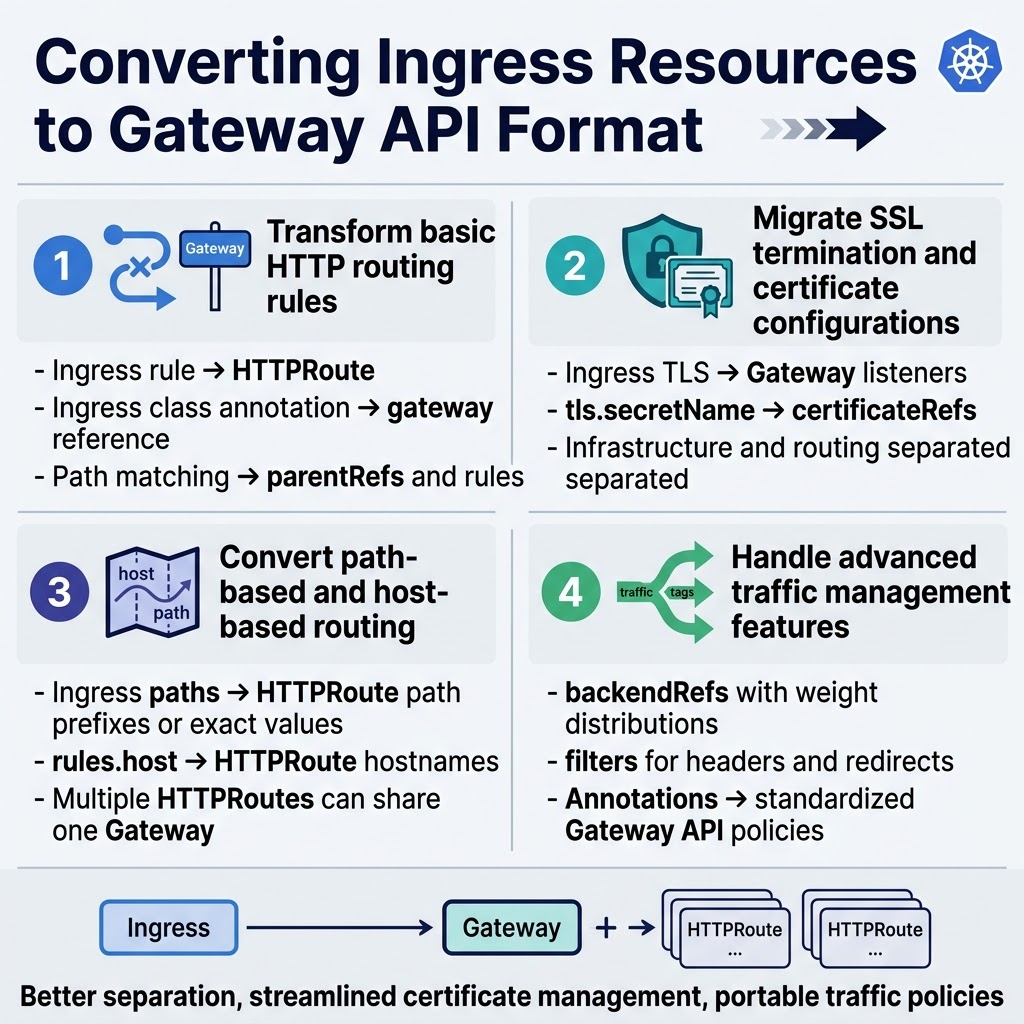
Transform basic HTTP routing rules
Converting Ingress-NGINX routing rules to Gateway API format requires understanding the structural differences between these technologies. Basic HTTP routing transforms from Ingress rules to HTTPRoute resources, where the gateway reference replaces the ingress class annotation. Route matching moves from path-based configurations to more explicit parentRefs and rule specifications.
Migrate SSL termination and certificate configurations
SSL termination shifts from Ingress TLS sections to Gateway listeners with HTTPS protocol definitions. Certificate management moves from tls.secretName fields to certificateRefs within Gateway specifications. This Gateway API migration approach provides better separation between infrastructure (Gateway) and application routing (HTTPRoute) concerns, making certificate rotation and management more streamlined.
Convert path-based and host-based routing
Path-based routing converts from Ingress path arrays to HTTPRoute matches with path prefixes or exact values. Host-based routing transforms from Ingress rules.host fields to HTTPRoute hostnames specifications. The Kubernetes Gateway API tutorial demonstrates how multiple HTTPRoutes can reference the same Gateway while maintaining traffic isolation through different hostname and path combinations.
Handle advanced traffic management features
Advanced features like traffic splitting, header manipulation, and request redirection require HTTPRoute backendRefs with weight distributions and filters. Ingress-NGINX annotations transform into structured Gateway API filters and policies. Custom load balancing strategies migrate from controller-specific annotations to standardized Gateway API configuration, ensuring better portability across different Kubernetes ingress migration scenarios.
Implementing Advanced Gateway API Features
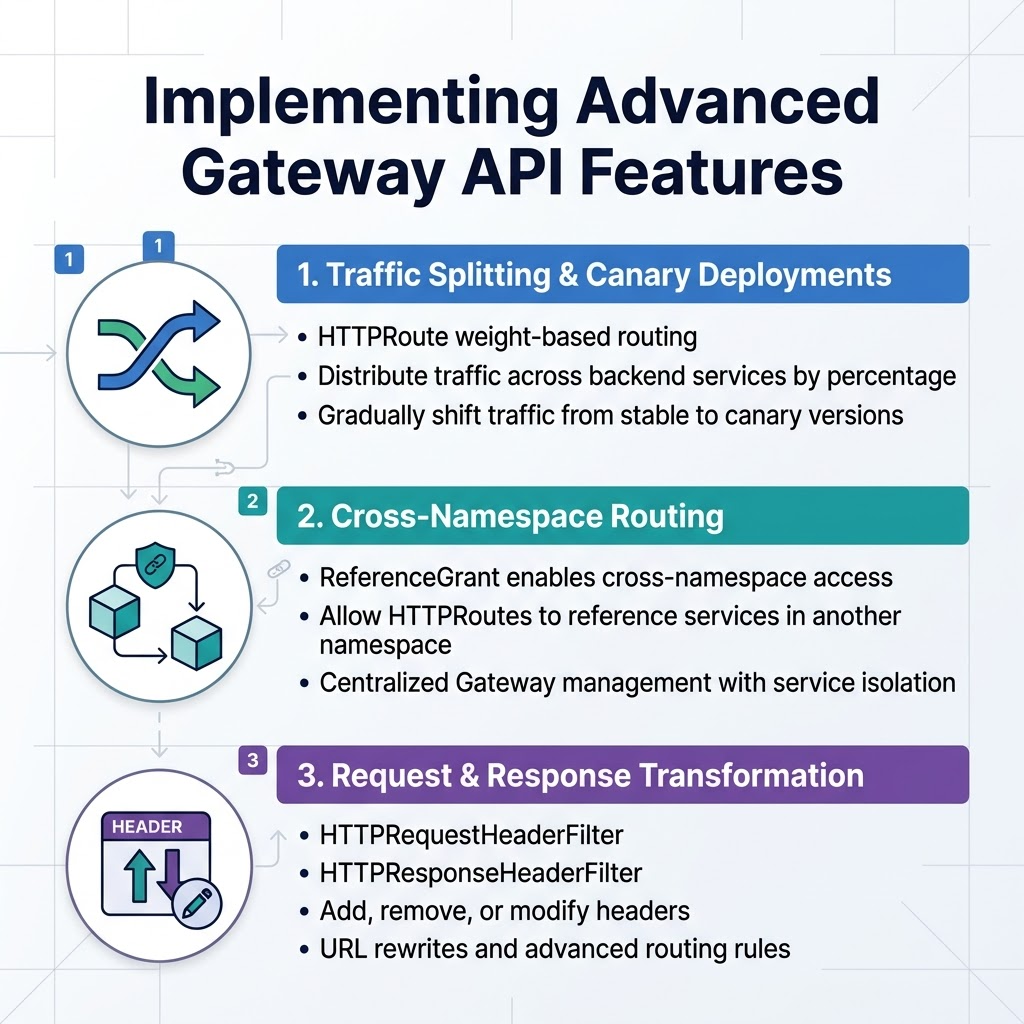
Configure traffic splitting and canary deployments
Gateway API makes traffic splitting incredibly straightforward through HTTPRoute weight-based routing. You can distribute traffic across multiple backend services by specifying percentage weights in your HTTPRoute configuration. For canary deployments, create two services pointing to different application versions, then gradually shift traffic from stable to canary by adjusting the weight values in your Gateway API implementation.
Set up cross-namespace routing capabilities
Cross-namespace routing becomes simple with Gateway API’s ReferenceGrant resources. Create a ReferenceGrant in the target namespace to allow HTTPRoutes from other namespaces to reference services. This enables centralized Gateway management while maintaining service isolation across different teams and environments, streamlining your Kubernetes traffic management migration from traditional ingress patterns.
Implement request/response transformation rules
Gateway API supports powerful transformation capabilities through HTTPRequestHeaderFilter and HTTPResponseHeaderFilter. You can add, remove, or modify headers, implement URL rewrites, and create sophisticated routing rules. These filters integrate seamlessly with your Gateway API configuration, providing enhanced control over request processing that surpasses basic Ingress-NGINX functionality.
Testing and Validating Your Gateway API Deployment
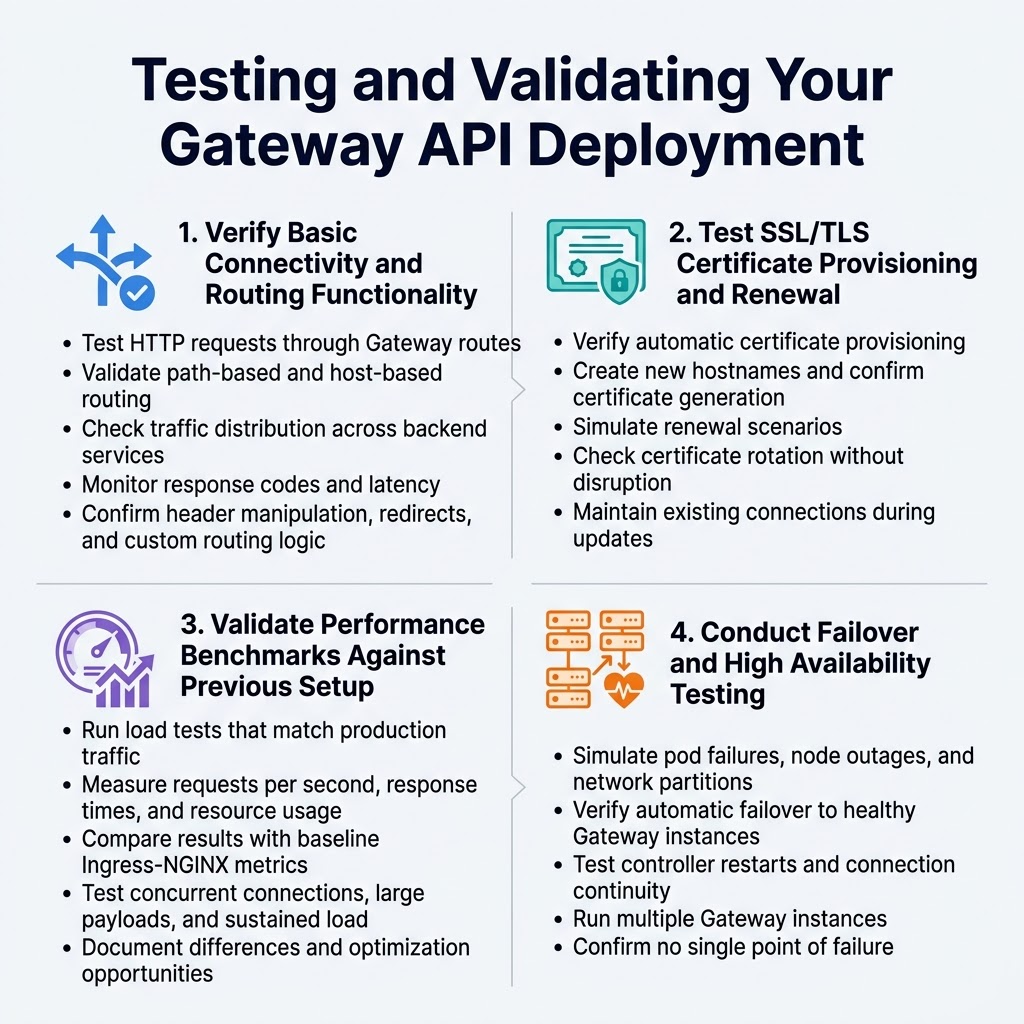
Verify Basic Connectivity and Routing Functionality
Start your Gateway API testing by confirming all traffic routes work correctly. Create test HTTP requests to different services through your Gateway configuration, checking that path-based and host-based routing functions as expected. Verify that your Gateway API implementation handles traffic distribution properly across backend services.
Monitor response codes and latency metrics during basic connectivity tests. Use tools like curl or specialized testing frameworks to validate routing rules match your previous Ingress-NGINX behavior. Pay attention to header manipulation, redirects, and any custom routing logic you’ve migrated from your original setup.
Test SSL/TLS Certificate Provisioning and Renewal
Certificate management represents a critical aspect of your Gateway API migration validation. Test automatic SSL/TLS certificate provisioning through your configured certificate management solution, whether using cert-manager or cloud provider integrations. Create new hostnames and verify certificates generate automatically within expected timeframes.
Simulate certificate renewal scenarios by adjusting certificate lifetimes or manually triggering renewal processes. Confirm that certificate updates don’t cause service disruptions and that your Gateway API configuration handles certificate rotation gracefully without dropping existing connections.
Validate Performance Benchmarks Against Previous Setup
Performance validation ensures your Gateway API migration maintains or improves upon your previous Ingress-NGINX setup. Run load testing scenarios that mirror your production traffic patterns, measuring key metrics like requests per second, response times, and resource consumption. Compare these results directly with baseline measurements from your original configuration.
Focus on testing scenarios specific to your application’s needs, including concurrent connection limits, large payload handling, and sustained traffic loads. Document any performance differences and identify optimization opportunities within your Gateway API configuration that could enhance overall system performance.
Conduct Failover and High Availability Testing
High availability testing validates your Gateway API deployment’s resilience under failure conditions. Simulate pod failures, node outages, and network partitions to verify your Gateway controllers maintain service availability. Test automatic failover mechanisms and confirm traffic continues flowing through healthy Gateway instances.
Validate your Gateway API configuration handles controller restarts gracefully and maintains established connections during brief disruptions. Test scenarios where multiple Gateway instances run simultaneously, ensuring load distribution works correctly and no single point of failure exists in your new architecture.
Executing the Production Migration
Implement Gradual Traffic Shifting Strategies
Start your Gateway API migration by implementing blue-green or canary deployment patterns. Configure traffic splitting rules to gradually shift small percentages of traffic from your existing Ingress-NGINX setup to the new Gateway API implementation. This approach minimizes risk and allows you to validate Gateway API functionality with real production traffic before committing to full migration.
Use Gateway API’s traffic splitting capabilities with HTTPRoute resources to control traffic distribution. Begin with 5-10% traffic allocation to the new gateway, then incrementally increase based on performance metrics. Configure routing rules that allow instant rollback to Ingress-NGINX if issues arise during the Gateway API migration process.
Monitor Application Performance and Error Rates
Set up comprehensive monitoring dashboards to track key metrics including response times, error rates, and throughput during your Gateway API migration. Monitor both the legacy Ingress-NGINX and new Gateway API endpoints simultaneously to identify performance differences or degradation patterns.
Establish alerting thresholds for critical metrics like 5xx error rates and latency percentiles. Use tools like Prometheus and Grafana to visualize traffic patterns and system health across both ingress solutions, ensuring your migration maintains application reliability standards.
Handle DNS Updates and External Load Balancer Changes
Coordinate DNS record updates with your traffic shifting strategy to ensure seamless user experience during Gateway API migration. Update external load balancer configurations to point to new Gateway API service endpoints while maintaining fallback capabilities to your original Ingress-NGINX setup.
Plan DNS TTL adjustments before migration to enable faster propagation of changes. Update external monitoring systems and CDN configurations to reflect new Gateway API endpoints, ensuring all traffic routing components align with your migration timeline and rollback procedures.
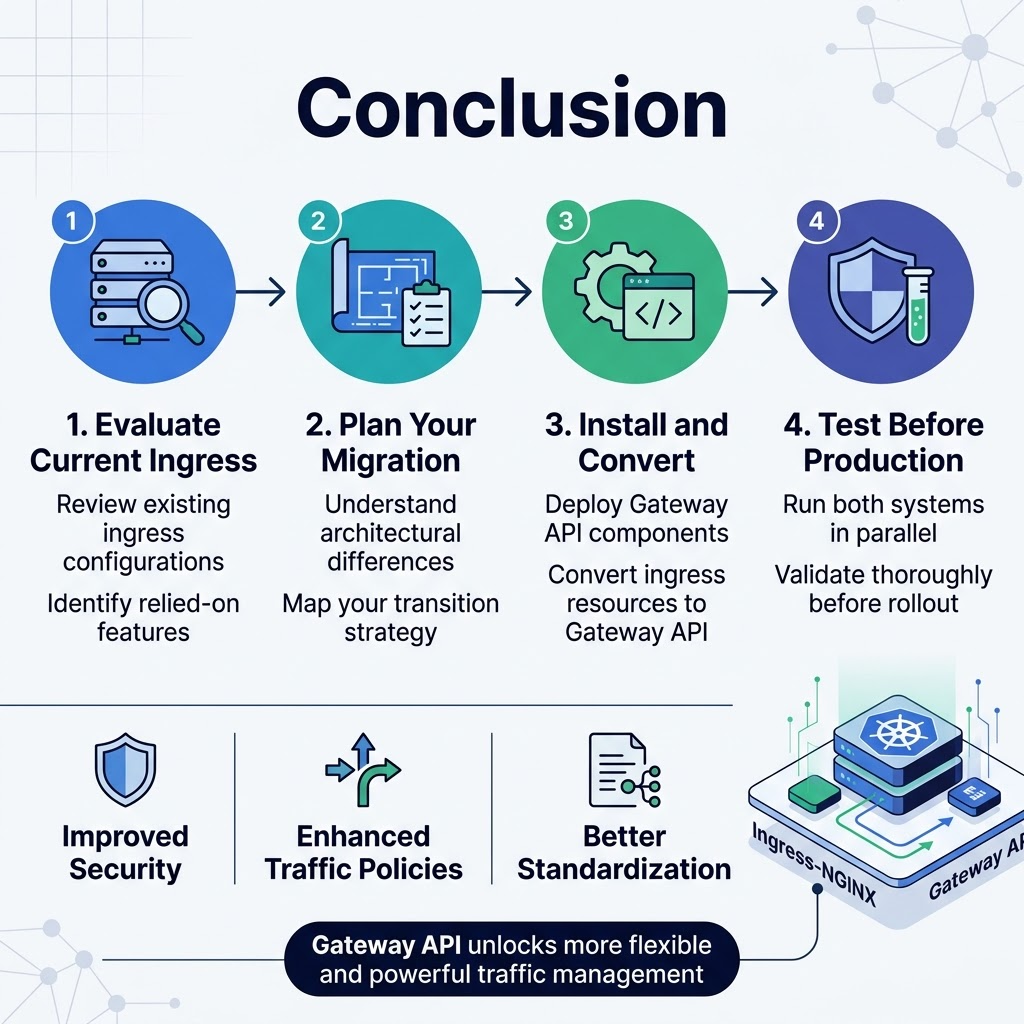
Moving from Ingress-NGINX to Gateway API marks a significant step toward more flexible and powerful traffic management in your Kubernetes environment. The migration process involves understanding the architectural differences, carefully assessing your current setup, and systematically converting your ingress resources to the new Gateway API format. By following the step-by-step approach of planning your strategy, installing the necessary components, and thoroughly testing before production deployment, you can ensure a smooth transition that unlocks advanced routing capabilities and better standardization across your infrastructure.
The Gateway API offers improved security models, enhanced traffic policies, and more intuitive resource management that will benefit your team in the long run. Start by evaluating your current ingress configurations and identifying which features you rely on most heavily. Take your time with the testing phase and consider running both systems in parallel during the initial stages of your migration. Your investment in this transition will pay off through more maintainable traffic routing, better developer experience, and access to cutting-edge Kubernetes networking features.









