


Moving your Docker containers to a new environment doesn’t have to keep you up at night worrying about lost data or broken applications. This guide walks DevOps engineers, system administrators, and development teams through seamless Docker migration techniques that protect your data and maintain service availability.
Docker container migration affects everything from small startups scaling their first application to enterprise teams managing hundreds of containers across multiple environments. Getting it wrong means downtime, frustrated users, and potentially corrupted data. Getting it right means smooth transitions that nobody even notices.
We’ll cover essential pre-migration planning that sets you up for success from day one, including inventory assessment and dependency mapping. You’ll learn proven data protection and backup techniques that create safety nets for your most critical information. Finally, we’ll walk through a step-by-step migration execution process that minimizes risks while keeping your services running smoothly.
Ready to make your next Docker migration stress-free? Let’s dive into the strategies that turn complex container moves into routine operations.
Essential Pre-Migration Planning for Zero Downtime
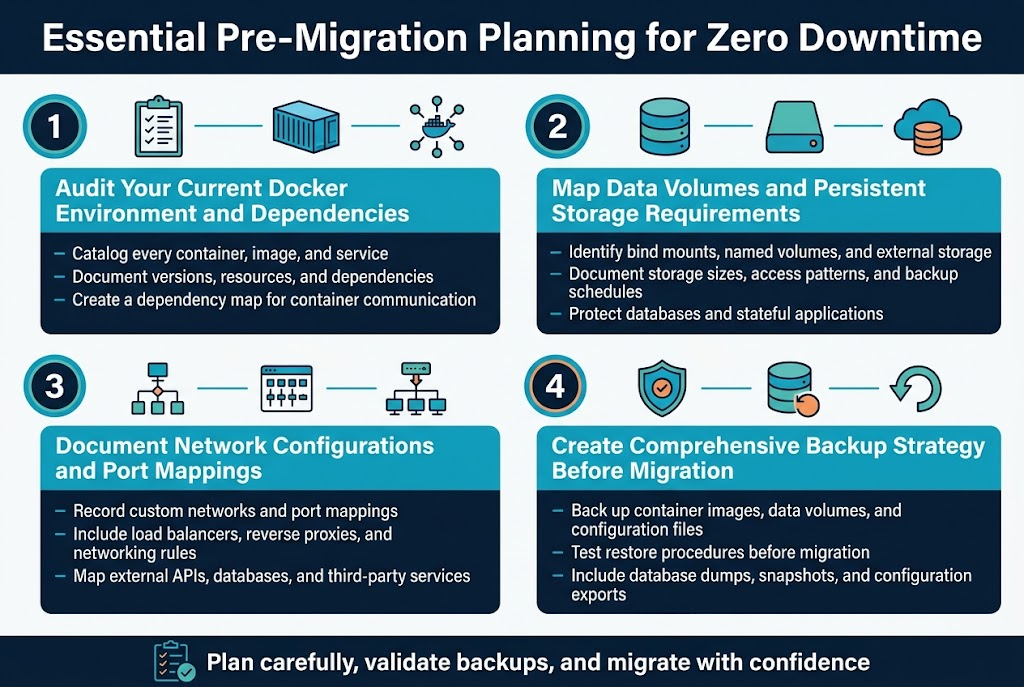
Audit Your Current Docker Environment and Dependencies
Start by cataloging every container, image, and service running in your environment. Document version numbers, resource allocations, and inter-container dependencies to prevent compatibility issues during docker migration. This inventory becomes your migration blueprint, ensuring nothing gets overlooked when planning your seamless docker migration.
Create a dependency map showing how containers communicate with each other and external services. Understanding these relationships helps you determine migration order and identify potential bottlenecks that could disrupt your zero downtime migration strategy.
Map Data Volumes and Persistent Storage Requirements
Identify all persistent data locations, including bind mounts, named volumes, and external storage systems. Each data source needs a specific migration approach to ensure docker data protection throughout the process. Document storage sizes, access patterns, and backup schedules to plan adequate migration windows.
Pay special attention to databases and stateful applications that require consistent data states. These components often determine your migration timeline and strategy, making thorough migration planning docker essential for maintaining data integrity.
Document Network Configurations and Port Mappings
Record all network configurations, custom networks, and port mappings your containers use. This documentation prevents connectivity issues that could cause downtime during container migration best practices. Include load balancer configurations, reverse proxies, and any custom networking rules.
Map external dependencies like APIs, databases, and third-party services that your containers access. Understanding these connections helps you maintain service availability and plan network cutover strategies for your docker deployment migration.
Create Comprehensive Backup Strategy Before Migration
Establish multiple backup layers including container images, data volumes, and configuration files. Test restore procedures to verify backup integrity before starting your migration process. This safety net provides confidence for executing docker backup strategies during critical migration phases.
Schedule backup creation close to migration time to minimize data drift. Include database dumps, file system snapshots, and configuration exports in your backup routine, ensuring complete recovery options if migration issues arise.
Choosing the Right Migration Strategy for Your Infrastructure
Blue-Green Deployment for Mission-Critical Applications
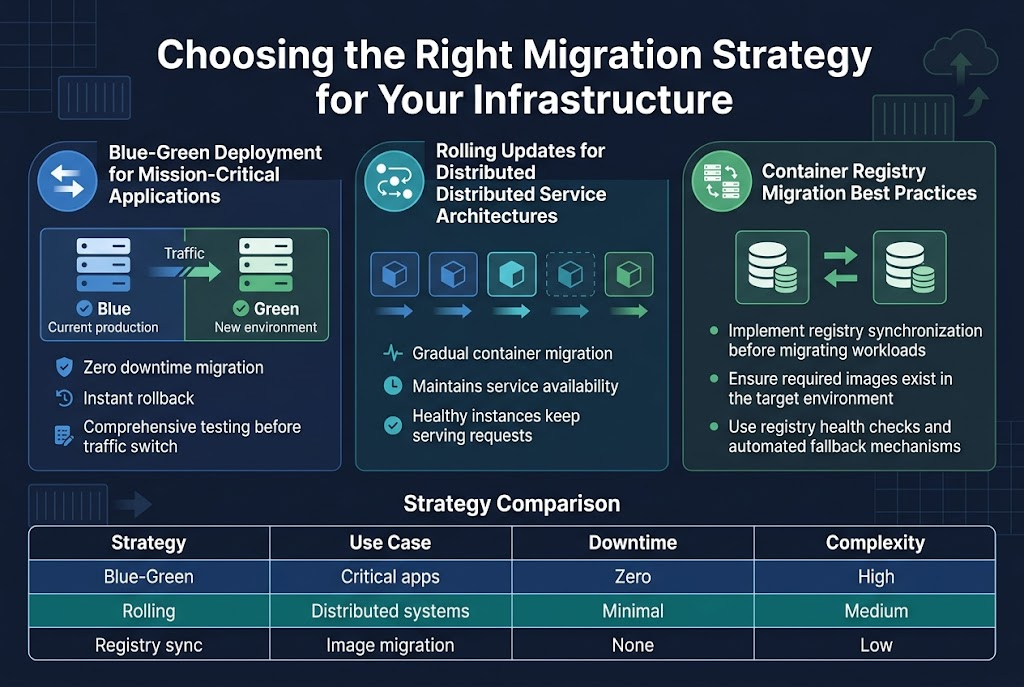
Blue-green deployment stands as the gold standard for docker migration when zero downtime migration is non-negotiable. This strategy maintains two identical production environments—blue (current) and green (new)—allowing instant rollback if issues arise. Container migration best practices dictate running comprehensive tests on the green environment before switching traffic, ensuring seamless docker migration for critical systems.
Rolling Updates for Distributed Service Architectures
Rolling updates excel in distributed systems where gradual docker container migration reduces risk across multiple nodes. This approach updates containers incrementally, maintaining service availability while monitoring each deployment phase. Migration planning docker workflows benefit from this strategy’s built-in fault tolerance, as healthy instances continue serving requests during the update process.
Container Registry Migration Best Practices
| Strategy | Use Case | Downtime | Complexity |
|---|---|---|---|
| Blue-Green | Critical apps | Zero | High |
| Rolling | Distributed systems | Minimal | Medium |
| Registry sync | Image migration | None | Low |
Docker deployment migration requires careful registry planning to avoid image availability issues. Implement registry synchronization before migrating workloads, ensuring all required images exist in the target environment. Data migration docker processes should include registry health checks and automated fallback mechanisms to maintain continuous integration pipelines during infrastructure transitions.
Data Protection and Backup Techniques During Migration
Volume Mounting Strategies for Persistent Data
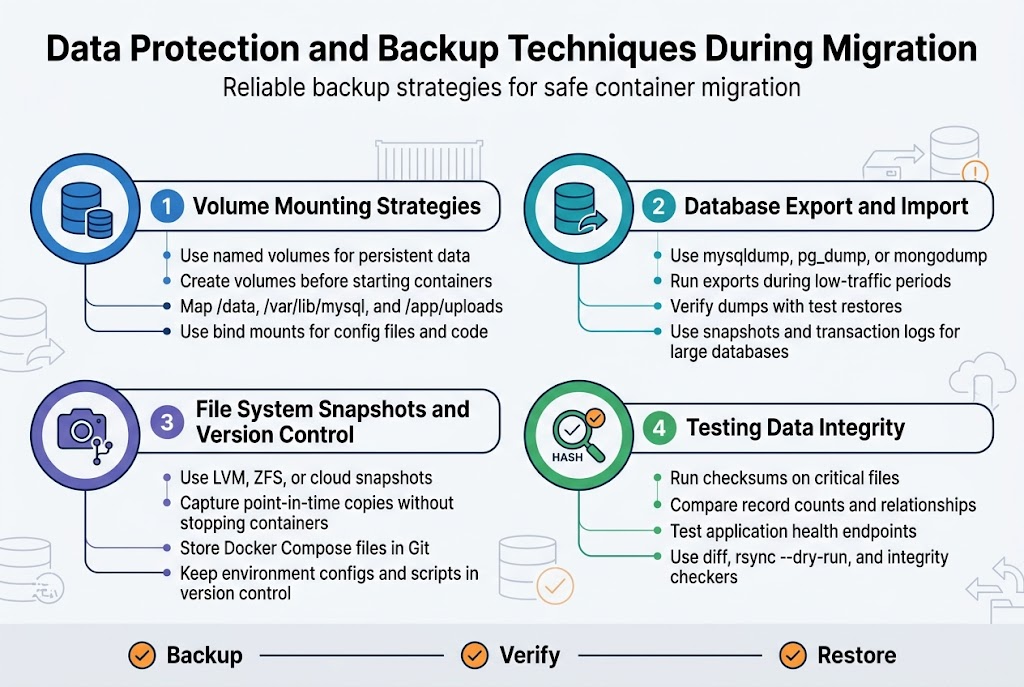
Named volumes provide the most reliable approach for docker data protection during migration. Create explicit volume mounts using docker volume create before starting containers, ensuring data persists independently of container lifecycle. Bind mounts work well for configuration files and application code, but named volumes offer better portability and performance. Map critical application directories like /data, /var/lib/mysql, or /app/uploads to dedicated volumes. This strategy makes container migration best practices straightforward since volumes can be backed up, restored, and attached to new containers seamlessly.
Database Export and Import Procedures
Database export and import procedures form the backbone of safe docker migration workflows. Use native database tools like mysqldump, pg_dump, or MongoDB’s mongodump to create consistent snapshots before migration. Schedule exports during low-traffic periods and verify dump integrity with test restores. For large databases, consider incremental backups and transaction log shipping. Container-based databases benefit from volume snapshots combined with logical exports, providing multiple recovery options during seamless docker migration processes.
File System Snapshots and Version Control
File system snapshots create point-in-time copies of your entire container environment, perfect for zero downtime migration scenarios. Tools like LVM snapshots, ZFS, or cloud provider snapshot services capture consistent states without stopping containers. Combine snapshots with Git-based configuration management to track infrastructure changes. Docker Compose files, environment configurations, and custom scripts should live in version control, making rollbacks simple when migration issues arise.
Testing Data Integrity Throughout the Process
Data integrity testing prevents silent corruption during docker container migration. Implement checksums for critical files and run automated validation scripts against migrated data. Compare record counts, verify application functionality, and test data relationships in target environments. Use tools like diff, rsync --dry-run, or database-specific integrity checkers. Schedule regular integrity checks during migration phases, not just at the end. Database consistency checks, application health endpoints, and user acceptance testing catch issues before they impact production workloads.
Step-by-Step Migration Execution Process
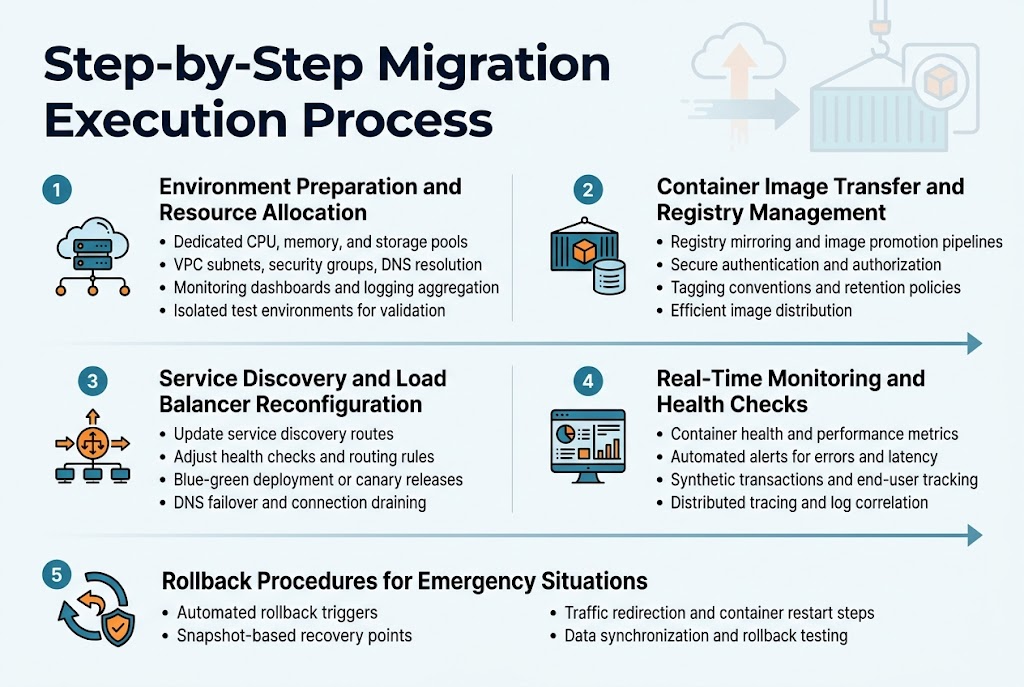
Environment Preparation and Resource Allocation
Before initiating your docker migration, establish dedicated resource pools on the target infrastructure. Allocate sufficient CPU, memory, and storage capacity to handle peak workloads during the transition period. Configure networking components including VPC subnets, security groups, and DNS resolution to ensure seamless connectivity between source and destination environments.
Set up monitoring dashboards and logging aggregation systems to track resource utilization throughout the migration process. Create isolated environments for testing container compatibility and performance validation before production deployment.
Container Image Transfer and Registry Management
Implement a robust image transfer strategy using container registries to move Docker images efficiently between environments. Use registry mirroring or image promotion pipelines to reduce transfer times and bandwidth consumption during docker container migration.
Configure authentication and authorization policies for registry access, ensuring secure image distribution across your infrastructure. Establish image tagging conventions and retention policies to maintain version control and storage optimization throughout the seamless docker migration process.
Service Discovery and Load Balancer Reconfiguration
Reconfigure service discovery mechanisms to route traffic between old and new container instances during the migration window. Update load balancer health checks and routing rules to gradually shift traffic from source to target environments without service interruption.
Implement blue-green deployment patterns or canary releases to validate service functionality before complete traffic cutover. Configure DNS failover mechanisms and connection draining policies to ensure zero downtime migration while maintaining service availability for end users.
Real-Time Monitoring and Health Checks
Deploy comprehensive monitoring solutions to track container health, resource consumption, and application performance metrics during docker deployment migration. Set up automated alerting systems for critical thresholds including response times, error rates, and resource utilization spikes.
Configure synthetic transaction monitoring and end-user experience tracking to validate service functionality throughout the migration process. Implement distributed tracing and log correlation to quickly identify and resolve issues that may arise during container migration best practices execution.
Rollback Procedures for Emergency Situations
Establish automated rollback triggers based on predefined failure conditions such as elevated error rates, performance degradation, or service unavailability. Create snapshot-based recovery points and maintain synchronized data backups to enable rapid restoration of previous stable states.
Document step-by-step rollback procedures including traffic redirection, container restart sequences, and data synchronization processes. Test rollback scenarios regularly to ensure emergency procedures execute smoothly when implementing data migration docker strategies under pressure situations.
Post-Migration Validation and Performance Optimization
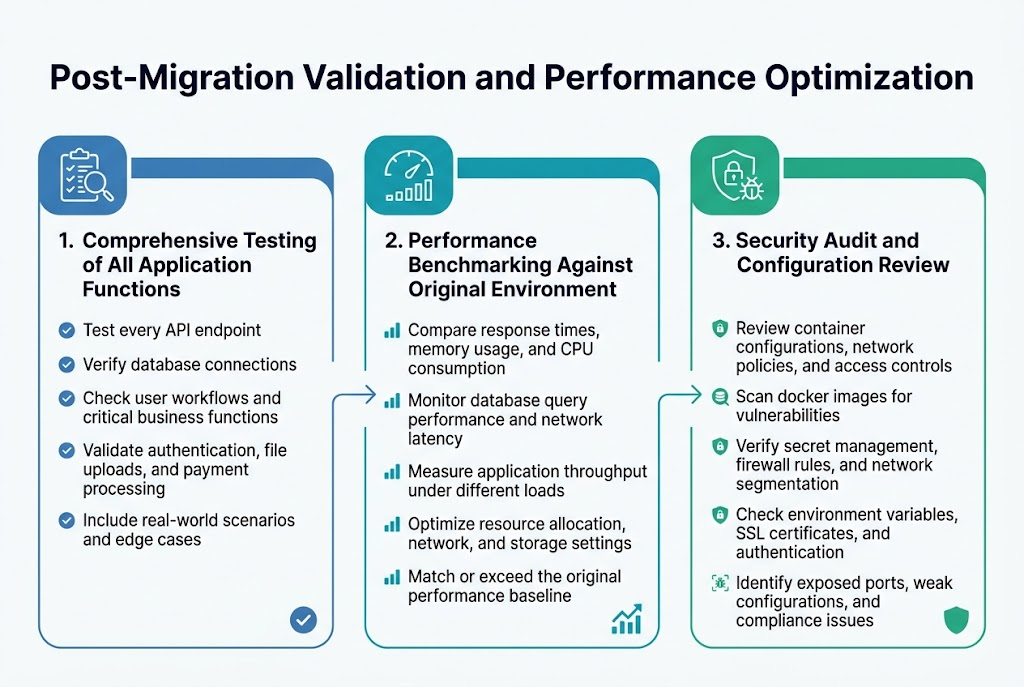
Comprehensive Testing of All Application Functions
After completing your docker migration, running thorough functional tests becomes your safety net. Check every API endpoint, database connection, and user workflow to catch any broken dependencies or configuration mismatches. Test user authentication, file uploads, payment processing, and all critical business functions in your new environment. Create test scenarios that mirror real-world usage patterns, including edge cases that might expose hidden issues.
Performance Benchmarking Against Original Environment
Compare response times, memory usage, and CPU consumption between your old and new docker container migration setup. Use monitoring tools to track metrics like database query performance, network latency, and application throughput under various load conditions. Document any performance differences and optimize container resource allocation, network configurations, or storage settings as needed to match or exceed your original environment’s performance baseline.
Security Audit and Configuration Review
Review all container configurations, network policies, and access controls in your migrated environment. Scan for vulnerabilities in your docker images, verify proper secret management, and validate firewall rules and network segmentation. Check that environment variables, SSL certificates, and authentication mechanisms work correctly. Run security scanning tools against your containers and infrastructure to identify any exposed ports, weak configurations, or compliance issues that need immediate attention.
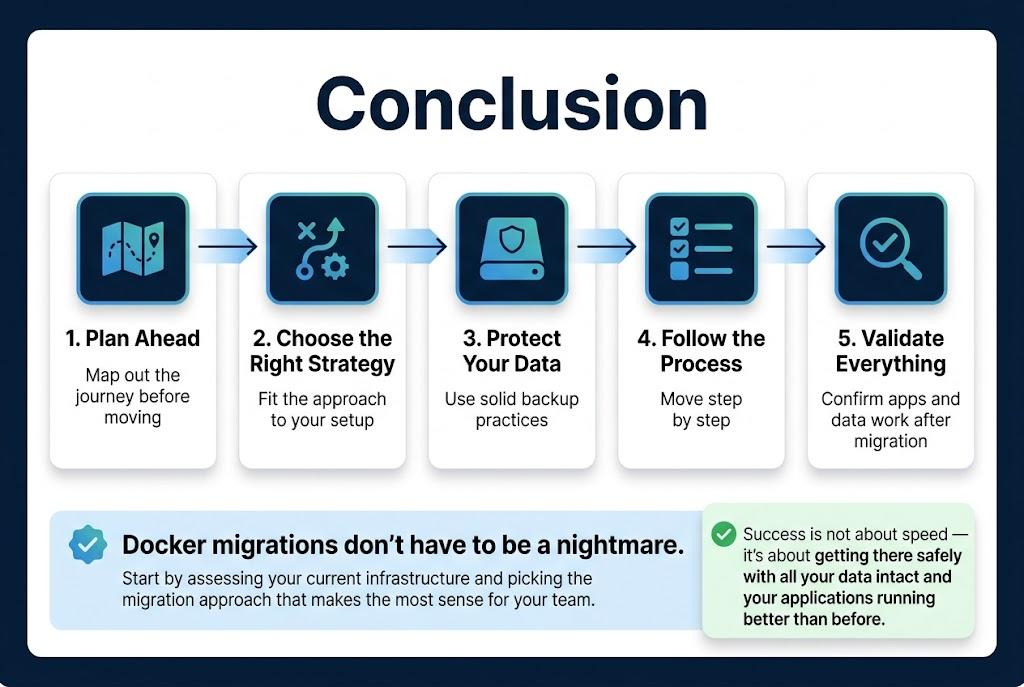
Docker migrations don’t have to be the nightmare scenarios we’ve all heard about. With the right planning, choosing a strategy that fits your setup, protecting your data with solid backup practices, following a clear step-by-step process, and validating everything afterwards, you can move your containers without breaking a sweat. The key is taking your time upfront to map out the journey rather than rushing into it blindly.
Ready to make your next Docker migration smooth and stress-free? Start by assessing your current infrastructure and picking the migration approach that makes the most sense for your team. Remember, a successful migration isn’t about speed – it’s about getting there safely with all your data intact and your applications running better than before.









