


Designing Unified Data Platforms with Databricks Lakehouse: A Complete Guide for Enterprise Teams
Modern enterprises struggle with fragmented data systems that create silos, slow down analytics, and complicate decision-making. Data engineers, architects, and IT leaders need a unified data platform design that breaks down these barriers while maintaining security and performance at scale.
This guide walks you through building robust Databricks Lakehouse solutions that transform how your organization manages and analyzes data. You’ll discover practical approaches to enterprise data management that work in real-world scenarios, not just theory.
We’ll cover the core Databricks architecture principles that make unified platforms successful, showing you how to design systems that actually scale with your business needs. You’ll also learn proven data integration pipelines strategies for connecting legacy systems, cloud services, and modern analytics tools into one cohesive platform.
Finally, we’ll dive into data governance framework implementation and migration strategies from legacy data systems, giving you the roadmap to move from scattered data chaos to streamlined, secure analytics that drive business value.
Understanding Databricks Lakebase Architecture for Enterprise Data Management
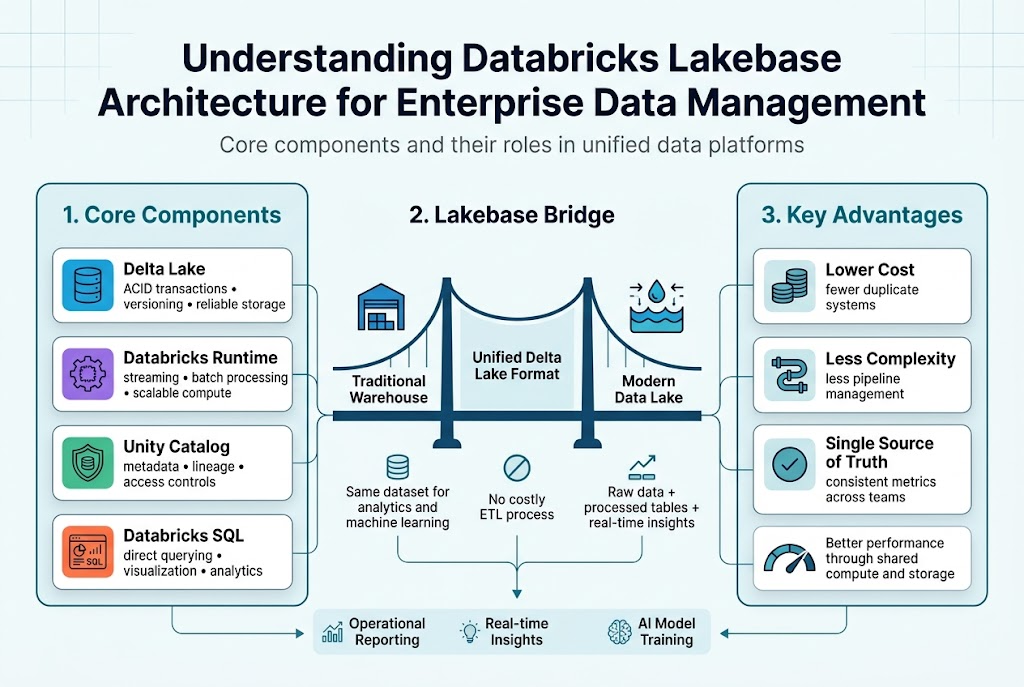
Core components and their roles in unified data platforms
Databricks Lakehouse architecture combines four essential components that work together seamlessly. The Delta Lake storage layer provides ACID transactions and versioning capabilities, while Databricks Runtime handles compute workloads across streaming and batch processing. The Unity Catalog serves as the centralized governance hub, managing metadata, lineage, and access controls. Finally, Databricks SQL enables direct querying and visualization, eliminating the need for separate analytics tools.
How Lakebase bridges traditional data warehouses and modern data lakes
The Databricks architecture eliminates the traditional divide between structured warehouse data and unstructured lake storage. Delta Lake format supports both analytical queries and machine learning workloads on the same dataset, removing costly ETL processes. This unified approach lets teams store raw data alongside processed analytics tables, enabling real-time insights without data movement. Organizations can now handle everything from operational reporting to advanced AI model training within a single platform.
Key advantages over fragmented data storage solutions
Unified data architecture dramatically reduces complexity and costs compared to maintaining separate systems. Teams spend less time managing data pipelines between different storage solutions and more time generating insights. The single source of truth approach eliminates data silos, ensuring consistent metrics across departments. Performance improvements come naturally when compute and storage work together, rather than transferring data between disconnected systems.
Building Data Integration Pipelines with Lakebase Technology
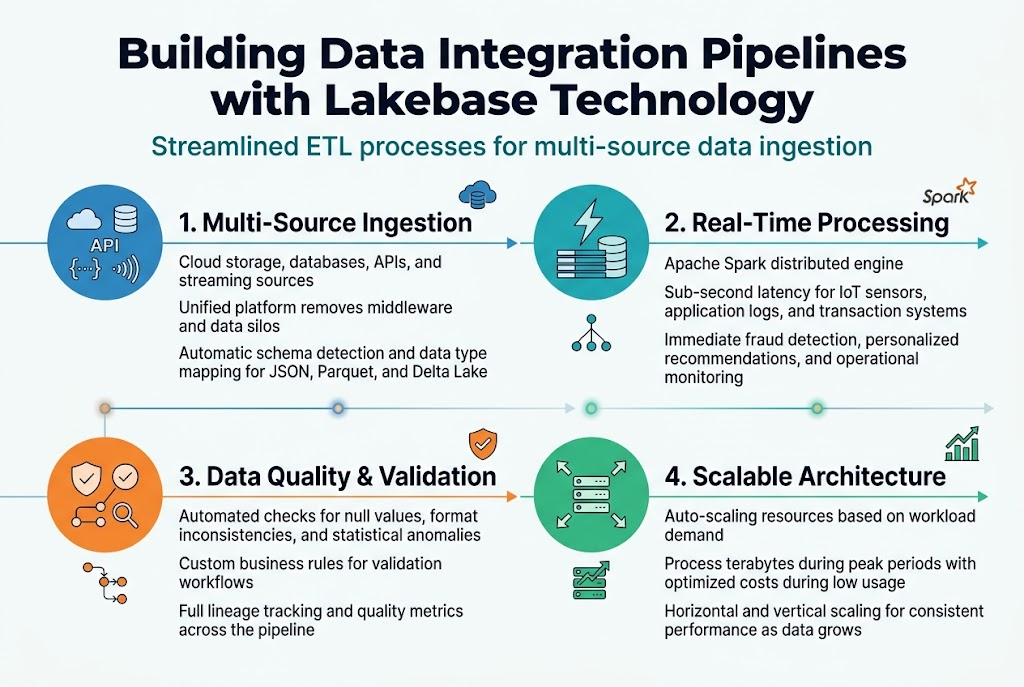
Streamlined ETL processes for multi-source data ingestion
Databricks Lakebase transforms traditional ETL workflows by connecting disparate data sources through a single, cohesive platform. Organizations can seamlessly ingest data from cloud storage, databases, APIs, and streaming sources without complex middleware. The unified data platform design eliminates data silos while providing automated schema detection and data type mapping across various formats including JSON, Parquet, and Delta Lake.
Real-time data processing capabilities for immediate insights
Modern businesses demand instant access to insights, and Databricks architecture delivers through Apache Spark’s distributed processing engine. Data integration pipelines process streaming data from IoT sensors, application logs, and transaction systems with sub-second latency. This real-time capability enables immediate fraud detection, personalized recommendations, and operational monitoring without the delays associated with traditional batch processing approaches.
Automated data quality checks and validation workflows
Data integrity remains paramount in enterprise data management, with built-in validation rules ensuring accuracy throughout the pipeline. Automated checks identify null values, format inconsistencies, and statistical anomalies before data reaches downstream systems. Custom validation logic can be configured to match specific business requirements, while detailed lineage tracking provides complete visibility into data transformations and quality metrics across the entire workflow.
Scalable architecture for handling growing data volumes
The lakehouse security implementation includes auto-scaling capabilities that dynamically adjust computing resources based on workload demands. Organizations process terabytes of data during peak periods without manual intervention, while costs remain optimized during low-usage periods. This elastic architecture supports both horizontal scaling across multiple nodes and vertical scaling for memory-intensive operations, ensuring consistent performance as data volumes grow exponentially.
Implementing Governance and Security Frameworks
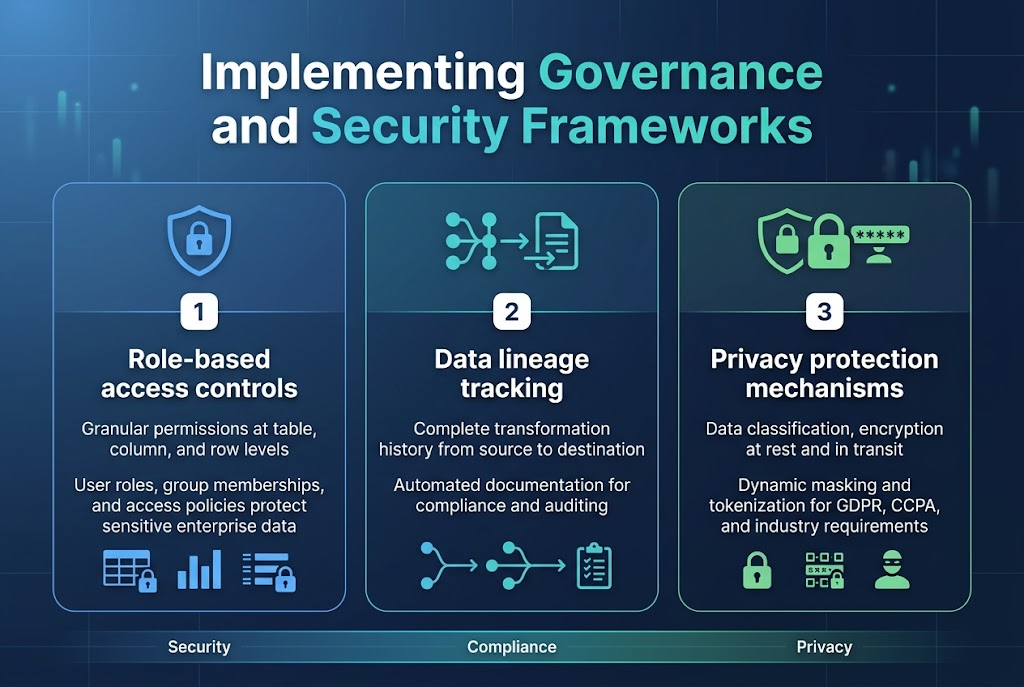
Role-based access controls for sensitive enterprise data
Databricks Lakehouse security starts with granular role-based access controls that protect sensitive enterprise information through multi-layered permissions. Organizations can define user roles, group memberships, and access policies that automatically enforce data security at the table, column, and row levels across their unified data platform design.
Data lineage tracking for compliance and auditing requirements
Built-in lineage tracking capabilities capture complete data transformation histories, showing how information flows through your Databricks architecture from source to destination. This automated documentation supports regulatory compliance by providing auditors with clear visibility into data processing workflows and transformation logic.
Privacy protection mechanisms for regulatory adherence
Data governance framework features include automated data classification, encryption at rest and in transit, and privacy controls that help organizations meet GDPR, CCPA, and industry-specific requirements. Dynamic data masking and tokenization features protect personally identifiable information while maintaining analytical value for authorized users within the lakehouse security implementation.
Optimizing Performance Through Advanced Analytics Features
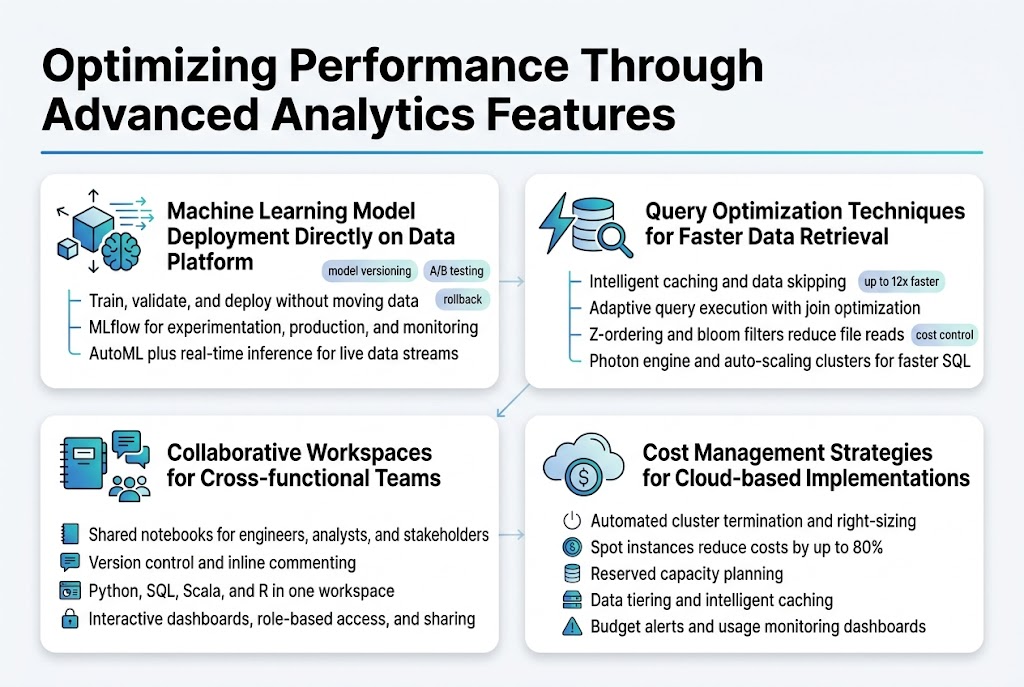
Machine Learning Model Deployment Directly on Data Platform
Databricks Lakehouse transforms machine learning workflows by enabling direct model deployment on the unified data platform. Data scientists can train, validate, and deploy models without moving data between systems, reducing latency and maintaining data freshness. The platform’s MLflow integration streamlines the entire ML lifecycle, from experimentation to production monitoring, while AutoML capabilities accelerate model development for teams with varying expertise levels.
Real-time inference becomes seamless through Databricks’ streaming capabilities, allowing models to process live data streams and deliver instant predictions. The platform automatically handles model versioning, A/B testing, and rollback scenarios, ensuring robust production deployments that maintain business continuity.
Query Optimization Techniques for Faster Data Retrieval
Delta Lake’s intelligent caching and data skipping features dramatically improve query performance by eliminating unnecessary data scans. The platform’s adaptive query execution automatically optimizes join strategies and partition pruning based on real-time statistics. Z-ordering and bloom filters further enhance performance by organizing data layout and reducing file reads during complex analytical queries.
Photon engine acceleration delivers up to 12x faster query execution for SQL workloads through vectorized processing and intelligent memory management. Auto-scaling clusters dynamically adjust compute resources based on workload demands, ensuring optimal performance while controlling costs across varying data processing requirements.
Collaborative Workspaces for Cross-functional Teams
Databricks notebooks create shared environments where data engineers, analysts, and business stakeholders collaborate in real-time. Version control integration tracks changes across team members, while commenting features enable contextual discussions directly within code cells. Multi-language support allows teams to work with Python, SQL, Scala, and R within the same workspace, breaking down technical silos.
Interactive dashboards and visualization tools make complex data insights accessible to non-technical team members. Role-based access controls ensure appropriate data exposure while maintaining security, and workspace sharing capabilities enable knowledge transfer across different departments and project teams.
Cost Management Strategies for Cloud-based Implementations
Automated cluster termination and right-sizing recommendations prevent unnecessary compute costs by shutting down idle resources and optimizing instance types based on workload patterns. Spot instance integration reduces costs by up to 80% for fault-tolerant batch processing jobs, while reserved capacity planning helps predict and control long-term infrastructure expenses.
Data tiering strategies automatically move infrequently accessed data to cheaper storage classes, and intelligent caching minimizes repeated data processing costs. Budget alerts and usage monitoring dashboards provide real-time visibility into spending patterns, enabling proactive cost optimization decisions across different teams and projects within the Databricks architecture.
Migration Strategies from Legacy Data Systems
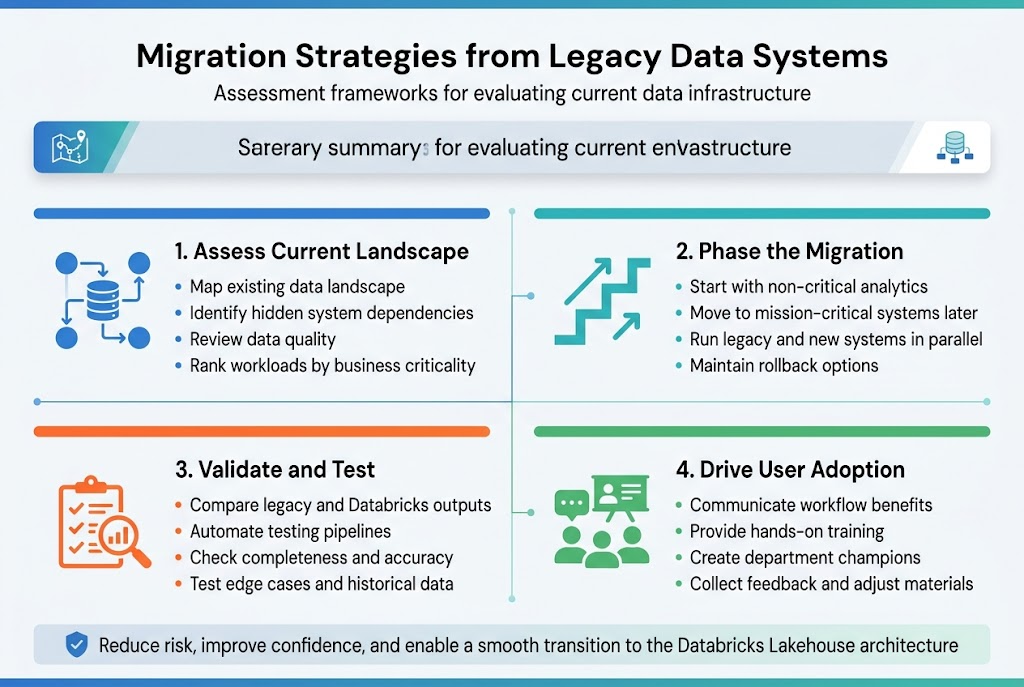
Assessment frameworks for evaluating current data infrastructure
Creating a solid assessment framework starts with mapping your existing data landscape and identifying dependencies across systems. Most organizations discover hidden connections between applications that could break during migration if not properly documented. The evaluation should examine data quality, system performance metrics, and business criticality rankings to prioritize which workloads move first to your unified data platform design.
Phased migration approaches to minimize business disruption
Breaking down your Databricks migration strategy into manageable phases prevents operational chaos and reduces risk exposure. Start with non-critical analytics workloads before moving mission-critical systems, allowing your team to build confidence with the Databricks Lakehouse architecture. Each phase should include parallel running periods where old and new systems operate simultaneously, giving you safety nets and rollback options if issues arise.
Data validation and testing protocols during transition
Robust validation protocols compare data outputs between legacy systems and your new Databricks architecture to catch discrepancies early. Set up automated testing pipelines that run continuously during migration phases, checking data completeness, accuracy, and transformation logic. Your testing should cover edge cases and historical data scenarios that might not surface during initial validation runs but could cause problems later.
Change management best practices for user adoption
User adoption hinges on clear communication about how the unified data architecture will improve their daily workflows rather than complicate them. Provide hands-on training sessions that show real business scenarios using Databricks tools, and create champions within each department who can support their colleagues through the transition. Regular feedback sessions help you address concerns quickly and adjust training materials based on actual user experiences with the new platform.
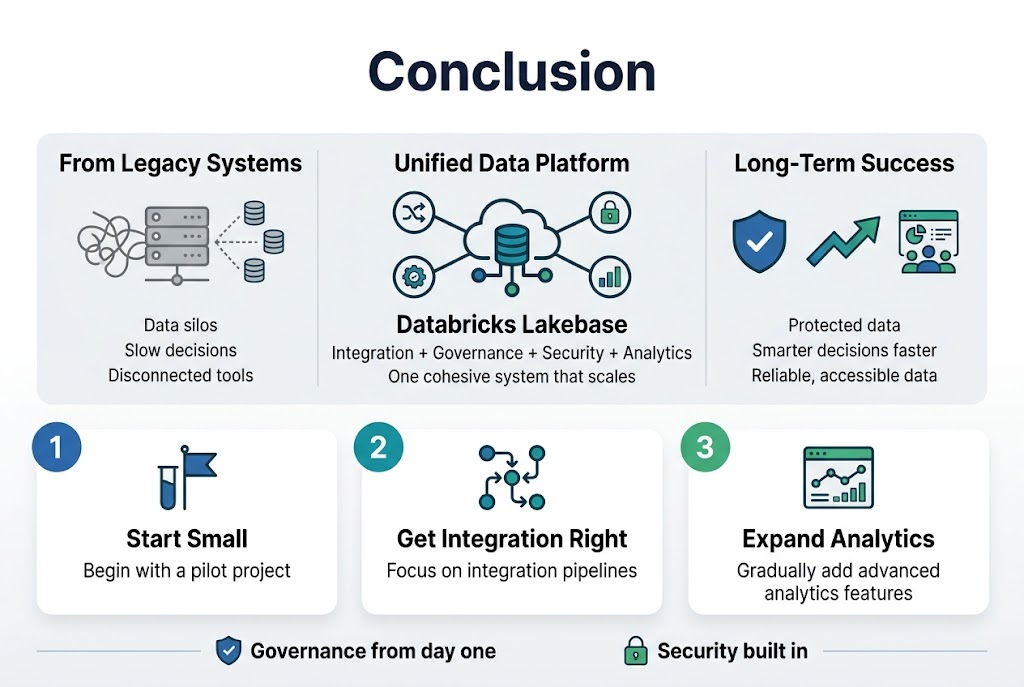
Creating a unified data platform with Databricks Lakebase gives organizations the power to break down data silos and make smarter decisions faster. The architecture brings together data integration, governance, security, and analytics into one cohesive system that scales with your business needs. When you implement proper governance frameworks and security measures from the start, you’re setting up your team for long-term success while keeping your data protected.
The journey from legacy systems to a modern data platform doesn’t have to be overwhelming. Start small with a pilot project, focus on getting your integration pipelines right, and gradually expand your use of advanced analytics features. Your data team will thank you for creating a platform that actually makes their jobs easier, and your business will benefit from having reliable, accessible data that drives real results.









