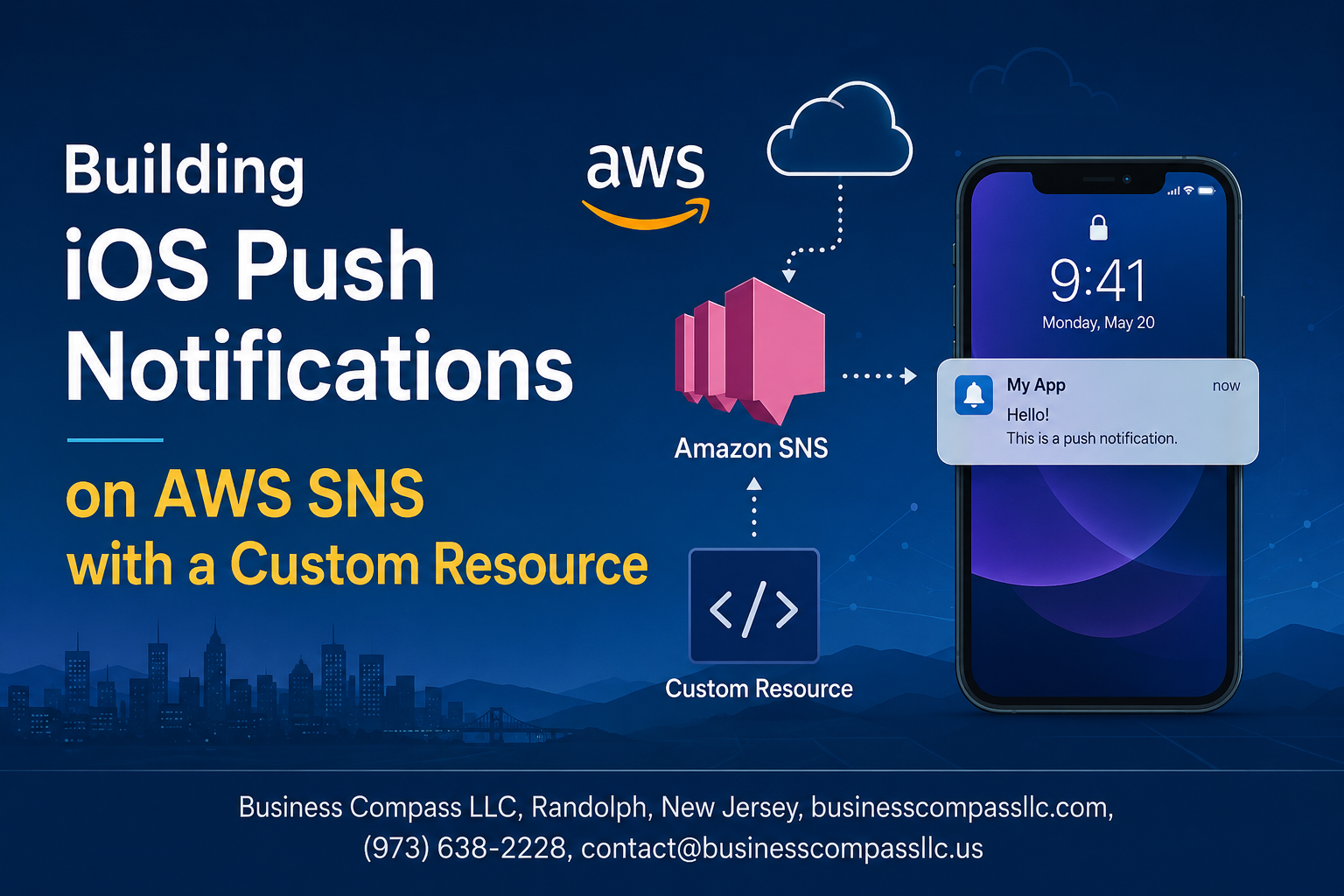
iOS developers and DevOps engineers often struggle with setting up reliable push notifications that scale with their applications. Building iOS push notifications on AWS SNS with a custom resource gives you the flexibility and control that standard configurations can’t match.
This guide is designed for iOS developers, backend engineers, and DevOps teams who want to build a robust push notification system using AWS infrastructure. You’ll learn how to go beyond basic SNS setups and create custom solutions that fit your specific needs.
We’ll walk through creating a custom resource Lambda function that handles the complex parts of AWS SNS iOS setup automatically. You’ll discover how to implement serverless push notifications that integrate seamlessly with Apple’s APNS system. Finally, we’ll cover testing strategies and performance optimization techniques to ensure your AWS mobile notifications work reliably at scale.
By the end, you’ll have a complete understanding of SNS custom resource implementation and the skills to build production-ready iOS push notification systems on AWS.
Understanding AWS SNS for iOS Push Notifications
Benefits of using AWS SNS over direct APNS integration
AWS SNS push notifications offer significant advantages over direct Apple Push Notification Service (APNS) integration. Instead of managing complex certificate rotations and connection handling with Apple’s servers, SNS abstracts this complexity through a unified API. Your application sends messages to SNS topics, and the service handles the intricate details of APNS communication, including authentication, connection pooling, and error handling. This approach reduces development overhead while providing enterprise-grade reliability for your iOS push notification system.
Cost-effective scalability for mobile applications
SNS operates on a pay-per-use model that scales automatically with your notification volume. You pay only for the messages you send, with no upfront costs or minimum commitments. The service handles millions of simultaneous notifications without requiring infrastructure provisioning or capacity planning. For startups sending thousands of notifications monthly or enterprises pushing millions, SNS adjusts costs proportionally. The pricing model includes free tier allowances, making it accessible for development and testing phases while remaining economical as your user base grows.
Multi-platform notification management capabilities
Managing notifications across iOS, Android, and web platforms becomes streamlined with AWS SNS. Rather than maintaining separate integrations for APNS, Firebase Cloud Messaging, and other services, SNS provides a single interface for cross-platform messaging. You can send targeted notifications to specific platforms or broadcast messages universally. The service automatically formats messages according to each platform’s requirements, handles platform-specific authentication, and manages delivery protocols. This unified approach reduces code complexity and maintenance overhead across your mobile application ecosystem.
Built-in retry mechanisms and delivery tracking
SNS includes robust delivery assurance features that would require custom implementation with direct APNS integration. The service automatically retries failed deliveries using exponential backoff algorithms and provides detailed delivery status reports through CloudWatch metrics. You can monitor delivery rates, track failures, and receive alerts for unusual patterns. Dead letter queues capture persistently failed messages for analysis, while delivery status logging helps debug notification issues. These built-in mechanisms ensure reliable message delivery without requiring custom retry logic or monitoring infrastructure in your application code.
Setting Up Your AWS Environment for Push Notifications

Creating and configuring your SNS service
Start by navigating to the AWS SNS console and creating a new topic for your iOS push notifications. Choose the standard topic type, which works perfectly for mobile push notifications. Configure your topic with a descriptive name like “iOS-Push-Notifications” and set up access policies to control who can publish messages and subscribe to your topic.
Obtaining Apple Push Notification certificates
Head to your Apple Developer account and generate either a development or production APNs certificate, depending on your deployment environment. Download the certificate file (.p12) and extract both the certificate and private key. You’ll need to convert these to PEM format using OpenSSL commands. Keep your certificate secure as it authenticates your app with Apple’s push notification servers.
Configuring platform applications in SNS console
Create a new platform application in the SNS console by selecting “Create platform application” and choosing Apple iOS as your platform. Upload your converted PEM certificate file and enter your private key. For production apps, make sure to uncheck the “Used for development” option. Once created, SNS will provide you with a platform application ARN that you’ll use in your AWS SNS iOS setup for sending targeted push notifications to specific devices.
Creating Custom Resources for Enhanced Flexibility

Understanding CloudFormation custom resources benefits
Custom resources transform your AWS SNS iOS push notification deployment by extending CloudFormation’s native capabilities beyond standard resource types. While CloudFormation handles basic SNS topic creation, custom resources enable advanced operations like dynamic APNS certificate management, platform application configuration validation, and automated iOS certificate rotation. These Lambda-backed resources provide declarative infrastructure management while maintaining the flexibility to execute complex business logic during stack operations.
Lambda function architecture for SNS management
Your custom resource Lambda function serves as the orchestration layer between CloudFormation and AWS SNS, handling platform application lifecycle management through event-driven architecture. The function processes CloudFormation events (Create, Update, Delete) and translates them into appropriate SNS API calls for iOS APNS integration. Key architectural components include input validation handlers, SNS client initialization with proper IAM permissions, and response formatting that adheres to CloudFormation custom resource specifications. The serverless approach ensures cost-effective scaling while maintaining high availability for your push notification system AWS infrastructure.
Automating certificate updates and renewals
Certificate management automation prevents service disruptions caused by expired APNS certificates through proactive renewal workflows. Your custom resource Lambda function can integrate with AWS Systems Manager Parameter Store to securely store certificate metadata and expiration dates. Implement CloudWatch Events rules that trigger certificate validation routines, automatically updating SNS platform applications when new certificates are available. This automation reduces manual intervention while ensuring your iOS push notifications AWS system maintains continuous operation without certificate-related outages.
Error handling and validation mechanisms
Robust error handling ensures reliable SNS custom resource implementation through comprehensive validation and graceful failure management. Implement certificate format validation, APNS connectivity testing, and SNS API response verification within your Lambda function. Structure error responses with detailed CloudFormation-compatible messages that include specific failure reasons and recommended remediation steps. Add retry logic with exponential backoff for transient AWS service errors, timeout handling for long-running operations, and proper cleanup procedures when resource creation fails, ensuring your AWS SNS Lambda tutorial implementation maintains system integrity across all scenarios.
Implementing the Custom Resource Lambda Function

Setting up IAM roles and permissions
Your Lambda function needs specific IAM permissions to interact with AWS SNS and manage iOS push notifications effectively. Create a custom IAM role that includes SNSFullAccess policy and Lambda basic execution role permissions. Grant additional access to AWS Systems Manager Parameter Store for secure credential storage and CloudWatch for logging. The role should allow creating, updating, and deleting SNS platform applications and endpoints.
Writing the Lambda function for SNS operations
Build your custom resource Lambda function using Python or Node.js to handle SNS platform application management. The function should accept CloudFormation custom resource events and extract necessary parameters like APNS certificates, bundle identifiers, and environment settings. Implement error handling and proper response formatting to communicate success or failure back to CloudFormation. Include logging mechanisms to track SNS operations and troubleshoot issues during deployment.
Handling CREATE, UPDATE, and DELETE events
Design your Lambda function to respond appropriately to CloudFormation lifecycle events. For CREATE events, establish new SNS platform applications with provided APNS credentials and configuration settings. UPDATE events should modify existing platform applications while preserving endpoint registrations when possible. DELETE events must clean up SNS resources completely, removing platform applications and associated endpoints. Always return proper success or failure responses to prevent CloudFormation stack operations from hanging indefinitely.
Managing platform application endpoints
Implement endpoint management functionality within your Lambda function to handle device registration and deregistration. Create methods to add new device tokens to your SNS platform application and update existing endpoints when tokens change. Include logic to handle endpoint cleanup for inactive devices and batch operations for improved performance. Store endpoint ARNs securely and provide mechanisms to retrieve them for targeted push notification campaigns.
Implementing secure credential storage
Store sensitive APNS certificates and private keys using AWS Systems Manager Parameter Store with SecureString encryption. Your Lambda function should retrieve these credentials dynamically during platform application creation rather than hardcoding them in your code. Implement proper error handling for credential retrieval failures and ensure certificates are validated before creating SNS platform applications. Set up parameter versioning to manage certificate renewals and maintain access logs for security auditing purposes.
Testing and Validating Your Push Notification System
Creating test device endpoints
Register your iOS devices with AWS SNS platform applications to create unique endpoints for testing. Each endpoint represents a specific device token generated by APNS. Use the AWS CLI or SDK to add endpoints programmatically, storing device tokens securely. Test with both development and production APNS certificates to validate your AWS SNS push notifications setup across different environments.
Sending test notifications through custom resource
Deploy your custom resource Lambda function to send targeted test messages to registered endpoints. Create CloudFormation templates that trigger your Lambda function with sample payloads containing different notification types – alerts, badges, and silent updates. Monitor Lambda execution logs to verify your serverless push notifications are processing correctly and handling edge cases like invalid device tokens or expired certificates.
Monitoring delivery success rates and failures
Track notification delivery metrics using CloudWatch to measure your push notification system AWS performance. Set up alarms for failed deliveries, invalid endpoints, and throttling issues. Use SNS delivery status logging to identify problematic devices and automatically remove inactive endpoints. Implement retry mechanisms within your Lambda function to handle temporary APNS failures and maintain high delivery rates for your iOS push notifications AWS implementation.
Optimizing Performance and Monitoring

Setting up CloudWatch metrics and alarms
Monitor your AWS SNS push notification system by creating CloudWatch dashboards that track delivery rates, error counts, and endpoint health. Set up alarms for critical metrics like message failures, throttling events, and delivery delays. Configure SNS to publish detailed metrics including NumberOfMessagesPublished, NumberOfNotificationsFailed, and platform-specific delivery statistics. Create automated alerts when delivery rates drop below acceptable thresholds or error rates spike unexpectedly.
Implementing message filtering for targeted notifications
Use SNS message filtering to reduce unnecessary notifications and improve user experience. Create filter policies based on user preferences, device types, or geographic locations. Apply JSON-based filtering rules to message attributes, allowing subscribers to receive only relevant notifications. This approach reduces AWS costs by preventing unwanted message deliveries and decreases battery drain on mobile devices while maintaining engagement with personalized content delivery.
Managing device token lifecycle and updates
Handle device token updates automatically by implementing Lambda functions that process feedback from APNS. Create DynamoDB tables to track token validity, update timestamps, and user preferences. Remove invalid tokens immediately to prevent delivery failures and maintain clean subscriber lists. Implement retry logic for temporary failures and establish automated cleanup processes for expired or uninstalled app tokens to optimize your push notification system performance.
Troubleshooting common delivery issues
Debug delivery problems by examining CloudWatch logs for APNS certificate errors, invalid tokens, and payload size violations. Common issues include expired certificates, malformed JSON payloads, and targeting sandbox endpoints in production. Use SNS delivery status logging to track message paths and identify bottlenecks. Test with different payload sizes and message priorities to ensure consistent delivery across various network conditions and device states.
AWS SNS paired with custom resources gives you the power to build robust iOS push notification systems that can scale with your app’s growth. The combination of proper environment setup, Lambda functions, and thorough testing creates a solid foundation that won’t let you down when your user base explodes overnight. You get the reliability of AWS infrastructure with the flexibility to customize exactly what your app needs.
Start with the basics – get your AWS environment configured correctly and your custom resource architecture planned out before diving into code. Once you have your Lambda functions handling the heavy lifting, invest time in comprehensive testing and set up monitoring that actually tells you what’s happening. Your future self will thank you when you can spot issues before your users do, and your push notifications keep working smoothly no matter how many people are using your app.