


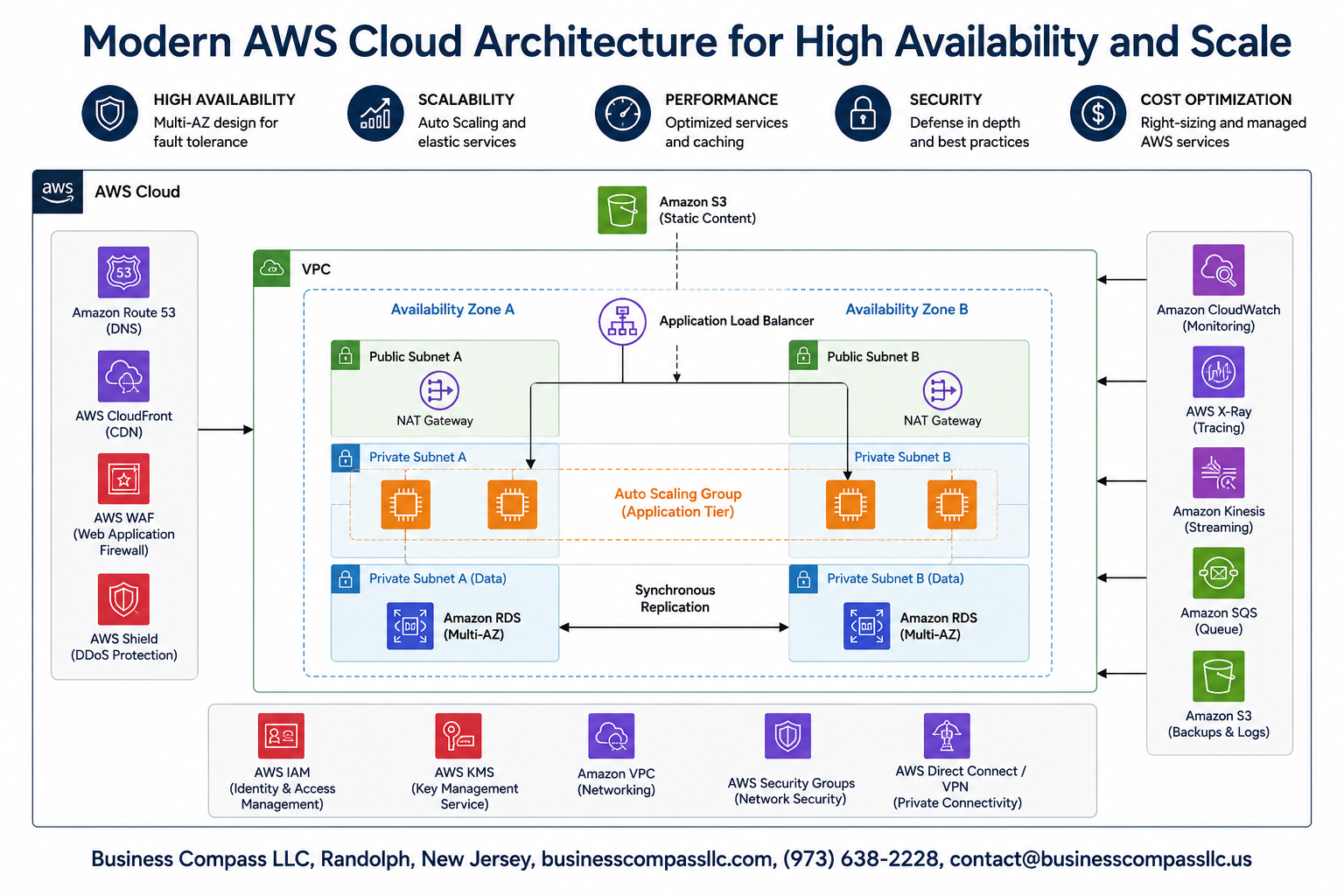
Building a robust AWS cloud architecture that stays online and handles traffic spikes is critical for modern businesses. When your applications go down or can’t handle user demand, you lose revenue and customer trust fast.
This guide is for cloud engineers, DevOps professionals, and technical leaders who need to design and implement enterprise cloud architecture that won’t break under pressure. You’ll learn practical strategies for creating AWS resilient infrastructure that automatically adapts to changing conditions.
We’ll walk through the essential AWS services that form the backbone of high availability AWS systems, including compute, storage, and networking components. You’ll discover proven multi-region deployment strategies that keep your applications running even when entire data centers go offline. Finally, we’ll cover how AWS auto scaling groups and AWS load balancer configurations work together to create scalable cloud infrastructure that grows and shrinks based on real demand.
By the end, you’ll have a clear roadmap for building AWS infrastructure that your business can depend on, complete with cloud monitoring and alerting systems and AWS security best practices that protect your data while maintaining performance.
Essential AWS Services for Building Resilient Cloud Infrastructure

Compute Services That Automatically Scale With Demand
Amazon EC2 Auto Scaling Groups form the backbone of scalable cloud infrastructure by automatically adjusting compute capacity based on real-time demand. These groups monitor application health and performance metrics, launching new instances during traffic spikes and terminating unnecessary resources during quiet periods. AWS Lambda provides serverless computing that scales instantly from zero to thousands of concurrent executions without manual intervention. Amazon ECS and EKS offer container orchestration with automatic scaling capabilities, perfect for microservices architectures. EC2 Spot Instances reduce costs by up to 90% while maintaining scalability through intelligent workload distribution across multiple instance types and availability zones.
Storage Solutions That Replicate Data Across Multiple Zones
Amazon S3 delivers 99.999999999% durability by automatically replicating objects across multiple Availability Zones within a region. Amazon EBS provides block storage with built-in replication and snapshot capabilities, ensuring data persistence even during instance failures. Amazon EFS offers fully managed file systems that automatically scale and replicate across multiple zones for high availability. AWS Storage Gateway seamlessly connects on-premises environments to AWS storage services with redundant pathways. Cross-region replication features in S3 and EBS create additional layers of protection against regional disasters while maintaining consistent performance.
Network Components That Distribute Traffic Intelligently
Application Load Balancers (ALB) route incoming traffic across multiple targets based on content, geographic location, and health status. Network Load Balancers handle millions of requests per second with ultra-low latency for high-performance applications. Amazon CloudFront acts as a global content delivery network, caching content at edge locations worldwide to reduce response times. AWS Global Accelerator improves application availability by routing traffic through AWS’s global network infrastructure. Route 53 provides DNS failover and health checks, automatically directing users to healthy endpoints when primary resources become unavailable.
Database Services With Built-in Failover Capabilities
Amazon RDS Multi-AZ deployments automatically maintain standby replicas in separate availability zones, providing seamless failover within minutes of detecting primary database issues. Amazon Aurora offers automatic failover to read replicas across multiple zones with typically less than 30 seconds of downtime. DynamoDB Global Tables enable multi-region, multi-master replication for globally distributed applications requiring consistent low-latency access. DocumentDB and Neptune provide managed graph and document databases with automatic backup, point-in-time recovery, and cross-region disaster recovery options. These services eliminate manual database administration while ensuring continuous availability.
Multi-Region Deployment Strategies for Maximum Uptime

Primary and secondary region configuration best practices
Setting up your AWS multi-region deployment requires careful planning of primary and secondary regions based on latency, compliance requirements, and disaster recovery objectives. Your primary region should host all active workloads, while the secondary region maintains warm standby resources or cold backups. Choose regions with sufficient AWS services availability and consider data sovereignty laws. Configure identical network architectures across both regions, including VPCs, subnets, and security groups to ensure seamless failover capabilities.
Data synchronization techniques across geographical locations
Effective data synchronization across regions relies on AWS native services like RDS Cross-Region Read Replicas, DynamoDB Global Tables, and S3 Cross-Region Replication. For real-time synchronization, implement AWS Database Migration Service with ongoing replication or use Amazon ElastiCache Global Datastore for in-memory data. Batch synchronization works well with scheduled Lambda functions triggering data transfers. Monitor replication lag closely and establish RPO (Recovery Point Objective) thresholds that align with business requirements while balancing cost and performance.
Automated failover mechanisms that minimize downtime
Route 53 health checks enable DNS-based failover by monitoring endpoint health and automatically redirecting traffic to healthy regions. Application Load Balancers can distribute traffic across multiple Availability Zones and regions when configured with Global Load Balancer. Implement AWS Lambda functions triggered by CloudWatch alarms to orchestrate complex failover scenarios, including database promotion and service scaling. Use AWS Systems Manager automation documents to execute standardized failover procedures, reducing human error and achieving RTO (Recovery Time Objective) targets under 15 minutes.
Auto Scaling Groups and Load Balancing for Dynamic Performance

Horizontal scaling policies that respond to traffic spikes
AWS auto scaling groups automatically adjust your EC2 instances based on real-time demand patterns. Configure target tracking policies that monitor CPU utilization, network traffic, or custom CloudWatch metrics to trigger scaling events. Set up step scaling for gradual capacity increases during moderate load changes, while implementing simple scaling for predictable traffic patterns. Dynamic scaling policies can respond to sudden spikes within minutes, ensuring your scalable cloud infrastructure maintains optimal performance without manual intervention.
Application Load Balancer configuration for optimal distribution
Application Load Balancers distribute incoming traffic across multiple availability zones using sophisticated routing algorithms. Configure path-based routing to direct requests to specific target groups based on URL patterns, while host-based routing handles multiple domains through a single load balancer. Enable sticky sessions for applications requiring user state persistence, and implement weighted routing for blue-green deployments. Cross-zone load balancing ensures even traffic distribution across all registered targets, maximizing resource utilization and preventing hotspots.
Health checks that maintain service quality
Implement comprehensive health monitoring through custom health check endpoints that validate application functionality beyond basic connectivity. Configure health check intervals, timeout values, and failure thresholds to balance responsiveness with stability. Use application-specific health checks that verify database connections, external service dependencies, and critical business logic. Unhealthy instances are automatically removed from rotation and replaced through auto scaling policies, maintaining consistent service quality while preventing cascading failures across your high availability AWS architecture.
Cost optimization through intelligent scaling decisions
Leverage predictive scaling to anticipate traffic patterns based on historical data, reducing the need for reactive scaling events. Implement scheduled scaling for known traffic patterns like business hours or seasonal peaks, minimizing unnecessary capacity costs. Use mixed instance types within auto scaling groups to balance performance and cost, combining on-demand instances for baseline capacity with spot instances for additional scalability. Monitor scaling metrics through CloudWatch to identify optimization opportunities and adjust policies for maximum cost efficiency while maintaining performance standards.
Monitoring and Alerting Systems for Proactive Issue Resolution

CloudWatch Metrics That Predict Potential Failures
CloudWatch provides powerful predictive capabilities through custom metrics and anomaly detection models that identify unusual patterns before they become critical issues. CPU utilization trends, memory consumption spikes, and disk I/O bottlenecks serve as early warning indicators for your scalable cloud infrastructure. Set up composite alarms that combine multiple metrics to trigger alerts when your AWS cloud architecture shows signs of degradation. Memory leak patterns, database connection pool exhaustion, and network latency increases often precede major outages. Configure custom metrics for application-specific KPIs like queue depth, response times, and error rates to catch problems while they’re still manageable.
Automated Notification Systems for Critical Events
Amazon SNS integrates seamlessly with CloudWatch alarms to deliver instant notifications through multiple channels when your high availability AWS systems need attention. Configure escalation paths that start with Slack or email notifications for minor issues, then progress to SMS and voice calls for critical events. EventBridge rules can automatically trigger Lambda functions that create support tickets, restart services, or scale resources based on specific alarm conditions. Set up different notification groups for various severity levels – development teams get minor alerts while on-call engineers receive only critical system failures. Integration with PagerDuty or Opsgenie provides sophisticated alerting workflows that ensure the right people respond to issues quickly.
Dashboard Creation for Real-Time System Visibility
Custom CloudWatch dashboards give your team immediate visibility into your AWS resilient infrastructure health across all regions and services. Create role-based dashboards that show relevant metrics for different stakeholders – executives see high-level availability metrics while engineers monitor detailed performance indicators. Real-time widgets for Auto Scaling Groups, load balancer health checks, and database performance provide instant insights into system status. Use log insights queries to surface error patterns and trends that might not trigger traditional metric alarms. Mobile-responsive dashboards ensure your team can monitor cloud monitoring and alerting systems from anywhere, making it easier to respond quickly to emerging issues.
Security and Compliance Measures for Enterprise-Grade Protection

Identity and Access Management for Controlled Resource Access
AWS Identity and Access Management (IAM) forms the foundation of enterprise cloud security by controlling who can access what resources and when. Create granular policies that follow the principle of least privilege, granting users only the minimum permissions needed for their roles. Multi-factor authentication (MFA) adds an essential security layer, while IAM roles eliminate the need for hard-coded credentials in applications. Service-linked roles automatically provision the right permissions for AWS services, and cross-account roles enable secure resource sharing between different AWS accounts without exposing sensitive credentials.
Network Security Groups and Firewall Configurations
Network security groups act as virtual firewalls that control inbound and outbound traffic at the instance level. Configure security groups with specific port ranges, protocols, and source IP addresses to create multiple layers of network protection. Network Access Control Lists (NACLs) provide subnet-level filtering, while AWS WAF protects web applications from common attacks like SQL injection and cross-site scripting. VPC endpoints keep traffic within the AWS network backbone, reducing exposure to internet-based threats. Private subnets house sensitive resources like databases, while public subnets handle internet-facing components through carefully configured routing tables.
Data Encryption Strategies for Information Protection
Encryption protects data both at rest and in transit across your AWS cloud architecture. AWS Key Management Service (KMS) provides centralized key management with automatic key rotation and fine-grained access controls. S3 bucket encryption ensures stored objects remain secure, while EBS volume encryption protects database and file system data. SSL/TLS certificates from AWS Certificate Manager encrypt data in transit between clients and load balancers. Application-level encryption adds another protection layer for sensitive fields like personally identifiable information. CloudHSM offers dedicated hardware security modules for applications requiring FIPS 140-2 Level 3 compliance.
Compliance Frameworks and Audit Trail Implementation
AWS CloudTrail creates comprehensive audit logs of all API calls and user activities across your infrastructure, providing the foundation for compliance reporting. Config Rules automatically evaluate resource configurations against compliance standards like SOC 2, PCI DSS, and HIPAA. AWS Systems Manager helps maintain consistent security baselines across EC2 instances and on-premises servers. GuardDuty uses machine learning to detect suspicious activities and potential security threats. Security Hub centralizes security findings from multiple AWS security services, creating unified compliance dashboards that simplify audit preparation and ongoing monitoring.
Backup and Disaster Recovery Protocols
Automated backup strategies ensure business continuity through AWS Backup, which creates centralized backup policies across multiple services. Cross-region replication protects against regional outages by maintaining data copies in geographically separate locations. RDS automated backups and point-in-time recovery provide database restoration capabilities, while EBS snapshots create incremental backups of block storage volumes. Disaster recovery plans should include defined Recovery Time Objectives (RTO) and Recovery Point Objectives (RPO) that align with business requirements. AWS Disaster Recovery services offer pilot light, warm standby, and multi-site configurations depending on availability needs and budget constraints.

Building a robust AWS cloud architecture isn’t just about picking the right services—it’s about creating a system that can handle whatever comes its way. The combination of multi-region deployments, auto scaling groups, and comprehensive monitoring creates a foundation that keeps your applications running smoothly, even when things go wrong. Load balancing distributes traffic intelligently, while security measures protect your valuable data and maintain compliance standards.
The real power comes from bringing all these pieces together into a cohesive strategy. Start with the basics: set up your core AWS services, implement proper monitoring, and establish your security framework. Then scale up gradually, adding multi-region capabilities and advanced auto scaling as your needs grow. Remember, high availability isn’t a destination—it’s an ongoing process that requires regular testing, monitoring, and refinement to keep your infrastructure resilient and ready for whatever challenges lie ahead.







