Stop Opening SSH Ports. There’s a Better Way to Access Your EC2 Instances.
If you’re managing EC2 instances, you’ve probably dealt with the headache of SSH keys, open inbound ports, and bastion hosts that need their own patching and maintenance. It works — until it doesn’t. A misconfigured security group, a lost private key, or an audit finding can turn a routine access task into a full-blown incident.
This guide is for AWS engineers, DevOps teams, and cloud architects who want a cleaner, more secure way to manage remote access without the overhead of traditional methods.
AWS Systems Manager Session Manager gives you secure EC2 access without SSH, without opening port 22, and without a bastion host sitting in your VPC. We’ll walk through how Session Manager actually works under the hood, the real security advantages it brings to your environment, and how to set it up step by step. We’ll also cover how to use Session Manager for compliance auditing — so your security team gets the session logs and activity trails they need, and you get to skip the “who accessed what and when” investigation next time an audit rolls around.
Understanding the Limitations of Traditional EC2 Access Methods

Security Risks Associated with SSH and Open Ports
Open SSH ports are magnets for brute-force attacks and zero-day exploits.
High Maintenance Costs of Managing Bastion Hosts
Bastion hosts demand constant patching, monitoring, and scaling — draining engineering time.
Compliance Challenges with Conventional Remote Access
Tracking who accessed what becomes a nightmare, making audit trails nearly impossible to maintain reliably.
What AWS Systems Manager Session Manager Is and How It Works
Core Architecture and Key Components Explained
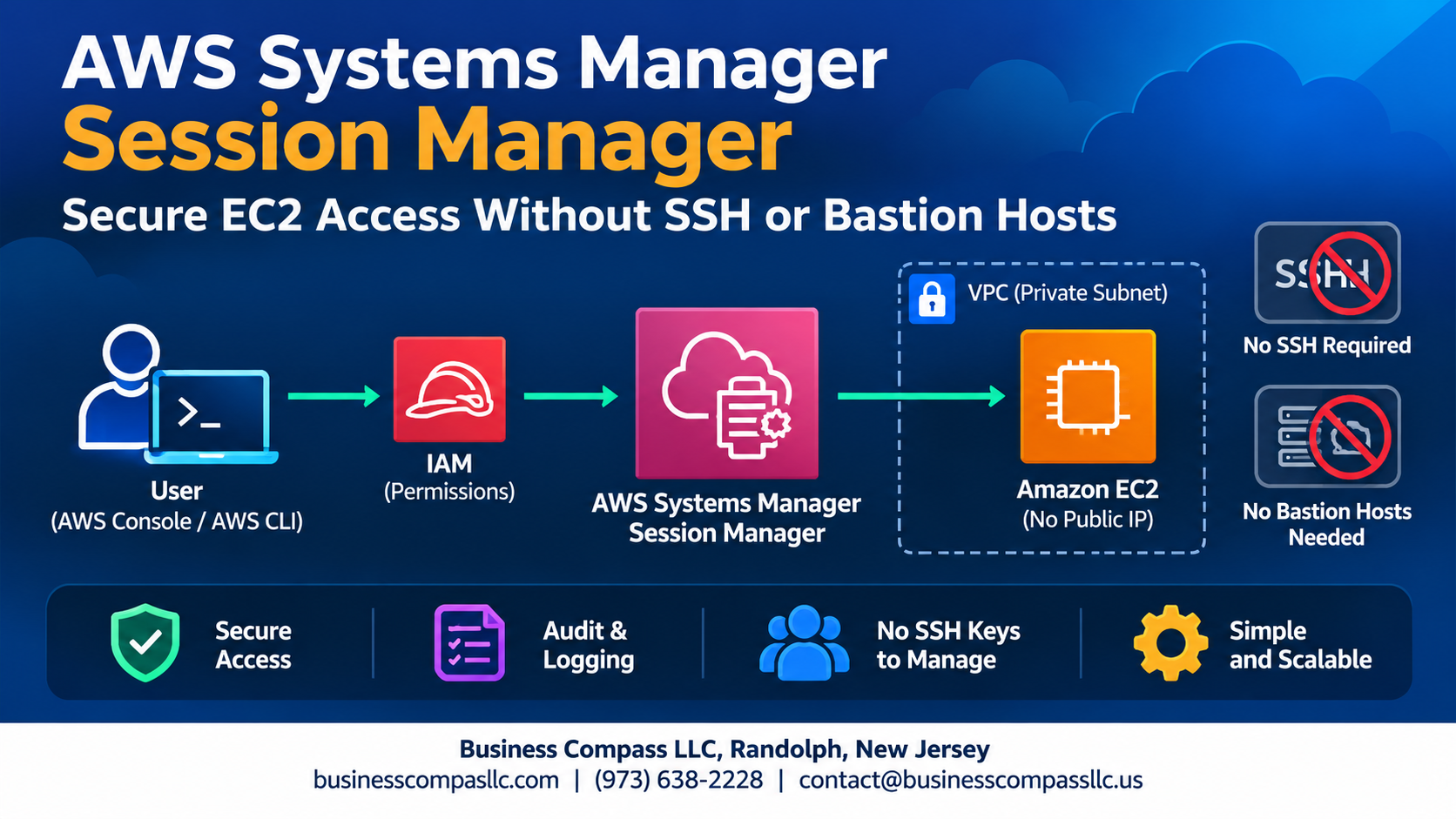
AWS Systems Manager Session Manager runs through the SSM Agent installed on EC2 instances, connecting securely via AWS endpoints—no open ports, SSH keys, or bastion hosts needed. Sessions tunnel through HTTPS, keeping traffic encrypted while IAM policies control exactly who accesses what, making secure EC2 access without SSH genuinely straightforward.
Key Security Advantages of Using Session Manager

Eliminating Inbound Ports to Reduce Attack Surface
AWS SSM Session Manager removes the need for open inbound ports, SSH keys, or bastion hosts—cutting your attack surface dramatically. Sessions run over encrypted TLS, IAM controls who connects, and every keystroke gets logged to CloudWatch or S3, making secure EC2 access without SSH genuinely effortless and audit-ready.
Setting Up Session Manager for Your EC2 Instances

Prerequisites and Required IAM Permissions
Attach the AmazonSSMManagedInstanceCore policy to your EC2 instance role.
Installing and Configuring the SSM Agent on EC2
Most Amazon Linux 2 and Windows AMIs include the SSM Agent pre-installed.
Enabling Session Manager in the AWS Console
Navigate to Systems Manager → Session Manager → Configure preferences.
Connecting to Instances via Browser, CLI, or AWS Console
- Console: Click “Start session”
- CLI:
aws ssm start-session --target instance-id
Enhancing Productivity With Advanced Session Manager Features

Port Forwarding to Access Private Resources Securely
Forward local ports to private EC2 resources without SSH keys or bastion hosts.
Running Remote Commands Without Opening a Shell
Run scripts directly via SSM Run Command.
Tunneling for Secure Database and Application Access
Connect securely to RDS or internal apps through encrypted SSM tunnels.
Monitoring, Auditing, and Maintaining Compliance With Session Manager

Streaming Session Logs to Amazon S3 and CloudWatch
Configure Session Manager to automatically stream logs to S3 or CloudWatch for full session recording.
Setting Up Alerts for Unauthorized Sessions
Use CloudWatch alarms to flag suspicious activity instantly.
Tracking Activity With AWS CloudTrail
CloudTrail captures every Session Manager API call, giving you a complete audit trail for Session Manager compliance auditing.

Securing access to your EC2 instances doesn’t have to mean juggling SSH keys, managing bastion hosts, or leaving ports open and hoping for the best. Session Manager gives you a cleaner, safer way to connect — no inbound ports, no key management headaches, and no extra infrastructure to maintain. Add in the built-in logging, audit trails, and compliance-friendly features, and it’s hard to argue against making the switch.
If you haven’t tried Session Manager yet, now is a great time to set it up and see how it fits into your workflow. Start with a single instance, get comfortable with the setup, and explore the advanced features as you go. Your security posture will thank you, and so will the team member who no longer has to track down lost SSH keys at 2 AM.