


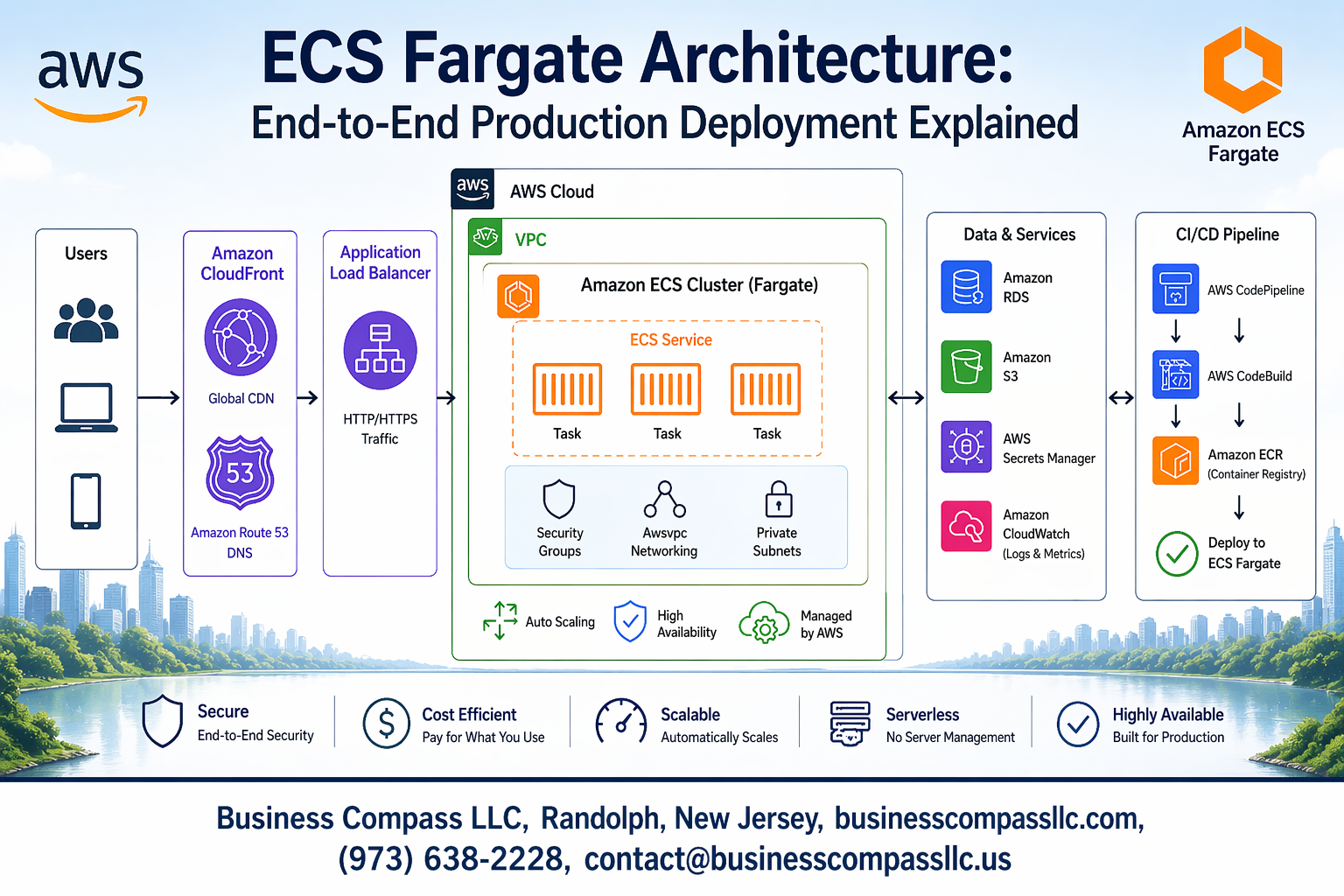
Amazon ECS Fargate lets you run containers without managing servers, making it a game-changer for teams looking to deploy scalable applications quickly. This guide breaks down ECS Fargate architecture from the ground up and walks you through building a complete production deployment that actually works in the real world.
This tutorial is for DevOps engineers, cloud architects, and development teams who want to move beyond basic container deployments and build robust, production-ready systems on AWS. You’ll get practical knowledge you can apply immediately, not just theory.
We’ll start by exploring the core components of ECS Fargate architecture and how they work together to support production workloads. Then we’ll dive into setting up a complete CI/CD pipeline for automated deployments that saves you time and reduces errors. Finally, we’ll cover the essential production topics that separate successful deployments from ones that fail at scale – including cost optimization strategies, security best practices, and troubleshooting techniques that will help you sleep better at night.
By the end, you’ll have a clear roadmap for implementing ECS Fargate in your production environment with confidence.
Understanding ECS Fargate Fundamentals for Production Workloads
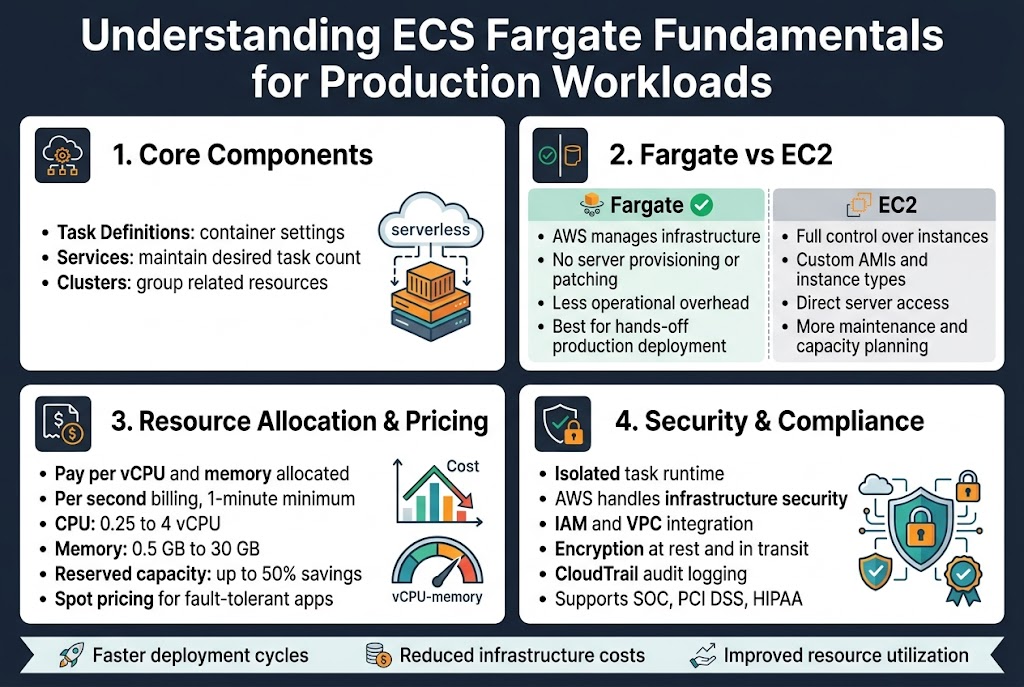
Core Components and Serverless Container Benefits
AWS ECS Fargate architecture eliminates the need to manage underlying infrastructure while providing robust container orchestration capabilities. The service automatically handles server provisioning, patching, and scaling, allowing development teams to focus purely on application logic. Key components include task definitions that specify container configurations, services that maintain desired task counts, and clusters that group related resources. This serverless container deployment AWS approach reduces operational overhead significantly compared to traditional EC2-based deployments.
Fargate’s serverless model delivers automatic scaling based on demand, built-in load balancing, and seamless integration with other AWS services like CloudWatch and Application Load Balancer. Organizations benefit from faster deployment cycles, reduced infrastructure costs, and improved resource utilization since you only pay for actual compute resources consumed by running tasks.
Fargate vs EC2 Launch Types Comparison
The choice between Fargate and EC2 launch types depends on specific workload requirements and operational preferences. EC2 launch type provides complete control over underlying instances, allowing custom AMIs, specific instance types, and direct server access for debugging. This approach works well for applications requiring specialized hardware configurations or legacy systems needing specific OS-level modifications. However, it demands significant operational overhead for patch management, capacity planning, and instance maintenance.
ECS Fargate production deployment offers a hands-off approach where AWS manages all infrastructure concerns. You define resource requirements, and Fargate handles the rest automatically. While this reduces operational complexity, it comes with less flexibility in terms of instance customization and potentially higher per-unit costs for consistent workloads.
Resource Allocation and Pricing Model
Fargate uses a pay-per-use pricing model based on vCPU and memory allocated to tasks, calculated per second with a one-minute minimum. Resource allocation follows specific combinations: CPU ranges from 0.25 vCPU to 4 vCPUs, with memory scaling proportionally from 0.5GB to 30GB. This granular allocation ensures you pay only for resources actually reserved by your containers, making it cost-effective for variable workloads and development environments.
ECS Fargate cost optimization becomes crucial for production workloads running continuously. Reserved capacity options provide up to 50% savings for predictable workloads, while Spot pricing offers additional cost reduction for fault-tolerant applications. Understanding these pricing tiers helps organizations balance performance requirements with budget constraints effectively.
Security and Compliance Advantages
Production ECS Fargate security benefits from AWS’s shared responsibility model, where AWS handles infrastructure security while customers manage application-level security. Each task runs in its own isolated compute environment with dedicated kernel runtime, preventing resource interference between containers. Integration with AWS IAM provides fine-grained access control, while VPC networking ensures secure communication between services.
Compliance requirements become easier to meet with Fargate’s built-in security features including encryption at rest and in transit, detailed audit logging through CloudTrail, and automatic security updates. The service supports various compliance standards like SOC, PCI DSS, and HIPAA, making it suitable for regulated industries requiring stringent security controls.
Designing Scalable ECS Fargate Architecture Components
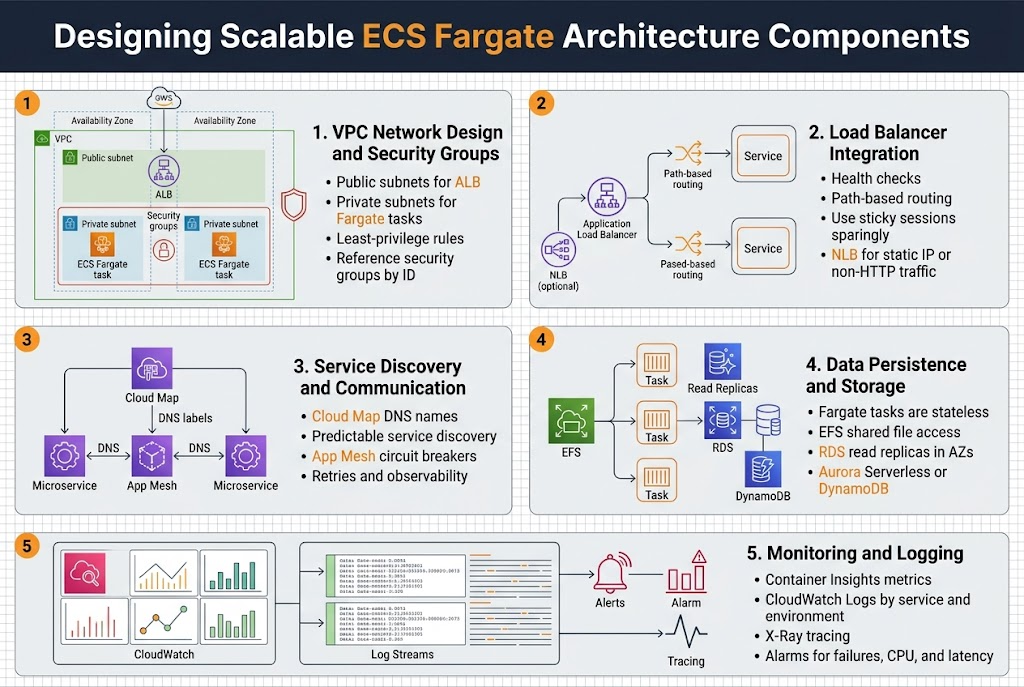
VPC Network Design and Security Groups Configuration
Your ECS Fargate architecture starts with a well-structured VPC that separates public and private subnets across multiple availability zones. Place your Fargate tasks in private subnets to enhance security while keeping load balancers in public subnets for internet access. Configure security groups with least-privilege principles, allowing only necessary traffic between components.
Security group rules should explicitly define communication paths between your ALB, ECS services, and backend resources like RDS or ElastiCache. Create separate security groups for different tiers and reference them by ID rather than IP ranges for better maintainability during scaling events.
Load Balancer Integration Strategies
Application Load Balancers provide essential traffic distribution and health checking for your AWS ECS Fargate production deployment. Configure target groups with appropriate health check parameters, setting reasonable timeout and interval values that match your application’s startup time. Use path-based routing to direct different API endpoints to specific services.
Implement sticky sessions only when absolutely necessary, as they can limit scaling flexibility. Consider using Network Load Balancers for high-performance scenarios requiring static IP addresses or when handling non-HTTP traffic protocols.
Service Discovery and Container Communication
AWS Cloud Map enables seamless serverless container deployment AWS by providing DNS-based service discovery for your microservices. Configure service discovery namespaces that match your environment structure, allowing services to find each other using predictable DNS names rather than hard-coded IP addresses.
Set up service mesh integration using AWS App Mesh for advanced traffic management, including circuit breakers and retry policies. This approach simplifies container communication while providing observability into service-to-service interactions across your distributed architecture.
Data Persistence and Storage Options
Fargate tasks are stateless by design, requiring external storage solutions for data persistence. Amazon EFS provides shared file system access across multiple tasks, perfect for applications needing concurrent file access. Configure EFS mount targets in each availability zone where your tasks run.
For database connectivity, use Amazon RDS with read replicas positioned in the same availability zones as your Fargate tasks to minimize latency. Consider Aurora Serverless for variable workloads or DynamoDB for NoSQL requirements with built-in scaling capabilities.
Monitoring and Logging Infrastructure Setup
CloudWatch Container Insights automatically collects metrics from your ECS Fargate best practices implementation, providing CPU, memory, and network utilization data. Configure custom application metrics using the CloudWatch agent or AWS X-Ray for distributed tracing across your microservices architecture.
Centralize log management using CloudWatch Logs with appropriate retention policies to control costs. Structure your log groups by service and environment, enabling easy filtering and analysis. Set up CloudWatch alarms for critical metrics like task failures, high CPU usage, and response time thresholds to maintain optimal performance.
Implementing CI/CD Pipeline for Automated Deployments
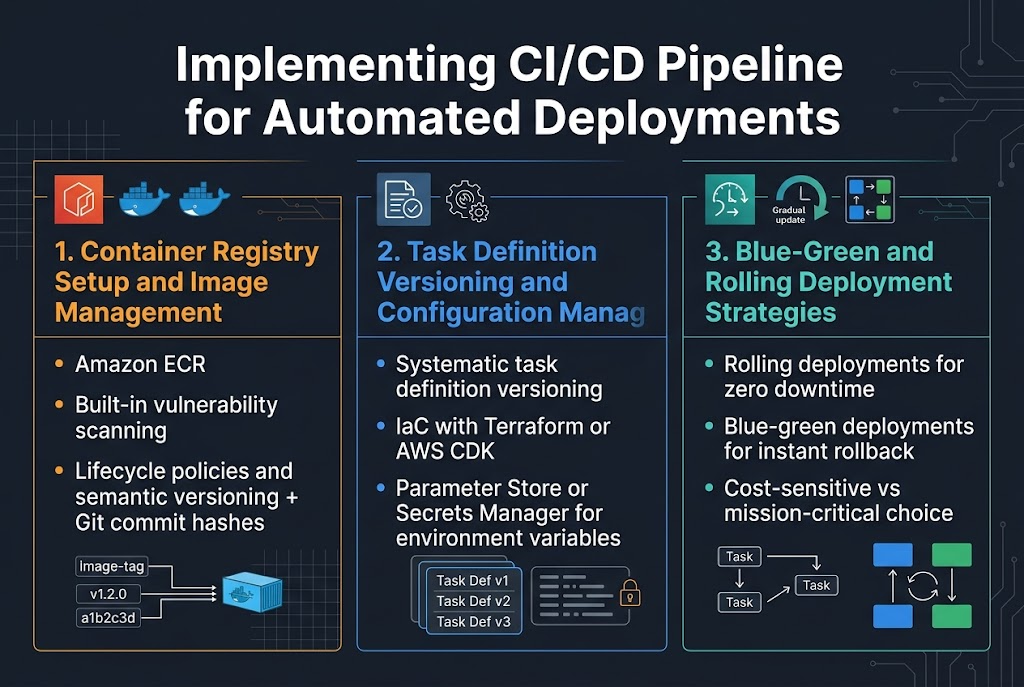
Container Registry Setup and Image Management
Amazon ECR serves as the cornerstone for your ECS Fargate CI/CD pipeline, providing secure container image storage with built-in vulnerability scanning. Configure lifecycle policies to automatically remove unused images and maintain cost efficiency while ensuring your production images remain available. Implement image tagging strategies using semantic versioning combined with Git commit hashes to track deployments precisely.
Task Definition Versioning and Configuration Management
Task definitions require systematic versioning to enable reliable deployments and quick rollbacks. Use infrastructure-as-code tools like Terraform or AWS CDK to manage task definition configurations, ensuring consistency across environments. Store environment-specific variables in AWS Systems Manager Parameter Store or Secrets Manager, allowing your ECS Fargate deployments to remain configuration-agnostic while maintaining security best practices.
Blue-Green and Rolling Deployment Strategies
Rolling deployments offer zero-downtime updates by gradually replacing tasks while monitoring health checks, making them ideal for most ECS Fargate production workloads. Blue-green deployments provide instant rollback capabilities by maintaining parallel environments, though they require double the infrastructure cost during transitions. Choose rolling deployments for cost-sensitive applications and blue-green for mission-critical services requiring immediate rollback options.
Optimizing Performance and Cost Management
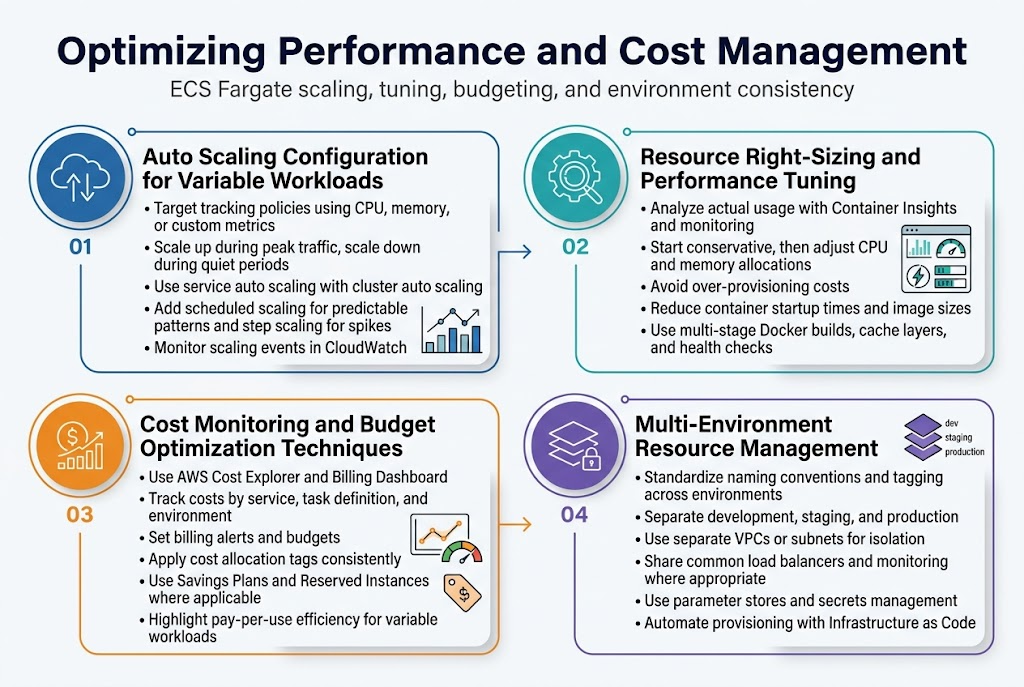
Auto Scaling Configuration for Variable Workloads
ECS Fargate auto scaling responds dynamically to traffic patterns using Application Auto Scaling policies based on CloudWatch metrics like CPU utilization, memory usage, or custom application metrics. Configure target tracking policies to maintain optimal performance during peak loads while scaling down during quiet periods.
Service auto scaling works alongside cluster auto scaling to manage both task count and underlying infrastructure. Set up scheduled scaling for predictable traffic patterns and step scaling for sudden spikes. Monitor scaling events through CloudWatch to fine-tune thresholds and prevent unnecessary scaling activities that impact cost efficiency.
Resource Right-Sizing and Performance Tuning
Right-sizing ECS Fargate tasks requires analyzing actual resource consumption versus allocated capacity using Container Insights and custom monitoring. Start with conservative estimates and adjust CPU and memory allocations based on real-world usage patterns to avoid over-provisioning costs.
Performance tuning focuses on optimizing container startup times, reducing image sizes, and configuring health checks appropriately. Use multi-stage Docker builds and cache layers effectively to minimize deployment overhead while ensuring applications respond quickly to scaling events.
Cost Monitoring and Budget Optimization Techniques
AWS Cost Explorer and Billing Dashboard provide detailed breakdowns of ECS Fargate costs across different dimensions like service, task definition, and environment. Set up billing alerts and budgets to track spending against projections and identify cost anomalies early.
Implement cost allocation tags consistently across all Fargate resources to enable accurate cost tracking per project or team. Use Savings Plans and Reserved Instances where applicable, though Fargate’s pay-per-use model often provides better cost efficiency for variable workloads than traditional EC2 instances.
Multi-Environment Resource Management
Managing multiple environments requires standardized resource naming conventions and consistent tagging strategies across development, staging, and production deployments. Use separate VPCs or subnets to isolate environments while sharing common infrastructure components like load balancers and monitoring systems where appropriate.
Environment-specific parameter stores and secrets management ensure configuration drift doesn’t occur between environments. Implement automated environment provisioning through Infrastructure as Code to maintain consistency and enable rapid environment creation for testing and disaster recovery scenarios.
Production Security and Compliance Best Practices
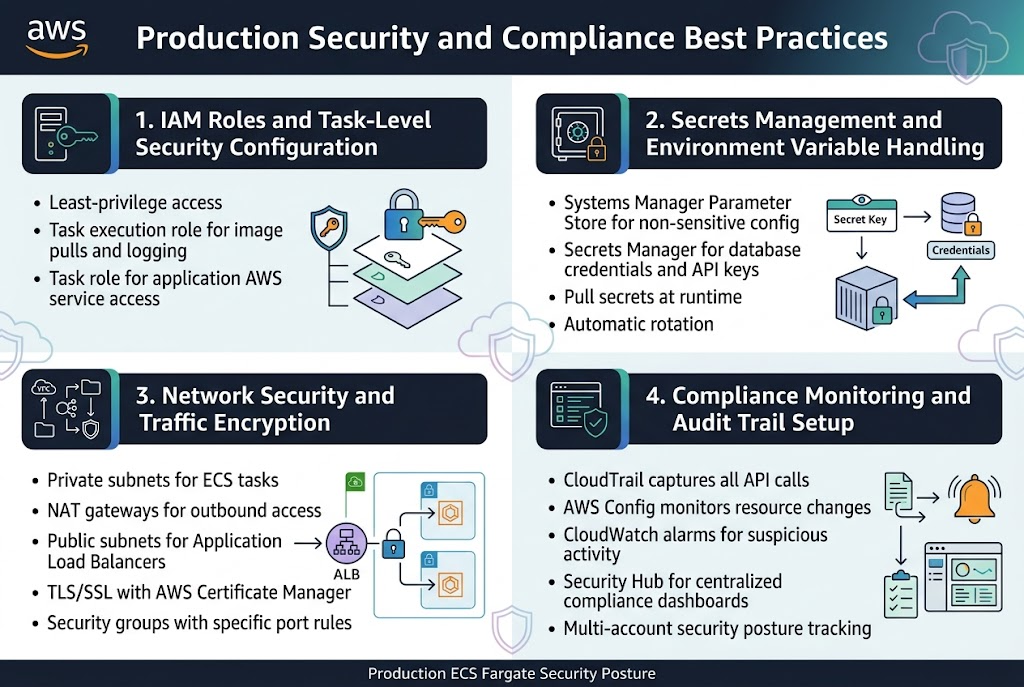
IAM Roles and Task-Level Security Configuration
Implementing proper IAM roles for ECS Fargate production deployments requires a least-privilege approach where each task definition receives only the permissions needed for specific functions. Create dedicated task execution roles for container image pulls and CloudWatch logging, while task roles handle application-specific AWS service interactions. This separation ensures your production ECS Fargate security maintains granular access control across different service components.
Secrets Management and Environment Variable Handling
AWS Systems Manager Parameter Store and Secrets Manager provide secure storage for sensitive configuration data in ECS Fargate architectures. Configure task definitions to pull secrets at runtime rather than embedding them in container images, reducing exposure risks. Parameter Store handles non-sensitive configuration while Secrets Manager manages database credentials and API keys with automatic rotation capabilities.
Network Security and Traffic Encryption
VPC configuration forms the backbone of network security for production ECS Fargate deployments. Place tasks in private subnets with NAT gateways for outbound internet access, while Application Load Balancers in public subnets handle incoming traffic. Enable encryption in transit using TLS/SSL certificates through AWS Certificate Manager and configure security groups with specific port rules for each service tier.
Compliance Monitoring and Audit Trail Setup
CloudTrail logging captures all API calls related to your ECS Fargate infrastructure, creating comprehensive audit trails for compliance requirements. AWS Config monitors resource configurations and flags deviations from security baselines. Set up CloudWatch alarms for suspicious activities and integrate with AWS Security Hub for centralized compliance dashboards that track your production ECS Fargate security posture across multiple accounts.
Troubleshooting Common Production Issues and Maintenance
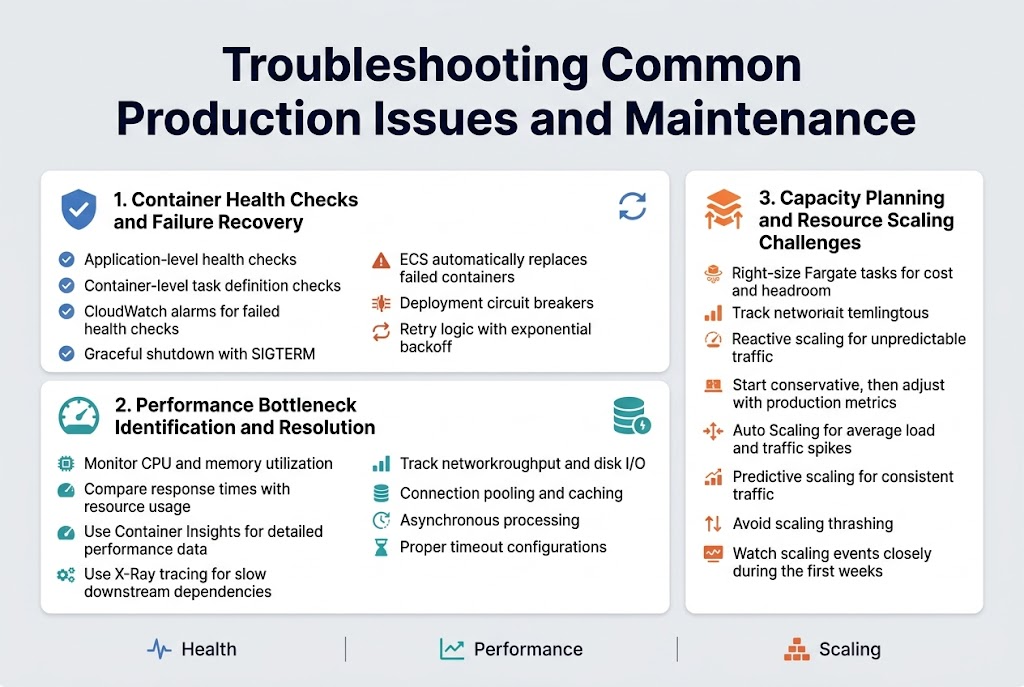
Container Health Checks and Failure Recovery
Health checks act as your first line of defense in ECS Fargate troubleshooting, monitoring container availability and triggering automatic restarts when failures occur. Configure both application-level health checks through your load balancer and container-level checks within your task definition to catch issues early. When containers fail health checks repeatedly, ECS automatically replaces them with fresh instances, but you need proper logging and alerting to understand root causes.
Set up CloudWatch alarms for failed health checks and implement graceful shutdown procedures in your applications to handle SIGTERM signals properly. Use deployment circuit breakers to prevent bad deployments from cascading across your entire service, and consider implementing retry logic with exponential backoff for transient failures.
Performance Bottleneck Identification and Resolution
CPU and memory utilization metrics in CloudWatch reveal the most common ECS Fargate performance bottlenecks, but network throughput and disk I/O can also create unexpected slowdowns. Monitor your application’s response times alongside container resource usage to identify when scaling becomes necessary versus when code optimization is the better solution. Container Insights provides detailed performance data that helps pinpoint whether issues stem from resource constraints or application inefficiencies.
Database connection pooling, caching strategies, and asynchronous processing often resolve performance issues more effectively than simply adding more compute resources. Use X-Ray tracing to identify slow downstream dependencies and implement proper timeout configurations to prevent cascading failures across your microservices architecture.
Capacity Planning and Resource Scaling Challenges
Right-sizing Fargate tasks requires balancing cost efficiency with performance headroom, as you pay for allocated vCPU and memory regardless of actual usage. Start with conservative resource allocations and gradually increase based on real production metrics rather than guessing requirements. Auto Scaling policies should account for both average load patterns and sudden traffic spikes, with separate scaling metrics for different types of workloads.
Predictive scaling works well for applications with consistent traffic patterns, while reactive scaling handles unpredictable workloads better. Monitor your scaling events closely during the first few weeks of production deployment to fine-tune thresholds and avoid thrashing between scale-out and scale-in actions that can destabilize your application performance.
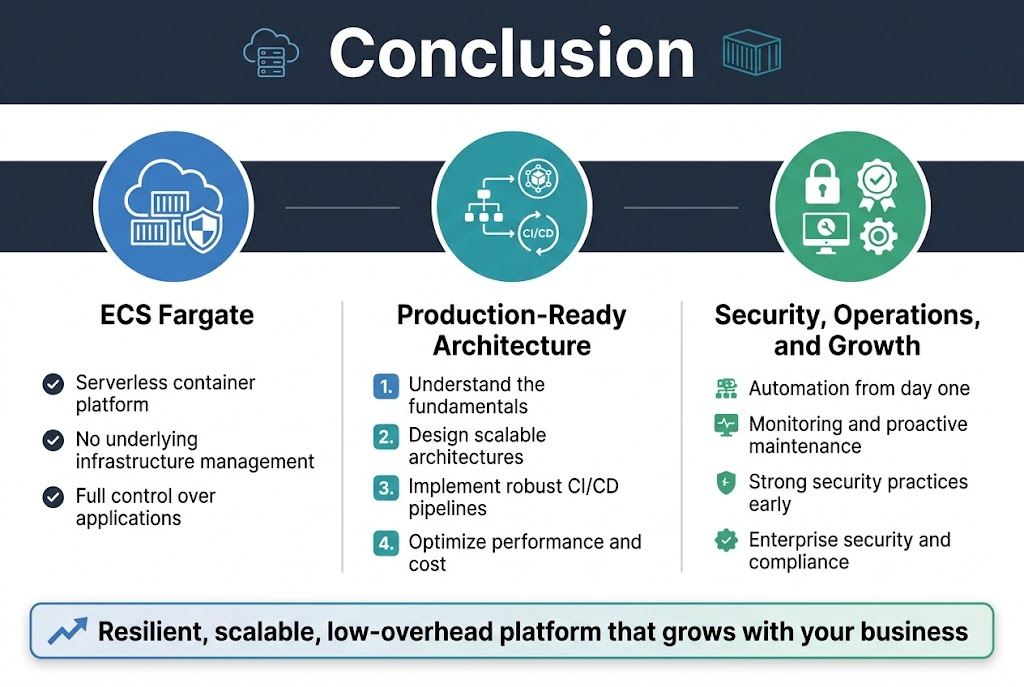
ECS Fargate delivers a powerful serverless container platform that removes the complexity of managing underlying infrastructure while giving you full control over your applications. From understanding the core fundamentals to designing scalable architectures, implementing robust CI/CD pipelines, and optimizing for both performance and cost, Fargate proves itself as a production-ready solution for modern containerized workloads. The security features and compliance capabilities ensure your applications meet enterprise standards without sacrificing agility.
Getting your production deployment right means focusing on automation, monitoring, and proactive maintenance from day one. Start small with a well-designed architecture, build comprehensive CI/CD pipelines, and establish strong security practices early in your journey. With proper planning and the strategies covered here, you’ll have a resilient, scalable platform that grows with your business needs while keeping operational overhead to a minimum.









