

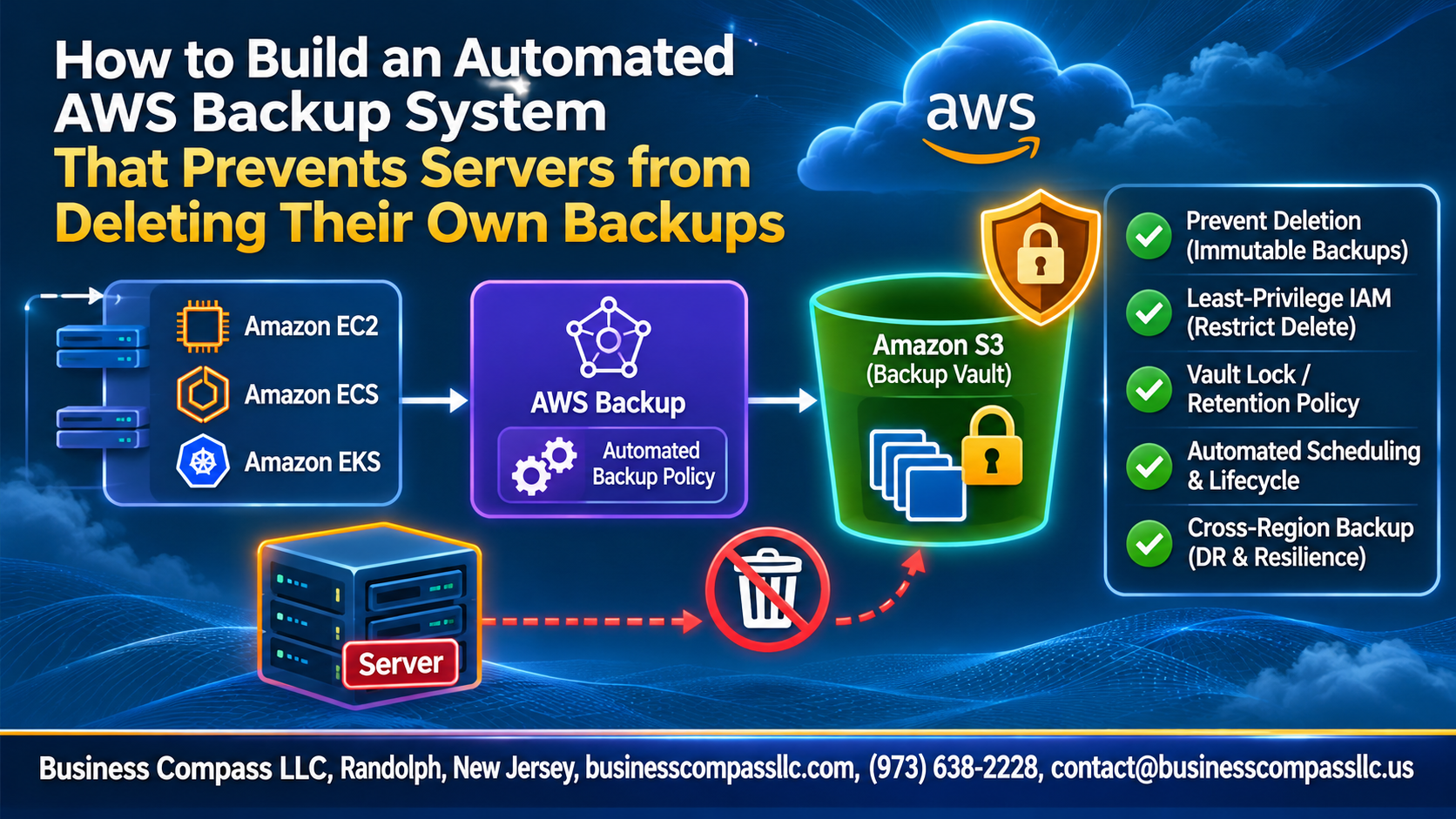
If a server can delete its own backups, so can anyone who breaks into it. Ransomware, a bad script, or a rushed admin can wipe your data and your safety net in one go.
This guide is for AWS admins, DevOps engineers, and cloud architects who want an automated AWS backup setup that keeps backups safe, even when a server is compromised. You’ll learn AWS backup best practices to prevent backup deletion in AWS and get solid ransomware protection for your AWS backups.
Here’s what we’ll cover:
- Why servers shouldn’t control their own backups, and how to design a secure setup with centralized, cross-account backup in AWS.
- How to lock deletion down using AWS Backup, an AWS backup IAM policy, and AWS Backup Vault Lock for immutable backups.
- How to automate, monitor, and test it, so your protection keeps working over time.
Grab a coffee. Let’s build it.
Understand Why Servers Must Not Control Their Own Backups

A. Identify the risks of self-deletable backups
If a server can delete its own backups, whoever controls the server controls your recovery. Ransomware wipes both data and backups.
B. Recognize common causes like compromised credentials and runaway scripts
Stolen IAM keys and buggy cleanup scripts quietly delete recovery points.
C. Define the goals of a tamper-proof backup strategy
Make backups immutable, centralized, and cross-account.
Design a Secure Backup Architecture

Dedicated Backup Account
Keep vaults in a separate account, so compromised servers can’t touch them.
Least-Privilege Server Roles
Give roles backup-only permissions, and explicitly deny backup:DeleteRecoveryPoint.
Right AWS Services
Combine AWS Backup, Vault Lock, IAM, and Organizations.
Backup Flow Map
Server → backup plan → cross-account copy → locked vault.
Set Up Centralized Backups with AWS Backup

A. Create backup vaults with strong encryption
Use a dedicated vault in a separate account, encrypted with a customer-managed KMS key.
B. Define backup plans with schedules and retention rules
Schedule daily backups and set clear retention periods.
C. Assign resources using tags for automatic coverage
Tag resources like backup=true so new ones get covered automatically.
D. Enable cross-account and cross-region copies
Copy backups to another account and region for ransomware protection.
Block Servers from Deleting Their Backups

IAM Deny Policies
- Explicitly deny backup:DeleteRecoveryPoint and DeleteBackupVault for server roles.
Service Control Policies
- Use SCPs so no account admin bypasses guardrails.
Vault Access Policies
- Add vault policies denying deletion except backup-admin roles.
AWS Backup Vault Lock
- Enable compliance-mode Vault Lock for immutable backups and ransomware protection.
Automate Deployment and Enforcement

Define everything as code
Use Terraform or CloudFormation for vaults, plans, and IAM policies.
Auto-tag new servers
Tag at launch with backup=true so plans pick them up.
Detect gaps with AWS Config
Enable ec2-resources-protected-by-backup-plan to flag unprotected instances.
Remediate automatically
Systems Manager automation tags noncompliant servers.
Monitor, Alert, and Audit Your Backups

Track Jobs with CloudWatch
Alert Through SNS
Log Attempts in CloudTrail
Report with Audit Manager
Watch backup jobs in CloudWatch, send failures and suspicious deletes to SNS, log every DeleteRecoveryPoint attempt in CloudTrail, and prove compliance with Audit Manager reports. Together, they catch ransomware tricks early and show your AWS Backup setup works.
Test and Validate Your Protection

Simulate a deletion attempt from a server
Use the server’s IAM role to run aws backup delete-recovery-point. You should get an AccessDenied error.
Run restore tests to confirm backup integrity
Restore a recent recovery point into an isolated account and check that the data opens and works.
Review results and fix permission gaps
Check CloudTrail for the denied calls, then tighten any IAM policies or vault policies that let a request through.
Maintain and Improve Your Backup System

Review policies and retention periods regularly
Check your backup plans and IAM policies every quarter. Make sure retention still fits compliance needs and Vault Lock settings stay intact.
Optimize storage costs with lifecycle rules
Move older backups to cold storage and expire what you don’t need.
Update the system as your infrastructure grows
Tag new resources so they join your cross-account backup plans automatically.

A backup is only worth something if it’s still there when everything goes wrong. If a server can delete its own backups, then anyone who breaks into that server (or any bug or bad script) can wipe out your safety net too. The fix is simple: keep backups separate, centralize them in AWS Backup, and lock down permissions so servers can’t touch them. Add automation to keep it all consistent, plus monitoring and alerts so you know right away if something looks off.
Setting it up is just the start. Test your restores regularly, check your policies every so often, and tweak things as your setup grows. Take 30 minutes this week to look at who and what can delete your backups right now. If the answer is “the servers themselves,” you know where to begin.