Build a Smarter Product Matching System with Amazon Bedrock and S3 Vectors
If you’ve ever searched for a product online and gotten results that had nothing to do with what you wanted, you already know why AI product matching systems matter. Rule-based search breaks down fast when customers use natural language, misspell things, or search by concept rather than exact keywords. That’s the problem this guide helps you solve.
This tutorial is for backend developers, ML engineers, and AWS practitioners who want to build a semantic product search pipeline that actually understands what users are looking for, not just what they typed.
Here’s what we’ll walk through together:
- How Amazon Bedrock embeddings work and why they’re a practical starting point for generating vector representations of your product catalog
- How S3 Vectors indexing stores and organizes those embeddings so you can run fast, scalable similarity searches without managing a separate vector database
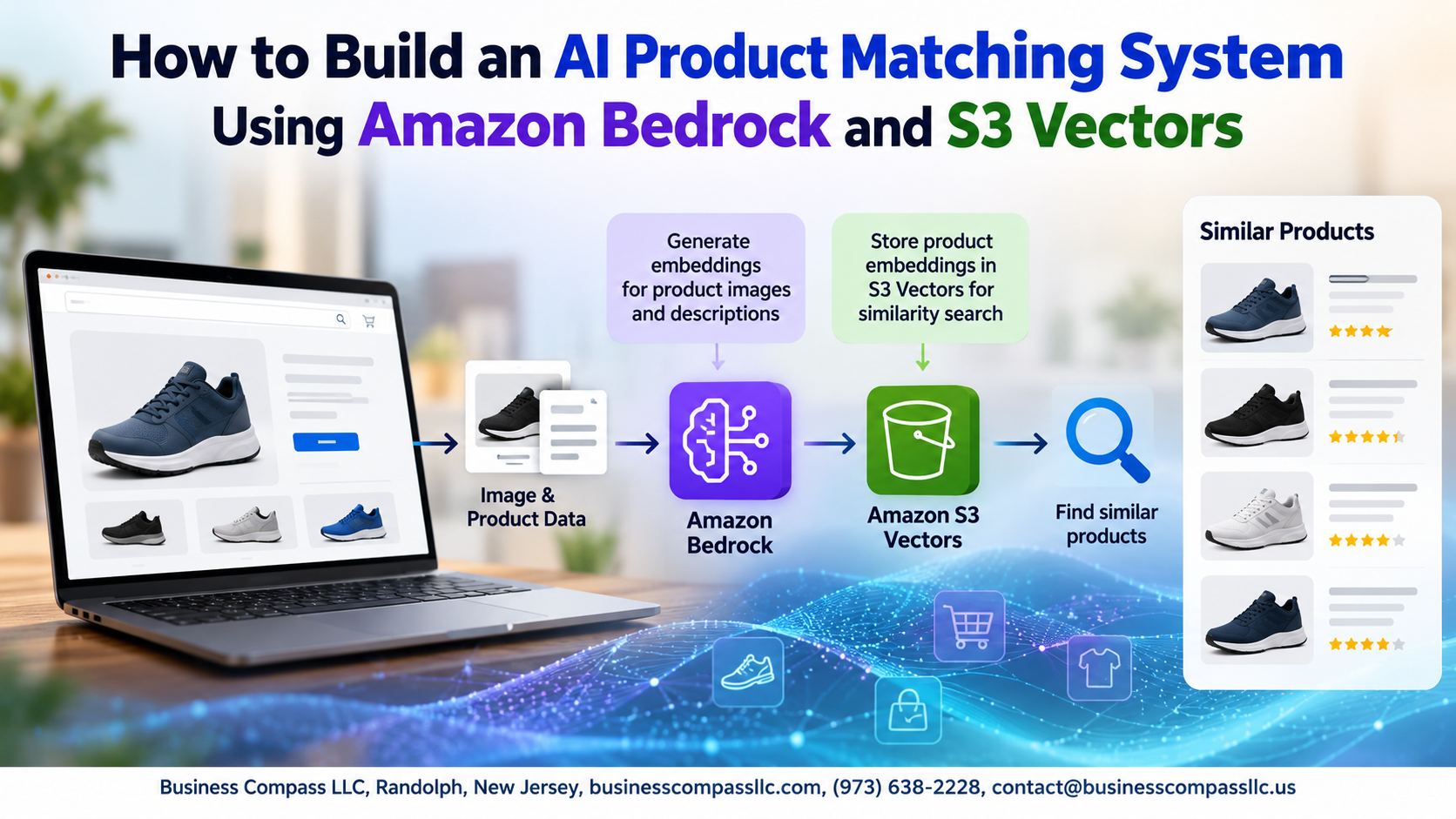
- How to wire up the full similarity search pipeline, from query input to ranked product results, so you end up with something you can ship and improve over time
By the end, you’ll have a working foundation for a product recommendation AI that scales with your catalog and gets smarter as you tune it. No fluff, just the architecture, the code, and the decisions that actually matter.
Understanding the Core Components of an AI Product Matching System

What Amazon Bedrock Brings to Product Matching
Amazon Bedrock handles embedding generation without managing ML infrastructure, giving you access to foundation models like Titan instantly.
How S3 Vectors Enables Scalable Similarity Search
S3 Vectors stores and indexes embeddings natively, making vector search on AWS fast and cost-efficient at scale.
Why Vector Embeddings Are the Foundation of Accurate Matching
Embeddings capture semantic meaning, so your AI product matching system finds similar items even when product names differ completely.
Setting Up Your AWS Environment for Success

Configuring Amazon Bedrock Access and Model Permissions
Enable Bedrock model access via the AWS Console under Model Access, selecting Titan Embeddings.
Creating and Structuring Your S3 Vectors Storage
Create an S3 Vectors bucket, defining your vector index with matching dimensions.
Establishing IAM Roles and Security Best Practices
Attach AmazonBedrockFullAccess and S3 permissions to your role.
Installing and Connecting Required SDKs
Run pip install boto3.
Generating High-Quality Product Embeddings with Amazon Bedrock

Choosing the Right Embedding Model for Your Product Catalog
Pick Amazon Titan Embeddings V2 for most catalogs — it handles mixed product attributes well.
Preparing and Cleaning Product Data
Combine key fields into one string:
title + brand + category + description
Sending Attributes to Bedrock
Call invoke_model, capture the returned vector, store it per SKU.
Storing and Indexing Embeddings in S3 Vectors

Designing an Efficient Vector Index Structure
Structure your S3 Vectors index around product categories to keep similarity searches fast and scoped. Use metadata filters like category, brand, and price_range alongside your Amazon Bedrock embeddings to narrow searches before vector comparison hits.
- Partition by catalog segment
- Tag embeddings with product attributes
- Keep index namespaces lean for faster S3 Vectors indexing
Building the Product Matching Query Pipeline

Converting User Queries into Real-Time Embeddings
When a user searches, Amazon Bedrock instantly converts their query into a vector embedding using the same model used during indexing.
Running Similarity Searches Against Your S3 Vector Index
S3 Vectors runs cosine similarity searches across stored embeddings, returning the closest product matches fast.
Filtering and Ranking Results for Business Relevance
Apply metadata filters—price, category, stock status—to refine raw similarity results into business-ready recommendations.
Evaluating and Improving Matching Accuracy Over Time

Measuring Precision and Recall with Real Product Data
Track matches using labeled datasets, comparing returned results against known relevant products.
Fine-Tuning Embedding Strategies Based on Performance Gaps
Swap models in Amazon Bedrock embeddings or adjust chunking when recall drops.
Using Feedback Loops to Continuously Refine Results
User click data shapes smarter semantic product search rankings.
Scaling the System to Handle Growing Product Catalogs
S3 Vectors indexing handles millions of embeddings without rebuilding pipelines.

Building an AI product matching system with Amazon Bedrock and S3 Vectors comes down to a handful of moving parts working together smoothly. You start by setting up your AWS environment the right way, generate meaningful product embeddings using Bedrock, store and index them efficiently in S3 Vectors, and wire up a query pipeline that actually finds the right matches. Each step builds on the last, and getting the foundation right makes everything downstream a lot easier.
The part that often gets overlooked is the last one — continuously evaluating and improving your matching accuracy. A system that works well on day one can drift over time as your product catalog grows and changes. Keep testing, keep measuring, and treat accuracy improvement as an ongoing habit rather than a one-time task. If you haven’t started yet, pick one small product category, run through the full pipeline, and see how your matches hold up. That first real test will teach you more than any documentation ever could.