Stop Hardcoding Secrets in Your Kubernetes Clusters
If you’re running workloads on Kubernetes and still managing secrets manually — copying values into ConfigMaps, baking credentials into container images, or juggling base64-encoded YAML files — this guide is for you.
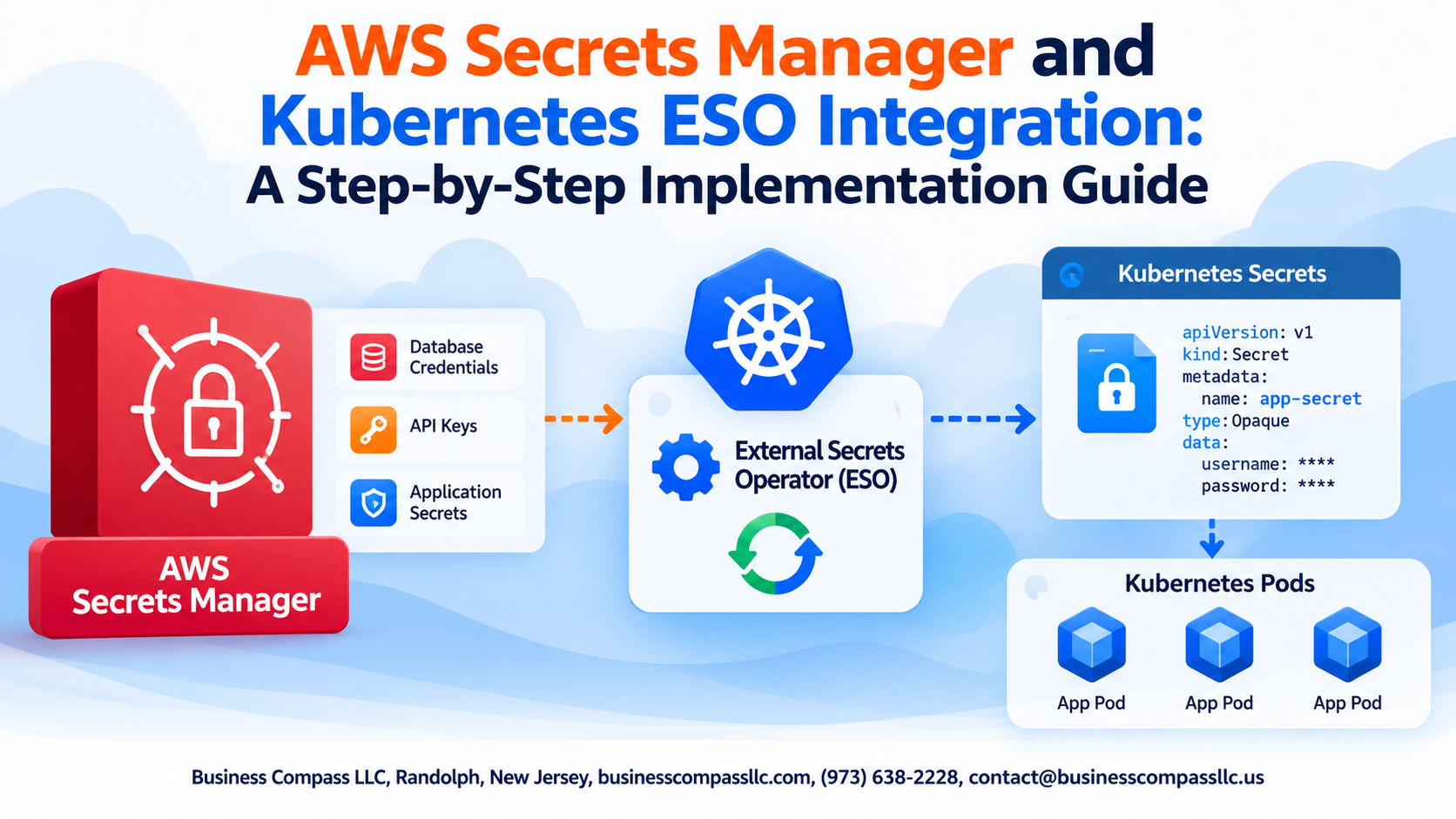
DevOps engineers, platform teams, and cloud architects who want a cleaner, more secure way to handle sensitive data in Kubernetes will find exactly what they need here. Specifically, this covers AWS Secrets Manager Kubernetes integration using the External Secrets Operator (ESO) — a practical setup that lets AWS act as your secret backend while Kubernetes stays in sync automatically.
Here’s what you’ll walk away with:
- A working ESO setup — from installing the External Secrets Operator to connecting AWS Secrets Manager as your secret backend on EKS
- A reliable sync pipeline — so secrets stored in AWS automatically flow into your Kubernetes clusters without manual intervention
- Production-ready practices — including IAM scoping, secret rotation handling, and scaling the integration without creating new security gaps
No theory-heavy fluff. Just a step-by-step breakdown of how to get securely managing Kubernetes secrets working in your environment, from prerequisites all the way through to maintaining the setup as your infrastructure grows.
Understanding the Core Components

What AWS Secrets Manager Offers for Secure Secret Storage
AWS Secrets Manager handles credential storage, automatic rotation, and fine-grained IAM access controls.
How Kubernetes External Secrets Operator Bridges the Gap
ESO pulls secrets from AWS directly into Kubernetes, eliminating manual syncing.
Key Benefits of Combining Both Tools
- Centralized secret management
- Automatic rotation support
- Reduced credential sprawl across AWS EKS secrets sync workflows
Setting Up Prerequisites for a Smooth Integration

A. Configuring AWS IAM Permissions
- Create an IAM policy granting
secretsmanager:GetSecretValueaccess - Attach it to a dedicated IAM role using IRSA for AWS EKS secrets sync
B. Preparing Kubernetes Cluster
- Run Kubernetes 1.24+ with OIDC enabled
C. Required CLI Tools
- Install
kubectl,helm,aws-cli
Installing and Configuring the External Secrets Operator

A. Deploying ESO Using Helm for Faster Setup
helm repo add external-secrets https://charts.external-secrets.io
helm install external-secrets external-secrets/external-secrets -n external-secrets --create-namespace
B. Verifying the Operator Is Running Correctly
- Run
kubectl get pods -n external-secrets
C. Understanding ESO Custom Resource Definitions
- SecretStore – connects AWS Secrets Manager
- ExternalSecret – syncs secrets into Kubernetes
Connecting AWS Secrets Manager as Your Secret Backend

Creating a Dedicated IAM Role for ESO Access
Attach a scoped IAM policy granting secretsmanager:GetSecretValue to your ESO service account via IRSA.
Configuring the SecretStore Resource
provider:
  aws:
    service: SecretsManager
    region: us-east-1
Validating & Troubleshooting
- Check
STATUS: Ready - Verify OIDC thumbprint matches
Syncing Secrets from AWS into Kubernetes

Defining Your First ExternalSecret Resource
Create an ExternalSecret manifest referencing your ClusterSecretStore, specifying the AWS secret name and target Kubernetes secret. Once applied, ESO automatically pulls values, maps keys, and refreshes them on your chosen interval — keeping your AWS EKS secrets sync seamless without manual intervention or pod restarts.
Applying Security Best Practices Across the Integration

Enforcing Least Privilege IAM Policies for ESO
Scope IAM roles tightly—grant ESO only secretsmanager:GetSecretValue on specific ARNs.
Encrypting Kubernetes Secrets at Rest
Enable envelope encryption via AWS KMS on your EKS cluster to protect synced secrets.
Auditing Secret Access with CloudTrail
CloudTrail automatically logs every AWS Secrets Manager API call, giving you a clear access trail for compliance.
Scaling and Maintaining the Integration in Production

Managing Multiple SecretStores Across Environments
Use separate ClusterSecretStore resources per environment, pointing to different AWS accounts or IAM roles.
Monitoring ESO Health with Prometheus and Alerts
Scrape ESO metrics at /metrics and alert on externalsecret_sync_calls_error.
Automating Secret Rotation Without Application Downtime
Set refreshInterval: 1h — ESO quietly pulls updated secrets from AWS Secrets Manager and patches Kubernetes secrets without restarting pods.
Bringing AWS Secrets Manager and Kubernetes together through the External Secrets Operator takes the headache out of managing sensitive configuration data across your cluster. From setting up the prerequisites and installing the ESO to connecting your AWS backend and syncing secrets directly into Kubernetes, each step builds on the last to give you a clean, automated pipeline for secret management. Layering in security best practices along the way means you’re not just making things convenient — you’re keeping them locked down too.
As your workloads grow, the patterns covered here scale right along with them. Whether you’re running a handful of services or managing secrets across multiple namespaces and environments, this integration gives you the foundation to handle it confidently. The next step is simple — pick your environment, follow the setup, and start moving your secrets out of scattered configs and into a centralized, secure system that actually works with your Kubernetes workflow.