Build a Secure AWS VPC Two-Tier Architecture with SSH ProxyJump
If you’ve ever spun up an EC2 instance and just… left port 22 open to the world, you’re not alone — but there’s a better way. This AWS VPC networking tutorial is for cloud engineers, DevOps practitioners, and developers who want to stop cutting corners on network security and start building infrastructure that can actually survive a production environment.
Here’s what we’ll walk through together:
- How a two-tier architecture works and why splitting your resources into public and private subnets dramatically reduces your attack surface
- Setting up a secure VPC from scratch, launching EC2 instances in the right tiers, and locking down your AWS security groups so nothing gets in that shouldn’t
- Configuring SSH ProxyJump to reach your private subnet EC2 instances cleanly through a bastion host — no messy workarounds, no storing keys on jump servers
By the end, you’ll have a working, secure VPC setup you can validate and tighten up for real-world use. Whether you’re building this for the first time or finally doing it the right way, this guide covers every step without skipping the parts that actually matter.
Understanding the Two-Tier Architecture and Its Security Benefits

What Makes a Two-Tier Architecture Ideal for Secure Deployments
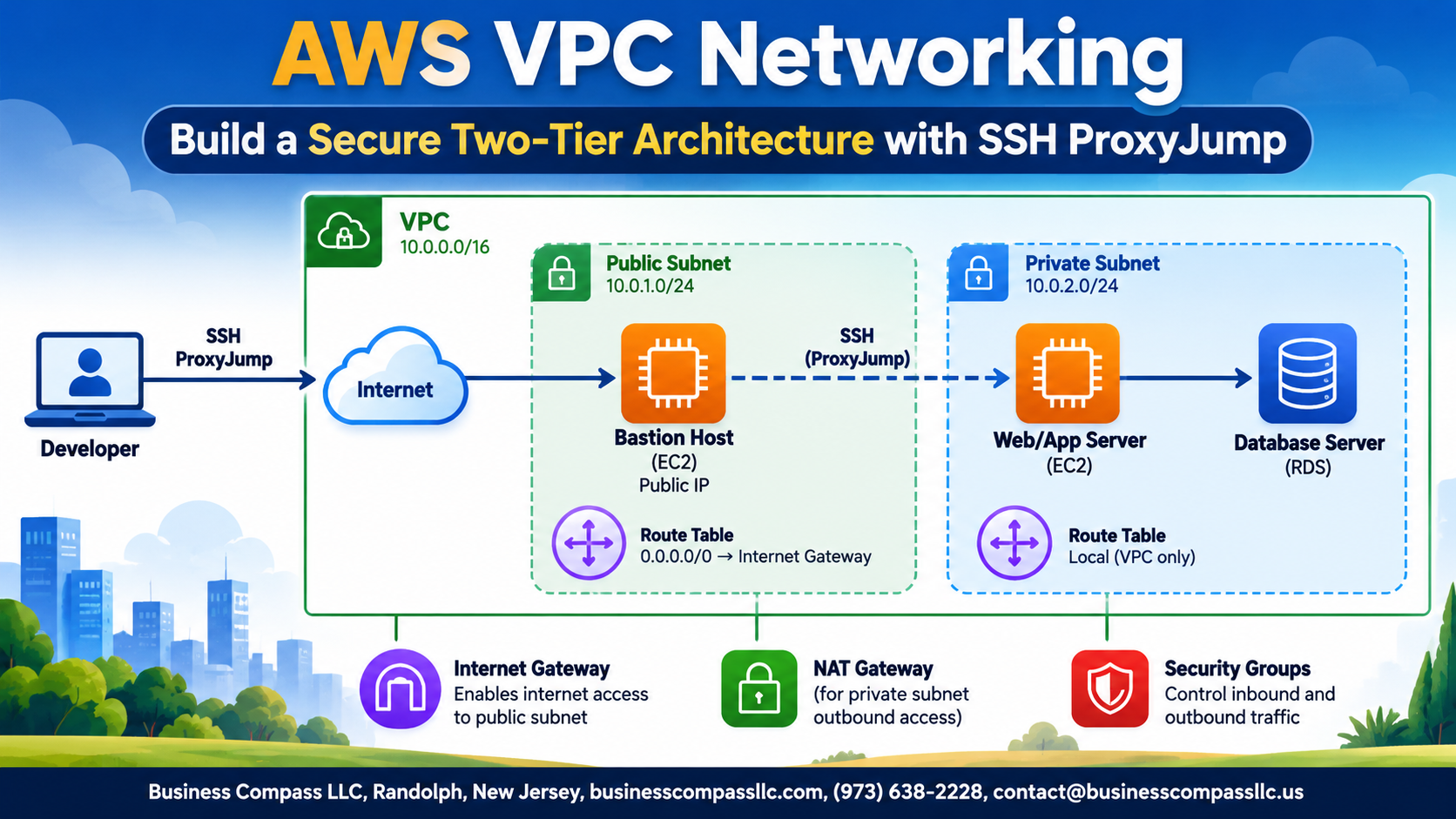
A two-tier AWS VPC networking setup splits your infrastructure into public and private layers, keeping sensitive backend resources away from direct internet exposure. Public subnets handle incoming traffic while private subnets protect databases and internal services, giving you a clean security boundary without overcomplicating your AWS network security architecture.
Setting Up Your AWS VPC from Scratch

A. Defining the Right CIDR Block
Use 10.0.0.0/16 for your VPC — giving you 65,536 IPs with room to grow.
B. Public and Private Subnets
- Public:
10.0.1.0/24 - Private:
10.0.2.0/24
C. Internet Gateway
Attach one IGW to your VPC for outbound public access.
D. Route Tables
Point public subnet routes to the IGW; keep private subnet routes internal only.
Launching EC2 Instances in the Correct Tiers

Deploying a Bastion Host in the Public Subnet
Launch a t3.micro EC2 instance into your public subnet, assigning it an Elastic IP for consistent SSH access.
Placing Your Application or Database Server in the Private Subnet
Deploy your app/database EC2 instance privately — no public IP needed.
Choosing the Right Instance Types and Key Pairs
- Use the same key pair across both tiers for seamless SSH ProxyJump configuration
Locking Down Security with the Right Security Group Rules

Restricting Bastion Host Access to Trusted IP Addresses Only
- Allow SSH (port 22) only from your specific IP using
/32CIDR notation in your AWS security groups best practices setup.
Allowing Private Instance Traffic Only from the Bastion Host
- Reference the bastion’s security group ID as the source — never use
0.0.0.0/0for private subnet EC2 access.
Mastering SSH ProxyJump to Access Private Instances Seamlessly

Understanding How SSH ProxyJump Replaces Traditional Bastion Workflows
SSH ProxyJump skips the old two-step login dance. Instead of manually SSHing into your bastion, then SSHing again into your private EC2 instance, ProxyJump chains both connections in one command, keeping your private subnet EC2 access clean and your workflow fast.
Validating and Hardening Your Architecture for Production Readiness

Verifying Connectivity Between Public and Private Tiers
- SSH into your bastion, then ping or curl your private EC2 to confirm routing works.
Enabling VPC Flow Logs
- Capture traffic at the VPC level; send logs to CloudWatch for quick anomaly spotting.
Additional Hardening Measures
- Rotate SSH keys regularly, restrict CIDR ranges tightly, and tag every resource for auditability.

Setting up a secure two-tier architecture on AWS doesn’t have to be overwhelming. By carving your VPC into public and private tiers, placing your EC2 instances in the right spots, and locking down your security groups, you create a solid defense-in-depth setup that keeps your backend resources out of reach from the public internet. Layering in SSH ProxyJump on top of that means you can still get to your private instances without punching unnecessary holes in your security setup.
Once everything is running, don’t skip the validation step. Test your connectivity, double-check your security group rules, and think about what it would take to run this in a real production environment. A little extra hardening now saves a lot of headaches later. Start building, experiment with the setup, and make it your own — a secure AWS network is one of the best foundations you can give any cloud project.