


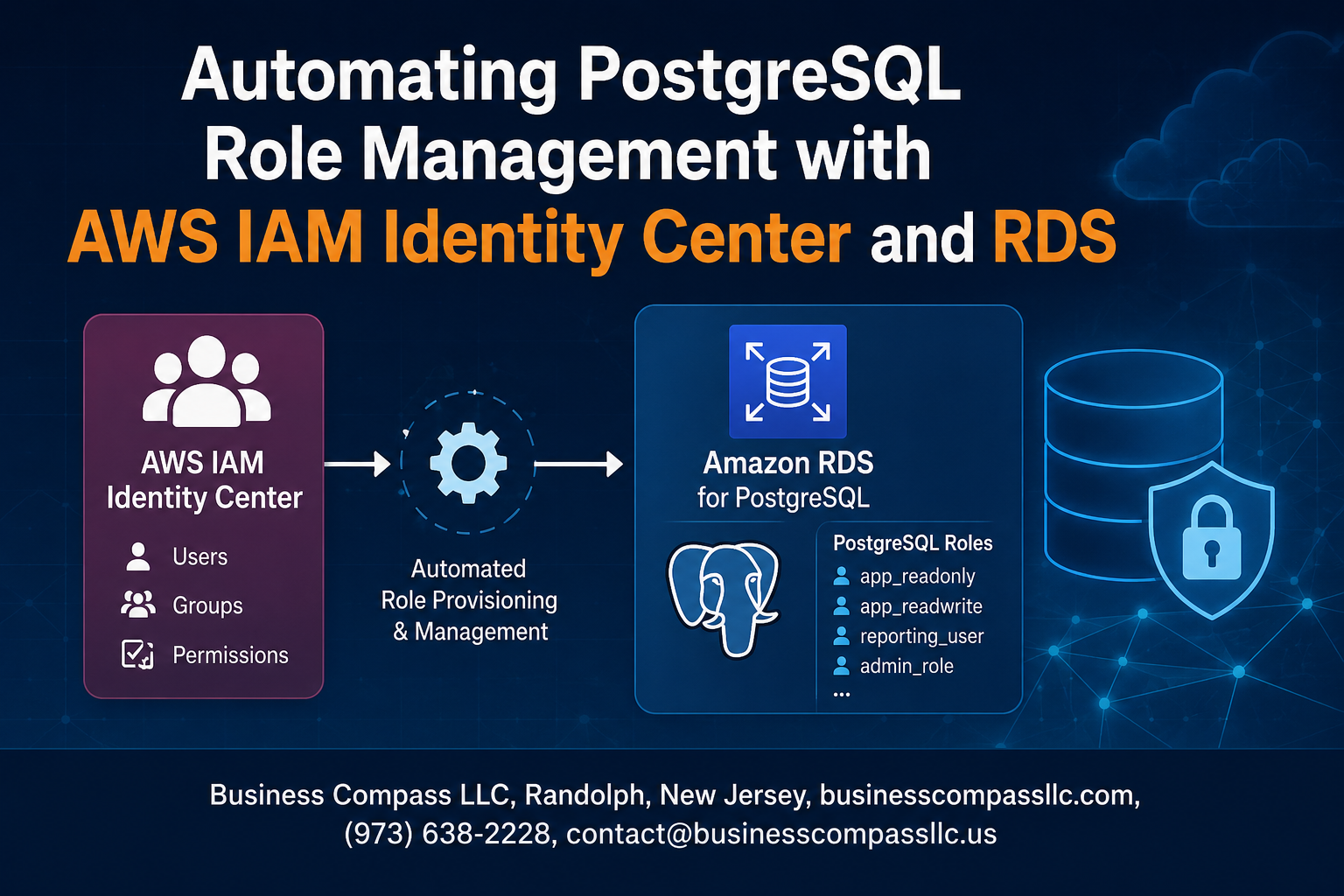
Managing PostgreSQL user access manually across multiple databases is time-consuming and error-prone. AWS IAM Identity Center PostgreSQL integration solves this challenge by automating database role provisioning and streamlining user management at scale.
This guide is designed for database administrators, DevOps engineers, and security teams who want to implement automated database access control using AWS services. You’ll learn how to eliminate manual user provisioning while maintaining strict security standards.
We’ll walk through setting up AWS Identity Center RDS integration to connect your identity provider with PostgreSQL databases. You’ll discover how to implement automated PostgreSQL user management that creates, updates, and removes database roles based on your organization’s access policies. Finally, we’ll cover PostgreSQL security best practices for monitoring and maintaining your automated role management system to ensure consistent AWS database authentication across your infrastructure.
Understanding AWS IAM Identity Center and PostgreSQL Integration

Key benefits of centralized identity management for databases
Centralized identity management transforms how organizations handle database access by eliminating the chaos of scattered user accounts and inconsistent permissions. With AWS IAM Identity Center PostgreSQL integration, administrators can enforce uniform security policies across all database instances, reducing human error and improving compliance. The system automatically synchronizes user identities, groups, and permissions, making it easier to onboard new team members and revoke access when employees leave. This approach cuts down administrative overhead while providing better visibility into who has access to what data, creating a single source of truth for all database authentication and authorization decisions.
How AWS IAM Identity Center streamlines authentication workflows
AWS IAM Identity Center acts as a bridge between your organization’s identity provider and PostgreSQL databases, creating seamless authentication workflows that users actually want to use. Instead of juggling multiple database passwords, team members sign in once through their familiar corporate credentials and gain automatic access to authorized databases. The system supports modern authentication protocols like SAML and OIDC, allowing integration with popular identity providers such as Active Directory, Okta, or Azure AD. This automated database access control means developers spend less time dealing with connection issues and more time building applications, while security teams maintain tight control over permissions through familiar group-based access controls.
PostgreSQL role management challenges in enterprise environments
Managing PostgreSQL roles in enterprise environments feels like herding cats – users scattered across multiple databases, permissions that drift over time, and manual processes that break down under pressure. Traditional approaches require database administrators to manually create users, assign roles, and remember to clean up access when people change teams or leave the company. This creates security gaps where former employees retain database access for months, and bottlenecks where new team members wait days for proper permissions. The complexity multiplies with multiple PostgreSQL instances, each potentially having different role structures and naming conventions, making PostgreSQL security best practices nearly impossible to enforce consistently across the organization.
Setting Up AWS IAM Identity Center for Database Access
Configuring permission sets for PostgreSQL access
Permission sets in AWS IAM Identity Center serve as the backbone for PostgreSQL database access control. Create dedicated permission sets that align with your database access requirements – typically separating read-only, read-write, and administrative privileges. Configure these sets with specific RDS permissions like rds-db:connect and attach custom policies that define which PostgreSQL databases and schemas users can access. Each permission set should follow the principle of least privilege, granting only the minimum access needed for specific job functions.
Creating user groups based on database responsibilities
Organize your database users into logical groups that mirror your organization’s structure and responsibilities. Create groups like DatabaseAdmins, DataAnalysts, ApplicationDevelopers, and ReadOnlyUsers within AWS IAM Identity Center. Map these groups to corresponding PostgreSQL roles with appropriate privileges. This approach streamlines AWS IAM Identity Center PostgreSQL integration by allowing you to manage access at the group level rather than individual users, making automated database access control more efficient and maintainable.
Establishing secure connection protocols between AWS and PostgreSQL
Configure SSL/TLS encryption for all connections between AWS services and your PostgreSQL instances. Enable IAM database authentication on your RDS PostgreSQL instance to allow AWS IAM Identity Center users to connect using temporary credentials instead of traditional passwords. Set up VPC security groups and network ACLs to restrict database access to authorized sources only. Configure connection pooling and timeout settings to optimize performance while maintaining security standards for your PostgreSQL security best practices implementation.
Mapping IAM roles to PostgreSQL database roles
Establish a clear mapping strategy between AWS IAM roles and PostgreSQL database roles to enable seamless automated PostgreSQL user management. Create PostgreSQL roles that correspond to your IAM Identity Center groups, ensuring each role has appropriate database privileges. Use the CREATE ROLE command with IAM authentication enabled, allowing users to authenticate using their AWS credentials. Implement role inheritance where appropriate, enabling junior roles to inherit permissions from senior roles while maintaining granular control over specific database operations and schema access.
Implementing Automated Role Provisioning in PostgreSQL

Creating Dynamic Role Assignment Scripts
Dynamic role assignment scripts form the backbone of automated PostgreSQL user management. These scripts leverage AWS IAM Identity Center group memberships to automatically provision database roles based on user attributes and organizational structure. Python scripts using the psycopg2 library can query IAM groups and create corresponding PostgreSQL roles with appropriate permissions. The automation pulls user metadata from Identity Center, maps it to predefined role templates, and executes SQL commands to grant or revoke database access in real-time.
Establishing Role Templates for Different User Types
Role templates standardize database permissions across your organization while maintaining security boundaries. Create distinct templates for developers, analysts, administrators, and read-only users with predefined privilege sets. Each template includes specific schema access, table permissions, and function execution rights. Store these templates as JSON configurations or database views that scripts can reference during automated provisioning. This approach ensures consistent security policies while reducing manual configuration errors and speeding up user onboarding processes.
Setting Up Automated Privilege Escalation and De-escalation
Automated privilege escalation systems monitor user role changes in AWS IAM Identity Center and adjust PostgreSQL permissions accordingly. Configure CloudWatch Events to trigger Lambda functions when group memberships change, automatically promoting or demoting database access levels. Implement time-based access controls that temporarily elevate privileges for specific tasks and automatically revoke them after predetermined periods. This system maintains principle of least privilege while providing flexibility for operational needs and emergency access scenarios.
Configuring Real-time Synchronization Between IAM and PostgreSQL
Real-time synchronization ensures PostgreSQL role management stays aligned with AWS IAM Identity Center changes. Set up EventBridge rules to capture Identity Center events and trigger immediate database updates through Lambda functions. Configure webhook endpoints that receive user lifecycle notifications and execute corresponding PostgreSQL role modifications. Implement retry mechanisms and error handling to manage network issues or database connectivity problems. This synchronization eliminates delays between identity changes and database access updates, maintaining security and operational efficiency.
Leveraging AWS RDS Features for Enhanced Security

Implementing database activity monitoring and logging
AWS RDS provides comprehensive database activity monitoring through Performance Insights and CloudWatch integration, allowing you to track PostgreSQL role management automation in real-time. Enable database activity streams to capture detailed audit logs of user authentication events, role assignments, and permission changes when using AWS IAM Identity Center PostgreSQL integration. These logs help identify unauthorized access attempts and ensure compliance with security policies. Configure CloudTrail to monitor API calls related to automated database access control, creating a complete audit trail for your PostgreSQL security best practices implementation.
Configuring automatic backup and recovery for role configurations
RDS automated backups protect your PostgreSQL role configurations and IAM integration settings, ensuring quick recovery during system failures or configuration errors. Set up point-in-time recovery with transaction log backups to restore specific role assignments without losing critical database changes. Create manual snapshots before major updates to your automated PostgreSQL user management system, providing rollback points for complex role provisioning changes. Enable cross-region backup replication for disaster recovery scenarios, ensuring your AWS Identity Center RDS setup remains resilient against regional outages and maintains business continuity.
Setting up multi-factor authentication for sensitive operations
Integrate MFA requirements directly into your PostgreSQL role management automation by configuring conditional access policies within AWS IAM Identity Center. Require additional authentication factors for administrative operations like role creation, permission elevation, and bulk user provisioning to strengthen your AWS RDS database security posture. Configure session timeouts and re-authentication intervals for sensitive database operations, ensuring that automated database access control maintains security even during extended sessions. Implement step-up authentication for high-privilege roles, forcing users to provide additional verification before accessing critical database functions or sensitive data through your automated system.
Monitoring and Maintaining Your Automated Role Management System

Creating dashboards for role usage and access patterns
Building effective monitoring dashboards requires tracking key metrics across your AWS IAM Identity Center PostgreSQL integration. CloudWatch provides essential insights into connection patterns, failed authentication attempts, and role usage frequency. Configure custom dashboards that display real-time user sessions, database connection counts, and privilege escalation events. Include widgets showing geographic access patterns and peak usage times to identify suspicious activity. RDS Performance Insights offers detailed query-level monitoring that helps correlate user roles with database performance impact.
Establishing alerts for unauthorized access attempts
Set up CloudWatch alarms that trigger on failed authentication events, unusual connection volumes, or access from unexpected IP ranges. Configure SNS notifications to send immediate alerts when users attempt to access resources beyond their assigned permissions. Create EventBridge rules that capture IAM Identity Center login anomalies and correlate them with database access patterns. Implement threshold-based alerts for concurrent sessions per user and automated responses that temporarily suspend accounts showing suspicious behavior. Lambda functions can process these events and automatically revoke access when specific threat indicators are detected.
Performing regular audits of role assignments and permissions
Schedule weekly reviews of user role mappings between AWS IAM Identity Center and PostgreSQL using automated scripts that compare intended permissions with actual database grants. Use AWS Config rules to monitor compliance with your security baseline and detect configuration drift. Export user access reports monthly to identify inactive accounts, over-privileged users, and roles that haven’t been used recently. Cross-reference Active Directory group memberships with database privileges to ensure alignment with organizational changes. Implement automated cleanup processes that remove orphaned database roles when users leave the organization.
Troubleshooting common synchronization issues
Address sync failures by monitoring CloudTrail logs for API errors between IAM Identity Center and RDS. Common issues include network connectivity problems, incorrect security group configurations, and expired authentication tokens. Check that your Lambda functions handling role provisioning have sufficient permissions and aren’t hitting execution timeouts. Verify that PostgreSQL connection limits aren’t causing sync failures during peak provisioning periods. When users report access issues, validate their group memberships in Active Directory and confirm that role mappings are correctly configured in your automation scripts. Keep detailed logs of all provisioning activities to simplify troubleshooting and maintain audit trails.

Managing database access gets complicated fast when you’re dealing with multiple users and teams. AWS IAM Identity Center paired with RDS PostgreSQL changes that game completely. You get automatic user provisioning, role-based access that syncs with your organization structure, and security controls that work without constant manual tweaking. No more spreadsheets tracking who has access to what or wondering if someone still has database permissions after switching teams.
The real win here is peace of mind. Your database security stays tight while your developers and analysts get the access they need without waiting around. Set up proper monitoring from day one, and you’ll catch any issues before they become problems. Start small with one database and a few roles, then expand once you see how smooth everything runs. Your future self will thank you for automating this headache away.









