


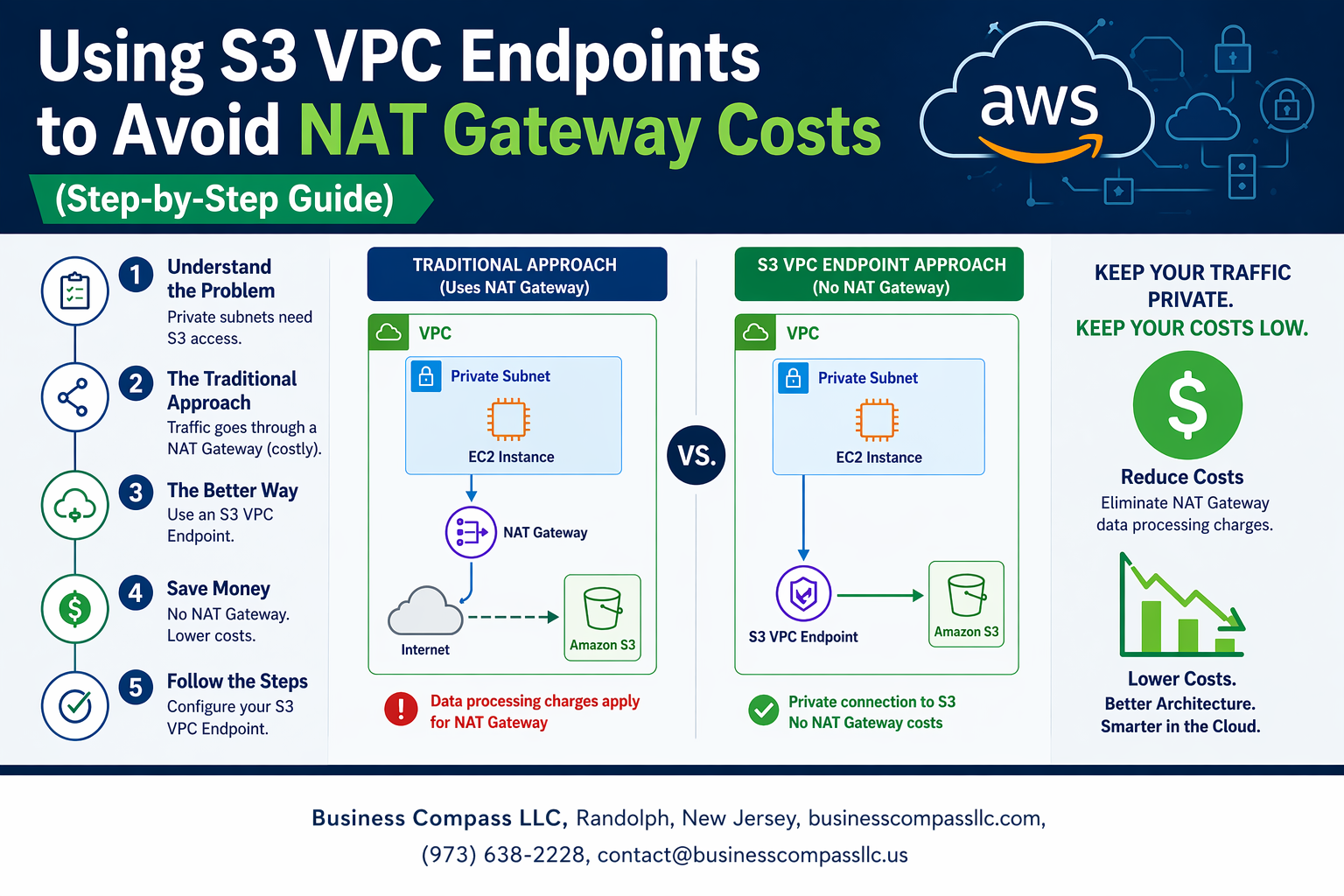
AWS bills can get expensive fast, especially when your private subnets need to access S3 through NAT gateways. Every gigabyte of data transfer adds up, and those costs can surprise you at month’s end.
This guide is for AWS engineers, cloud architects, and DevOps teams who want to cut data transfer costs while keeping their S3 access secure and private.
S3 VPC endpoints let your private resources connect directly to S3 without routing through expensive NAT gateways. You’ll save money on data processing charges while maintaining the same level of security and functionality.
We’ll walk through setting up your S3 VPC endpoint from scratch, including the planning phase and security configurations that keep your data protected. You’ll also learn cost optimization techniques and monitoring strategies to track your savings and ensure your endpoint performs as expected.
By the end, you’ll have a working S3 VPC endpoint that reduces your AWS bills while providing secure, private access to your S3 buckets.
Understanding S3 VPC Endpoints and NAT Gateway Cost Challenges

What are S3 VPC Endpoints and how they differ from NAT Gateways
S3 VPC endpoints create a direct, private connection between your VPC and Amazon S3, allowing resources in private subnets to access S3 without routing traffic through the internet. Unlike NAT gateways that provide general internet access and charge for data processing, S3 VPC endpoints offer a dedicated pathway specifically for S3 traffic at no additional cost.
When you use a NAT gateway, your EC2 instances send S3 requests through the NAT gateway to reach the internet, then connect to S3. With S3 VPC endpoint configuration, traffic flows directly from your instances to S3 through Amazon’s backbone network, bypassing the need for internet routing entirely.
Hidden costs of NAT Gateway data transfer charges
NAT gateways charge $0.045 per GB for data processing, which quickly adds up when transferring large amounts of data to and from S3. Organizations running data-intensive workloads often see monthly NAT gateway bills reaching hundreds or thousands of dollars just for S3 traffic.
The charges apply to both inbound and outbound data transfer, meaning every S3 upload, download, and API call through your NAT gateway generates costs. For applications that frequently backup data, process large files, or sync content with S3, these NAT gateway cost optimization opportunities represent significant savings potential.
Cost savings potential with VPC Endpoints for S3 traffic
AWS cost reduction strategies using S3 VPC endpoints eliminate data processing fees entirely for S3 traffic. Organizations typically save 70-90% on their S3-related data transfer costs by implementing private S3 access without NAT gateway routing.
Real-world examples show companies saving $500-5,000 monthly by redirecting their S3 traffic through VPC endpoints instead of NAT gateways. The savings multiply with data volume – teams transferring terabytes monthly see the most dramatic cost reductions when they reduce AWS data transfer costs through proper endpoint configuration.
When VPC Endpoints make financial sense for your infrastructure
VPC endpoints provide immediate value when your monthly NAT gateway data processing charges exceed $50-100, which happens with just 1-2 TB of S3 traffic. Applications with regular S3 operations like automated backups, log archiving, or content distribution benefit most from S3 VPC endpoints.
Consider implementing VPC endpoints if you’re running analytics workloads, data lakes, or any applications that frequently interact with S3 from private subnets. The break-even point is often reached within the first month, making this one of the fastest-returning AWS S3 VPC endpoint setup investments available.
Prerequisites and Planning for S3 VPC Endpoint Implementation

Required AWS permissions and IAM roles setup
Setting up S3 VPC endpoints requires specific IAM permissions for your AWS account. Your user or role needs ec2:CreateVpcEndpoint, ec2:DescribeVpcEndpoints, and ec2:ModifyVpcEndpoint permissions. You’ll also need route table modification rights including ec2:DescribeRouteTables and ec2:CreateRoute. Consider creating a dedicated IAM policy that groups these endpoint management permissions together for easier administration.
Identifying existing S3 traffic patterns in your VPC
Before implementing S3 VPC endpoints, analyze your current S3 traffic flow using VPC Flow Logs and CloudTrail. Look for EC2 instances, Lambda functions, or other services that frequently access S3 buckets through your NAT gateway. Use AWS Cost Explorer to identify which resources generate the most S3 data transfer charges. This analysis helps you prioritize which subnets need S3 VPC endpoint access first and estimate potential cost savings.
Assessing current NAT Gateway usage and costs
Review your monthly NAT gateway charges in the AWS billing console, focusing on data processing fees rather than hourly rates. Most S3 traffic appears under “NAT Gateway Data Processing” charges. Check which availability zones have the highest S3-related data transfer costs. This assessment shows you exactly how much you’ll save by redirecting S3 traffic through VPC endpoints instead of NAT gateways, helping justify the implementation effort.
Creating Your First S3 VPC Endpoint
Navigating to VPC Endpoints in AWS Console
The AWS Console makes finding VPC endpoints straightforward. Log into your AWS account and search for “VPC” in the services menu. Once you’re in the VPC dashboard, look for “Endpoints” in the left sidebar navigation panel. Click on “Create endpoint” to start the S3 VPC endpoint setup process. You’ll see a clean interface that guides you through each configuration step, making AWS S3 VPC endpoint setup accessible even for beginners.
Selecting the Correct Endpoint Type for S3 Access
AWS offers two endpoint types for S3: Gateway and Interface endpoints. Gateway endpoints are the smart choice for S3 access since they’re free and route traffic directly through Amazon’s backbone network. Unlike Interface endpoints that charge per hour and per GB processed, Gateway endpoints help you avoid NAT gateway costs without additional fees. Select “Gateway” when prompted for endpoint type, then choose “com.amazonaws.region.s3” as your service name.
Configuring Route Tables and Subnet Associations
Route table configuration determines which subnets can access your S3 VPC endpoint. Select the route tables associated with your private subnets where you want S3 private connectivity. The endpoint automatically adds routes to these tables, directing S3 traffic through the Gateway endpoint instead of your NAT gateway. This setup creates the foundation for NAT gateway cost optimization by keeping S3 traffic within AWS’s internal network.
Setting up Endpoint Policies for Security Control
Endpoint policies control which S3 resources your endpoint can access. Start with the default “Full Access” policy for testing, then customize based on your security requirements. You can restrict access to specific S3 buckets, actions, or even IP ranges. Well-configured policies enhance your S3 endpoint security setup while maintaining the cost benefits of private S3 access without NAT. Review AWS documentation for policy examples that match your use case and security standards.
Configuring Security and Access Controls
Designing endpoint policies to restrict S3 bucket access
S3 VPC endpoint configuration demands precise endpoint policies to control bucket access and maintain data security. Create JSON policies that specify allowed actions like s3:GetObject and s3:PutObject while restricting access to specific buckets or prefixes. These policies work independently of IAM permissions, adding an extra security layer that prevents unauthorized access even when users have broad S3 permissions.
Resource-based policies attached to your S3 VPC endpoint should include condition statements that validate source VPC, IP ranges, or specific AWS principals. This approach ensures that only authorized resources within your VPC can access designated S3 buckets through the private endpoint, effectively blocking external traffic and reducing potential attack vectors.
Managing DNS resolution for S3 service endpoints
DNS resolution plays a critical role in ensuring your applications connect to S3 through the VPC endpoint rather than the public internet. When you enable private DNS for your S3 endpoint setup, Route 53 Resolver automatically redirects standard S3 API calls to the private endpoint within your VPC. This seamless redirection means your existing application code requires no modifications while benefiting from private S3 connectivity.
Configure your VPC’s DNS settings to enable both DNS resolution and DNS hostnames, allowing proper endpoint hostname resolution. Applications will automatically route S3 requests through the VPC endpoint, eliminating NAT gateway costs and improving security without changing API endpoints or connection strings in your code.
Updating security groups for endpoint connectivity
Security groups attached to your S3 VPC endpoint must allow HTTPS traffic on port 443 from resources that need S3 access. Create inbound rules permitting traffic from specific security groups or CIDR blocks representing your application servers, Lambda functions, or other AWS services requiring S3 connectivity. This granular control ensures only authorized resources can communicate through the endpoint.
Outbound rules for compute resources should explicitly allow HTTPS connections to the S3 endpoint’s security group or the 0.0.0.0/0 range for broader S3 access. Review existing security group configurations to remove any unnecessary NAT gateway dependencies, as traffic now flows directly through the private endpoint infrastructure rather than public internet routes.
Testing and Validating Your S3 VPC Endpoint Setup

Verifying S3 access from private subnets without NAT Gateway
Testing your S3 VPC endpoint setup requires confirming that EC2 instances in private subnets can reach S3 buckets directly. Launch a test instance in your private subnet and run AWS CLI commands like aws s3 ls to verify connectivity. Check your route tables to ensure traffic routes through the VPC endpoint rather than an internet gateway.
Monitoring traffic flow through VPC Flow Logs
Enable VPC Flow Logs to track data flowing through your S3 VPC endpoint and confirm traffic stays within your private network. Configure Flow Logs for your VPC endpoint’s network interface to capture detailed traffic patterns. Review logs to verify S3 requests bypass NAT gateways completely, reducing AWS data transfer costs while maintaining secure private S3 access without NAT dependency.
Troubleshooting common connectivity issues
DNS Resolution Problems:
- Verify private DNS is enabled on your VPC endpoint
- Check that your VPC has DNS resolution and DNS hostnames enabled
- Test DNS queries for S3 service endpoints resolve to private IP addresses
Security Group Misconfigurations:
- Allow HTTPS (port 443) outbound traffic to S3 service
- Review security groups attached to both EC2 instances and VPC endpoints
- Ensure IAM policies grant necessary S3 permissions to your instances
Performance testing and latency comparisons
Run performance benchmarks comparing S3 access speeds before and after implementing VPC endpoints. Use tools like AWS CLI with timing flags or custom scripts to measure upload/download latencies. Most users see improved performance since traffic no longer traverses NAT gateways, plus significant cost savings from eliminating NAT gateway data processing charges for S3 traffic.
Optimizing Costs and Monitoring Your Implementation

Calculating actual cost savings versus NAT Gateway charges
Comparing NAT gateway costs against S3 VPC endpoint expenses reveals significant savings potential. NAT gateways charge $0.045 per hour plus $0.045 per GB processed, while S3 VPC endpoints cost only $0.01 per hour with no data processing fees. Organizations transferring large volumes to S3 can save thousands monthly by eliminating NAT gateway data transfer costs through private S3 access without NAT.
Setting up CloudWatch metrics for endpoint usage tracking
CloudWatch automatically tracks VPC endpoint metrics including packet count, bytes transferred, and connection attempts. Enable detailed monitoring by accessing the VPC console, selecting your S3 endpoint, and activating CloudWatch integration. Create custom dashboards displaying endpoint utilization patterns, helping identify peak usage times and validate your AWS cost reduction strategies are working effectively.
Scaling endpoint policies for multiple S3 buckets and applications
Managing multiple applications requires granular endpoint policies that restrict access based on bucket names, prefixes, or source conditions. Create resource-based policies using wildcard patterns for bucket groups while maintaining security through principal restrictions. This approach supports growth without creating separate endpoints, maximizing your S3 VPC endpoint setup efficiency across diverse workloads and maintaining centralized cost optimization.
S3 VPC endpoints offer a smart way to cut down on those expensive NAT gateway costs while keeping your AWS infrastructure secure and efficient. By setting up these endpoints, you’re creating a direct path between your private subnets and S3 that bypasses the internet entirely. The setup process might seem complex at first, but following the right steps for configuration, security controls, and testing will get you there without major headaches.
The real win here is long-term cost savings and improved performance for your S3 traffic. Once you’ve got everything running smoothly, keep an eye on your usage patterns and costs to make sure you’re getting the most out of your setup. Start with one endpoint, test it thoroughly, and then scale up your implementation across other subnets and regions as needed.









