


Amazon EventBridge makes building event-driven systems on AWS simple and scalable. This AWS event-driven systems tutorial walks you through every step, from basic setup to advanced patterns.
Who this guide is for: Developers and architects building serverless applications, microservices, or any system that needs to respond to real-time events. You should have basic AWS knowledge and some experience with cloud services.
We’ll start by covering EventBridge fundamentals – what it is, how it works, and why it’s perfect for serverless event processing. Then we’ll dive into setting up your first EventBridge environment with practical examples you can follow along. Finally, we’ll explore creating effective event rules and patterns that route your events exactly where they need to go.
By the end, you’ll know how to build robust event-driven microservices AWS applications that scale automatically and handle complex workflows with ease. Each section includes code examples, real-world scenarios, and EventBridge monitoring best practices to keep your systems running smoothly.
Understanding Amazon EventBridge Fundamentals
What is Amazon EventBridge and Why It Matters for Modern Applications
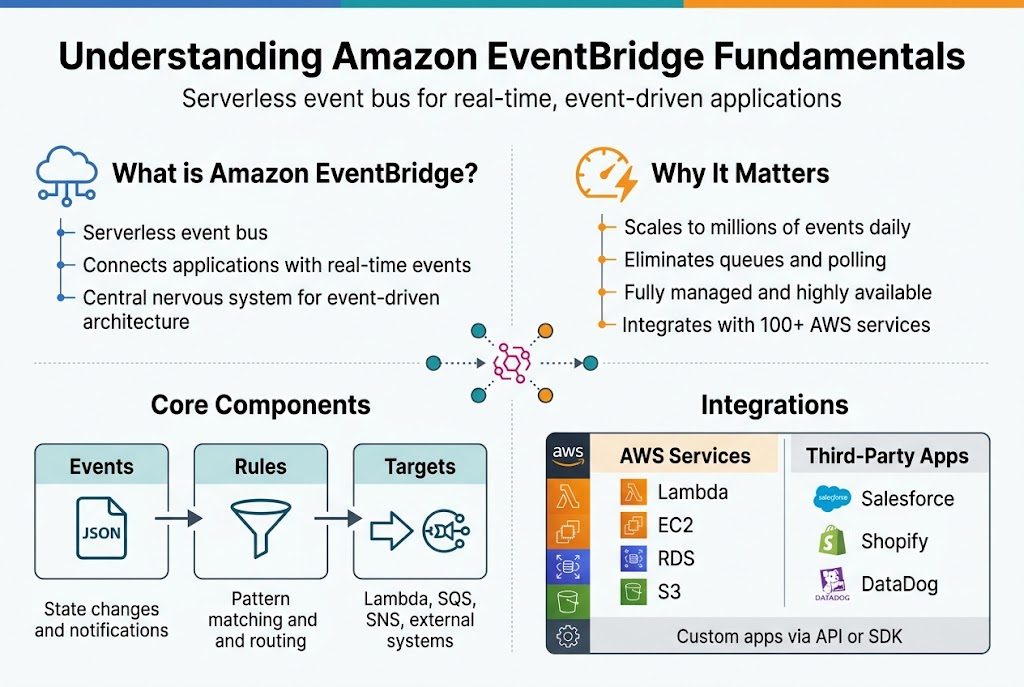
Amazon EventBridge is a serverless event bus service that connects applications using data from your own apps, integrated SaaS applications, and AWS services. Think of it as the nervous system for your cloud architecture, routing events between different components without requiring direct connections. EventBridge transforms how applications communicate by enabling loose coupling between services, making your systems more resilient and scalable.
Modern applications demand flexibility and responsiveness that traditional point-to-point integrations simply can’t deliver. EventBridge addresses this challenge by creating a central hub where events flow naturally between services, allowing developers to build reactive systems that respond to changes in real-time without complex orchestration logic.
Key Benefits of Event-Driven Architecture Over Traditional Approaches
Event-driven architecture with EventBridge eliminates the tight coupling that plagues traditional systems. Instead of services calling each other directly, they publish events and subscribe to relevant notifications, creating a more flexible ecosystem where components can evolve independently.
The scalability advantages are immediate – your system automatically handles traffic spikes by processing events asynchronously. When one service goes down, others continue operating, and events wait in queues until systems recover. This resilience, combined with reduced latency and improved developer productivity, makes event-driven systems ideal for modern cloud-native applications.
EventBridge Components: Events, Rules, and Targets Explained
Events are JSON objects containing information about changes in your system – think customer orders, file uploads, or user logins. These events carry all the context needed for other services to react appropriately. Rules act as smart filters that evaluate incoming events against specific patterns, deciding which events should trigger which actions.
Targets represent the destinations where matching events get delivered – Lambda functions, SQS queues, SNS topics, or other AWS services. This three-part system creates a powerful routing mechanism where you can send the right information to the right place at the right time, all without hardcoding dependencies between services.
How EventBridge Integrates with AWS Services and Third-Party Applications
EventBridge connects seamlessly with over 90 AWS services as both event sources and targets. Your Lambda functions can trigger on S3 uploads, EC2 instances can publish state changes, and DynamoDB can broadcast data modifications – all flowing through EventBridge’s unified event bus for consistent processing.
Third-party integration extends this power beyond AWS through partner event sources like Shopify, Zendesk, and PagerDuty. Custom applications can also publish events using the AWS SDK, creating a hybrid ecosystem where SaaS tools, on-premises systems, and cloud services communicate effortlessly through standardized event patterns.
Setting Up Your EventBridge Environment
Creating Your First Custom Event Bus
Creating a custom event bus in Amazon EventBridge gives you complete control over your event-driven architecture. Navigate to the EventBridge console and click “Create event bus” to set up your dedicated message pathway. Name your bus something descriptive like “order-processing-events” or “user-activity-bus” to make its purpose clear. Custom event buses isolate your application events from the default AWS service events, providing better organization and security. Once created, your custom bus becomes the central hub where all your application events flow through defined rules to their designated targets.
Configuring IAM Roles and Permissions for Secure Event Processing
Security forms the backbone of any robust EventBridge setup through proper IAM configuration. Create a service role with events:PutEvents permissions for your event sources and events:InvokeFunction or sqs:SendMessage permissions for your targets. The principle of least privilege applies here – grant only the minimum permissions needed for each component to function. Your Lambda functions need execution roles with EventBridge trigger permissions, while your event publishers require specific access to your custom event bus. Test your permissions thoroughly using the AWS CLI to verify events flow correctly before moving to production.
Installing and Configuring AWS CLI for EventBridge Operations
The AWS CLI streamlines EventBridge operations and enables automation of your event-driven workflows. Install the latest AWS CLI version using pip install awscli or download the installer from AWS. Configure your credentials with aws configure using your access key, secret key, and preferred region. Test your EventBridge access by running aws events list-event-buses to verify connectivity. Set up named profiles for different environments using aws configure --profile production to manage multiple deployments safely. The CLI becomes essential for scripting event publishing, rule creation, and monitoring your EventBridge infrastructure.
Creating and Managing Event Sources
Building Custom Event Publishers with AWS SDKs
Creating custom event publishers with AWS SDKs allows you to send events from any application directly to EventBridge. The AWS SDK provides simple methods like put_events() for Python or putEvents() for JavaScript to publish custom events. Your applications can trigger events based on user actions, system changes, or business logic. Structure your event payload with source, detail-type, and detail fields for proper routing and processing.
Custom publishers give you complete control over event timing and content. You can batch multiple events in a single API call to improve performance and reduce costs. Remember to implement proper error handling and retry logic since network issues can cause event delivery failures.
Integrating SaaS Applications as Event Sources
EventBridge partner integrations make connecting SaaS applications incredibly straightforward. Popular services like Shopify, Zendesk, and Auth0 can send events directly to your EventBridge setup without custom coding. These integrations automatically format events according to EventBridge standards and provide reliable delivery mechanisms.
Set up partner event sources through the EventBridge console by selecting your desired SaaS provider and following the authentication flow. Most integrations require you to configure webhooks or event subscriptions within the SaaS platform itself.
Setting Up AWS Service Event Sources
AWS services automatically generate events that flow into EventBridge, providing rich observability across your infrastructure. Services like EC2, S3, and Lambda emit state changes, errors, and lifecycle events that you can capture and route to different targets. Enable these event sources through service-specific configuration or EventBridge rules that match AWS service event patterns.
Configure event sources by creating rules that filter for specific AWS service events using event patterns. This selective approach prevents your system from being overwhelmed by unnecessary events while capturing critical state changes.
Implementing Event Schema Registry for Better Data Management
EventBridge Schema Registry helps standardize event formats across your event-driven architecture AWS implementation. The registry automatically discovers schemas from events flowing through EventBridge and generates code bindings for popular programming languages. This feature reduces integration errors and makes event handling more predictable across different services and teams.
Upload custom schemas or let EventBridge discover them automatically from your event traffic. Version control ensures backward compatibility when event structures evolve, preventing breaking changes in downstream consumers.
Testing Event Source Connectivity and Data Flow
Testing event sources requires verifying both connectivity and data accuracy before production deployment. Use EventBridge’s built-in monitoring tools to track event delivery rates and identify failed events. Create test rules that route events to CloudWatch Logs or simple Lambda functions for validation purposes during development phases.
Implement comprehensive testing strategies that include synthetic events, load testing, and failure scenarios. Monitor event latency, delivery success rates, and schema compliance to ensure your Amazon EventBridge setup performs reliably under various conditions.
Designing Effective Event Rules and Patterns
Writing Event Pattern Matching Rules That Scale
Building scalable EventBridge rules and patterns requires careful consideration of your event structure and filtering requirements. Start by designing JSON patterns that match specific event attributes without being overly restrictive. Use prefix matching for dynamic values and leverage numeric ranges for threshold-based filtering. Always test your patterns against sample events to ensure they capture the intended data flow while avoiding false positives.
Consider the computational cost of complex pattern matching when designing rules at scale. Simple equality checks perform better than nested object matching or array operations. Group related events using consistent naming conventions and event source hierarchies to simplify pattern design and improve rule performance across your event-driven architecture.
Implementing Content-Based Filtering for Precise Event Routing
Content-based filtering transforms raw events into actionable insights by examining event payloads and routing messages based on specific criteria. Use EventBridge’s pattern matching to filter events by nested JSON properties, enabling precise targeting of downstream services. This approach reduces noise in your system by ensuring only relevant events reach their intended targets, improving overall system efficiency and reducing processing costs.
Design filters that balance precision with maintainability by avoiding overly complex nested conditions. Create reusable filter patterns for common scenarios like order processing states, user activity types, or system alerts. Document your filtering logic clearly and use meaningful rule names that describe the filtering criteria for easier troubleshooting and team collaboration.
Creating Multi-Target Rules for Fan-Out Scenarios
Fan-out patterns allow single events to trigger multiple downstream processes simultaneously, enabling parallel processing and system decoupling. Configure EventBridge rules to send the same event to multiple targets like Lambda functions, SQS queues, and SNS topics. This pattern works perfectly for scenarios like order processing, where you need to update inventory, send confirmation emails, and trigger shipping workflows concurrently.
Design fan-out architectures with failure isolation in mind by ensuring one target’s failure doesn’t impact others. Use dead letter queues for each target to handle processing errors independently. Monitor target performance individually to identify bottlenecks and optimize resource allocation across your distributed processing pipeline.
Managing Rule Priority and Execution Order
EventBridge processes rules concurrently by default, but understanding execution patterns helps optimize your event-driven systems. While you can’t guarantee strict ordering between rules, you can design your architecture to handle eventual consistency gracefully. Use event timestamps and sequence identifiers within your event payloads to maintain logical ordering when processing order matters for your business logic.
Structure your rules to minimize dependencies between targets and embrace asynchronous processing patterns. When strict ordering is required, consider using SQS FIFO queues as targets or implement coordination mechanisms within your application logic. This approach maintains the scalability benefits of parallel processing while ensuring critical business processes execute in the correct sequence.
Implementing Event Targets and Handlers
Connecting Lambda Functions as Event Processors
Lambda functions serve as the backbone of serverless event processing in Amazon EventBridge. When events match your defined rules, EventBridge automatically invokes the configured Lambda function with the event payload as input. Set up Lambda targets by specifying the function ARN in your rule configuration, ensuring proper IAM permissions for EventBridge to invoke the function.
Configure dead letter queues for failed Lambda invocations to capture processing errors and enable retry mechanisms. Lambda’s built-in retry behavior works seamlessly with EventBridge, automatically attempting failed invocations up to three times before sending events to your configured DLQ for manual investigation.
Routing Events to SQS Queues for Reliable Processing
SQS queues provide durable event storage and reliable message processing for high-volume scenarios. Configure SQS as an EventBridge target to decouple event producers from consumers, enabling your applications to process events at their own pace without losing messages during traffic spikes or system failures.
Standard SQS queues offer high throughput with at-least-once delivery, while FIFO queues guarantee exact ordering and exactly-once processing. Set up visibility timeouts and message retention periods based on your processing requirements, and implement DLQs to handle messages that exceed your retry thresholds.
Integrating Step Functions for Complex Workflow Orchestration
Step Functions excel at orchestrating multi-step workflows triggered by EventBridge events. Create state machines that coordinate multiple AWS services, handle error scenarios gracefully, and maintain workflow state across long-running processes. EventBridge can directly start Step Functions executions, passing the entire event payload as input to your state machine.
Design your state machines with proper error handling and retry logic to manage transient failures. Use Step Functions’ visual workflow editor to map out complex business processes, incorporating parallel execution paths, conditional branching, and wait states for time-based operations.
Setting Up SNS Topics for Multi-Channel Event Distribution
SNS topics enable fan-out event distribution patterns where a single event triggers multiple processing paths simultaneously. Configure SNS as an EventBridge target to broadcast events to multiple subscribers including email notifications, SMS alerts, mobile push notifications, and additional SQS queues or Lambda functions.
Implement message filtering at the SNS subscription level to ensure subscribers receive only relevant events. Use SNS message attributes to include metadata that downstream systems can use for routing decisions, and configure delivery retry policies to handle temporary subscriber unavailability gracefully.
Monitoring and Troubleshooting Event-Driven Systems
Leveraging CloudWatch Metrics for Performance Insights
EventBridge automatically sends metrics to CloudWatch, giving you real-time visibility into your event-driven systems. Key metrics include invocation counts, failed invocations, and throttles across your event rules. You can track message processing rates, latency patterns, and error frequencies to identify bottlenecks before they impact your applications.
Custom dashboards help you visualize event flow patterns and spot anomalies quickly. Monitor rule execution success rates, target delivery failures, and cross-region replication metrics to maintain optimal performance across your AWS event-driven architecture.
Implementing Event Replay for Failed Processing Recovery
Event replay functionality lets you reprocess events that failed during initial delivery attempts. Configure replay policies on your custom event buses to automatically retry failed events within specified time windows. This feature proves invaluable when downstream services experience temporary outages or when you need to reprocess events after fixing application bugs.
Set replay start and end times to target specific failure periods, ensuring your event-driven systems maintain data consistency. EventBridge stores events for up to 24 hours, providing sufficient time to recover from most processing failures without losing critical business data.
Setting Up Dead Letter Queues for Error Handling
Dead letter queues capture events that consistently fail processing after multiple retry attempts. Configure SQS dead letter queues as targets for your EventBridge rules to prevent event loss during system failures. This approach isolates problematic events while allowing healthy traffic to continue flowing through your event-driven systems.
Route failed events to dedicated queues based on error types or source applications. This separation enables targeted troubleshooting and allows teams to address specific failure patterns without impacting overall system performance in your AWS event-driven architecture.
Creating Alerts and Dashboards for Proactive Monitoring
CloudWatch alarms trigger notifications when event processing metrics exceed defined thresholds. Set alerts for failed invocations, rule execution errors, and target delivery failures to catch issues before they cascade through your system. Configure SNS topics to notify on-call teams immediately when EventBridge monitoring best practices indicate potential problems.
Build comprehensive dashboards showing event volume trends, processing latencies, and error rates across different event sources. Include custom metrics from your application targets to correlate EventBridge performance with downstream service health, enabling faster root cause analysis.
Advanced EventBridge Patterns and Best Practices
Implementing Cross-Account Event Sharing Strategies
Cross-account event sharing with Amazon EventBridge enables organizations to build distributed systems across multiple AWS accounts while maintaining proper security boundaries. Set up resource-based policies on custom event buses to grant specific accounts permission to publish events, and use AWS Organizations for streamlined cross-account access management.
Design your event architecture with clear account boundaries – development, staging, and production environments should maintain separate event buses while allowing controlled event flow between them through dedicated integration patterns.
Designing Event Transformation and Enrichment Pipelines
Event transformation pipelines let you modify event payloads before they reach their targets, enabling better data consistency across your event-driven architecture AWS systems. Use EventBridge input transformers to restructure event data, add contextual information, or filter sensitive fields before delivery to downstream services.
Build enrichment workflows using Lambda functions as intermediate targets that fetch additional data from databases or external APIs, then republish enhanced events to secondary custom buses for further processing.
Optimizing Costs Through Intelligent Event Filtering
Smart event filtering significantly reduces unnecessary invocations and associated costs in your EventBridge step-by-step guide implementation. Create precise event patterns that match only relevant events using content-based filtering on nested JSON attributes, arrays, and numeric ranges rather than broad catch-all rules.
Implement tiered filtering strategies where high-volume, low-value events get processed through cost-effective batch targets like SQS, while critical real-time events route directly to Lambda functions or other immediate-response targets.
Ensuring High Availability and Disaster Recovery
EventBridge automatically provides multi-AZ redundancy, but your disaster recovery strategy should include cross-region event replication for critical business processes. Set up secondary event buses in different regions and use Lambda functions to replicate essential events across regions when building resilient serverless event processing systems.
Design your event handlers with idempotency in mind – events may be delivered multiple times during failover scenarios, so ensure your target services can safely process duplicate events without causing data corruption or business logic errors.
Amazon EventBridge opens up a world of possibilities for creating flexible, scalable event-driven architectures. From setting up your first event bus to implementing complex routing patterns, you now have the tools and knowledge to build systems that respond intelligently to real-time events. Remember that effective event patterns, proper monitoring, and well-designed targets are the backbone of any successful EventBridge implementation.
Start small with a simple use case and gradually expand your event-driven system as you become more comfortable with the platform. The combination of EventBridge’s native AWS integrations, custom event sources, and powerful filtering capabilities gives you everything you need to create responsive applications that can scale with your business needs. Take the first step today and begin transforming your traditional request-response architecture into a modern, event-driven powerhouse.









