


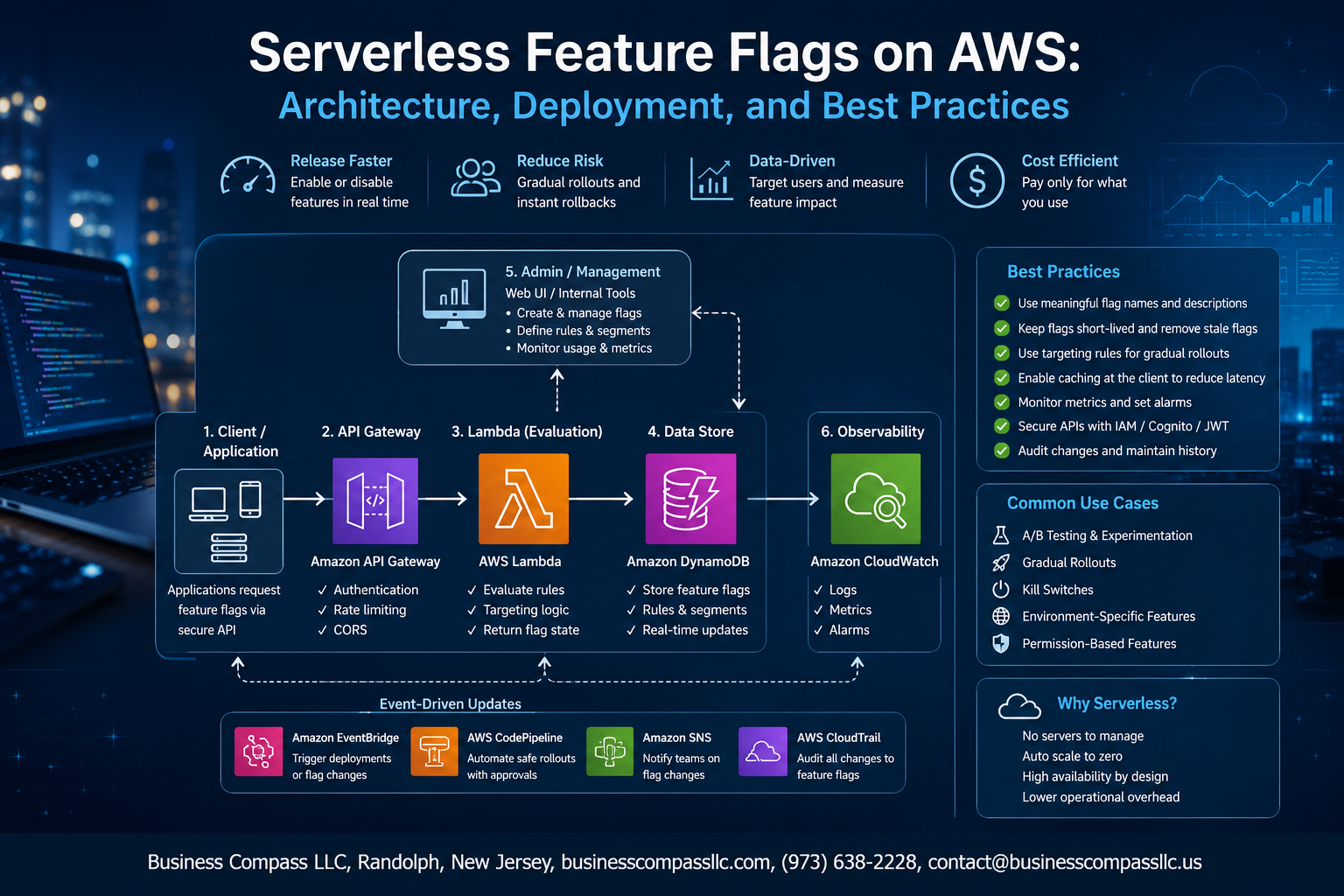
Ship Features Without the Fear: Serverless Feature Flags on AWS
If you’ve ever pushed a bad release to production and spent the next hour in full panic mode, you already know why feature flags exist. They give you a kill switch — a way to turn features on or off without redeploying your entire app.
This guide is for backend engineers, DevOps teams, and cloud architects who want to build a serverless feature flag system on AWS that actually scales — not just a proof of concept that falls apart under real traffic.
Here’s what we’ll walk through:
- The core AWS services behind a solid feature flag architecture — think AWS Lambda, AppConfig, DynamoDB, and how they fit together
- How to deploy and secure your setup, including wiring feature flags into your CI/CD pipeline so flag changes don’t become their own deployment nightmare
- Best practices for managing feature flags at scale, from naming conventions to cleanup strategies that keep your codebase from turning into a graveyard of forgotten toggles
By the end, you’ll have a clear picture of how to design, deploy, and maintain a scalable feature flag system on AWS — one that makes shipping faster and sleeping at night a lot easier.
Understanding Feature Flags and Their Role in Modern Development
What Feature Flags Are and Why They Matter
Feature flags (also called feature toggles) are simple on/off switches baked into your code that let you control which features are active without redeploying your application. Think of them as a remote control for your software — you can turn a new checkout flow on for 10% of users while keeping everyone else on the old experience, all without touching your deployment pipeline.
- They decouple code deployment from feature release, giving teams the freedom to ship code anytime
- They reduce risk by letting you roll back a bad feature instantly — no hotfix, no emergency deployment
- They give product and engineering teams shared control over what users actually see
Key Use Cases: Gradual Rollouts, A/B Testing, and Kill Switches
The real power of serverless feature flags on AWS shows up when you look at what they can actually do in practice:
- Gradual rollouts: Release a new feature to 5% of users, watch your metrics, then slowly ramp up to 100% — no big-bang launches, no sleepless nights
- A/B testing: Serve two different versions of a feature to different user segments and let data drive the decision on which one wins
- Kill switches: If something breaks in production, flip a flag and the bad feature goes dark instantly — your AWS Lambda functions stop serving it without any redeployment
- Beta access: Gate features behind user roles or account tiers so your best customers get early access
These patterns fit perfectly into any feature flags CI/CD pipeline, letting teams ship faster with far less fear.
Why Serverless Architectures Are Ideal for Feature Flag Systems
Running a scalable feature flag system on a serverless stack just makes sense. You get automatic scaling, pay-per-use pricing, and zero server management — all things that matter when your flag evaluation service needs to handle spikes in traffic without breaking a sweat.
- AWS Lambda handles flag evaluation logic without you spinning up or managing any servers
- AWS AppConfig gives you a managed way to store, validate, and deploy flag configurations safely
- The whole setup scales from zero to millions of requests without any manual intervention
- You only pay for what you actually use — no idle servers sitting around burning money
When you combine AWS serverless architecture with a well-designed feature flag architecture on AWS, you get a system that’s cheap to run, easy to maintain, and built to grow with your product.
Core AWS Services That Power a Serverless Feature Flag System

Using AWS Lambda for Flag Evaluation Logic
AWS Lambda is the backbone of a serverless feature flag system on AWS, handling flag evaluation logic without managing any servers. Each Lambda function can assess flag rules — like user segments, percentage rollouts, or environment conditions — and return a true/false decision in milliseconds.
- Lambda scales automatically based on request volume, so traffic spikes during deployments won’t bottleneck your flag evaluations
- Cold start latency can be reduced by keeping functions warm using provisioned concurrency, which matters a lot when flag checks sit in critical request paths
- You can version Lambda functions independently, meaning you can roll back flag evaluation logic without touching your flag data store
Storing Flag Configurations Efficiently with DynamoDB
DynamoDB is the go-to choice for storing AWS feature flag configurations because it delivers single-digit millisecond reads at any scale. Each flag can be a single item in a table, with attributes covering its name, targeting rules, enabled status, and environment context.
- Use DynamoDB Streams to trigger Lambda functions whenever a flag configuration changes, keeping downstream caches in sync automatically
- Partition your table by environment (production, staging, dev) to avoid accidental cross-environment flag bleeding
- TTL attributes help auto-expire temporary flags like experiment toggles, reducing flag debt without manual cleanup
Exposing Flag APIs Securely Through API Gateway
API Gateway sits in front of your Lambda evaluation functions, giving external services and frontend clients a clean, secure HTTP endpoint to query flag states. It handles request throttling, authentication, and payload validation before a single line of your Lambda code runs.
- REST or HTTP APIs can both work here, but HTTP APIs cost less and have lower latency — a smart pick for high-frequency flag checks
- Attach usage plans and API keys to control how many requests each client can make, protecting your Lambda functions from runaway polling
- Request validation at the Gateway level rejects malformed payloads early, cutting unnecessary Lambda invocations
Caching Flag Responses at Scale with ElastiCache or DAX
Hitting DynamoDB or Lambda on every single flag evaluation request gets expensive and slow fast. Caching is where a scalable feature flag system really finds its footing, and AWS gives you two solid options depending on your setup.
- ElastiCache (Redis) works well for caching full flag payloads at the API layer, with TTLs you control per flag type — short TTLs for fast-changing experiment flags, longer ones for stable kill switches
- DynamoDB Accelerator (DAX) plugs directly into DynamoDB and caches reads transparently, so your Lambda code doesn’t change at all — you just swap the DynamoDB client for a DAX client
- Both options can cut read latency from milliseconds down to microseconds, which compounds into real cost savings at high request volumes
Designing a Scalable and Resilient Feature Flag Architecture

Structuring Flag Data Models for Flexibility and Speed
A solid flag data model is the backbone of any scalable feature flag system. Keep your schema lean but expressive — store the flag key, enabled state, targeting rules, rollout percentage, environment tag, and a version timestamp. Using DynamoDB as your backing store gives you single-digit millisecond reads, and with a well-designed partition key (like flagKey#environment), you avoid hot partitions even under heavy load.
A minimal flag record might look like this:
flagKey— unique identifier (e.g.,new-checkout-flow)enabled— boolean or percentage rollout valueenvironment—dev,staging, orproductiontargetingRules— JSON array of conditionsversion— used for optimistic locking and cache invalidationupdatedAt— ISO timestamp for audit trails
Handling Targeting Rules and User Segmentation
Targeting rules are where feature flags get genuinely powerful. Instead of a simple on/off switch, you can roll out a feature to 10% of users, target a specific beta group, or enable something only for users in a certain region.
Store targeting rules as a JSON array attached to each flag. Each rule should define:
- Attribute — the user property to evaluate (e.g.,
userId,plan,country) - Operator —
equals,contains,in,percentageHash - Value — the comparison value or list
At evaluation time, your AWS Lambda feature flags resolver hashes the userId against the flag key to get a deterministic, stable rollout bucket. This keeps the same user in the same experience across sessions without storing any state server-side.
Designing for Low Latency and High Availability
The golden rule for feature flag architecture on AWS is: never make a flag evaluation a blocking remote call in your hot path. Here’s how to keep things fast and resilient:
- Cache aggressively — Pull flag configs into Lambda memory at cold start using
/aws/appconfigor a DynamoDB read. Refresh every 30–60 seconds using a background TTL check. - Use AWS AppConfig — It natively handles polling, deployment strategies, and rollback. Your Lambda function fetches configs from the local AppConfig agent sidecar, keeping latency under 1ms for in-process reads.
- Layer in ElastiCache (Redis) — For high-traffic APIs, a Redis cache in front of DynamoDB drops flag read latency to sub-millisecond.
- Design for failure — If the flag store is unreachable, fall back to the last known good state or default to
false. Never crash a request because of a flag evaluation failure.
Managing Environment-Specific Flags Across Dev, Staging, and Production
Mixing environments in a single flag store is a recipe for chaos. The cleanest approach is to namespace flags by environment right in the data model, then enforce access boundaries with IAM policies so your staging Lambda can only read staging flags.
A few patterns that work well in practice:
- Composite keys in DynamoDB — Use
flagKey#environmentas the partition key so reads are isolated and cheap. - Separate AppConfig environments — AWS AppConfig has a built-in concept of environments, making it straightforward to promote a flag config from
dev→staging→productionas part of your CI/CD pipeline. - Infrastructure as Code — Define all flag configurations in Terraform or AWS CDK. This means flag changes go through pull requests, get reviewed, and are version-controlled — no manual console edits slipping into production.
Keeping Your Architecture Decoupled with Event-Driven Updates
Polling for flag changes works, but pushing changes through events is cleaner and faster. When a flag gets updated in DynamoDB, a DynamoDB Stream triggers a Lambda that publishes a change event to an SNS topic. Downstream services subscribed to that topic can immediately invalidate their local cache and pull the fresh config.
This event-driven pattern gives you:
- Near real-time propagation — Flag changes reach all services in seconds, not minutes
- Loose coupling — Services don’t need to know about each other; they just react to events
- Audit trail — Every flag change flowing through EventBridge or SNS can be logged to S3 or CloudWatch for compliance
A simple flow looks like this:
DynamoDB update → DynamoDB Streams → Lambda processor → SNS/EventBridge → subscriber Lambdas invalidate cache
This keeps your serverless feature flags on AWS architecture reactive, resilient, and easy to reason about as your system grows.
Deploying Your Feature Flag System on AWS

Automating Infrastructure Provisioning with AWS CDK or Terraform
Spinning up a serverless feature flag system on AWS gets a lot smoother when you lean on infrastructure-as-code tools like AWS CDK or Terraform. Both let you define your DynamoDB tables, Lambda functions, API Gateway endpoints, and IAM roles in version-controlled code, so your environments stay consistent and repeatable.
AWS CDK approach:
- Write your infrastructure in TypeScript, Python, or Java — languages your team already knows
- Use CDK constructs to bundle Lambda + DynamoDB + API Gateway as a single reusable stack
- Run
cdk deployto provision everything in minutes, with built-in CloudFormation rollback support
Terraform approach:
- Define resources in HCL files that work across multiple cloud providers if needed
- Store state remotely in S3 with DynamoDB locking to keep team deployments conflict-free
- Use Terraform workspaces to manage dev, staging, and production environments cleanly
Setting Up CI/CD Pipelines for Safe Flag Deployments
A solid CI/CD pipeline keeps your AWS Lambda feature flags deployment process safe and auditable. You want every flag change to go through the same review process as your application code.
Recommended pipeline stages:
- Lint & validate — catch malformed flag configs before they reach production
- Unit tests — verify flag evaluation logic works as expected across edge cases
- Staging deploy — push changes to a non-production environment first
- Canary release — roll out flag updates to a small traffic percentage using Lambda aliases or weighted routing
- Production promote — full rollout only after canary metrics look healthy
Hooking this into AWS CodePipeline or GitHub Actions gives you a clean audit trail, so you always know who changed what flag and when. For feature flags CI/CD pipeline safety, always enforce pull request reviews for any flag touching production traffic.
Using AWS AppConfig as a Managed Alternative
If building a custom serverless feature flags AWS system feels like too much overhead, AWS AppConfig is a solid managed option worth trying. It handles configuration storage, versioning, and deployment strategies out of the box.
What AppConfig gives you:
- Deployment strategies — linear, exponential, or all-at-once rollouts with automatic rollback on CloudWatch alarm triggers
- Validators — JSON schema or Lambda-based validators that block bad configs from deploying
- Native Lambda integration — the AppConfig Lambda extension caches flag values locally, cutting latency and reducing API call costs
- Audit history — every configuration change is tracked with timestamps and deployer identity
When to pick AppConfig over a custom build:
- Your team is small and doesn’t want to maintain flag infrastructure
- You need deployment bake times and automatic rollback without writing that logic yourself
- You’re already deep in the AWS ecosystem and want everything in one console
The trade-off is flexibility — AppConfig works great for straightforward AWS feature toggles but gets limiting if you need complex targeting rules like percentage rollouts per user segment or real-time flag updates under 100ms without caching compromises.
Securing Your Feature Flag Infrastructure

Enforcing Fine-Grained Access Control with IAM Policies
Locking down who can read or write feature flags is non-negotiable in a serverless feature flag system on AWS. Use IAM policies to separate concerns cleanly:
- Readers (your AWS Lambda functions) get
appconfig:GetConfigurationand nothing else - Editors (your CI/CD pipeline roles) get
appconfig:UpdateDeploymentStrategyandappconfig:StartDeployment - Admins keep the keys to create or delete environments and applications
Attach these policies to roles, never to users directly, and always follow least-privilege. Tag your AppConfig resources so you can scope policies with aws:ResourceTag conditions, giving different teams access only to their own flags.
Encrypting Flag Data at Rest and in Transit
All flag configuration stored in AWS AppConfig or DynamoDB should be encrypted with AWS KMS using customer-managed keys (CMKs). This gives you full control over key rotation and lets you revoke access instantly if needed. In transit, every API call between Lambda and AppConfig rides over TLS by default — keep it that way and never disable certificate validation. If you cache flag values in ElastiCache, enable in-transit encryption and auth tokens there too.
Auditing Flag Changes with AWS CloudTrail
Every flag change in your AWS serverless architecture should leave a paper trail. CloudTrail captures every StartDeployment, UpdateConfigurationProfile, and DeleteApplication API call automatically. Set up:
- A CloudTrail trail that ships logs to an S3 bucket with Object Lock enabled (so nobody can tamper with them)
- CloudWatch Metric Filters that alert on unexpected flag changes outside business hours
- Athena queries against your CloudTrail S3 bucket for fast post-incident investigation
This setup means you always know who changed a flag, when they changed it, and exactly what the new value was — which is a lifesaver during an incident response.
Monitoring, Observability, and Incident Response

Tracking Flag Evaluation Metrics with CloudWatch
Keeping an eye on how your serverless feature flags perform means wiring up CloudWatch to capture every flag evaluation your AWS Lambda functions make. Push custom metrics like evaluation count, latency, and flag-state distribution directly to CloudWatch using PutMetricData, then build dashboards that show you at a glance which flags are firing hot and which ones look suspiciously quiet.
- EvaluationCount – total times a flag was checked per minute
- FlagStateDistribution – percentage split between
trueandfalseevaluations - EvaluationLatency – how long Lambda takes to fetch and resolve flag values from DynamoDB or AWS AppConfig
- CacheHitRatio – how often your in-memory cache serves the flag instead of hitting the backend
Group these metrics by FlagName, Environment, and ServiceName as CloudWatch dimensions so you can slice the data without drowning in noise.
Setting Up Alerts for Anomalous Flag Behavior
A sudden spike or drop in a flag’s evaluation rate almost always signals something worth investigating — a bad deployment, a runaway loop, or a config push that went sideways. Wire up CloudWatch Alarms on the metrics above and route them through SNS to your team’s Slack channel or PagerDuty.
- Sudden flag-state flip alert – trigger when
FlagStateDistributionshifts more than 20% within a 5-minute window - Zero-evaluation alarm – fire when
EvaluationCountdrops to zero for a critical flag, which could mean your Lambda cold-start cache is broken - High-latency alarm – alert when
EvaluationLatencycrosses your SLA threshold, pointing to a slow AppConfig fetch or DynamoDB throttle - Anomaly detection – use CloudWatch Anomaly Detection on evaluation counts so the system learns your traffic baseline and flags deviations automatically without you manually tuning thresholds
Pair these alarms with a runbook link in the SNS message body so whoever gets paged knows exactly what to check first.
Debugging Flag Issues Using AWS X-Ray Tracing
When a flag behaves unexpectedly in production, CloudWatch metrics tell you that something is wrong — AWS X-Ray tells you why. Enable active tracing on your Lambda functions and annotate every flag evaluation segment with the flag name, resolved value, and the user or request context that triggered it.
from aws_xray_sdk.core import xray_recorder

subsegment = xray_recorder.begin_subsegment('feature_flag_evaluation')
subsegment.put_annotation('flag_name', flag_name)
subsegment.put_annotation('flag_value', str(resolved_value))
subsegment.put_metadata('user_context', user_context)
xray_recorder.end_subsegment()
- Trace filtering – search X-Ray traces by
flag_nameannotation to isolate every request where a specific flag was evaluated - Service map – the X-Ray service map shows you the full call chain from API Gateway through Lambda to DynamoDB or AppConfig, making it obvious where latency is hiding
- Cold-start tracing – X-Ray captures Lambda initialization time separately, so you can tell whether a slow flag evaluation is a cold-start problem or a backend bottleneck
- Error correlation – cross-reference X-Ray error segments with CloudWatch Logs Insights queries to pinpoint the exact invocation where a flag returned an unexpected value
Running a scalable feature flag system on AWS without X-Ray tracing is like debugging blindfolded — the combination of CloudWatch metrics for the big picture and X-Ray traces for the deep dive gives your team the full visibility needed to ship confidently.
Best Practices for Managing Feature Flags at Scale
Establishing a Flag Lifecycle to Avoid Technical Debt
Stale feature flags are one of the sneakiest sources of technical debt in any codebase. Set a clear lifecycle from day one — flags should have an owner, a creation date, and a planned removal date logged somewhere visible. When a rollout is complete, schedule cleanup immediately rather than letting flags pile up.
- Create: Flag is added with a ticket reference and owner
- Active: Flag is in use during rollout or experiment
- Retired: Feature is fully live, flag is queued for removal
- Deleted: Code and config are cleaned up and archived
Naming Conventions and Documentation Standards
Consistent naming makes managing a scalable feature flag system dramatically easier, especially when multiple teams are touching the same AWS AppConfig profiles. A good naming pattern looks like [team]-[feature]-[type], for example payments-darkmode-rollout or auth-mfa-experiment. Every flag should have a short description, its expected lifespan, and the rollback plan documented — even a simple README entry works.
Minimizing Performance Overhead Through Smart Caching Strategies
AWS Lambda feature flags can become a performance bottleneck if your function calls AppConfig or DynamoDB on every single invocation. Cache flag values in memory at the Lambda runtime level and refresh them on a schedule, like every 30–60 seconds, rather than per request. AWS AppConfig’s built-in client-side caching support handles this cleanly with minimal setup.
- Use in-memory caching within the Lambda execution context
- Set a reasonable TTL that balances freshness with latency
- Avoid cold-start penalties by pre-loading flags during initialization
Coordinating Flag Rollouts Across Multiple Teams Safely
Rolling out flags across multiple teams on AWS without stepping on each other requires clear ownership boundaries and a shared rollout calendar. Use separate AppConfig environments per team or domain, and require a review step before any flag targets more than 10% of traffic. Pair flag deployments with your CI/CD pipeline gates so no flag goes live without passing automated checks first.

Feature flags have become a go-to tool for teams that want more control over how they ship and manage software. When built on AWS serverless infrastructure, they give you the flexibility to toggle features on and off without touching your deployment pipeline, all while keeping things scalable, secure, and cost-efficient. From choosing the right AWS services to designing a resilient architecture, locking down access, and keeping a close eye on system behavior, every piece of the puzzle plays a role in making your feature flag system work reliably at scale.
The good news is that you don’t need to build a perfect system from day one. Start simple, follow the best practices around naming conventions, flag hygiene, and access control, and build in observability from the start so you’re never flying blind. As your team and product grow, your feature flag system can grow with you. If you haven’t already started exploring serverless feature flags on AWS, now is a great time to take that first step and give your team the flexibility and confidence to ship faster.









