


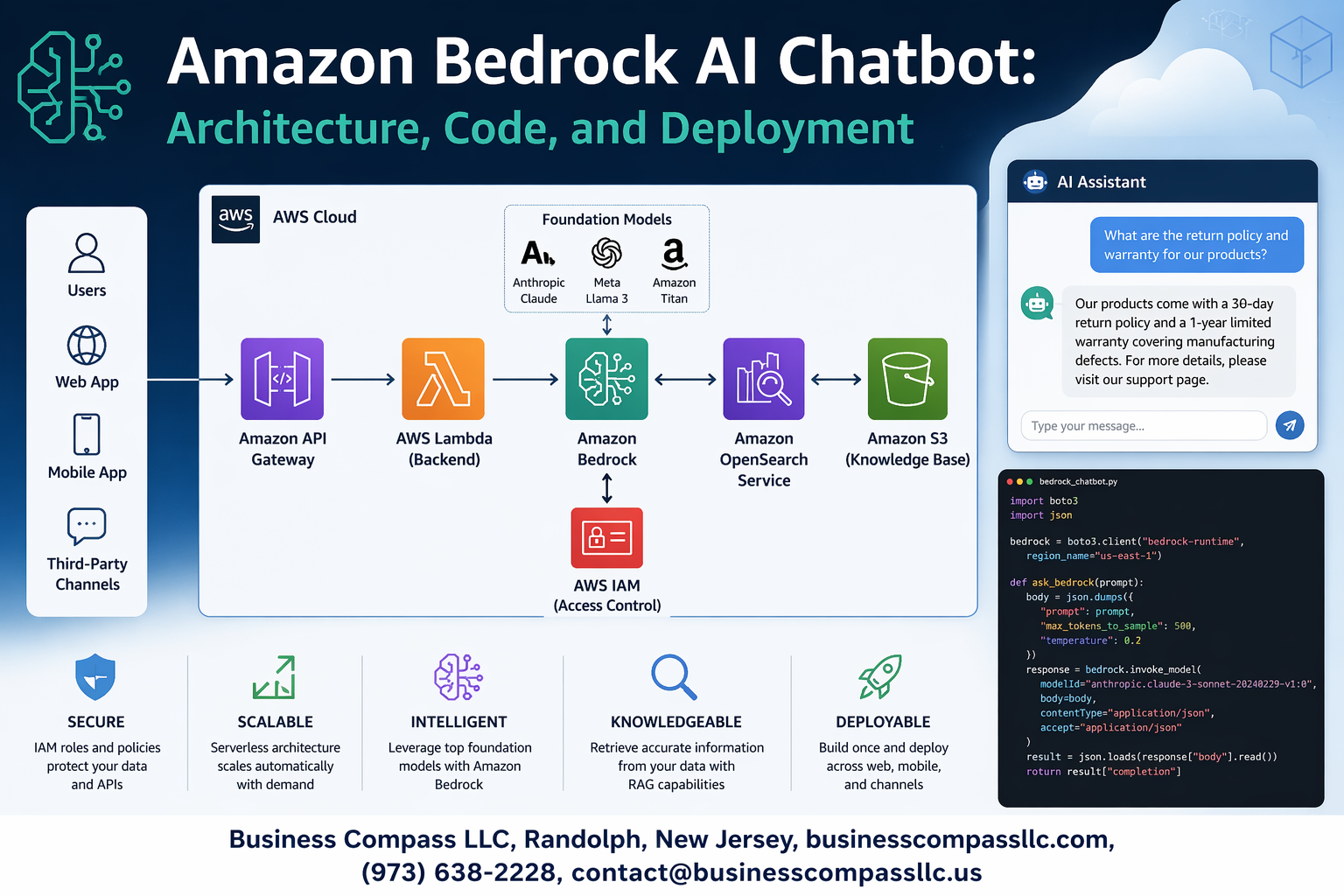
Amazon Bedrock makes building production-ready AI chatbots simpler than ever, but getting started can feel overwhelming without the right roadmap. This comprehensive Amazon Bedrock tutorial is designed for developers, cloud architects, and technical teams who want to build scalable AWS AI chatbot solutions from scratch.
You’ll learn how to design robust AI chatbot architecture using Amazon Bedrock’s foundation models, write clean Bedrock chatbot code that handles real-world scenarios, and master Amazon Bedrock deployment strategies for production environments. We’ll walk through the essential architecture components that make chatbots reliable and responsive, then dive into hands-on code implementation that you can adapt for your specific use case.
The guide also covers advanced customization techniques to make your AWS generative AI chatbot stand out, plus proven deployment strategies that ensure your Bedrock implementation guide leads to stable, scalable results. By the end, you’ll have everything needed to build, deploy, and maintain professional-grade chatbots using Amazon Bedrock’s powerful capabilities.
Understanding Amazon Bedrock and Its Core Capabilities

What is Amazon Bedrock and why it matters for chatbot development
Amazon Bedrock transforms AI chatbot development by providing serverless access to top-tier foundation models through simple API calls. This managed service eliminates the complexity of infrastructure management while offering enterprise-grade security and compliance features. Developers can now build sophisticated conversational AI applications without deep machine learning expertise or massive computational resources.
Key features and benefits of using Bedrock for AI applications
Core Advantages:
- Serverless Architecture: No infrastructure provisioning or scaling concerns
- Model Flexibility: Easy switching between different AI models based on use case requirements
- Enterprise Security: Built-in data encryption, VPC support, and compliance certifications
- Rapid Prototyping: Quick deployment of AI chatbot architectures for testing and validation
Development Benefits:
- Pre-trained models reduce development time from months to days
- Pay-per-use pricing model optimizes costs for varying workloads
- Seamless AWS integration with Lambda, API Gateway, and other services
Available foundation models and their specific use cases
Text Generation Models:
- Claude (Anthropic): Excels at conversational AI with strong safety guardrails and nuanced responses
- Titan Text: Amazon’s own model optimized for summarization, content generation, and classification tasks
- Jurassic-2 (AI21 Labs): Specialized for creative writing and complex reasoning applications
Specialized Applications:
- Customer Support: Claude’s safety features make it ideal for customer-facing chatbots
- Content Creation: Jurassic-2 handles creative writing and marketing copy generation
- Document Processing: Titan Text excels at analyzing and summarizing business documents
Cost optimization advantages over traditional AI solutions
Traditional AI solutions require significant upfront investments in GPU infrastructure, often costing $50,000+ for basic setups. Amazon Bedrock’s pay-per-token pricing starts at $0.0008 per 1K tokens, making it accessible for startups and cost-effective for enterprises. The serverless model eliminates idle resource costs while automatic scaling ensures optimal performance during traffic spikes.
Financial Benefits:
- No hardware procurement or maintenance expenses
- Predictable pricing based on actual usage patterns
- Reduced operational overhead compared to self-hosted solutions
- Fast ROI through rapid deployment and reduced development cycles
Essential Architecture Components for Bedrock Chatbots

Core Infrastructure Requirements and AWS Service Integrations
Building a successful Amazon Bedrock chatbot starts with selecting the right foundation models and integrating essential AWS services. Your architecture needs Amazon Bedrock as the core AI service, API Gateway for request routing, Lambda functions for business logic, and DynamoDB for conversation state management. Consider adding CloudWatch for monitoring, S3 for document storage, and Cognito for user authentication. The key is creating seamless connections between these services while maintaining low latency and high availability for your AI chatbot deployment.
Data Flow Design Patterns for Optimal Performance
Smart data flow patterns make or break your Amazon Bedrock chatbot’s performance. Design your architecture with asynchronous processing pipelines that handle user inputs through API Gateway, route them to Lambda functions, and manage Bedrock API calls efficiently. Implement caching layers using ElastiCache for frequently requested responses and use SQS for handling message queues during high-traffic periods. Your data flow should minimize API calls to Bedrock while maximizing response speed through intelligent preprocessing and result caching strategies.
Security and Compliance Considerations in Your Architecture
Security forms the backbone of any production-ready Amazon Bedrock implementation. Configure IAM roles with least-privilege access, encrypt data in transit and at rest using AWS KMS, and implement VPC endpoints for private communication between services. Your architecture must include input validation, output filtering, and audit logging for compliance requirements. Set up WAF rules at the API Gateway level to prevent malicious inputs from reaching your Bedrock models, and establish proper data governance policies for handling sensitive information.
Scalability Planning for High-Traffic Chatbot Deployments
Planning for scale means designing your Amazon Bedrock chatbot architecture to handle traffic spikes gracefully. Implement auto-scaling policies for Lambda functions, configure API Gateway throttling limits, and use multiple AWS regions for global distribution. Your scalability strategy should include connection pooling for database access, implementing circuit breakers for external API calls, and using CloudFront for content delivery. Consider serverless architectures that automatically scale based on demand while keeping costs predictable during varying traffic patterns.
API Gateway and Lambda Function Integration Strategies
Effective integration between API Gateway and Lambda functions creates the responsive experience users expect from modern AI chatbots. Configure API Gateway with proper request validation, response mapping templates, and CORS settings for web applications. Your Lambda functions should handle Bedrock API calls asynchronously, implement proper error handling and retry logic, and maintain conversation context efficiently. Use Lambda layers for shared code libraries and implement connection pooling to reduce cold start times while ensuring your Amazon Bedrock tutorial implementation remains maintainable and performant.
Step-by-Step Code Implementation Guide

Setting up your development environment and dependencies
Getting your Amazon Bedrock development environment ready starts with installing the AWS SDK and setting up proper Python or Node.js dependencies. For Python developers, install boto3 and langchain libraries to streamline your Amazon Bedrock integration. Node.js developers should grab the AWS SDK v3 along with TypeScript support for better code reliability.
Create a virtual environment to isolate your chatbot project dependencies and avoid conflicts with other applications. Your development setup should include environment variables for AWS region configuration and proper logging frameworks to track your AI chatbot development progress throughout the implementation process.
Authentication and permission configuration for Bedrock access
AWS IAM roles and policies control access to Amazon Bedrock services, requiring specific permissions for model invocation and API calls. Create an IAM user or role with bedrock:InvokeModel permissions and attach the necessary policies for your target foundation models. Configure your AWS credentials using the CLI, environment variables, or IAM roles depending on your deployment strategy.
Set up cross-region access if needed, since Bedrock availability varies by AWS region. Your authentication setup should include proper error handling for permission denials and token expiration scenarios that commonly occur during Bedrock chatbot development.
Building the core chatbot logic with Python or Node.js
The foundation of your Bedrock chatbot code centers around the invoke_model API call that sends user prompts to your chosen foundation model. Structure your chatbot logic with input validation, prompt engineering, and response parsing to handle various conversation scenarios. Python developers can leverage the boto3.client('bedrock-runtime') while Node.js teams should use the BedrockRuntime client from AWS SDK v3.
Implement message formatting that matches your selected model’s requirements, whether you’re using Claude, Llama, or other Amazon Bedrock models. Your core logic should handle streaming responses for real-time conversations and include fallback mechanisms when the AI model encounters errors or rate limits.
Implementing conversation memory and context management
Conversation memory transforms your basic Amazon Bedrock integration into a contextually aware chatbot that remembers previous interactions. Store conversation history using DynamoDB, Redis, or in-memory solutions depending on your scalability requirements. Design your context management system to maintain conversation threads while respecting token limits of your chosen foundation model.
Smart context windowing helps manage long conversations by keeping recent messages while summarizing older context. Your memory implementation should include conversation expiration policies and user session management to prevent unlimited storage growth and maintain optimal chatbot performance across multiple user interactions.
Advanced Features and Customization Techniques

Fine-tuning Responses with Prompt Engineering Best Practices
Crafting effective prompts for your Amazon Bedrock chatbot requires strategic thinking about context, role definition, and output formatting. Start by establishing clear system roles that define your chatbot’s personality and expertise level, then structure prompts with specific instructions, examples, and desired response formats. Use few-shot learning techniques by providing 2-3 high-quality examples that demonstrate the exact tone and structure you want.
Temperature and top-p parameters dramatically impact response quality in Bedrock implementations. Lower temperature values (0.1-0.3) produce more consistent, factual responses perfect for customer support scenarios, while higher values (0.7-0.9) generate creative, conversational outputs. Chain-of-thought prompting breaks complex queries into logical steps, helping the AI model reason through problems systematically and provide more accurate answers.
Integrating External Data Sources and Knowledge Bases
Amazon Bedrock Knowledge Bases revolutionize how chatbots access real-time information by connecting to S3 buckets, databases, and API endpoints. Configure vector embeddings to automatically index your documentation, FAQs, and product catalogs, enabling semantic search capabilities that understand user intent rather than just keyword matching. This integration ensures your AI chatbot stays current with the latest business information without manual updates.
Implement retrieval-augmented generation (RAG) patterns to combine Bedrock’s language capabilities with your proprietary data. Set up data connectors that refresh knowledge bases automatically, and use metadata filtering to ensure responses draw from relevant, authorized sources. This approach maintains data accuracy while providing contextually appropriate answers that reflect your organization’s specific knowledge and policies.
Adding Multi-language Support and Localization Capabilities
Building multilingual Amazon Bedrock chatbots starts with detecting user language preferences through browser headers, user profiles, or explicit language selection. Configure separate prompt templates for each supported language, ensuring cultural nuances and regional expressions are properly addressed. Bedrock models like Claude and Titan excel at maintaining context across languages while adapting response styles to match local communication patterns.
Implement dynamic language switching within conversations using session state management to track user preferences. Store localized content in separate knowledge bases organized by language codes, and use conditional logic to route queries to appropriate language-specific resources. Test thoroughly with native speakers to ensure translations feel natural and culturally appropriate rather than mechanically translated.
Implementing Guardrails and Content Filtering Mechanisms
Amazon Bedrock Guardrails provide enterprise-grade content filtering that blocks harmful, inappropriate, or off-topic responses before they reach users. Configure topic filters to keep conversations focused on business-relevant subjects, and set up content filters that prevent the generation of sensitive information like personal data, financial details, or proprietary content. These guardrails work at the model level, intercepting problematic outputs regardless of input prompt complexity.
Custom guardrail policies can be tailored to your industry’s specific compliance requirements, whether that’s healthcare HIPAA standards, financial regulations, or educational content guidelines. Implement word filtering for brand-specific terms, competitor mentions, or sensitive topics that should redirect to human agents. Monitor guardrail triggers through CloudWatch metrics to identify patterns and adjust filtering sensitivity based on real user interactions.
Performance Monitoring and Logging Implementation
Comprehensive logging strategies for Amazon Bedrock deployments track response latency, token usage, error rates, and user satisfaction metrics through CloudWatch and AWS X-Ray integration. Set up custom metrics that monitor conversation completion rates, escalation triggers, and knowledge base hit ratios to identify performance bottlenecks. Real-time dashboards help teams spot issues before they impact user experience.
Implement distributed tracing to follow request flows from user input through knowledge base queries to final response generation, helping pinpoint slow components in complex chatbot architectures. Use CloudTrail for audit logging and compliance tracking, ensuring all AI interactions are properly recorded for security reviews and performance analysis. Configure automated alerts for unusual patterns like sudden spikes in error rates or unexpected token consumption that might indicate system issues or security concerns.
Deployment Strategies and Production Readiness

Containerization Options Using Docker and ECS
Creating a containerized Amazon Bedrock chatbot starts with building a Docker image that packages your application dependencies and runtime environment. Your Dockerfile should include the AWS SDK, necessary Python libraries, and proper security configurations for production use. Amazon ECS provides seamless container orchestration, allowing you to deploy your Bedrock chatbot with built-in service discovery and load balancing capabilities.
ECS Fargate eliminates server management overhead while providing automatic scaling based on demand patterns. Configure your task definitions to include proper CPU and memory allocations, environment variables for Bedrock model endpoints, and IAM roles with least-privilege access to AWS services.
CI/CD Pipeline Setup for Automated Deployments
Setting up automated deployments requires integrating AWS CodePipeline with CodeBuild and CodeDeploy services. Your pipeline should trigger on code commits, run automated tests against Bedrock APIs, build Docker images, and deploy to target environments with zero downtime. Include security scanning and vulnerability assessments in your build process to maintain production-ready code quality.
CodeBuild can execute unit tests, integration tests with Bedrock models, and performance benchmarks before promoting builds through environments. Configure blue-green deployments to minimize risk during Amazon Bedrock production deployment updates.
Environment Configuration Management Across Dev, Staging, and Production
Managing configurations across multiple environments requires careful separation of concerns and secure credential handling. Use AWS Systems Manager Parameter Store or AWS Secrets Manager to store environment-specific values like Bedrock model ARNs, API endpoints, and authentication tokens. Your application should dynamically retrieve these values at runtime based on deployment environment tags.
Create separate AWS accounts or VPCs for each environment to ensure proper isolation. Configure different Bedrock model versions and inference parameters for testing versus production workloads, allowing thorough validation before promoting changes.
Load Balancing and Auto-Scaling Configuration
Application Load Balancer distributes incoming requests across multiple ECS tasks running your Bedrock chatbot instances. Configure health checks that verify both application responsiveness and Bedrock API connectivity to ensure proper traffic routing. Set up CloudWatch metrics to monitor response times, error rates, and token usage patterns for informed scaling decisions.
ECS Service Auto Scaling automatically adjusts task counts based on CPU utilization, memory consumption, or custom CloudWatch metrics like active chat sessions. Configure target tracking policies that scale out quickly during traffic spikes while scaling in gradually to maintain cost efficiency and user experience consistency.
Testing, Monitoring, and Optimization

Comprehensive testing strategies for chatbot reliability
Building a robust Amazon Bedrock chatbot requires systematic testing across multiple dimensions. Unit tests should validate individual components like prompt engineering functions, response parsing, and error handling mechanisms. Integration testing focuses on the complete conversation flow, ensuring seamless interaction between your application layer and Bedrock’s foundation models. Load testing simulates high-traffic scenarios to identify performance bottlenecks before production deployment.
User acceptance testing plays a critical role in validating conversational quality and accuracy. Create diverse test scenarios covering edge cases, ambiguous queries, and domain-specific conversations. Automated testing frameworks can execute regression tests whenever you update prompts or model configurations, maintaining consistent chatbot behavior across deployments.
Real-time performance monitoring and alerting setup
Amazon CloudWatch provides comprehensive monitoring capabilities for your Bedrock chatbot infrastructure. Set up custom metrics to track response times, token consumption rates, and error frequencies across different conversation types. Configure CloudWatch alarms to trigger notifications when response latencies exceed acceptable thresholds or when error rates spike unexpectedly.
Application Performance Monitoring tools like AWS X-Ray enable distributed tracing across your chatbot’s request flow. Monitor database query performance, API gateway response times, and Lambda function execution durations. Real-time dashboards help operations teams quickly identify performance degradation and respond to issues before they impact user experience.
Cost tracking and optimization techniques
Amazon Bedrock pricing depends on input and output token consumption, making cost monitoring essential for production deployments. AWS Cost Explorer and billing alerts help track spending patterns and identify unexpected cost increases. Implement token counting mechanisms in your application to monitor usage per conversation and user session.
Optimization strategies include prompt engineering to reduce token usage, implementing response caching for frequently asked questions, and using streaming responses to improve perceived performance. Consider using smaller, specialized models for simple queries while reserving larger models for complex reasoning tasks. Regular cost analysis helps balance performance requirements with budget constraints.
User feedback integration and continuous improvement workflows
Collecting user feedback drives continuous improvement in your Amazon Bedrock chatbot’s performance and accuracy. Implement thumbs up/down ratings, detailed feedback forms, and conversation quality surveys to gather user insights. Store feedback data in Amazon DynamoDB or RDS for analysis and correlation with conversation logs.
Establish automated workflows using AWS Step Functions to process feedback and trigger model fine-tuning or prompt optimization. Machine learning pipelines can analyze conversation patterns, identify common failure modes, and suggest improvements. Regular feedback review sessions with product teams ensure your chatbot evolves to meet changing user needs and expectations.

Building an AI chatbot with Amazon Bedrock opens up exciting possibilities for creating intelligent conversational experiences. We’ve covered the essential building blocks – from understanding Bedrock’s core capabilities to designing robust architecture components that can handle real-world traffic. The step-by-step implementation guide gives you a solid foundation to start coding, while advanced customization techniques help you tailor the chatbot to your specific needs.
Getting your chatbot production-ready requires careful planning around deployment strategies, testing protocols, and ongoing monitoring. The beauty of Amazon Bedrock lies in its managed approach – you can focus on creating great user experiences instead of worrying about infrastructure management. Start with a simple implementation, test thoroughly, and gradually add advanced features as your users’ needs evolve. Your chatbot journey begins with understanding these fundamentals, but the real magic happens when you put them into practice.









